Edge Release Notes - August 2026
The content on this site may have changed or moved since you last viewed it. As a result, some of your bookmarks may become obsolete. Therefore, we recommend accessing the latest content via the Hevo Docs website.
In this Release
New and Changed Features
Pipelines
Support for Hashing Data in a Source Field
NewHevo now lets you secure sensitive data in the fields of your Source objects before it is loaded to your Destination. While creating or editing a Pipeline, you can enable the Hash toggle for the fields you want to secure. This ensures that sensitive information, such as email addresses and phone numbers, is stored in a non-readable format in your Destination.
This feature is available only for Pipelines created with any variant of MySQL or PostgreSQL Source and a Snowflake Destination.
Hashing the Data in a Source Field →Support for Resyncing Multiple Objects with a Single Action
NewHevo now lets you select multiple objects in the Objects tab of your Pipeline and resync their data in a single action, instead of resyncing them one at a time. You can also choose to drop and re-create the Destination tables for the selected objects as part of the resync.
Managing Objects →Sources
Support for TikTok Organic as a Source
NewHevo now supports TikTok Organic as a Source for creating Pipelines. TikTok is a short-form video platform where businesses use a TikTok Business Account to publish organic (non-paid) videos, engage with viewers, and track how their content performs. You can replicate data from your TikTok account, including video, comment, and profile details, along with audience demographics and business benchmark data, into your Destination.
TikTok Organic →Support for Snapchat Ads as a Source
NewHevo now supports Snapchat Ads as a Source for creating Pipelines. Snapchat Ads is Snap Inc.’s advertising platform that lets businesses create and manage full-screen, immersive vertical ad campaigns to reach Snapchat’s user base. You can replicate data from your Snapchat Ads account, including campaign, ad squad, and ad details, along with Snap Pixel tracking information, into your Destination.
Snapchat Ads →Support for Pinterest Organic as a Source
NewHevo now supports Pinterest Organic as a Source for creating Pipelines. Pinterest is a visual discovery platform where businesses share images and videos as Pins on boards, and track how their organic content performs. You can replicate data from your Pinterest account, including Pin and User Account details, along with organic and paid performance analytics for your account and individual Pins, into your Destination.
Pinterest Organic →Support for Amazon Ads as a Source
NewHevo now supports Amazon Ads as a Source for creating Pipelines. Amazon Ads is Amazon’s advertising platform that lets you create and manage ads to promote your products across Amazon and third-party sites. You can replicate data from your Amazon Ads account, including profile and portfolio details, Sponsored Products and Sponsored Display campaigns, ad groups, and targeting details, into your Destination.
Amazon Ads →Support for Commerce Hub and Additional CRM Objects in HubSpot
EnhancedHevo now supports ingesting data from additional Source objects, including Commerce Hub objects such as carts, discounts, invoices, and subscriptions, as well as Customer Relationship Management (CRM) objects such as courses, listings, orders, and projects. This provides a more complete view of sales, billing, and account activity in your Destination, enabling better analysis and insights into customer activity, transactions, and revenue.
HubSpot →Support for StackAdapt as a Source
NewHevo now supports StackAdapt as a Source for creating Pipelines. StackAdapt is an AI-powered advertising platform that helps advertisers, agencies, and brands plan, execute, and optimize multi-channel ad campaigns across various digital channels. You can replicate data from your StackAdapt account, including advertiser, campaign, and ad details, along with delivery and campaign insight reports, into your Destination.
StackAdapt →Support for TikTok Ads as a Source
NewHevo now supports TikTok Ads as a Source for creating Pipelines. TikTok Ads is TikTok’s advertising platform that helps you create, manage, and measure ad campaigns across the TikTok app. You can replicate data from your TikTok Ads account, including campaign, ad group, ads, and performance reports, into your Destination.
TikTok Ads →Support for Amazon Selling Partner as a Source
NewHevo now supports Amazon Selling Partner as a Source for creating Pipelines. Amazon Selling Partner (Seller Central) is Amazon’s platform for third-party sellers to list, price, fulfill, and manage products sold across Amazon’s marketplaces worldwide. You can replicate data from your Amazon Selling Partner account, including orders, financial events, inventory and fulfillment details, catalog information, and sales and traffic reports, into your Destination.
Amazon Selling Partner →Support for Instagram Business as a Source
NewHevo now supports Instagram Business as a Source for creating Pipelines. Instagram Business is Meta’s platform for content creators and businesses to manage Instagram professional accounts, publish posts, stories, and reels, and track engagement and performance metrics. You can replicate data from your Instagram Business account, including media posts, comments, and account and media performance insights, into your Destination.
Instagram Business →Support for Historical Sync Duration in HubSpot
NewHevo now lets you configure the historical sync duration for the HubSpot Source, giving you control over the period of data ingested during the historical load. The default duration is 3 months, and you can also change it after creating the Pipeline.
HubSpot →Support for Xero as a Source
NewHevo now supports Xero as a Source for creating Pipelines. Xero is a cloud-based accounting platform that helps small and medium-sized businesses manage invoicing, bank reconciliation, fixed assets, payroll, and project tracking from a single place. You can replicate data from your Xero organization, including invoices, contacts, bank transactions, payments, payroll, and project details, into your Destination.
Xero →Support for LinkedIn Ads as a Source
NewHevo now supports LinkedIn Ads as a Source for creating Pipelines. LinkedIn Ads is LinkedIn’s self-serve advertising platform that lets you create and manage ad campaigns to reach professional audiences through Sponsored Content, Sponsored Messaging, Text Ads, and Dynamic Ads. You can replicate data from your LinkedIn Ads account, including account, campaign, and creative details, ad analytics and conversion reports, Lead Gen Form responses, and Company Page statistics, into your Destination.
LinkedIn Ads →Support for Microsoft Ads as a Source
NewHevo now supports Microsoft Ads as a Source for creating Pipelines. Microsoft Ads is Microsoft’s advertising platform that helps you create and manage search, display, and shopping campaigns across the Microsoft Search Network, Microsoft Audience Network, and partner networks. You can replicate data from your Microsoft Ads account, including account, campaign, ad group, ad, and keyword details, along with performance and audience reports, into your Destination.
Microsoft Ads →User Experience
Needs Attention Tab in Pipelines Detailed View
NewHevo now reflects the current health of your Pipeline by displaying all the active errors affecting it, eliminating the need to review individual sync jobs to identify issues. For each error, you can view a description of the issue, its cause, when it was first detected, and the recommended action to resolve it.
Needs Attention →Warning Banners for Replication Slot Management in PostgreSQL Pipelines
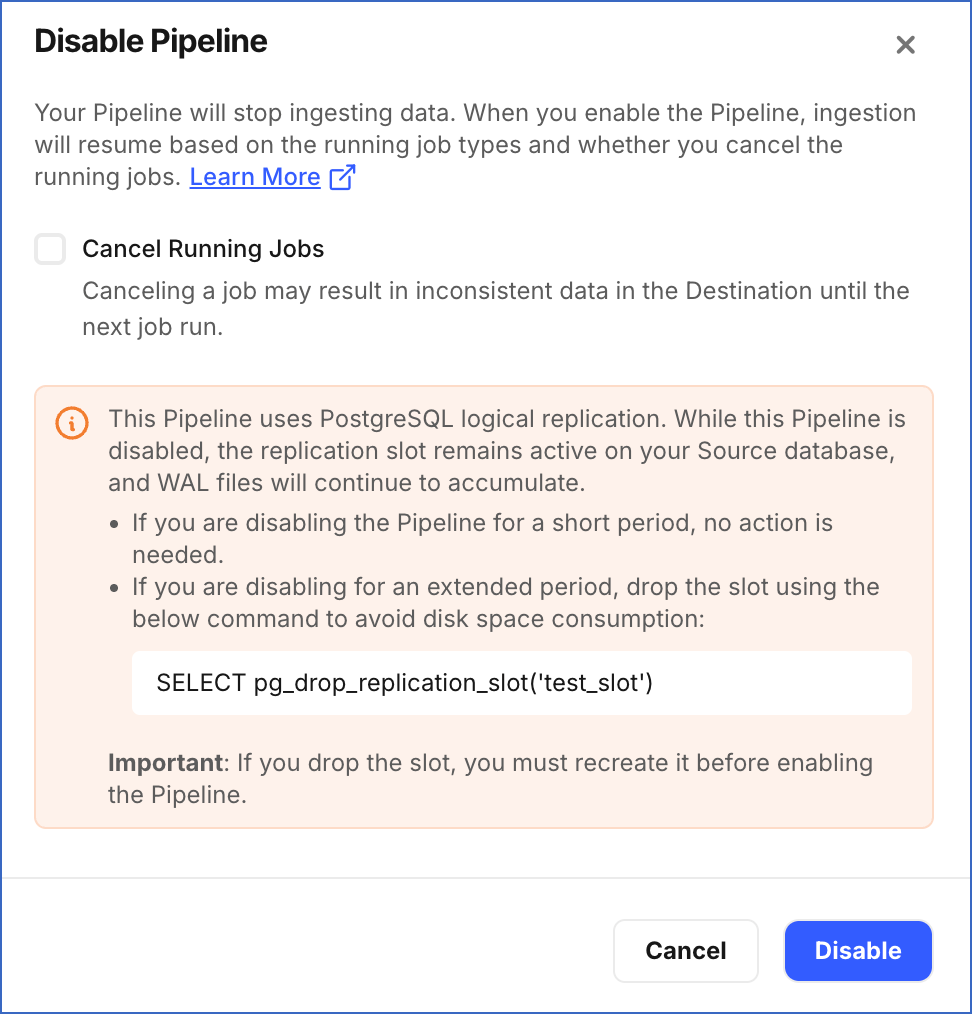
NewHevo now displays warning banners in the Disable, Enable, and Delete Pipeline dialogs for Pipelines created with any PostgreSQL Source variant using logical replication. These banners inform you that Hevo does not automatically drop the replication slot when you disable or delete a Pipeline, and that an unused slot continues to retain WAL files, causing storage consumption on your Source database. The banners also provide the commands required to drop and recreate the replication slot.
Managing Replication Slot when Disabling, Enabling, or Deleting a Pipeline →