TikTok is a short-form video platform where individuals and businesses create, share, and discover video content. Businesses can use a TikTok Business Account to publish organic (non-paid) videos, engage with viewers through comments, and track how their videos and profile perform over time.
Hevo uses the TikTok API for Business (Accounts API) to replicate data from your TikTok account to the Destination of your choice.
Hevo supports the following authentication methods to connect to your TikTok Organic account:
-
Open Authorization (OAuth): Allows Hevo to connect to your account through an authorization flow, where you sign in to TikTok and grant Hevo access to your account data.
-
OAuth app: Allows Hevo to connect to your account using the client ID, client secret, and refresh token of an OAuth app that you create in TikTok.
Note: To create a Pipeline with TikTok Organic as the Source using an OAuth app, you must use the Create a Pipeline endpoint through the Hevo API. This method is not available in the Hevo UI. Read Creating a Pipeline with Hevo API for the steps to create the Pipeline.
If you reside in a country that has blocked TikTok, such as India, you need to use a VPN to access your TikTok account and create the Pipeline. Alternatively, set up your Hevo account in any of the following instances: US, EU, or AU. Refer to Selecting your Hevo Region for the app URLs.
Supported Features
| Feature Name | Supported |
|---|---|
| Capture deletes | Yes (for specific objects only) |
| History mode | No |
| Custom data (user-configured tables & fields) | No |
| Data blocking (skip objects and fields) | Yes |
| Resync (objects and Pipelines) | Yes |
| API configurable | Yes |
Prerequisites
-
An active TikTok account from which data is to be ingested.
-
Your TikTok account is set up as a Business Account, and has at least 100 followers if you want to ingest audience demographic and activity metrics.
-
You are connected via a VPN if the country you are in has blocked TikTok.
Configure TikTok Organic as a Source in your Pipeline
Perform the following steps to configure your TikTok Organic Source:
-
Click Pipelines in the Navigation Bar.
-
Click + Create Pipeline in the Pipelines List View.
-
On the Select Source Type page, select TikTok Organic.
-
On the Select Destination Type page, select the type of Destination you want to use.
-
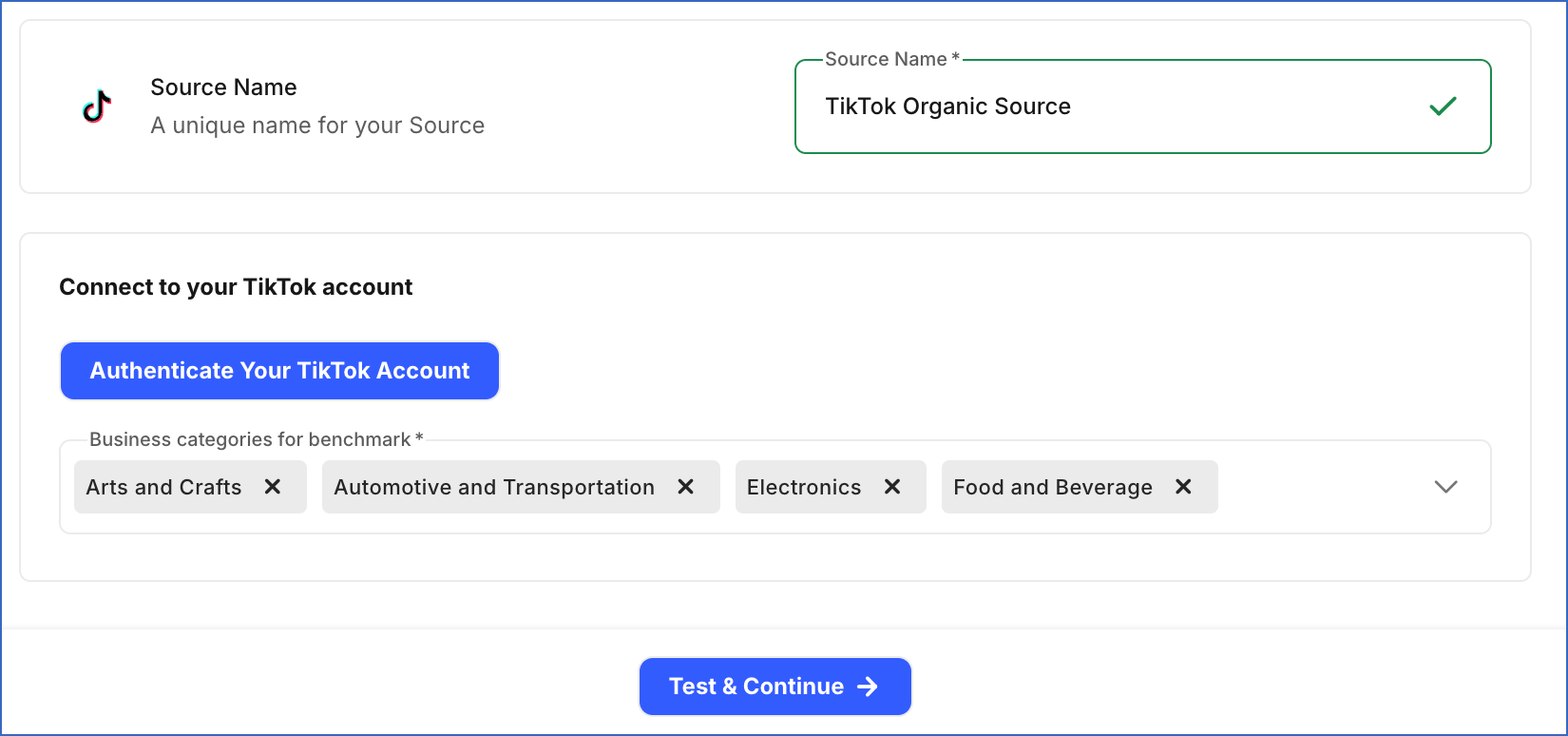
In the Configure Source screen, specify the following:
-
In the Connect to your TikTok account section, do the following:
-
Click Authenticate Your TikTok Account, log in to your TikTok account, grant Hevo the requested permissions to read your account data, and complete the authorization.
-
Business categories for benchmark: From the drop-down, select one or more business categories for which you want Hevo to ingest TikTok’s average performance data for businesses in that industry. Each selected category adds a row to the Business Benchmark object.
-
-
-
Click Test & Continue to test the connection to your TikTok Organic Source. Once the test is successful, you can proceed to set up your Destination.
Data Replication
Hevo replicates data for all the objects selected on the Configure Objects page during Pipeline creation. By default, all supported objects and their available fields are selected. However, you can modify this selection while creating or editing the Pipeline.
Hevo ingests the following types of data from your Source objects:
-
Historical Data: The first run of the Pipeline ingests all available historical data for the selected objects and loads it into the Destination.
-
Incremental Data: Once the historical load is complete, new and updated records for objects are ingested as per the sync frequency.
For the following objects, Hevo ingests only the incremental data in subsequent Pipeline runs:
-
Comment
-
Profile
-
Profile Audience Age
-
Profile Audience City
-
Profile Audience Country
-
Profile Audience Gender
-
Profile Metric
-
Profile Metric Audience Activity
-
Replies to Comment
For all other objects, Hevo ingests the entire data during each Pipeline run.
Note: The Business Benchmark object contains one row for each business category you select while configuring the Source. Hevo fetches the benchmark data for each selected category from TikTok separately.
TikTok enforces a rate limit on the number of calls that can be made to its Accounts API in a given time period. If this limit is exceeded, a rate limit exception occurs. To understand how Hevo handles such scenarios, read Handling Rate Limit Exceptions.
Note: You can create a Pipeline with this Source only using the Merge load mode. The Append mode is not supported for this Source.
Schema and Primary Keys
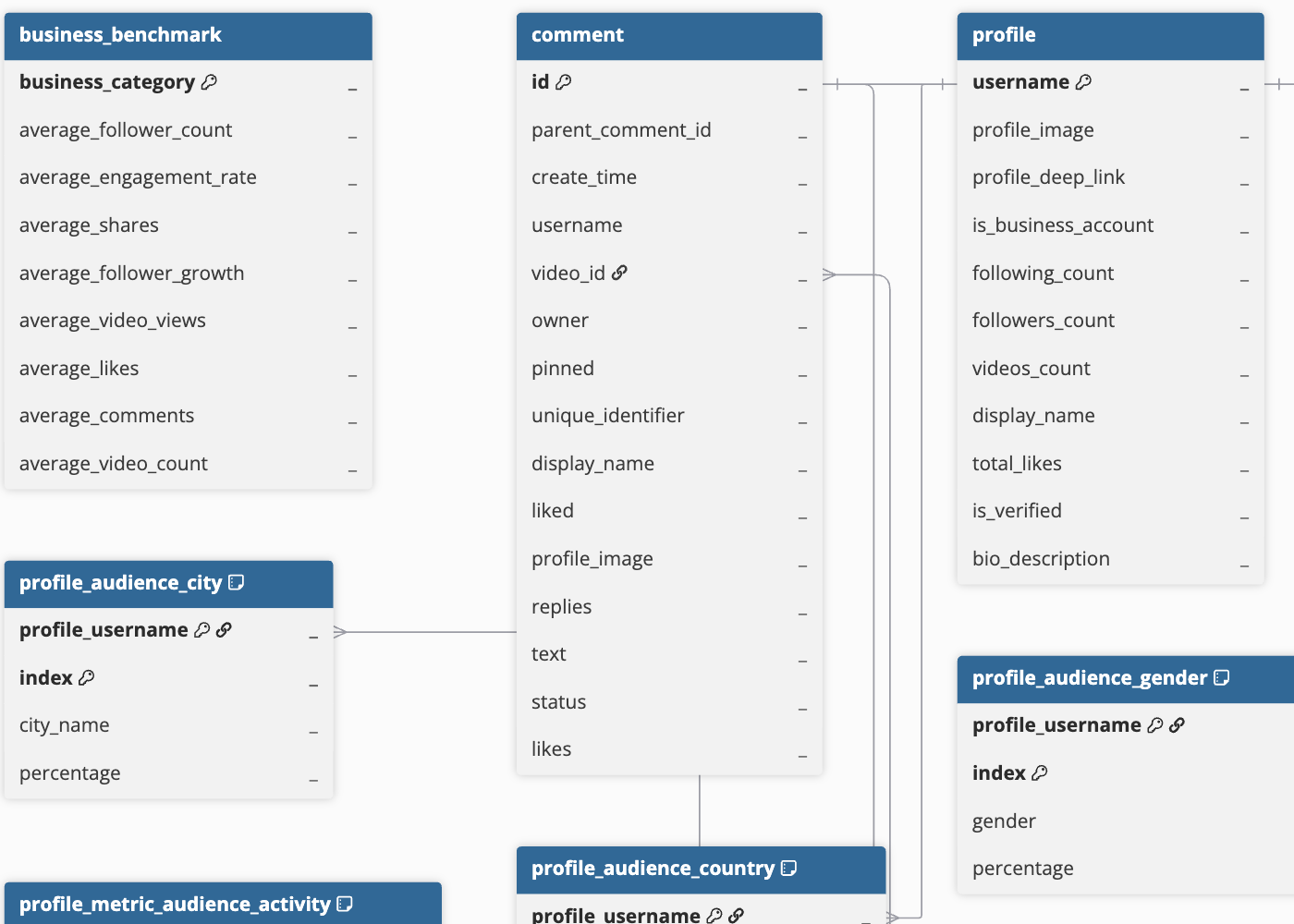
Hevo uses the following schema to upload the records to the Destination. For a detailed view of the objects, fields, and relationships, click the ERD.
Data Model
The following is the list of tables (objects) that are created at the Destination when you run the Pipeline:
| Object | Description |
|---|---|
| Business Benchmark | Contains TikTok’s average performance data for the business categories you select, such as average follower count, engagement rate, likes, comments, shares, and video views. |
| Comment | Contains comments posted on your videos, including the commenter’s username, comment text, like count, and pinned status. |
| Profile | Contains information about your TikTok account, including follower count, following count, video count, and verification status. It includes the following child objects: - Profile Audience Age - Profile Audience City - Profile Audience Country - Profile Audience Gender - Profile Metric - Profile Metric Audience Activity |
| Replies to Comment | Contains replies posted to a comment on your videos, including the reply text, like count, and pinned status. |
| Video | Contains information about each TikTok video, such as views, likes, comments, shares, watch time, and audience details. It includes the following child objects: - Video Audience City - Video Audience Country - Video Audience Gender - Video Audience Type - Video Engagement Like - Video Impression Source - Video View Retention |
Additional Information
Read the detailed Hevo documentation for the following related topics:
Handling of Deletes
TikTok does not explicitly mark records as deleted in its API responses. When a record is deleted, it is no longer returned in subsequent API responses.
Hevo uses a full data refresh approach to capture delete actions. During each Pipeline run, Hevo compares the data fetched from the Source object with the data present in the Destination table. If a record exists in the Destination but is no longer returned by the Source, the record is marked as deleted by setting the value of the metadata column __hevo__marked_deleted to True. This applies to the following objects:
-
Business Benchmark
-
Video
-
Video Audience City
-
Video Audience Country
-
Video Audience Gender
-
Video Audience Type
-
Video Engagement Like
-
Video Impression Source
-
Video View Retention
For all other objects, Hevo does not support capturing deletes.
Source Considerations
-
TikTok is blocked by regulators or internet service providers (ISPs) in some countries, such as India. If your Hevo account is in an affected region, use a VPN or create your account in an unaffected region, such as US, EU, or AU. For app URLs, refer to Selecting your Hevo Region.
-
Your TikTok account must be a Business Account with at least 100 followers to access certain profile metrics, such as audience demographics, hourly audience activity, unique video views, and daily follower counts.
-
Some metrics in the Video object, such as phone_number_clicks, lead_submissions, and app_download_clicks, and in the Profile object, such as bio_link_clicks, email_clicks, and address_clicks, are available only for Verified Business Accounts. If your account is not verified, TikTok does not return these metrics.
-
Some profile metrics are updated with a delay of 24 to 48 hours. As a result, the latest values in Hevo may not include your most recent TikTok activity.