Selecting your Hevo Region
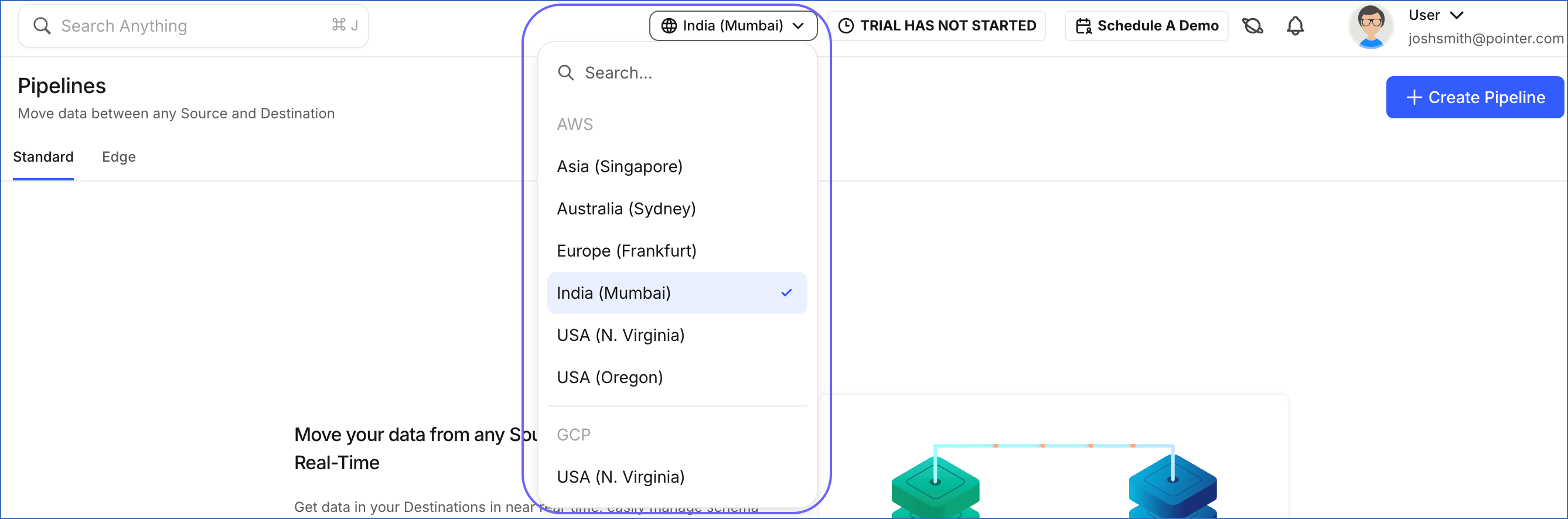
Hevo is currently available in seven regions on AWS: Frankfurt (Europe), London (EU2), Mumbai (India), N. Virginia (US), Oregon (US2), Singapore (Asia), and Sydney (Australia). Hevo is also available on Google Cloud Platform (GCP) in the N. Virginia (US-GCP) region.
Hevo processes your Pipeline data in the region you choose. The region you pick affects:
-
Latency: Creating a Pipeline in a region close to your Source reduces ingestion latency.
-
Compliance: Keeping data processing within a specific geography can help meet data residency and regulatory requirements.
Requesting a Region (Edge only)
If Hevo isn’t yet available in the AWS region where your infrastructure lives, contact Hevo Support to request it.
Regions enabled this way support only Edge Pipelines and Destinations. Standard Pipelines are not available for these regions.
Once your requested region is enabled, it is added to your account’s region selector in the top navigation bar, so you can start creating Edge Pipelines in it right away. The app URL and IP addresses for the new region are added to the Supported Regions section. Allowlist them the same way you would for any other region.
Note: Edge Pipelines are currently not supported in the N. Virginia (US-GCP) region.
Identifying your Region
Your account’s region is tied to how and when you signed up:
-
If you signed up before October 31, 2022, you can set up your account in any of the supported regions. Log in using the app URL of the region where your account was set up and create Pipelines within that region. The app URL indicates your Hevo account’s region. For example, if your app URL is https://asia.hevodata.com/, then your region is asia. Refer to the Supported Regions section for the list of app URLs corresponding to different regions.
-
If you signed up after October 31, 2022, Hevo automatically selects the nearest region by default based on your IP address. However, you can log in using the app URL of any region and switch regions anytime from the Hevo UI to create Pipelines in your preferred location.
Note: Pipelines are region-specific. When you switch to a different region, only the Pipelines created in that region are visible. Pipelines created in another region are not accessible until you switch back to it.
Supported Regions
The table below lists all available Hevo regions, their app URLs, and the IP addresses that must be allowlisted in your Source and Destination.
To connect Hevo to your databases or SSH server, you must allowlist the IP addresses of the region where your Pipeline is created. All connections to your Sources and Destination are formed from that region. For example, if your Source applications exist in multiple regions but you create your Pipeline in Asia, all connections are formed from Asia. In this case, allowlist Hevo’s IP addresses for the Asia region.
| Region | App URL | Cloud Provider | Location | Allowlist IP Addresses |
|---|---|---|---|---|
| Asia | https://asia.hevodata.com/ | AWS | Singapore (ap-southeast-1) | 13.228.214.171, 52.77.50.136 |
| Australia | https://au.hevodata.com/ | AWS | Sydney (ap-southeast-2) | 13.210.251.57, 13.238.136.87 |
| Europe | https://eu.hevodata.com/ | AWS | Frankfurt (eu-central-1) | 18.193.42.189, 52.59.118.71 |
| EU2 (Edge only) | https://eu2.hevodata.com/ | AWS | London (eu-west-2) | 16.61.207.1, 18.175.77.18 |
| India | https://in.hevodata.com/ | AWS | Mumbai (ap-south-1) | 13.235.131.126, 3.108.247.197 |
| US | https://us.hevodata.com/ | AWS | N. Virginia (us-east-1) | 35.170.232.243, 52.86.82.26 |
| US2 | https://us2.hevodata.com/ | AWS | Oregon (us-west-2) | 44.233.140.106, 44.241.236.118 |
| US-GCP | https://us-gcp.hevodata.com/ | GCP | N. Virginia (us-east4) | 35.186.177.186, 34.86.161.218 |
Verifying IP Address Allowlisting
To confirm that Hevo’s IP addresses are correctly allowlisted, enter your Source or Destination details in Hevo and test the connection. A successful test connection indicates that the IP addresses are successfully allowlisted.