Pinterest is a visual discovery and content-sharing platform that allows individuals and businesses to organize and share images and videos, called Pins, on virtual pinboards known as boards. Businesses use Pinterest to showcase products, drive traffic to their websites, and engage with their audience through organic content and both Pin-level and account-level performance analytics.
Hevo uses the Pinterest APIs (v5) to replicate data from your Pinterest Organic account to the Destination of your choice.
Hevo supports the following authentication methods to connect to your Pinterest Organic account:
-
Open Authorization (OAuth): Allows Hevo to connect to your account through an authorization flow, where you sign in to Pinterest and grant Hevo access to your account data.
-
OAuth app: Allows Hevo to connect to your account using the client ID, client secret, and refresh token of an OAuth app that you create in Pinterest.
Note: To create a Pipeline with Pinterest Organic as the Source using an OAuth app, you must use the Create a Pipeline endpoint through the Hevo API. This method is not available in the Hevo UI. Read Creating a Pipeline with Hevo API for the steps to create the Pipeline.
Supported Features
| Feature Name | Supported |
|---|---|
| Capture deletes | Yes (for the Pin and User Account objects only) |
| History mode | No |
| Custom data (user-configured tables & fields) | No |
| Data blocking (skip objects and fields) | Yes |
| Resync (objects and Pipelines) | Yes |
| API configurable | Yes |
Prerequisites
-
An active Pinterest Business account to ingest data from.
-
You have the following scopes on your Pinterest Business account, so that you can grant Hevo access to the required data:
-
pins:read -
boards:read -
user_accounts:read
Note: The
boards:readscope is required to retrieve board details associated with Pins. Board details are included in the Pin object and are not synced as a separate object. -
Configure Pinterest Organic as a Source in your Pipeline
Perform the following steps to configure your Pinterest Organic Source:
-
Click Pipelines in the Navigation Bar.
-
Click + Create Pipeline in the Pipelines List View.
-
On the Select Source Type page, select Pinterest Organic.
-
On the Select Destination Type page, select the type of Destination you want to use.
-
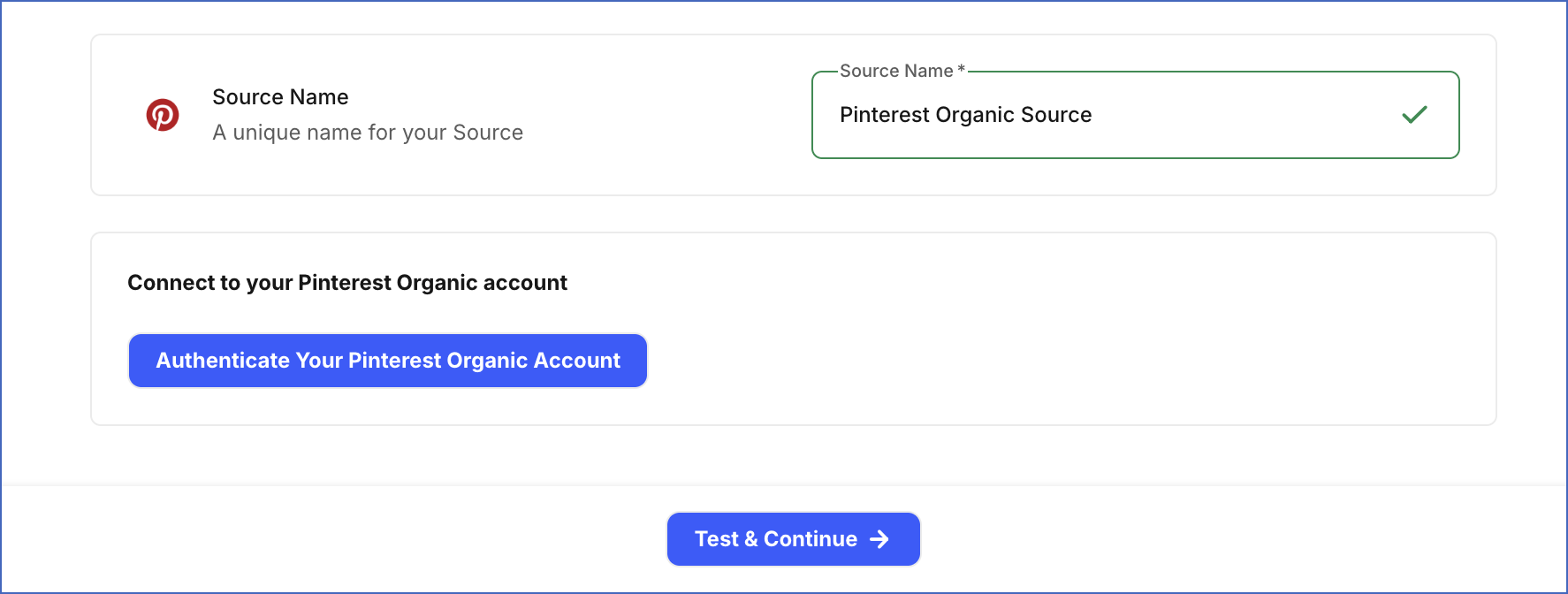
In the Configure Source screen, specify the following:
-
Source Name: A unique name for your Source, not exceeding 255 characters. For example, Pinterest Organic Source.
-
In the Connect to your Pinterest Organic account section, click Authenticate Your Pinterest Organic Account, log in to your Pinterest account, review the permissions Hevo requests to access your account data, and grant Hevo access to your account.
-
-
Click Test & Continue to test the connection to your Pinterest Organic Source.
Data Replication
Hevo replicates data for all the objects selected on the Configure Objects page during Pipeline creation. By default, all supported objects and their available fields are selected. However, you can modify this selection while creating or editing the Pipeline.
Hevo ingests the following types of data from your Source objects:
-
Historical Data: The first run of the Pipeline ingests historical data for the last 90 days for the selected objects and loads it into the Destination.
-
Incremental Data: Once the historical load is complete, new and updated records for objects are ingested as per the sync frequency.
For the following objects, Hevo ingests the entire data during each Pipeline run:
-
Pin
-
User Account
-
User Account Top Pin Analytics
-
User Account Top Video Pin Analytics
For all other objects, Hevo ingests only the incremental data in each Pipeline run.
Pinterest enforces rate limits on the number of calls that can be made to its APIs in a given time period. If these limits are exceeded, a rate limit exception occurs. To understand how Hevo handles such scenarios, read Handling Rate Limit Exceptions.
Note: You can create a Pipeline with this Source only using the Merge load mode. The Append mode is not supported for this Source.
Schema and Primary Keys
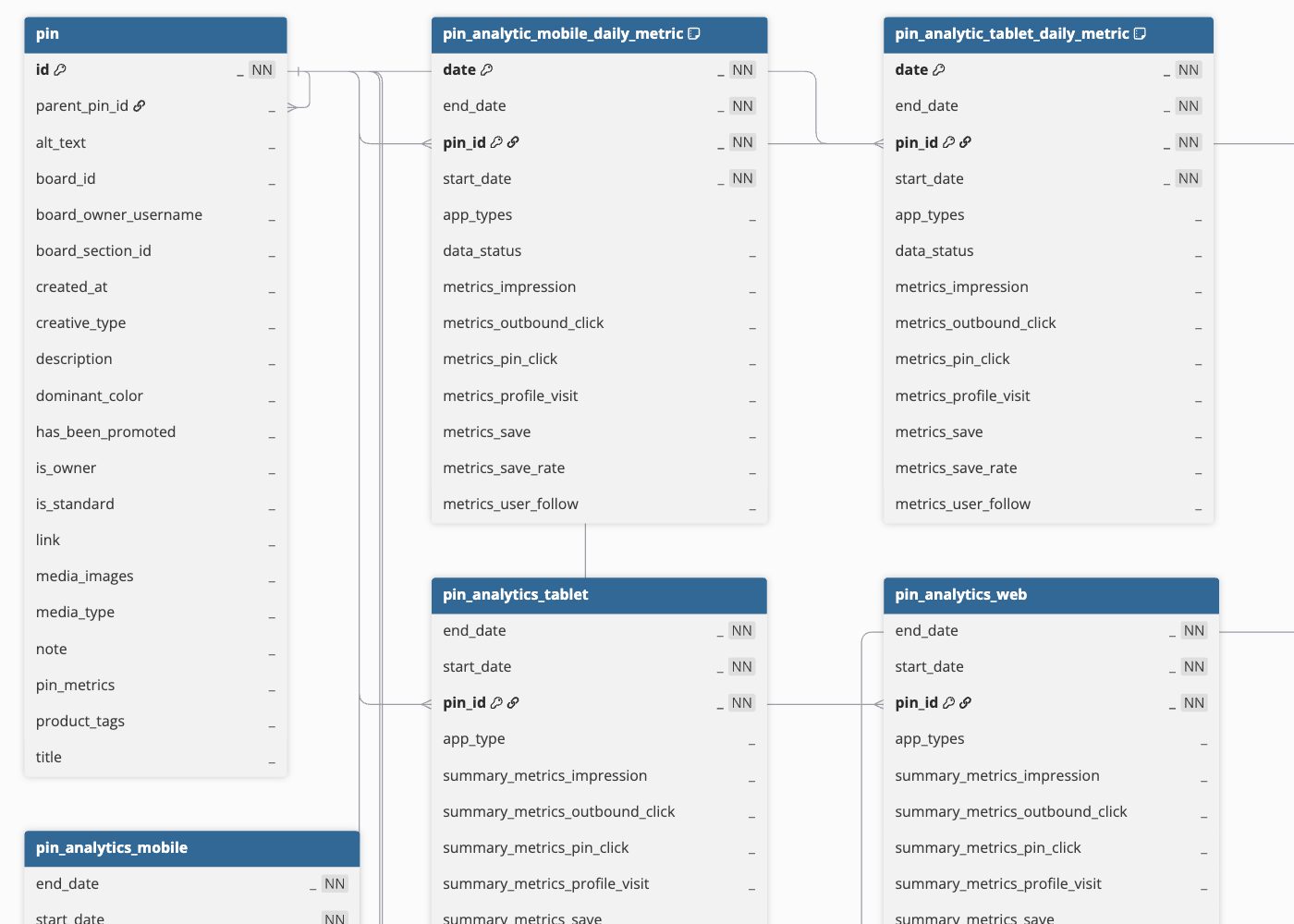
Hevo uses the following schema to upload the records to the Destination. For a detailed view of the objects, fields, and relationships, click the ERD.
Data Model
The following is the list of tables (objects) that are created at the Destination when you run the Pipeline:
| Object | Description |
|---|---|
| Pin | Contains details about individual visual posts on your Pinterest account, including the title, description, alt text, the board they belong to, and media type. |
| User Account | Contains details about the connected Pinterest business profile, including the account type, business name, username, follower count, following count, board count, post count, and monthly views. |
| User Account Analytics Organic | Contains organic (unpaid) performance metrics for the connected Pinterest profile over a selected date range, including engagement, impressions, outbound clicks, post clicks, saves, and video views. |
| User Account Analytics Paid | Contains paid performance metrics for the connected Pinterest profile, including engagement, impressions, outbound clicks, post clicks, video views, and saves. |
| User Account Analytics Daily Metric | Contains a daily breakdown of organic (unpaid) performance metrics for the connected Pinterest profile, including engagement, impressions, and video views. |
| User Account Analytics Daily Metric Paid | Contains a daily breakdown of paid performance metrics for the connected Pinterest profile, including engagement, impressions, and video views. |
| User Account Top Pin Analytics | Contains performance metrics for your best-performing posts, ranked by engagement, impressions, saves, and outbound clicks. |
| User Account Top Video Pin Analytics | Contains performance metrics for your best-performing video posts, including engagement, impressions, saves, and views. |
| Pin Analytics Web | Contains performance metrics for an individual post on the web platform, including impressions, outbound clicks, post clicks, profile visits, saves, and new followers gained. |
| Pin Analytics Web Daily Metric | Contains a daily breakdown of web platform performance metrics for an individual post. |
| Pin Analytics Mobile | Contains performance metrics for an individual post on the mobile platform. |
| Pin Analytics Mobile Daily Metric | Contains a daily breakdown of mobile platform performance metrics for an individual post. |
| Pin Analytics Tablet | Contains performance metrics for an individual post on the tablet platform. |
| Pin Analytics Tablet Daily Metric | Contains a daily breakdown of tablet platform performance metrics for an individual post. |
Additional Information
Read the detailed Hevo documentation for the following related topics:
Handling of Deletes
Pinterest does not explicitly mark records as deleted in its API responses. When a record is deleted, it is no longer returned in subsequent API responses. Hevo uses a full data refresh approach to capture delete actions for these objects. During each Pipeline run, Hevo compares the data fetched from the Source object with the data present in the Destination table. If a record exists in the Destination but is no longer returned by the Source, the record is marked as deleted by setting the value of the metadata column __hevo__marked_deleted to True. This applies to the following objects:
-
Pin
-
User Account
For all other objects, Hevo does not support capturing deletes.