Amazon Ads (formerly known as AMS or Amazon Marketing Services) is an advertising platform that lets you create and manage ads to promote your products and brand across Amazon and third-party sites. It provides tools to manage campaigns, targeting, and creatives, along with performance measurement and analytics to help you optimize your advertising strategy.
Hevo uses the Amazon Ads API to replicate data from your Amazon Ads account to the Destination of your choice.
Hevo supports the following authentication methods to connect to your Amazon Ads account:
-
Open Authorization (OAuth): Allows Hevo to connect to your account through an authorization flow, where you sign in to Amazon and grant Hevo access to your account data.
-
OAuth app: Allows Hevo to connect to your account using the client ID, client secret, and refresh token of a Login with Amazon (LwA) application that you create.
Note: To create a Pipeline with Amazon Ads as the Source using an OAuth app, you must use the Create a Pipeline endpoint through the Hevo API. This method is not available in the Hevo UI. Read Creating a Pipeline with Hevo API for the steps to create the Pipeline.
Supported Features
| Feature Name | Supported |
|---|---|
| Capture deletes | Yes |
| History mode | No |
| Custom data (user-configured tables & fields) | No |
| Data blocking (skip objects and fields) | Yes |
| Resync (objects and Pipelines) | Yes |
| API configurable | Yes |
Prerequisites
-
An active Amazon Ads account with at least one advertiser account to ingest data from.
-
The account has Editor or Admin permission to ingest data for all objects.
Configure Amazon Ads as a Source in your Pipeline
Perform the following steps to configure your Amazon Ads Source:
-
Click Pipelines in the Navigation Bar.
-
Click + Create Pipeline in the Pipelines List View.
-
On the Select Source Type page, select Amazon Ads.
-
On the Select Destination Type page, select the type of Destination you want to use.
-
On the Select Pipeline Type page, click Edge, and then click Continue.
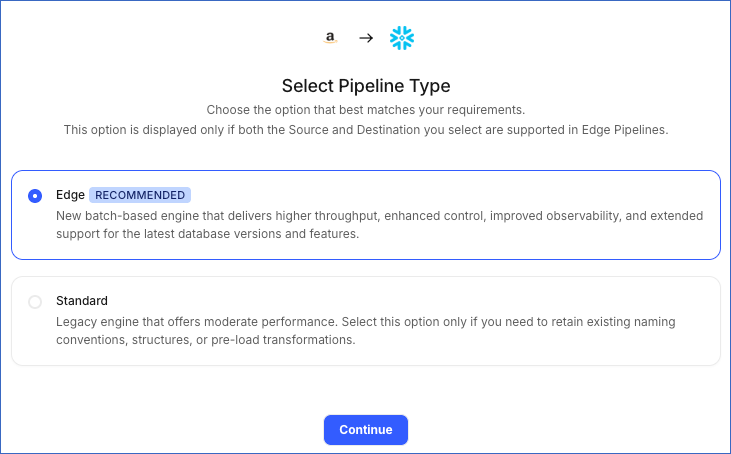
This page appears only if the selected Destination type is supported in Edge and your Team has an existing Amazon Ads Pipeline with the same Destination type. Otherwise, you can proceed to create an Edge Pipeline.
-
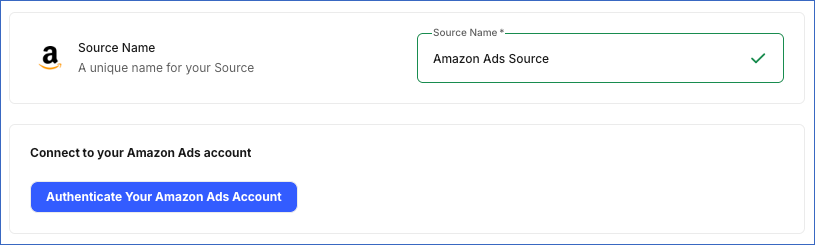
In the Configure Source screen, specify the following:
-
Source Name: A unique name for your Source, not exceeding 255 characters. For example, Amazon Ads Source.
-
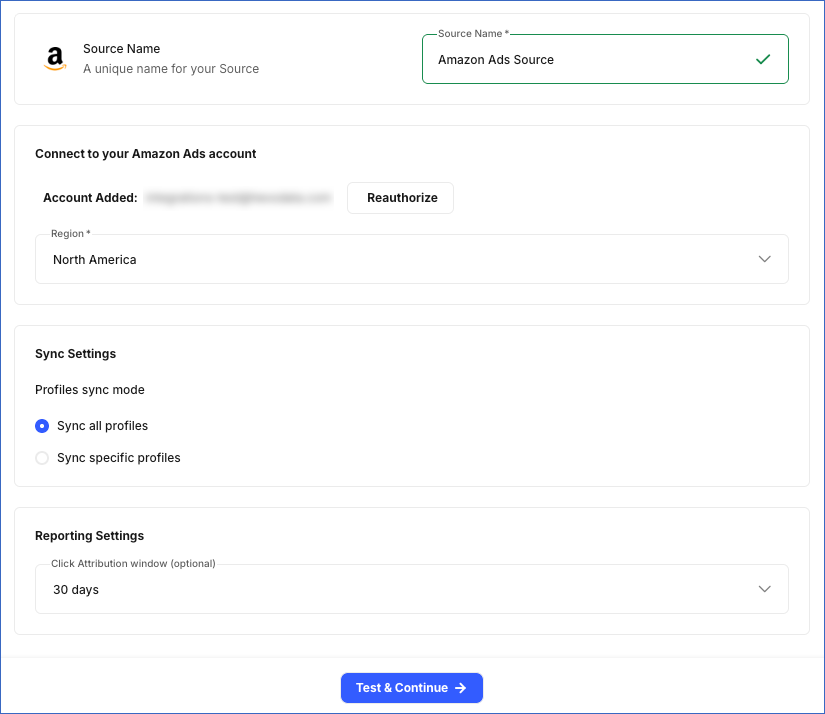
In the Connect to your Amazon Ads account section, do the following:
-
Click Authenticate Your Amazon Ads Account, log in to your Amazon Ads account, and grant Hevo access to your account.
-
From the Region drop-down, select the region of your Amazon Ads advertiser account. This determines the API endpoint Hevo uses to connect to your account. Default value: North America.
-
-
In the Sync Settings section, specify the following:
-
Profiles sync mode: Choose whether to sync data for all advertiser accounts in the selected region, or only for specific ones:
-
Sync all profiles: Hevo syncs data for all advertiser accounts accessible to your authorized Amazon Ads account in the selected region, including any accounts added later.
-
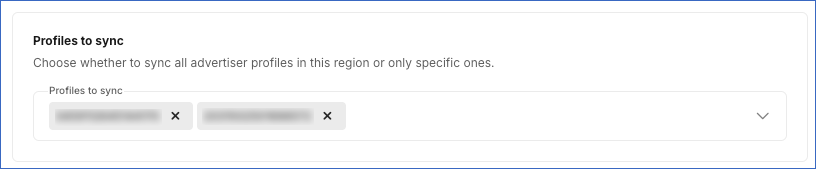
Sync specific profiles: Hevo ingests data only for the accounts you select from the Profiles to sync drop-down.
-
-
-
In the Reporting Settings section:
- Click Attribution window (optional): The number of days between a person clicking your ad and completing a conversion. This setting applies to Sponsored Products reporting objects only. Default value: 30 days.
-
-
Click Test & Continue to test the connection to your Amazon Ads Source. Once the test is successful, you can proceed to set up your Destination.
Data Replication
Hevo replicates data for all the objects selected on the Configure Objects page during Pipeline creation. By default, all supported objects and their available fields are selected. However, you can modify this selection while creating or editing the Pipeline.
Hevo ingests the following types of data from your Source objects:
-
Historical Data: The first run of the Pipeline ingests all available historical data for the selected objects and loads it into the Destination.
-
Incremental Data: Once the historical load is complete, new and updated records for objects are ingested as per the sync frequency.
For the following objects, Hevo ingests only the incremental data in subsequent Pipeline runs:
-
Ad Group Level Report
-
Ad Group Report (Sponsored Brands)
-
Ad Group Report (Sponsored Display)
-
Ad Report
-
Advertised Product Report
-
Budget Usage (Sponsored Brands)
-
Budget Usage (Sponsored Display)
-
Campaign Level Report
-
Campaign Placement Report
-
Campaign Report (Sponsored Brands)
-
Campaign Report (Sponsored Display)
-
Keyword Report (Sponsored Brands)
-
Matched Target Report (Sponsored Display)
-
Placement Report (Sponsored Brands)
-
Product Ad Report (Sponsored Display)
-
Purchased Product Keyword Report
-
Purchased Product Targeting Report
-
Purchased Products Reports (Sponsored Display)
-
Search Term Ad Keyword Report
-
Search Term Report (Sponsored Brands)
-
Search Term Targeting Report
-
Target Report (Sponsored Brands)
-
Target Report (Sponsored Display)
-
Targeting Keyword Report
-
Targeting Report
For all other objects, Hevo ingests the entire data during each Pipeline run.
Amazon Ads enforces rate limits on the number of calls that can be made to its API in a given time period. If this limit is exceeded, a rate limit exception occurs. To understand how Hevo handles such scenarios, read Handling Rate Limit Exceptions.
Note: You can create a Pipeline with this Source only using the Merge load mode. The Append mode is not supported for this Source.
Schema and Primary Keys
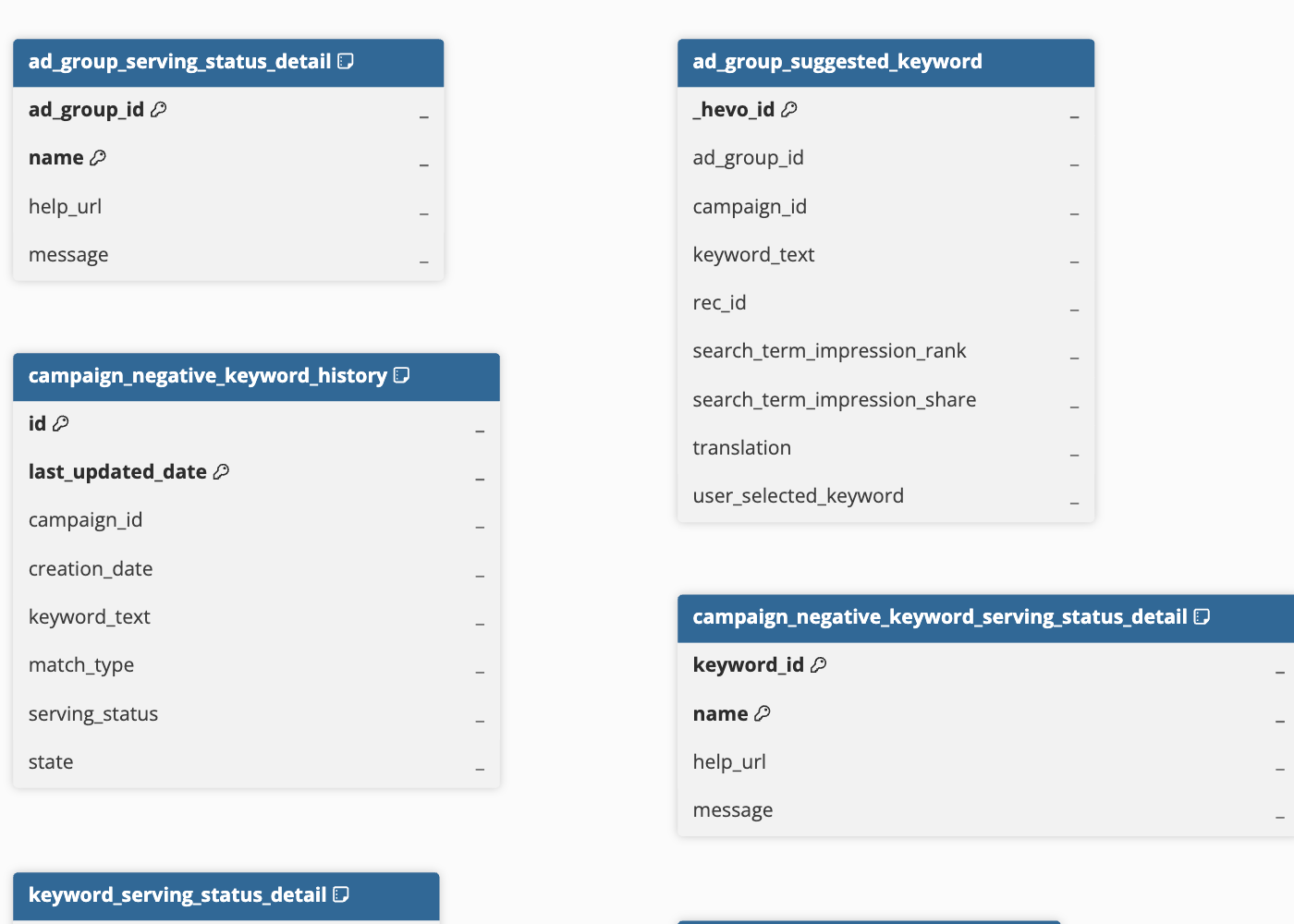
Hevo uses the following schema to upload the records to the Destination. For a detailed view of the objects, fields, and relationships, click the ERD.
Data Model
The Amazon Ads data model is organized into the following sections:
-
Account Information: Contains basic details about your Amazon Ads account, such as advertiser profiles and portfolios.
-
Sponsored Products: Contains data about ads that promote individual products on Amazon. This includes information about campaigns and ad groups, the products, and the search terms customers use.
Note: For Sponsored Products objects, Hevo does not use a prefix in their names on the Configure Objects page.
-
Sponsored Brands: Contains data about ads that showcase your brand and multiple products through custom headlines, videos, and Amazon Stores. This includes information about campaigns, ad groups, ads, keywords, and product targeting.
Note: For Sponsored Brands objects, Hevo uses the
sb_prefix in their names on the Configure Objects page. -
Sponsored Display: Contains data about ads that promote products to users based on their interests or shopping activity. This includes information about campaigns, ad groups, and the products being advertised.
Note: For Sponsored Display objects, Hevo uses the
sd_prefix in their names on the Configure Objects page.
Account Information
The following is the list of tables (objects) that are created at the Destination when you run the Pipeline:
| Object | Description |
|---|---|
| Profile | Contains details of your Amazon Ads advertiser accounts, including the account ID, country, marketplace, account type, and currency used for daily budgets. |
| Portfolio | Contains details used to group related campaigns together in your Amazon Ads account, including the name, budget, and status. |
Sponsored Products
The following is the list of tables (objects) that are created at the Destination when you run the Pipeline:
| Object | Description |
|---|---|
| Ad Group | Contains details of groups used to organize related ads, including the name, default bid, status, start date, and the campaign it belongs to. It includes a child object, Ad Group Serving Status Detail. |
| Ad Group Level Report | Contains daily performance data for ad groups, such as clicks, cost, sales, purchases, and units sold. |
| Ad Group Suggested Keyword | Contains words and phrases that Amazon Ads recommends using to target users for a specific ad group or campaign. |
| Ad Group Theme-Based Bid Recommendation | Contains Amazon’s suggested bid amounts for different products, categories, or audiences that you can target with an ad group, including the recommended targeting type. It includes the following child objects: - Ad Group Bid Analysis - Ad Group Bid Recommendation Value |
| Advertised Product Report | Contains daily performance data for each advertised product, identified by its Amazon Standard Identification Number (ASIN) or Stock Keeping Unit (SKU). Performance data includes impressions, clicks, cost, ad spend efficiency, sales, purchases, and units sold over different time periods, along with related budget and naming details for the campaign and ad group. |
| ASIN Suggested Keyword | Contains words and phrases Amazon Ads recommends targeting for a specific Amazon Standard Identification Number (ASIN), along with each keyword’s search term impression rank and share, and whether it was manually selected by the advertiser. |
| ASIN Theme-Based Bid Recommendation | Contains Amazon’s estimated bid range for an ASIN based on the bidding strategy, targeting type, and theme, along with bid analysis details. |
| Campaign | Contains details about campaigns, including the campaign name, budget, bidding strategy, targeting type, start and end dates, state, and portfolio. It includes the following child objects: - Campaign Placement Bidding - Campaign Serving Status Detail - Campaign Tag |
| Campaign Level Report | Contains daily performance data for campaigns, such as clicks, cost, sales, purchases, units sold, and how often ads appeared at the top of search results, along with the campaign’s budget details. |
| Campaign Negative Keyword | Contains keywords excluded at the campaign level, including the keyword, match type, status, and whether it’s currently active. It includes a child object, Campaign Negative Keyword Serving Status Detail. |
| Campaign Placement Report | Contains daily performance data for campaigns, including clicks, cost, sales, purchases, and units sold, broken down by where the ad appeared. |
| Keyword | Contains the search terms you want to target with ads, including the keyword, match type, bid, translated keyword, and status. It includes a child object, Keyword Serving Status Detail. |
| Negative Keyword | Contains the search terms you want to exclude with ads, including the keyword, match type, translated keyword, and status. It includes a child object, Negative Keyword Serving Status Detail. |
| Negative Product Targeting | Contains products and categories excluded from targeting, including the exclusion type, status, and active status. It includes the following child objects: - Negative Targeting Expression - Negative Targeting Resolved Expression - Negative Targeting Serving Status Detail |
| Product Ad | Contains details about ads created to promote products, including the product’s ASIN and SKU, custom ad text, and the ad’s status. It includes a child object, Product Ad Serving Status Detail. |
| Purchased Product Keyword Report | Contains daily data about products that customers purchased after clicking an ad that appeared for a specific keyword. |
| Purchased Product Targeting Report | Contains daily data about products customers purchased after clicking an ad that appeared for a specific product, category, or audience. |
| Search Term Ad Keyword Report | Contains daily data about the words or phrases customers searched for before clicking an ad, including performance metrics such as clicks, cost, sales, purchases, and units sold. |
| Search Term Targeting Report | Contains daily data about the search terms customers used when they clicked an ad shown for a specific product or category, including the product or category that triggered the ad, clicks, cost, sales, purchases, and units sold. |
| Targeting Clause | Contains the products, categories, or audiences that an ad group is set up to target, along with the bid, targeting type, and status. It includes the following child objects: - Targeting Expression - Targeting Resolved Expression - Targeting Serving Status Detail |
| Targeting Keyword Report | Contains daily performance data for keywords you target in your ads, including clicks, cost, sales, bid, and match type. |
| Targeting Report | Contains daily performance data for the products and audiences you target in your ads, including clicks, cost, sales, bid, and match type. |
Sponsored Brands
The following is the list of tables (objects) that are created at the Destination when you run the Pipeline:
| Object | Description |
|---|---|
| Ad | Contains details of individual ads, including the ad name, creation date, status, landing page type, URL, and the ad group and campaign it belongs to. It includes the following child objects: - Ad Sub Page - Creative ASIN - Creative Custom Image - Creative - Creative Original Video Asset - Creative Video Asset |
| Ad Group | Contains details about a group of related ads, including its name, creation date, status, and the campaign it belongs to. |
| Ad Group Report | Contains daily performance data for ad groups, such as clicks, cost, impressions, viewable impressions, video completion views, attributed sales, conversions, and units sold. |
| Ad Landing Page ASIN | Contains the product identifiers (ASINs) associated with the landing page of an ad. |
| Ad Report | Contains daily performance data for ads, such as clicks, cost, impressions, viewable impressions, video completion views, view-through rate, video click-through rate, attributed sales, conversions, and units sold. |
| Benchmark Brand and Category | Contains performance data for a brand within a category over a time period, including the median (50th percentile), 75th percentile, and 25th percentile values for click-through rate (CTR), impressions, and return on ad spend (ROAS). |
| Brand | Contains details of the Amazon brand registered to the account, including the brand’s identifier, brand entity identifier, and brand registry name. |
| Budget Recommendation | Contains Amazon’s suggested daily budget for a campaign for the next seven days, along with the estimated clicks and sales the campaign could miss due to budget constraints, and the percentage of time the campaign is expected to stay within budget. |
| Budget Rule | Contains details of rules that automatically adjust a campaign’s budget, including when the rule runs, how much the budget changes, the rule status, and the performance condition that triggers the change. It includes the following child objects: - Budget Rule Campaign - Budget Rule Recurrence Day |
| Budget Rule Recommendation | Contains Amazon’s suggested budget increase for a campaign based on a specific event, including the event name and when the event starts and ends. |
| Budget Usage | Contains the campaign’s budget usage details, including how much has been used and when the usage was last updated. |
| Campaign | Contains details about campaigns, including the campaign name, budget, bidding settings, goal, start and end dates, status, and portfolio. It includes the following child objects: - Campaign Bid Adjustments By Placement - Campaign Bid Adjustments By Shopper Segment - Campaign Tag |
| Campaign Report | Contains daily performance metrics for campaigns, including clicks, cost, impressions, attributed sales and conversions, and units sold. |
| Keyword | Contains details about the words and phrases used to target ads, including the keyword, match type, status, and the ad group and campaign it belongs to. |
| Keyword Report | Contains daily performance data for keywords, including clicks, cost, impressions, sales, conversions, and units sold. |
| Negative Keyword | Contains keywords that are excluded from keyword targeting, including the keyword, match type, status, and the ad group and campaign it belongs to. |
| Negative Product Target | Contains products excluded from product targeting, including the bid, status, and the ad group and campaign it belongs to. It includes the following child objects: - Negative Product Target Expression - Negative Product Target Resolved Expression |
| Placement Report | Contains daily performance metrics for campaigns broken down by placement, including clicks, cost, impressions, attributed sales and conversions, and units sold. |
| Product Target | Contains products and categories targeted by ads, including the bid, state, and the ad group and campaign it belongs to. It includes the following child objects: - Product Target Expression - Product Target Resolved Expression |
| Product Targeting Category | Contains product categories that you can target with ads, including the category name, number of products in the category, estimated reach, and whether the category can be targeted. |
| Purchased Product Report | Contains data about products purchased after users clicked or viewed ads, including the product name, category, orders, sales, and units sold. |
| Search Term Report | Contains daily performance data for search terms that customers used to find ads, including the search term, clicks, cost, sales, and conversions. The data is broken down by keyword, ad group, and campaign. |
| Store | Contains details about Amazon Stores associated with a brand, including the store name, status, and brand entity used to create campaigns and register assets. It includes a child object, Store Page Info. |
| Store Asset | Contains creative assets, such as logos and images, uploaded for campaigns, including the asset name, media type, dimensions, URL, and associated brand entity. |
| Target Report | Contains daily performance data for targets, including the targeting type, clicks, cost, impressions, sales, conversions, and units sold. |
| Targeting Recommendation Category | Contains Amazon’s recommended categories for targeting in campaigns based on a product ASIN, including the category name, category path, estimated reach, and whether it can be targeted. It includes a child object, Targeting Recommendation Brand Category. |
| Targeting Recommendation Product | Contains Amazon’s recommended products to target in campaigns, based on a specific product ASIN. |
Sponsored Display
The following is the list of tables (objects) that are created at the Destination when you run the Pipeline:
| Object | Description |
|---|---|
| Ad Group | Contains details about a group of related ads, including its name, default bid, ad format, targeting approach, and status. |
| Ad Group Report | Contains daily performance data for ad groups, such as clicks, cost, sales, purchases, units sold, and video completion views, along with reach and frequency metrics, including total unique reach and the average number of times an ad was shown per person. |
| Bid Recommendation | Contains Amazon’s recommended bid range for a targeting option, the product being advertised, the goal the bid is optimized for, and how you are charged for the ad. |
| Budget Rule | Contains details about a rule that automatically changes a campaign’s budget, including when the rule is triggered, how much the budget changes, and whether the rule is active. |
| Budget Usage | Contains the campaign’s budget usage details, including how much has been used and when the usage was last updated. |
| Campaign | Contains details about campaigns, including the campaign name, budget, cost type, targeting approach, portfolio, start and end dates, and status. |
| Campaign Report | Contains daily performance metrics for campaigns, including clicks, cost, impressions, attributed sales and conversions, and units sold. |
| Creative | Contains details about the content used in an ad, such as its type, headline, logo, image, and video. It includes a child object, Creative Moderation. |
| Matched Target Report | Contains daily results for the products that your ad was shown for after matching a targeting option, including clicks, cost, sales, purchases, and units sold. |
| Negative Targeting | Contains the products or categories an ad group is set to avoid, including how that exclusion is written and whether it’s currently running. |
| Product Ad | Contains details about product ads in an ad group, including the ad name, landing page, and status. |
| Product Ad Report | Contains daily performance data for individual product ads, such as clicks, cost, sales, purchases, units sold, and detail page views. |
| Purchased Products Reports | Contains daily results for other products that customers purchased after seeing or clicking your ad, including purchases, sales, and units sold. |
| Target Report | Contains daily results for each target, such as clicks, cost, sales, purchases, and units sold, including what the ad was targeting and whether the target is active. |
| Targeting | Contains the products, categories, or audiences that an ad group is set up to target, including the targeting type, creation date, and status. It includes the following child objects: - Targeting Expression - Targeting Resolved Expression |
| Targeting Recommendation Product | Contains Amazon’s recommended products to target based on the product being advertised, ranked by relevance. It includes the following child objects: - Targeting Recommendation Audience - Targeting Recommendation Category |
Additional Information
Read the detailed Hevo documentation for the following related topics:
Handling of Deletes
Hevo uses a full data refresh approach to capture delete actions. During each Pipeline run, Hevo compares the data fetched from the Source object with the data present in the Destination table. If a record exists in the Destination but is no longer returned by the Source, the record is marked as deleted by setting the value of the metadata column __hevo__marked_deleted to True. This applies to the following objects:
-
Negative Targeting Expression
-
Negative Targeting Resolved Expression
-
Negative Product Target (Sponsored Brands)
-
Product Target (Sponsored Brands)
-
Product Targeting Category (Sponsored Brands)
-
Profile
-
Store Asset (Sponsored Brands)
-
Targeting Expression
-
Targeting Resolved Expression
Source Considerations
-
If the authorized Amazon Ads account does not have Editor or Admin access, the following objects are marked as Inaccessible on the Pipeline’s Objects tab, and Hevo cannot ingest their data:
Object Category Name Sponsored Products Keyword, Keyword Serving Status Detail, Targeting Clause, Targeting Expression, Targeting Resolved Expression, Targeting Serving Status Detail Sponsored Brands Keyword, Negative Keyword, Product Target, Product Target Expression, Product Target Resolved Expression, Negative Product Target, Negative Product Target Expression, Negative Product Target Resolved Expression, Budget Rule, Budget Rule Recurrence Day, Budget Rule Campaign, Targeting Recommendation Product, Targeting Recommendation Category, Targeting Recommendation Brand Category, Brand, Store Asset Sponsored Display Budget Rule, Creative, Creative Moderation To ingest data for these objects, you must have Editor or Admin access on the Amazon Ads account.