StackAdapt is an AI-powered programmatic advertising platform that connects advertisers, agencies, and brands to audiences across Connected TV, display, video, audio, native, digital-out-of-home, and other digital channels. It enables businesses to plan, execute, optimize, and report on multi-channel ad campaigns using machine learning-driven targeting, bidding, and creative delivery.
Hevo uses StackAdapt’s GraphQL API to replicate data from your StackAdapt account to the Destination of your choice. To ingest data, you must provide Hevo with a StackAdapt GraphQL API Token to authenticate to your StackAdapt account.
StackAdapt Environments
StackAdapt provides separate environments for testing and production use:
-
Sandbox: This environment is used for testing API integrations without affecting your live campaign data. A sandbox environment is accessed using URLs that include the sandbox identifier, such as sandbox.stackadapt.com/public.
-
Production: This environment contains your live StackAdapt account data and is used for actual campaign management and reporting. A production environment is accessed using standard StackAdapt URLs, such as api.stackadapt.com.
Hevo supports replicating data from both the production and sandbox environments. By default, Hevo connects to the Production environment. To ingest data from the Sandbox environment instead, enable the Use Sandbox option while configuring your StackAdapt Source.
Supported Features
| Feature Name | Supported |
|---|---|
| Capture deletes | Yes |
| History mode | No |
| Custom data (user-configured tables & fields) | No |
| Data blocking (skip objects and fields) | Yes |
| Resync (objects and Pipelines) | Yes |
| API configurable | Yes |
Prerequisites
-
An active StackAdapt account exists from which data is to be ingested.
-
A GraphQL API Token is available to provide Hevo access to your StackAdapt account data.
Obtain the API Token
To connect Hevo to your StackAdapt account, you must provide a GraphQL API Token. StackAdapt does not allow you to generate GraphQL API Tokens from the account UI. To obtain an API Token, contact your StackAdapt account manager or the StackAdapt support team. Once your request is approved, they will provide the API Token required to authenticate your GraphQL API requests.
Use this API Token when configuring your StackAdapt Source in Hevo. If the API Token configured in the Pipeline is revoked manually from your StackAdapt account, Hevo cannot authenticate with the Source. As a result, all active jobs for the Pipeline fail, and no data is replicated. To resume data replication, modify the Source configuration in the Pipeline with a valid API Token. Once the updated token is saved, Hevo re-authenticates the Source, and data ingestion resumes from the last saved offset.
Configure StackAdapt as a Source in your Pipeline
Perform the following steps to configure your StackAdapt Source:
-
Click Pipelines in the Navigation Bar.
-
Click + Create Pipeline in the Pipelines List View.
-
On the Select Source Type page, select Stackadapt.
-
On the Select Destination Type page, select the type of Destination you want to use.
-
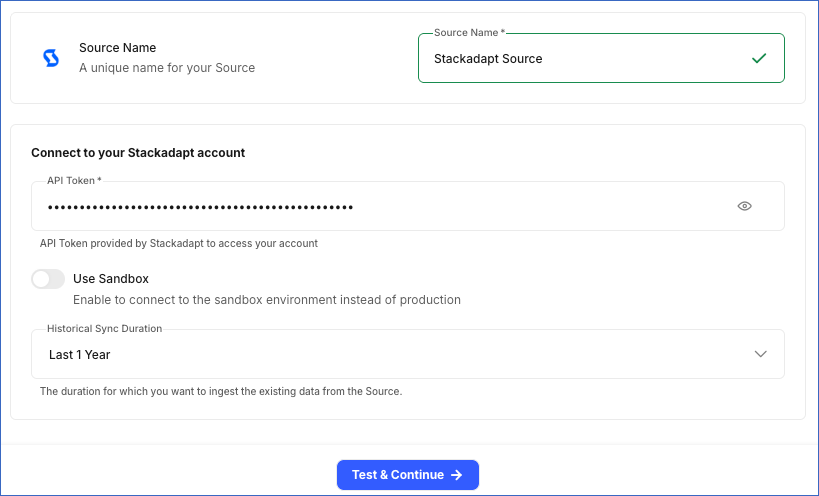
In the Configure Source screen, specify the following:
-
Source Name: A unique name for your Source, not exceeding 255 characters. For example, StackAdapt Source.
-
In the Connect to your StackAdapt account section, specify the following:
-
API Token: The API Token that you obtained from StackAdapt.
-
Use Sandbox: Enable this option to connect Hevo to a Sandbox environment instead of a Production environment.
-
Historical Sync Duration: The duration for which you want to ingest existing data from the Source. This cannot be changed after the Pipeline is created. Default duration: Last 1 Year.
-
-
-
Click Test & Continue to test the connection to your StackAdapt Source. Once the test is successful, you can proceed to set up your Destination.
Data Replication
Hevo replicates data for all the objects selected on the Configure Objects page during Pipeline creation. By default, all supported objects and their available fields are selected. However, you can modify this selection while creating or editing the Pipeline.
Hevo ingests the following types of data from your Source objects:
-
Historical Data: The first run of the Pipeline ingests all available historical data for the selected objects and loads it into the Destination. For Insight and Delivery reports, historical data is ingested based on the Historical Sync Duration specified when creating the Pipeline.
For the Insight Campaign Geo and Insight Campaign Group Geo objects, Hevo can ingest up to 30 days of historical data.
-
Incremental Data: Once the historical load is complete, new and updated records for objects are ingested as per the sync frequency.
For all objects, Hevo ingests the entire data during each Pipeline run.
Note: You can create a Pipeline with this Source only using the Merge load mode. The Append mode is not supported for this Source.
StackAdapt enforces a rate limit on its GraphQL API requests. If this limit is exceeded, a rate limit exception occurs. To understand how Hevo handles such scenarios, read Handling Rate Limit Exceptions.
Schema and Primary Keys
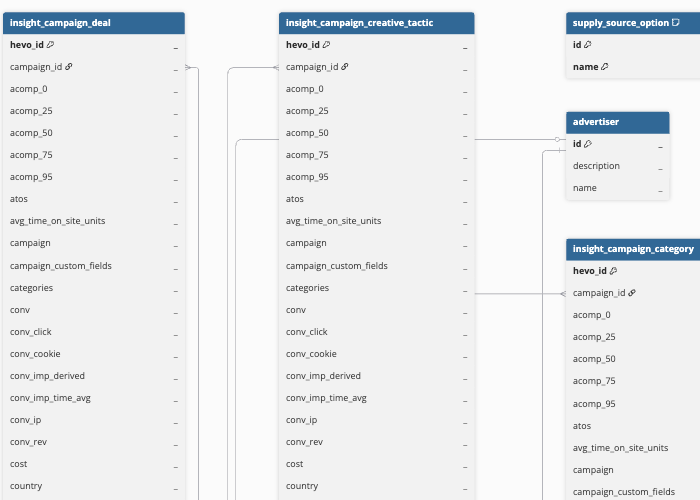
Hevo uses the following schema to upload the records to the Destination. For a detailed view of the objects, fields, and relationships, click the ERD.
Data Model
The following is the list of tables (objects) that are created at the Destination when you run the Pipeline:
| Object | Description |
|---|---|
| Advertiser | Contains account details, such as the account name and description, under which campaign groups and campaigns are managed. |
| Campaign Group | Contains details of a group of campaigns, including their budget, daily spending limit, schedule, purchase order number, and status. |
| Campaign | Contains details of an ad campaign, including its target audience, budget, schedule, optimization goal, ad frequency limits, and status. |
| Ad | Contains details of the ads used in campaigns, including the brand name, ad type, size, impression tracking, and status. |
| BYOD Deal | Contains details of Bring-Your-Own-Deal (BYOD) private agreements with publishers, including the publisher, floor price, bid type, device type, supply type, and start and end dates. |
| Inventory Package | Contains details of groups of ad space available for purchase, including available inventory, suggested bid amounts, the countries and device types they cover, and where the ad space comes from. |
| Brand Lift Study | Contains details of studies that measure how advertising affects brand awareness, including the study name, status, and related campaigns. |
| Webhook | Contains details of automated alerts set up in your StackAdapt account, including the name, the event that triggers it, whether it’s active, and the web address that receives the alert. |
| User Vertical Strategy | Contains details of templates used to set up campaign groups for a specific industry, including the goal, performance targets, industry, product areas, and suggested budget. |
| Supply Source Option | Contains a list of available sources of ad space, such as ad exchanges and marketplaces. |
| Custom Segment Option | Contains a list of custom audience groups available in your StackAdapt account. |
| Advertiser Delivery | Contains daily performance data at the advertiser level, including impressions, clicks, conversions, video and audio completion rates, viewability, engagement, cost, and revenue. |
| Campaign Group Delivery | Contains daily performance data at the campaign group level, including impressions, clicks, conversions, video and audio completion rates, viewability, engagement, cost, and revenue. |
| Campaign Delivery | Contains daily performance data at the campaign level, including impressions, clicks, conversions, video and audio completion rates, viewability, engagement, cost, and revenue. |
| Ad Delivery | Contains daily performance data for an ad, including impressions, clicks, conversions, completion rates, viewability, engagement, cost, and revenue. |
| Insight Campaign Supply Source | Contains daily campaign performance broken down by the source of the ad space, including impressions, clicks, cost, conversions, and engagement. |
| Insight Campaign Demographic | Contains daily performance data for each campaign, broken down by age, gender, or other demographic details. |
| Insight Campaign Deal | Contains daily performance data for each campaign, broken down by the advertising deal used to buy the ad space. |
| Insight Campaign Creative Tactic | Contains daily performance data for each campaign, broken down by the creative approach used in the ads. |
| Insight Campaign Audience AB | Contains daily performance data for each campaign, broken down by the test group in an A/B (side-by-side) test. |
| Insight Campaign Geo | Contains daily performance data for each campaign, broken down by location. |
| Insight Campaign Category | Contains daily performance data for each campaign, broken down by content category. |
| Insight Campaign Bid Factor | Contains daily performance data for each campaign, broken down by how much the bid amount was increased or decreased for specific conditions. |
| Insight Campaign Device | Contains daily performance data for each campaign, broken down by device type. |
| Insight Campaign Audience | Contains daily performance data for each campaign, broken down by audience group. |
| Insight Campaign Retargeting Segment | Contains daily performance data for each campaign, broken down by groups of people who previously visited or interacted with your business. |
| Insight Campaign Group Category | Contains daily performance data for each campaign group, broken down by content category. |
| Insight Campaign Group Device | Contains daily performance data for each campaign group, broken down by device type. |
| Insight Campaign Group Supply Source | Contains daily performance data for each campaign group, broken down by where the ad space came from. |
| Insight Campaign Group Bid Factor | Contains daily performance data for each campaign group, broken down by how much the bid amount was increased or decreased for specific conditions. |
| Insight Campaign Group Creative Tactic | Contains daily performance data for each campaign group, broken down by the creative approach used in the ads. |
| Insight Campaign Group Geo | Contains daily performance data for each campaign group, broken down by location. |
| Insight Campaign Group Deal | Contains daily performance data for each campaign group, broken down by the advertising deal used to buy the ad space. |
| Insight Campaign Group Retargeting Segment | Contains daily performance data for each campaign group, broken down by groups of people who previously visited or interacted with your business. |
| Insight Campaign Group Audience AB | Contains daily performance data for each campaign group, broken down by the test group in an A/B (side-by-side) test. |
| Insight Campaign Group Audience | Contains daily performance data for each campaign group, broken down by audience group. |
| Insight Campaign Group Demographic | Contains daily performance data for each campaign group, broken down by age, gender, or other demographic details. |
Additional Information
Read the detailed Hevo documentation for the following related topics:
Handling of Deletes
StackAdapt does not explicitly mark records as deleted in its GraphQL API responses. When a record is deleted, it is no longer returned in subsequent API responses.
Hevo uses a full data refresh approach to capture delete actions. During each Pipeline run, Hevo compares the data fetched from the Source object with the data present in the Destination table. If a record exists in the Destination but is no longer returned by the Source, the record is marked as deleted by setting the value of the metadata column __hevo__marked_deleted to True. This applies to all objects.