Rundeck is an open source runbook automation platform from PagerDuty. Operations teams use it to define jobs, schedule them, and run them on their servers.
Hevo uses the Rundeck API to replicate the projects, jobs, executions, schedules, and server information of your Rundeck server to the Destination of your choice. To ingest data, you must provide Hevo with the URL of your Rundeck server and an API token.
Supported Features
| Feature Name | Supported |
|---|---|
| Capture deletes | Yes |
| History mode | No |
| Custom data (user-configured tables & fields) | No |
| Data blocking (skip objects and fields) | Yes |
| Resync (objects and Pipelines) | Yes |
| API configurable | Yes |
Prerequisites
-
A Rundeck server that supports API version 47, from which data is to be ingested.
-
The Rundeck server is reachable from Hevo over HTTP or HTTPS. If your server is behind a firewall, allow connections from the Hevo IP addresses for your region.
-
An API token of a Rundeck user who can read the projects, jobs, and executions that you want to replicate. Read Create an API Token.
Create an API Token
Hevo connects to your Rundeck server using an API token. The token has the access of the Rundeck user who creates it, limited to the roles that you select for the token.
Perform the following steps to create an API token:
-
Log in to your Rundeck server.
-
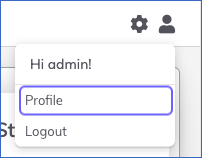
Click the user icon in the top-right corner of the page, and then click Profile.
-
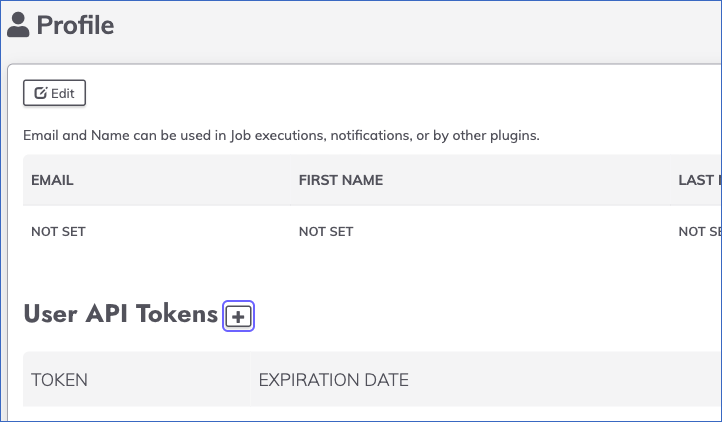
In the User API Tokens section, click the + icon.
-
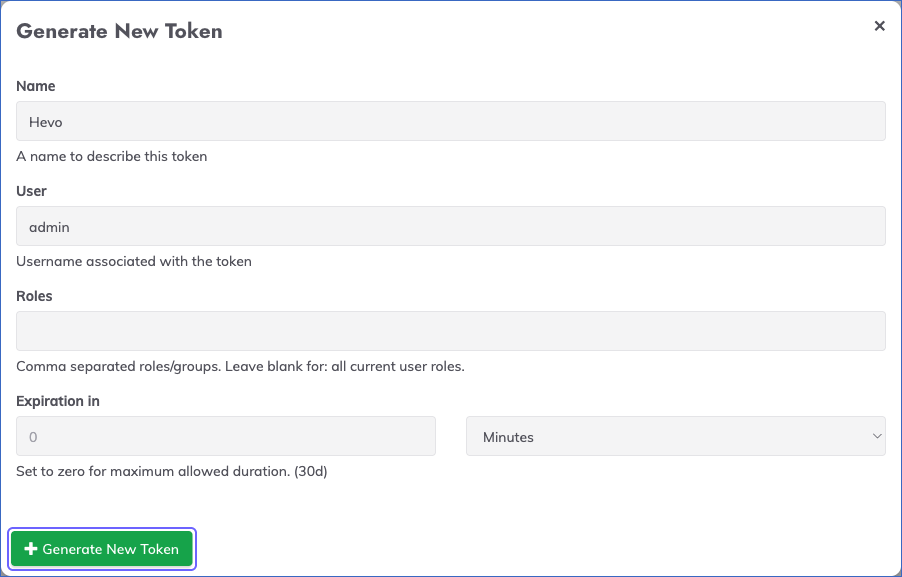
In the Generate New Token dialog, do the following:
-
Specify a Name for the token. For example, Hevo.
-
In the Roles field, specify the roles that the token must have, or leave it blank to give the token all the roles of your user.
-
In the Expiration in field, specify the duration for which the token is valid. Specify 0 for the maximum duration allowed by your Rundeck server.
-
Click Generate New Token.
-
-
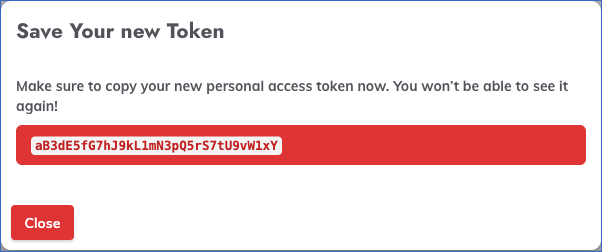
Copy the token and save it securely like any other password. Rundeck displays the token only once.
Read Token Authentication for more information about API tokens.
When the token expires or is deleted, Hevo cannot connect to your Rundeck server, and the Pipeline fails. To resume data ingestion, create a new token and modify the Source configuration with it.
Configure Rundeck as a Source in your Pipeline
Perform the following steps to configure your Rundeck Source:
-
Click Pipelines in the Navigation Bar.
-
Click + Create Pipeline in the Pipelines List View.
-
On the Select Source Type page, select Rundeck.
-
On the Select Destination Type page, select the type of Destination you want to use.
-
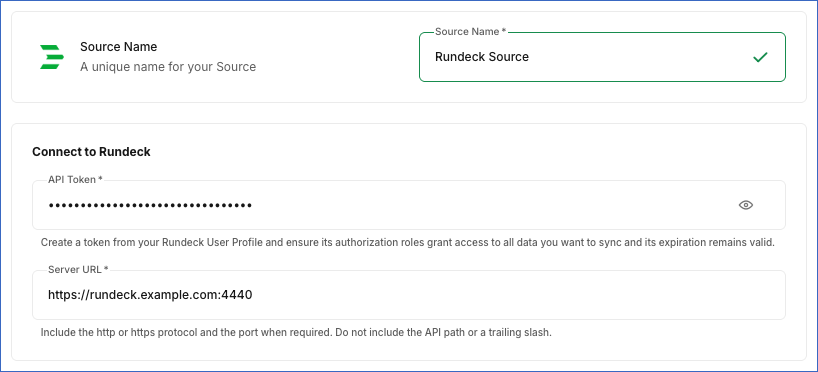
On the Configure Source page, specify the following:
-
Source Name: A unique name for your Source, not exceeding 255 characters. For example, Rundeck Source.
-
In the Connect to Rundeck section:
-
API Token: The API token that you created in Rundeck.
-
Server URL: The URL of your Rundeck server, including the protocol and, if required, the port. For example, https://rundeck.example.com:4440. Do not include the API path, such as /api/47, or a trailing slash.
-
-
-
Click Test & Continue to test the connection to your Rundeck Source. Once the test is successful, you can proceed to set up your Destination.
Data Replication
Hevo replicates data for all the objects selected on the Configure Objects page during Pipeline creation. By default, all supported objects and their available fields are selected. However, you can modify this selection while creating or editing the Pipeline. To ingest a child object, you must also select its parent object.
Hevo ingests the entire data of all the selected objects in each run, as per the sync frequency, including all the executions that your Rundeck server stores.
You can resync the parent objects. Resyncing a parent object also resyncs its child objects.
Note: You can create a Pipeline with this Source only using the Merge load mode. The Append mode is not supported for this Source.
Schema and Primary Keys
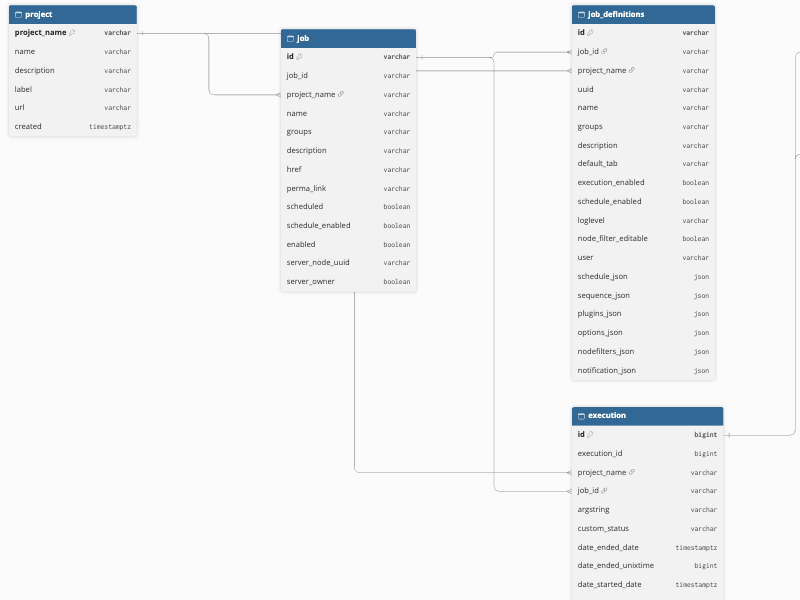
Hevo uses the following schema to upload the records in the Destination. For a detailed view of the objects, fields, and relationships, click the ERD.
Data Model
The following is the list of tables (objects) that are created at the Destination when you run the Pipeline:
| Object | Description |
|---|---|
| API Information | Contains the API version that your Rundeck server supports. |
| Config List | Contains the current configuration properties of your Rundeck server, including the category, label, and value of each property. Rundeck provides this data only in Rundeck Enterprise. |
| Config Meta List | Contains the metadata of the configuration properties, such as the data type, default value, and whether a restart is required. Rundeck provides this data only in Rundeck Enterprise. |
| Execution | Contains the executions in each project, including the job, status, start and end times, user, and options of each execution. It includes the child objects, Execution Failed Node and Execution Successful Node. |
| Execution Failed Node | Contains the nodes on which each execution failed. |
| Execution Mode | Contains the execution mode of your Rundeck server, which shows whether executions are enabled. |
| Execution Successful Node | Contains the nodes on which each execution succeeded. |
| Job | Contains the jobs in each project, including the name, group, description, and schedule status of each job. |
| Job Definitions | Contains the full definition of each job, including the steps, options, schedule, node filters, and notifications. |
| Log Storage | Contains the status of the log storage of your Rundeck server, including the plugin and the counts of stored, queued, and failed logs. |
| Metrics Catalog | Contains the links to the metrics endpoints of your Rundeck server. |
| Plugin | Contains the plugins installed on your Rundeck server, including the service, version, and author of each plugin. |
| Project | Contains the projects of your Rundeck server, including the name, description, and creation date of each project. It includes the child objects, Execution, Job, and Job Definitions. |
| Scheduled Job Future Executions | Contains the upcoming scheduled run times of each scheduled job. |
| Scheduled Jobs | Contains the jobs that are scheduled on your Rundeck server. It includes a child object, Scheduled Job Future Executions. |
| System Info | Contains the details of your Rundeck server, such as the version, operating system, Java version, CPU and memory usage, and uptime. |
| User Class | Contains the user class allocations of your Rundeck license. Rundeck provides this data only in Rundeck Enterprise. |
| User Profile | Contains the users of your Rundeck server, including the login, name, email address, and number of API tokens of each user. |
Additional Information
Read the detailed Hevo documentation for the following related topics:
Handling of Deletes
Hevo captures deletes by comparing the data ingested from the Source with the data present in the Destination in each run. If a record exists in the Destination but is no longer returned by the Source, Hevo marks it as deleted by setting the value of the metadata column __hevo__marked_deleted to True. The record remains in the Destination with all its data. For example, if you delete a job in Rundeck, Hevo marks the job as deleted in the Job and Job Definitions objects.
Rundeck keeps the executions of a deleted job. Hence, these executions are not marked as deleted. Instead, their job_deleted field is set to True, and their job_id field is empty.
Source Considerations
-
The Config List, Config Meta List, and User Class objects contain data only for Rundeck Enterprise. For the open source Rundeck server, these objects are empty.
-
Rundeck limits how long an API token is valid. By default, a token is valid for at most 30 days, unless your Rundeck administrator changes this limit. Create a new token and update it in the Source before the existing token expires, so that the Pipeline does not fail.
-
Hevo reads all the executions of your Rundeck server in each run. If your server stores a large number of executions, each run may take longer to complete. To reduce this, configure Rundeck to clean up the execution history.