Pylon is a customer support platform for B2B companies. Teams use it to manage support conversations across channels such as Slack, Microsoft Teams, email, and chat, and to track their customer accounts, contacts, and knowledge bases.
Hevo uses the Pylon API to replicate data from your Pylon organization to the Destination of your choice. To ingest data, you must provide Hevo with a Pylon API token and the region where your Pylon organization is hosted.
Supported Features
| Feature Name | Supported |
|---|---|
| Capture deletes | Yes |
| History mode | No |
| Custom data (user-configured tables & fields) | No |
| Data blocking (skip objects and fields) | Yes |
| Resync (objects and Pipelines) | Yes |
| API configurable | Yes |
Prerequisites
-
An active Pylon account from which data is to be ingested.
-
The Admin role in Pylon to create an API token. Only Admins can create and manage API tokens.
Create an API Token
Hevo connects to Pylon using an API token. The data that Hevo can read depends on the role that the token uses. Pylon API tokens do not have separate scopes, and they do not expire.
Perform the following steps to create an API token:
-
Log in to your Pylon account as an Admin.
-
Click Settings, and then click Integrations & dev > API tokens.
-
Click Create API Token.
-
Specify the following:
-
Name: A name for the token. For example, Hevo.
-
Act as user or bot (optional): Leave this field empty, so that the token has its own identity and is not affected if a teammate’s role changes or the teammate leaves.
-
Role: The role of the token. Select Admin. Pylon allows only Admins to view audit logs. If you select any other role, ingestion fails for the Audit Logs object, and for any other object that the role cannot view.
-
IP allowlist: (Optional) The IP addresses from which the token can be used. If you specify any, add Hevo’s IP addresses for your region. Otherwise, Hevo cannot connect to Pylon.
-
-
Click Create.
-
Copy the token and save it securely like any other password. Pylon shows the token only once. If you lose it, create a new token.
Use this API token while configuring your Pylon Source in Hevo. If the token is deleted or rotated, or if the Admin who created it is deactivated in Pylon, Hevo cannot connect to Pylon, and the Pipeline stops ingesting data. To resume, modify the Source configuration with a valid API token.
Configure Pylon as a Source in your Pipeline
Perform the following steps to configure your Pylon Source:
-
Click Pipelines in the Navigation Bar.
-
Click + Create Pipeline in the Pipelines List View.
-
On the Select Source Type page, select Pylon.
-
On the Select Destination Type page, select the type of Destination you want to use.
-
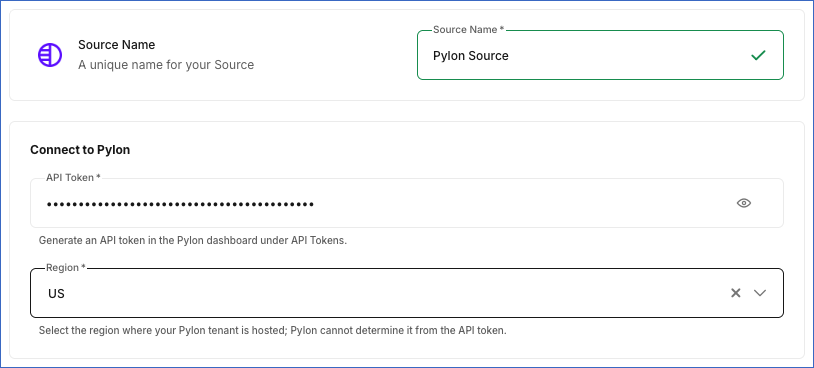
In the Configure Source screen, specify the following:
-
Source Name: A unique name for your Source, not exceeding 255 characters. For example, Pylon Source.
-
In the Connect to Pylon section:
-
API Token: The API token that you copied from Pylon.
-
Region: The region where your Pylon organization is hosted, US or EU. The prefix of the API token shows its region. A token that starts with pylon_api_eu_ belongs to the EU region, and a token that starts with pylon_api_ belongs to the US region. If your token was created before Pylon added these prefixes, select the region where your Pylon organization is hosted.
-
-
-
Click Test & Continue to test the connection to your Pylon Source. Hevo checks the connection by reading the accounts in your Pylon organization. If the API token is invalid, or if the region you selected does not match the prefix of the token, the test fails with the message Something went wrong, please try again later. In that case, check the token and the region, and test the connection again. Once the test is successful, you can proceed to set up your Destination.
Data Replication
Hevo replicates data for all the objects selected on the Configure Objects page during Pipeline creation. By default, all supported objects and their available fields are selected. However, you can modify this selection while creating or editing the Pipeline.
Hevo ingests the entire data of all the selected objects during each Pipeline run, as per the sync frequency. The Pylon API does not provide a way to fetch only the records that changed since the last run.
Note: You can create a Pipeline with this Source only using the Merge load mode. The Append mode is not supported for this Source.
Schema and Primary Keys
Hevo uses the following schema to upload the records in the Destination. For a detailed view of the objects, fields, and relationships, click the ERD.
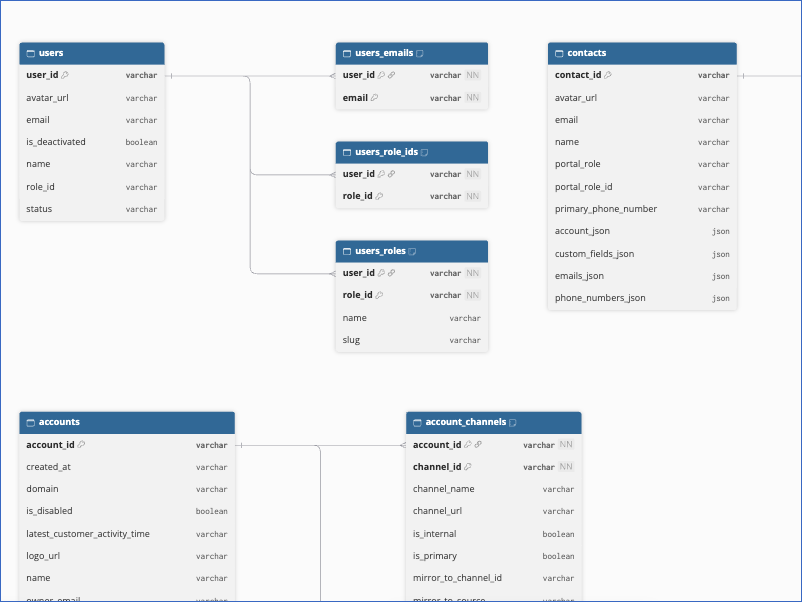
The following table lists the primary key of each object:
| Object | Primary Key |
|---|---|
| Accounts | account_id |
| Account Channels | account_id, channel_id |
| Account CRM Details | account_id, source |
| Account Domains | account_id, domain |
| Audit Logs | id |
| Contacts | contact_id |
| Contacts Integration User IDs | None |
| Issue Statuses | slug |
| Knowledge Bases | knowledge_base_id |
| Macro Groups | id |
| Surveys | id |
| Tags | id |
| Teams | team_id |
| Ticket Forms | ticket_form_id |
| Ticket Form Fields | field_key |
| Training Data | training_data_id |
| User Roles | id |
| Users | user_id |
| Users Emails | user_id, email |
| Users Role IDs | user_id, role_id |
| Users Roles | user_id, role_id |
Data Model
The following is the list of tables (objects) that are created at the Destination when you run the Pipeline:
| Object | Description |
|---|---|
| Accounts | Contains the customer accounts in your Pylon organization, including their name, type, primary domain, owner, parent account, and the time of the latest customer activity. It includes the following child objects: - Account Channels - Account CRM Details - Account Domains |
| Audit Logs | Contains the actions performed in your Pylon organization, including the action, the object it was performed on, the user or contact who performed it, and the time it happened. |
| Contacts | Contains the people at your customer accounts, including their name, email addresses, phone numbers, account, portal role, and custom field values. It includes the following child object: - Contacts Integration User IDs |
| Issue Statuses | Contains the statuses that issues can have in your Pylon organization, including their label, category, and whether they are archived or the default status. |
| Knowledge Bases | Contains the knowledge bases in your Pylon organization, including their title, slug, default language, and supported languages. |
| Macro Groups | Contains the groups into which the macros of your Pylon organization are organized. |
| Surveys | Contains the customer surveys in your Pylon organization, including their name and type. |
| Tags | Contains the tags defined in your Pylon organization, including their value, color, and the type of object to which they apply. |
| Teams | Contains the teams in your Pylon organization, including their name, assignment configuration, and schedule. |
| Ticket Forms | Contains the forms that customers use to submit tickets, including their name, URL, and whether they are public. It includes the following child object: - Ticket Form Fields |
| Training Data | Contains the sources of content used to train the AI features of Pylon, including their type, visibility, and scraping status. |
| User Roles | Contains the roles that can be assigned to the users of your Pylon organization. |
| Users | Contains the members of your Pylon organization, including the deactivated users, with their name, email address, role, and status. It includes the following child objects: - Users Emails - Users Role IDs - Users Roles |
Additional Information
Read the detailed Hevo documentation for the following related topics:
Handling of Deletes
The Pylon API does not return deleted records. Hence, Hevo handles deletes as follows:
-
For the Contacts, Issue Statuses, and Knowledge Bases objects, Hevo uses a full data refresh approach to capture delete actions. During each Pipeline run, Hevo compares the data fetched from the Source object with the data present in the Destination table. If a record exists in the Destination but is no longer returned by the Source, the record is marked as deleted by setting the value of the metadata column __hevo__marked_deleted to True.
-
For the Accounts, Audit Logs, Macro Groups, and Training Data objects, and the child objects of Accounts and Contacts, Hevo replaces the data in the Destination table with the data fetched in each Pipeline run. Records deleted in Pylon are removed from the Destination table.
-
For the Surveys, Tags, Teams, Ticket Forms, User Roles, and Users objects and their child objects, Hevo does not capture deletes. Records deleted in Pylon remain in the Destination.
Source Considerations
-
Hevo does not replicate the following Pylon data:
-
Issues and their messages, threads, followers, and voice calls.
-
Account activities, relationships, tags, external IDs, and sub-accounts, and contact external IDs.
-
Tasks, projects, milestones, feature requests, macros, survey responses, team members, custom objects, call recordings, and email suppressions.
-
Knowledge base articles, collections, and themes, and article feedback.
-
-
Without the Enterprise plan of Pylon, the Pylon API returns only the audit logs of the last 30 days. As Hevo replaces the data of the Audit Logs object in each Pipeline run, the Destination table contains only the audit logs that Pylon returns in the latest run.
-
The Users object contains both the active and the deactivated users of your Pylon organization. You can use the is_deactivated field to identify the deactivated users.
-
Hevo loads the nested data of some objects, such as the email addresses, phone numbers, and custom field values of a contact, as JSON strings in fields that end with _json. Most date and time fields, such as created_at and updated_at, are loaded as strings.
-
The Ticket Form Fields object identifies each field by its ticket form and its position in the form, in the field_key field. If you reorder the fields of a ticket form, Hevo updates each row with the field now at that position. If you remove fields, the rows for the positions that no longer exist remain in the Destination.
-
The Contacts Integration User IDs object does not have a primary key. Hevo replaces its data in each Pipeline run.
-
Pylon limits the number of API requests that can be made per minute, and the limit varies for each endpoint. If Hevo exceeds the limit or Pylon returns a server error, Hevo retries the request.