Front is a customer service platform that brings all your customer communication channels, such as email, SMS, chat, and social media, into a shared inbox. It enables teams to collaborate on customer messages using comments, assignments, and tags, and to automate their workflows using rules, message templates, and shifts.
Hevo uses the Front Core API to replicate data from your Front account to the Destination of your choice. Hevo supports the following authentication methods to connect to your Front account:
-
OAuth 2.0: You authorize Hevo to access your Front account by signing in to Front during Source configuration. Front OAuth apps can access only the shared and company-wide resources of your Front account.
-
API Token: You provide a Front API token. Use this method if you want to ingest data from the private resources of your teammates, such as their individual inboxes and conversations.
Supported Features
| Feature Name | Supported |
|---|---|
| Capture deletes | Yes (for some objects) |
| History mode | Yes (Conversation Status History and Conversation Tag History objects) |
| Custom data (user-configured tables & fields) | Yes (custom fields of the Account, Contact, Inbox, and Teammate objects) |
| Priority-First Sync | Yes |
| Data blocking (skip objects and fields) | Yes |
| Resync (objects and Pipelines) | Yes |
| API configurable | Yes |
Prerequisites
-
An active Front account exists from which data is to be ingested.
-
You are an admin in your Front account. Front allows only admins to authorize OAuth apps and to create API tokens.
-
If you want to ingest data from the private resources of your teammates, an API token with the required scopes is available to provide Hevo access to your Front account data.
Obtain the API Token
You need an API token only if you want to ingest data from the private resources of your teammates, such as their individual inboxes and conversations. If you connect to Front using OAuth, skip this section.
Front API tokens apply at the company level and are not tied to a specific user.
Perform the following steps to create an API token:
-
Log in to your Front account as an admin.
-
Click the Settings icon, and then click the company settings tab (the building icon). Under Integrations, click Developers.
-
On the Developers page, click the API tokens tab, and then click Create API token.
-
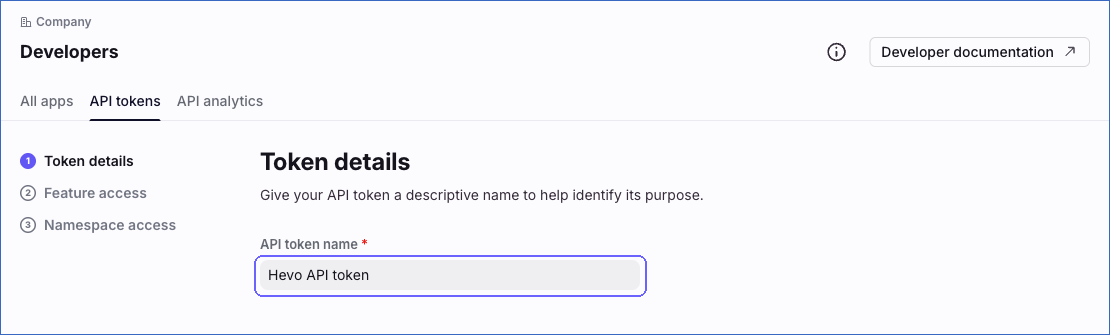
On the Token details step, specify a descriptive API token name, such as Hevo API token, and then click Continue.
-
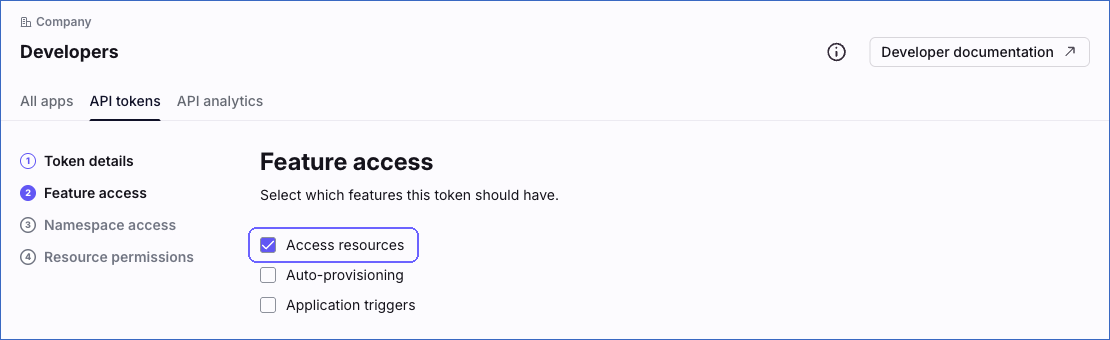
On the Feature access step, select Access resources, and then click Continue.
-
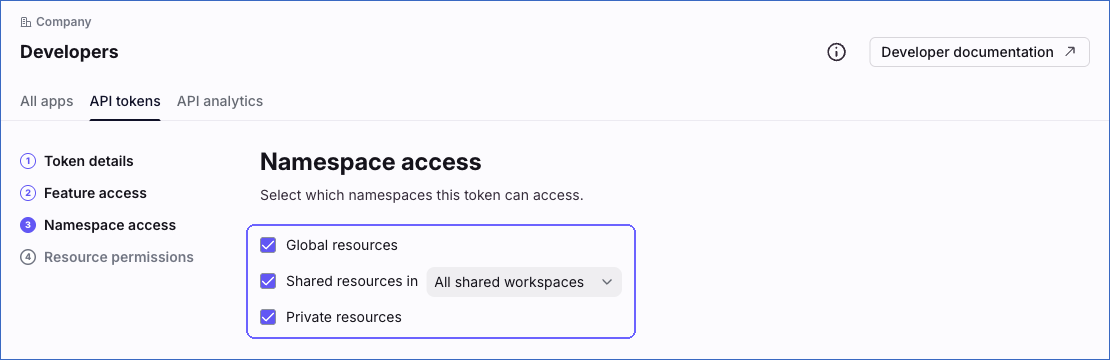
On the Namespace access step, select the following, and then click Continue:
-
Global resources: Provides access to company-wide resources, such as teammates, teams, and contacts.
-
Shared resources: Provides access to resources that belong to workspaces, such as shared inboxes and workspace tags. Select All shared workspaces to provide access to the resources of all your workspaces.
-
Private resources: Provides access to resources that belong to individual teammates, such as their individual inboxes.
-
-
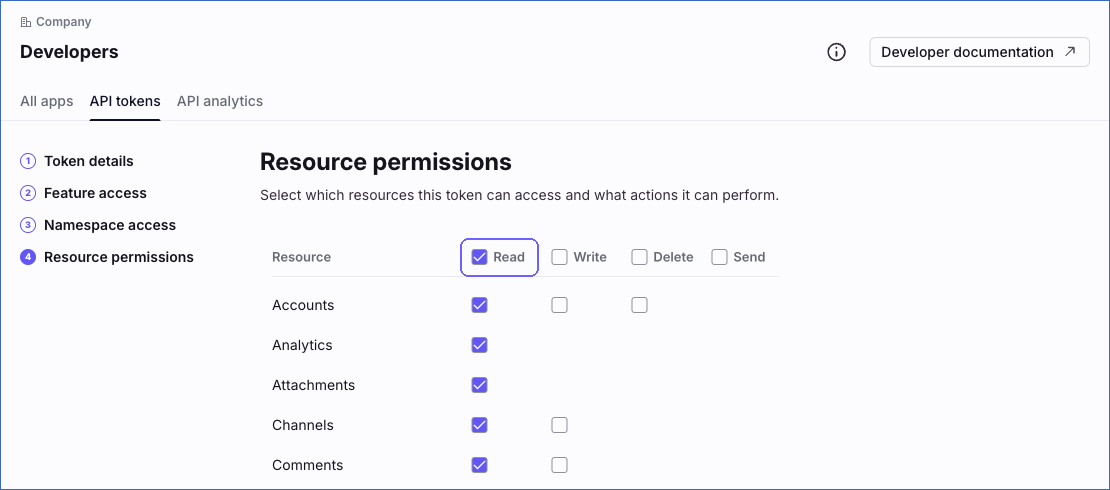
On the Resource permissions step, select the Read column header to provide read access to all the resources, and then click Create.
-
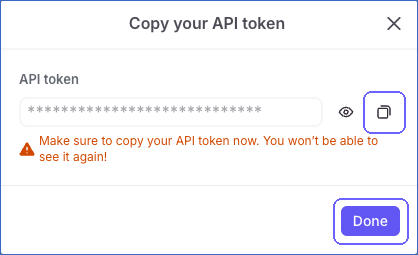
In the Copy your API token dialog, copy the API token and save it securely like any other password. Then, click Done.
Note: Each teammate whose private resources you want to ingest must enable the Allow access to my individual resources via the API option on the Preferences page of their personal Front settings. If a teammate does not enable this option, Hevo does not ingest data from their private resources.
Use this API token while configuring your Front Source in Hevo. If the API token configured in the Pipeline is revoked manually from your Front account, Hevo cannot authenticate with the Source. As a result, all active jobs for the Pipeline fail, and no data is replicated. To resume data replication, modify the Source configuration in the Pipeline with a valid API token. Once the updated token is saved, Hevo re-authenticates the Source, and data ingestion resumes from the last saved offset.
Configure Front as a Source in your Pipeline
Perform the following steps to configure your Front Source:
-
Click Pipelines in the Navigation Bar.
-
Click + Create Pipeline in the Pipelines List View.
-
On the Select Source Type page, select Front.
-
On the Select Destination Type page, select the type of Destination you want to use.
-
On the Select Pipeline Type page, click Edge, and then click Continue.
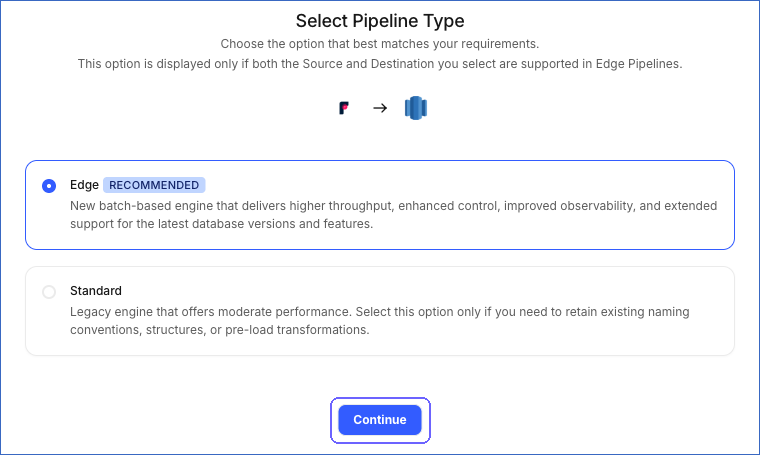
This page appears only if both the Source and the Destination that you select are supported in Edge Pipelines.
-
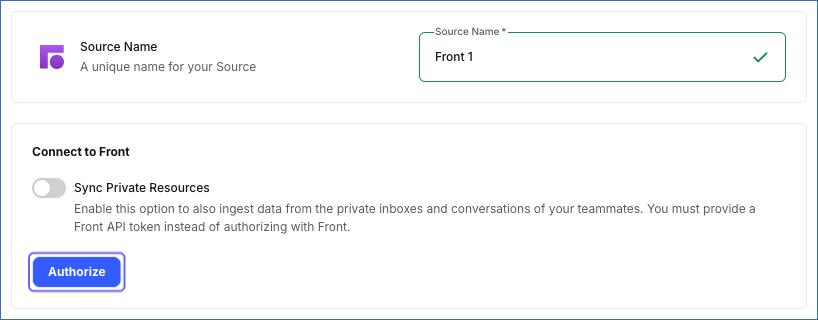
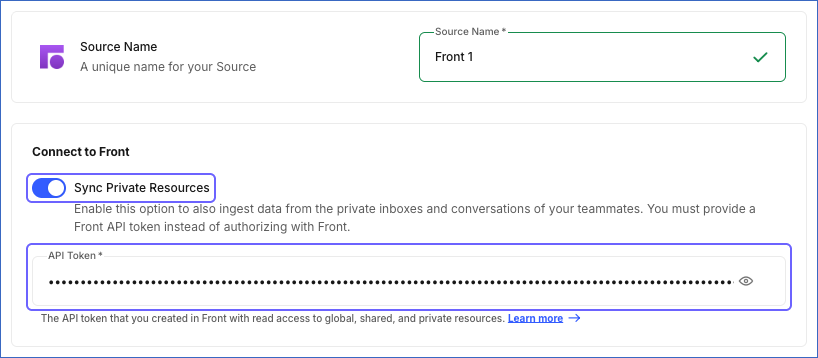
In the Configure Source screen, specify the following:
-
Source Name: A unique name for your Source, not exceeding 255 characters. For example, Front Source.
-
In the Connect to Front section, specify the following:
-
Sync Private Resources: Enable this option if you want to also ingest data from the private resources of your teammates, such as their individual inboxes and conversations. Default value: Disabled.
-
If this option is disabled, click Authorize and do the following:
-
Log in to your Front account as an admin, if you are not already logged in.
-
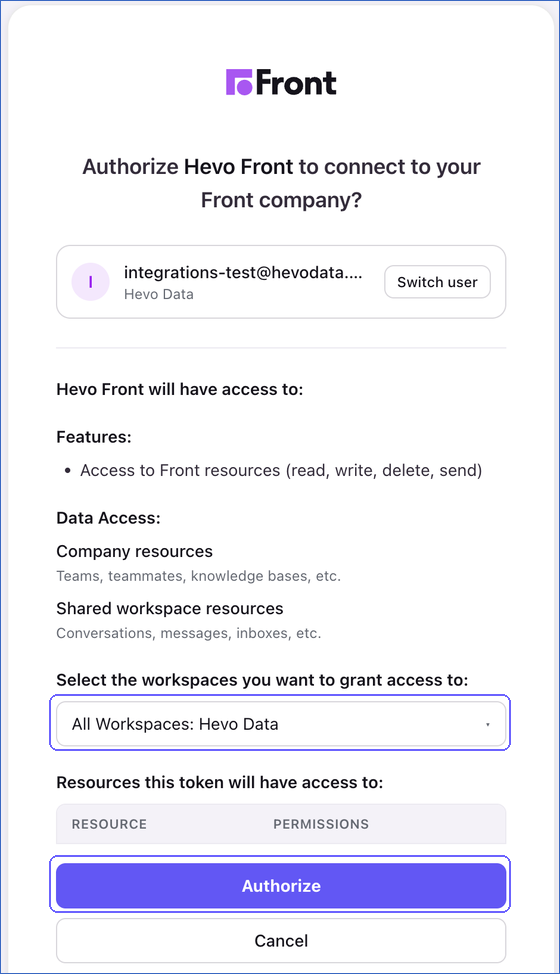
On the Authorize Hevo Front to connect to your Front company? page, from the Select the workspaces you want to grant access to drop-down, select the workspaces from which you want to ingest data, and then click Authorize.
-
-
If this option is enabled, specify the following:
-
API Token: The API token that you created in your Front account with access to the global, shared, and private resources.
-
-
-
-
-
Click Test & Continue to test the connection to your Front Source. Once the test is successful, you can proceed to set up your Destination.
Note: If Front does not allow Hevo to read some of your data, such as inboxes or teammates, Hevo displays a warning that lists the objects that cannot be ingested. You can still create the Pipeline. To ingest these objects, provide the missing access in Front and authorize Hevo again, or use an API token with access to all the resources.
Data Replication
Hevo replicates data for all the objects selected on the Configure Objects page during Pipeline creation. By default, all supported objects and their available fields are selected. However, you can modify this selection while creating or editing the Pipeline.
You can select or deselect the child objects individually. However, you cannot resync a child object individually. To resync a child object, resync its parent object, which also resyncs all the child objects of the parent.
Hevo ingests the following types of data from your Source objects:
-
Historical Data: The first run of the Pipeline ingests all available historical data for the selected objects and loads it into the Destination. Hevo uses priority-first sync to first load the data created in the last 30 days for the Contact and Conversation objects and their child objects, and then loads the older data, starting in the same run and continuing in the next runs if needed. The child objects synced on a priority-first basis are:
-
Contact: Contact Handle, Contact Link, Contact List, and Contact Note.
-
Conversation: Attachment, Comment, Comment Mention, Conversation Inbox, Conversation Link, Conversation Link History, Conversation Status History, Conversation Tag, Conversation Tag History, Follower, Message, and Message Recipient.
-
-
Incremental Data: Once the historical load is complete, new and updated records for objects are ingested as per the sync frequency.
Hevo ingests the objects as follows in the incremental runs:
| Object | Incremental data |
|---|---|
| Contact | The contacts updated since the previous run. Hevo also ingests the child objects, Contact Handle, Contact Link, Contact List, and Contact Note, of these contacts. |
| Comment | The comments and mentions posted since the previous run, along with the child object, Comment Mention. |
| Conversation | The conversations updated since the previous run, along with the child objects, Conversation Link and Conversation Tag. As Front does not support filtering conversations by their last updated time, Hevo reads all the conversations and ingests only the updated ones. |
| Message, Follower, and Conversation Inbox | The records of the conversations in which an event, such as a new message, an assignment, a tag change, a comment, or a move to another inbox, occurred since the previous run. Hevo ingests the child objects, Attachment and Message Recipient, along with the Message object. |
| Conversation Status History, Conversation Tag History, and Conversation Link History | The status, tag, and link changes made since the previous run. Each change is loaded as a new record, so these objects contain the complete history of changes. |
| All other objects | All the records available in the Source, if any record of the object was created, updated, or deleted since the previous run. If no record of the object changed, Hevo does not ingest any records of the object in that run. |
In each incremental run, Hevo also reads the changes made in the five minutes before the previous run started, so that changes made while the previous run was in progress are not missed.
Hevo ingests the custom fields of the Account, Contact, Inbox, and Teammate objects as columns named custom_<field name>. For example, the data of a custom field named Crew # is loaded into the custom_crew_number column. If you rename a custom field in Front, Hevo loads its data into a new column.
You can create a Pipeline with this Source using either the Merge or the Append load mode. The Conversation Status History and Conversation Tag History objects always use the History Tracking load mode. Read History Mode for more information.
Front currently enforces a rate limit of 50 API requests per minute by default. This limit varies based on your Front plan and is enforced for your entire Front company rather than for each API token: 50 requests per minute for the Starter plan, 100 requests per minute for the Professional plan, and 200 requests per minute for the Enterprise plan. Read Rate limits for more information. If you connect to Front using an API token, Hevo uses up to 80% of this limit while other applications in your Front company are also calling the Front API, so that these applications are not slowed down. If this limit is exceeded, a rate limit exception occurs. To understand how Hevo handles such scenarios, read Handling Rate Limit Exceptions.
Schema and Primary Keys
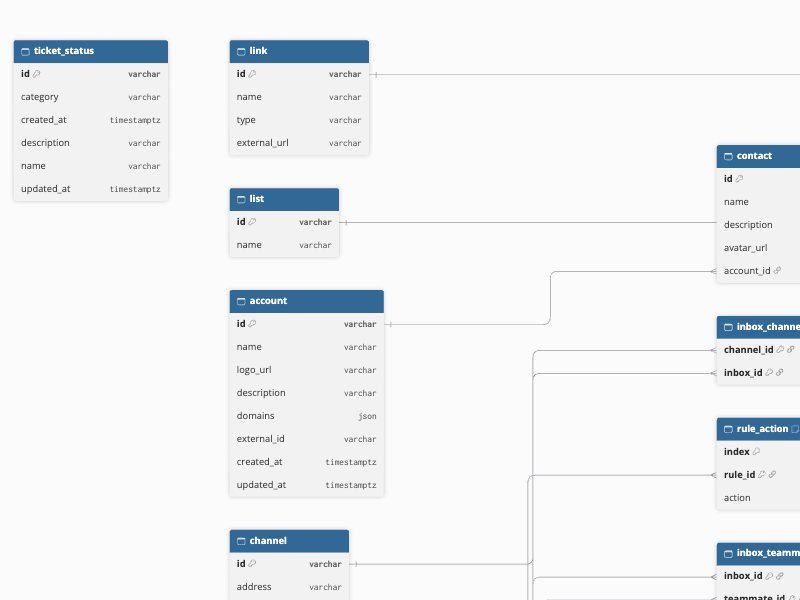
Hevo uses the following schema to upload the records in the Destination. For a detailed view of the objects, fields, and relationships, click the ERD.
Data Model
The following is the list of tables (objects) that are created at the Destination when you run the Pipeline:
| Object | Description |
|---|---|
| Account | Contains the details of the companies or organizations that your contacts belong to, such as the account name, description, domains, external ID, and logo URL. |
| Channel | Contains the details of the channels in your Front account, such as the channel address, type, and settings. A channel is a resource that can send and receive messages. |
| Comment | Contains the comments added to conversations, including the author, body, and posting time. A comment is a private message written by a teammate, visible only to other teammates. It includes a child object, Comment Mention. |
| Contact | Contains the details of the people or entities with whom you communicate, such as the contact name, description, avatar URL, and associated account. It includes the following child objects: - Contact Handle - Contact Link - Contact List - Contact Note |
| Conversation | Contains the details of conversations, such as the subject, status, assigned teammate, recipient, and last message. A conversation is a unique thread of messages. It includes the following child objects: - Conversation Inbox - Conversation Link - Conversation Link History - Conversation Status History - Conversation Tag - Conversation Tag History - Follower |
| Inbox | Contains the details of the inboxes in your Front account, such as the inbox name, address, and type. An inbox is a container of messages. It includes the following child objects: - Inbox Channel - Inbox Teammate |
| Link | Contains the details of the links in your Front account, such as the link name, type, and external URL. A link connects conversations to an external resource. |
| List | Contains the contact lists in your Front account. |
| Message | Contains the messages in conversations, such as the message type, author, body, text, blurb, headers, and whether the message is inbound. It also contains channel-specific details, such as Twitter and Intercom URLs and call duration. It includes the following child objects: - Attachment - Message Recipient |
| Message Template | Contains the message templates in your Front account, such as the template name, subject, body, folder, and owner, and whether the template is available for all inboxes. It includes the following child objects: - Message Template Attachment - Message Template Inbox |
| Message Template Folder | Contains the folders used to organize message templates, including the parent folder and owner. |
| Rule | Contains the rules in your Front account. A rule is a set of conditions that triggers automatic actions when they are met. It includes a child object, Rule Action. |
| Shift | Contains the details of the shifts in your Front account, such as the shift name, time zone, and times. A shift represents an interval of time repeated over one or more days in a week. It includes a child object, Shift Teammate. |
| Tag | Contains the details of the tags in your Front account, such as the tag name, description, highlight color, parent tag, and visibility settings. A tag is a label used to classify conversations. |
| Team | Contains the teams in your Front account. It includes the following child objects: - Team Inbox - Team Teammate |
| Teammate | Contains the details of your teammates, such as their email address, name, username, availability, and whether they are admins. A teammate is a Front user in your company. |
| Ticket Status | Contains the ticket statuses defined for your Front company, such as the status name, category, and description. |
Additional Information
Read the detailed Hevo documentation for the following related topics:
Handling of Deletes
Hevo handles deleted records differently based on how data is ingested for an object.
Hevo ingests all the records of the following objects in each Pipeline run. When a record is no longer available in Front, Hevo sets the value of the metadata column _hevo_marked_deleted to True for the record in the Destination:
-
Account
-
Channel
-
Inbox
-
Link
-
List
-
Message Template
-
Message Template Folder
-
Rule
-
Shift
-
Tag
-
Team
-
Teammate
-
Ticket Status
Hevo handles the deleted records of child objects as follows:
-
Inbox Channel, Inbox Teammate, Message Template Attachment, Message Template Inbox, Rule Action, Shift Teammate, Team Inbox, and Team Teammate: In each Pipeline run, Hevo replaces the data in the Destination tables with the data ingested from Front. As a result, the records deleted in Front are removed from the Destination.
-
Attachment, Comment Mention, Contact Handle, Contact Link, Contact List, Contact Note, Conversation Inbox, Conversation Link, Conversation Tag, Follower, and Message Recipient: Whenever Hevo ingests a parent record, it replaces the child records of that parent in the Destination. As a result, the child records deleted in Front are removed from the Destination. For example, if you remove a tag from a conversation, the corresponding record is removed from the Conversation Tag table in the next Pipeline run in which Hevo ingests the conversation.
The following objects do not support capturing deletes:
-
Comment
-
Contact
-
Conversation
-
Conversation Link History
-
Conversation Status History
-
Conversation Tag History
-
Message
If a conversation is deleted in Front, it remains in the Destination with the value of the status field as deleted. Its child records, such as messages, tags, links, inboxes, and followers, also remain as they were last loaded.
Source Considerations
-
Front does not support filtering conversations by their last updated time. As a result, Hevo reads all the conversations in each incremental run to find the updated ones, which increases the ingestion time for accounts with a large number of conversations.
-
Front returns the notes of a contact through a separate API call for each contact. As a result, ingesting the Contact Note object increases the ingestion time for accounts with a large number of contacts. Deselect this object if you do not need it.
-
Front does not return the handles of a contact in a fixed order. As a result, the value of the index field in the Contact Handle object may change between Pipeline runs for the same handle.
-
Front does not generate an event when a teammate starts or stops following a conversation. As a result, Hevo captures the change in the Follower object only when another event occurs in the conversation, or when you resync the Conversation object.
-
If Front denies Hevo access to an inbox, such as a private inbox or the inbox of a teammate who has not allowed access to their individual resources through the API, Hevo skips that inbox while ingesting the Inbox Channel, Inbox Teammate, and Conversation Inbox objects and ingests the data of the other inboxes.
-
The rate limit applies to your entire Front company. If other applications use the Front API with the same company, they share the limit with Hevo, and the ingestion takes longer.
Limitations
- Hevo does not ingest Front analytics data, such as the reaction times, handle times, and segments of messages, that Front provides through its analytics exports.