Priority-First Sync (Edge)
When you create a Pipeline, Hevo first ingests the historical data in your Source, and then ingests new and updated data in each subsequent run. For Sources with a large volume of historical data, the historical sync can take several hours or even days, and no data is available in your Destination until it completes.
Priority-first sync reduces this wait by loading your most recent data first. In the first run of the Pipeline, Hevo ingests the data from a recent period and loads it into your Destination before the older data. You can start using your recent data while Hevo continues to load the older data.
Note: Priority-first sync is enabled by default for Pipelines created with the supported Sources. It applies whenever Hevo ingests the historical data for a Pipeline, including when you resync it.
Understanding Priority-First Sync
With priority-first sync, Hevo splits the historical load into two parts, based on a period called the priority fetch period:
-
Recent data: The data created within the priority fetch period. Hevo fetches this data first.
-
Older data: All the data older than the priority fetch period. Hevo fetches this data in one or more Pipeline runs.
Refer to the following sections for the Sources and objects that priority-first sync applies to, and the jobs that Hevo runs in each Pipeline run:
-
Supported Sources: Lists the Sources that support priority-first sync, along with the priority fetch period and the backward sync duration for each.
-
Priority Objects: Lists the objects that Hevo syncs on a priority-first basis for each Source.
-
First Run of the Pipeline: Describes the two historical jobs that Hevo starts when the Pipeline runs for the first time, and the order in which their data is loaded.
-
Subsequent Runs of the Pipeline: Describes the jobs that Hevo runs in each run after the first one, until all the older data is ingested.
Supported Sources
Hevo supports priority-first sync for Pipelines created with the following Sources. The priority fetch period and the backward sync duration are defined by Hevo for each Source.
| Source | Priority Fetch Period | Backward Sync Duration |
|---|---|---|
| Amazon Selling Partner | 7 days | 6 hours |
| Stripe | 30 days | 6 hours |
| Zendesk Support | 15 days | 12 hours |
Priority Objects
Priority-first sync applies only to a specific set of objects, called the priority objects. For all the other objects in your Pipeline, Hevo ingests the entire data along with the older data.
Hevo syncs the following objects and their child objects on a priority-first basis:
| Source | Priority Objects |
|---|---|
| Amazon Selling Partner | Customer Shipment Sales Report, Easyship Package, FBA Returns Report, Financial Event Group, Fulfilled Shipments Data General Report, Fulfillment Customer Shipment Promotion Report, Market Basket Analysis Report Daily, Orders, Orders Report, Reimbursements Report, Sales And Traffic Business Child ASIN Report Daily, Sales And Traffic Business Parent ASIN Report Daily, Sales And Traffic Business Report Daily, Sales And Traffic Business SKU Report Daily, Search Terms Report Daily, Seller Fulfilled Returns Report |
| Stripe | Account, Application Fee, Authorization, Balance Transaction, Cardholder, Charge, Coupon, Customer, Dispute, File, File Link, Invoice, Invoice Item, Issuing Card, Issuing Dispute, Issuing Transaction, Payment Intent, Payout, Price, Product, Promotion Code, Refund, Review, Setup Intent, Shipping Rate, Subscription History, Subscription Schedule, Tax Rate, Topup, Transfer |
| Zendesk Support | Call Metrics, Satisfaction Ratings, Tickets |
First Run of the Pipeline
In the first run, Hevo starts two historical jobs at the same time:
-
Priority sync: Ingests the recent data for the priority objects and their child objects.
-
Backward sync: Ingests the older data for the priority objects, and all the data for the remaining objects in your Pipeline.
Both jobs ingest data at the same time, but Hevo loads the data of the priority sync into your Destination first. The backward sync loads its data only after the priority sync completes.
The backward sync runs for a limited time, called the backward sync duration. If the job cannot ingest all the older data within this time, it stops, and the remaining data is ingested in the subsequent runs. The job may run slightly longer than this duration to complete the data it is processing.
During the first run, Hevo does not run incremental jobs. Incremental data is ingested from the next run onwards.
Note: If the backward sync fails during the first run, Hevo marks both jobs as failed. However, the data that the priority sync has already loaded into your Destination is retained.
Subsequent Runs of the Pipeline
In each subsequent run, Hevo first runs an incremental job to ingest the new and updated data in your Source. If some older data is still pending, Hevo then runs a backward sync that continues from where the previous one stopped. Each backward sync runs for up to the backward sync duration.
Hevo repeats this in every run until all the older data is ingested. After that, the Pipeline runs only incremental jobs.
Note: As the incremental job runs before the backward sync in each run, your Destination receives new and updated data on schedule, even while the older data is still being loaded.
The following table shows an example of how data is loaded for a Pipeline created on October 16, 2026, with Stripe as the Source and a 30-day priority fetch period:
| Pipeline Run | Job | Data Loaded |
|---|---|---|
| First run | Priority sync | Data from September 16, 2026, to October 16, 2026, for the priority objects. |
| First run | Backward sync | Data older than September 16, 2026, for the priority objects, and all the data for the remaining objects, up to the backward sync duration. |
| Second run | Incremental job | Data created or updated since the first run. |
| Second run | Backward sync | The remaining older data, if any, up to the backward sync duration. |
| Subsequent runs | Incremental job, followed by a backward sync until all the older data is loaded | New and updated data, and the remaining older data. |
If you add an object to your Pipeline after it is created, or resync an object, Hevo ingests its data through a regular historical load, and not on a priority-first basis.
Viewing Priority-First Sync Jobs
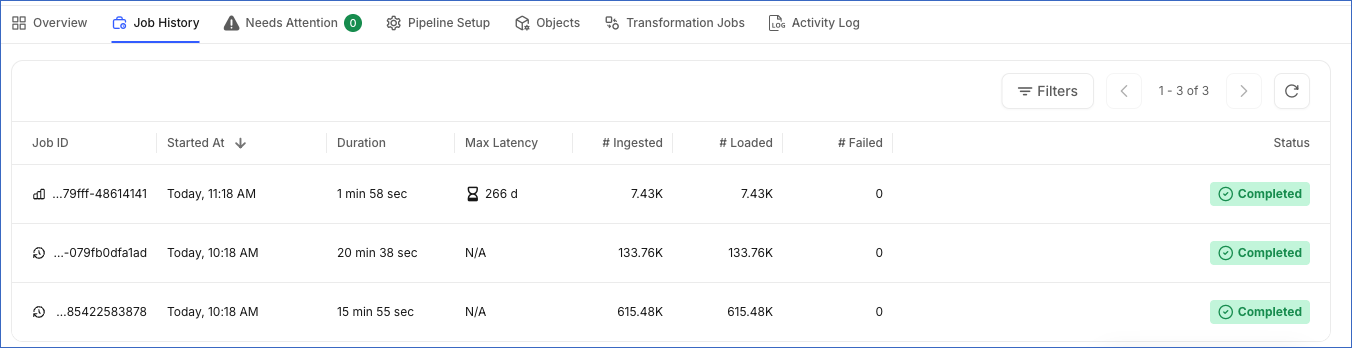
You can view these jobs in the Job History tab of your Pipeline. The priority sync and the backward sync are displayed as Historical jobs, and the jobs that ingest your new and updated data are displayed as Incremental jobs. When you resync the Pipeline, the two jobs are displayed as Resync jobs.
In the first run of the Pipeline, both the jobs start at the same time. To identify them, click the job. The priority sync lists only the priority objects and their child objects, and the backward sync lists all the objects in your Pipeline.
In the following image, the two historical jobs started at 10:18 AM. The job that ingested 615.48K Events is the priority sync, and the one that ingested 133.76K Events is the backward sync. The job that started at 11:18 AM is the incremental job of the next run.