Xray is a test management app for Jira Cloud. It enables teams to design, organize, and run manual and automated tests inside Jira, and to track test coverage and execution results alongside their development work.
Hevo uses the Xray Cloud REST API to authenticate and the Xray Cloud GraphQL API to replicate data from your Xray account to the Destination of your choice. To ingest data, you must provide Hevo with the Client ID and Client Secret of an Xray API key. Hevo exchanges these credentials for an access token and uses the token to authenticate its requests.
Supported Features
| Feature Name | Supported |
|---|---|
| Capture deletes | Yes, for the Status Detail object, and for the Test Run object when you resync it |
| History mode | No |
| Custom data (user-configured tables & fields) | No |
| Data blocking (skip objects and fields) | Yes |
| Resync (objects and Pipelines) | Yes |
| API configurable | Yes |
Prerequisites
-
An active Jira Cloud site with the Xray app installed, from which data is to be ingested.
-
The Jira administrator role, to create an Xray API key.
-
The Client ID and Client Secret of an Xray API key are available.
Note: Xray API requests run with the permissions of the Jira user to whom the API key belongs. Hence, create the API key for a user who has the Jira administrator permission. If the user does not have access to a project, Hevo does not ingest the Xray data of that project.
Obtain the Client ID and Client Secret
Hevo connects to your Xray account using an Xray API key, which consists of a Client ID and a Client Secret. Xray creates an API key for a Jira user, and each user can have only one API key. Read Xray Cloud authentication for more information.
Perform the following steps to obtain the Client ID and Client Secret:
-
Log in to your Jira Cloud site as a Jira administrator.
-
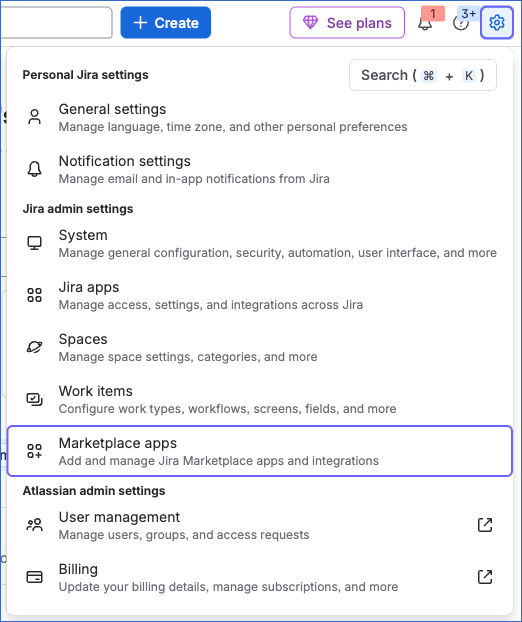
In the top-right corner of the page, click the Settings (gear) icon, and then under Jira admin settings, click Marketplace apps.
-
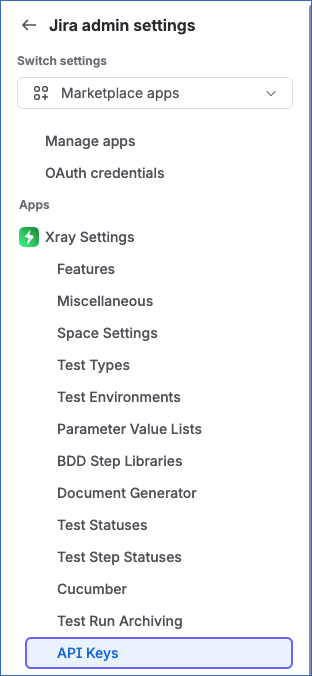
In the left navigation pane, under Apps, click Xray Settings, and then click API Keys.
-
On the API Keys page, click Create API Key.

-
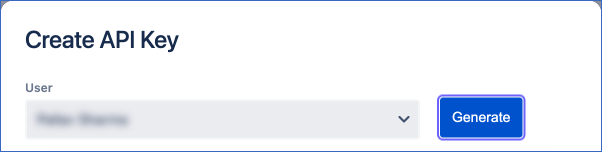
In the Create API Key dialog, select the User for whom you want to create the API key, and then click Generate.
-
Copy the Client ID and Client Secret that the dialog displays, and save them securely like any other password.
If the API key is deleted in Xray, or the Jira user to whom it belongs is deactivated, Hevo cannot connect to your account, and the Pipeline fails. To resume data ingestion, modify the Source configuration in the Pipeline with the Client ID and Client Secret of a valid API key.
Configure Xray as a Source in your Pipeline
Perform the following steps to configure your Xray Source:
-
Click Pipelines in the Navigation Bar.
-
Click + Create Pipeline in the Pipelines List View.
-
On the Select Source Type page, select Xray.
-
On the Select Destination Type page, select the type of Destination you want to use.
-
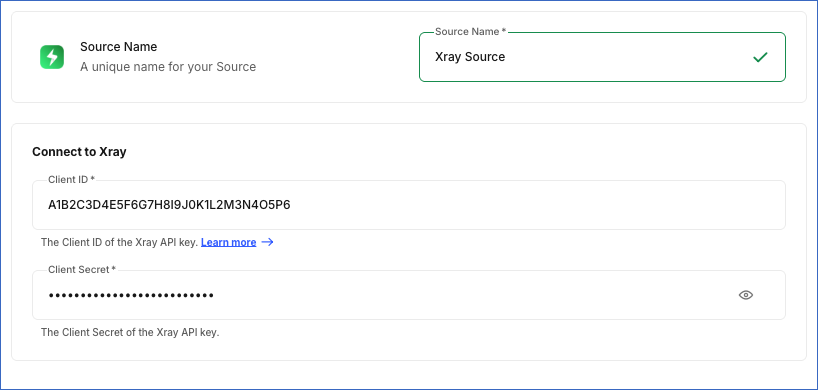
In the Configure Source screen, specify the following:
-
Source Name: A unique name for your Source, not exceeding 255 characters. For example, Xray Source.
-
In the Connect to Xray section, specify the following:
-
Client ID: The Client ID of the API key that you created in Xray.
-
Client Secret: The Client Secret of the API key. You can change this value after the Pipeline is created.
-
-
-
Click Test & Continue to test the connection to your Xray Source. Once the test is successful, you can proceed to set up your Destination.
When you click this button, Hevo checks that it can authenticate with Xray using the specified Client ID and Client Secret.
Data Replication
Hevo replicates data for all the objects selected on the Configure Objects page during Pipeline creation. By default, all supported objects and their available fields are selected. However, you can modify this selection while creating or editing the Pipeline.
Selecting a parent object automatically includes all its associated child objects for replication. Child objects cannot be selected or deselected individually. The Data Model lists the child objects of each parent object.
In the first run of the Pipeline, Hevo ingests all the data available for the selected objects in your Xray account. In the subsequent runs, as per the sync frequency, Hevo ingests data as follows:
| Ingestion | Objects |
|---|---|
| New and updated records, based on the time each record was last modified in Xray | Expanded Test, Precondition, Test, Test Execution, Test Plan, Test Run, and Test Set |
| All the records, in each run | Status Detail |
Hevo ingests the child objects of a parent object along with it. When Hevo ingests a new or updated test, it replaces the steps and step attachments of that test in the Destination. Similarly, when Hevo ingests a new or updated test plan, test set, or test execution, it replaces the list of tests linked to it.
Xray enforces a rate limit of 60 calls per minute (300 calls per 5 minutes) for Xray Standard and 200 calls per minute (1000 calls per 5 minutes) for Xray Enterprise. The limit applies to each Jira instance. If this limit is exceeded, a rate limit exception occurs. To understand how Hevo handles such scenarios, read Handling Rate Limit Exceptions. For more information, read the Xray article on the Xray Cloud REST API limit.
Note: You can create a Pipeline with this Source only using the Merge load mode. The Append mode is not supported for this Source.
Schema and Primary Keys
Hevo uses the following schema to upload the records in the Destination. For a detailed view of the objects, fields, and relationships, click the ERD.
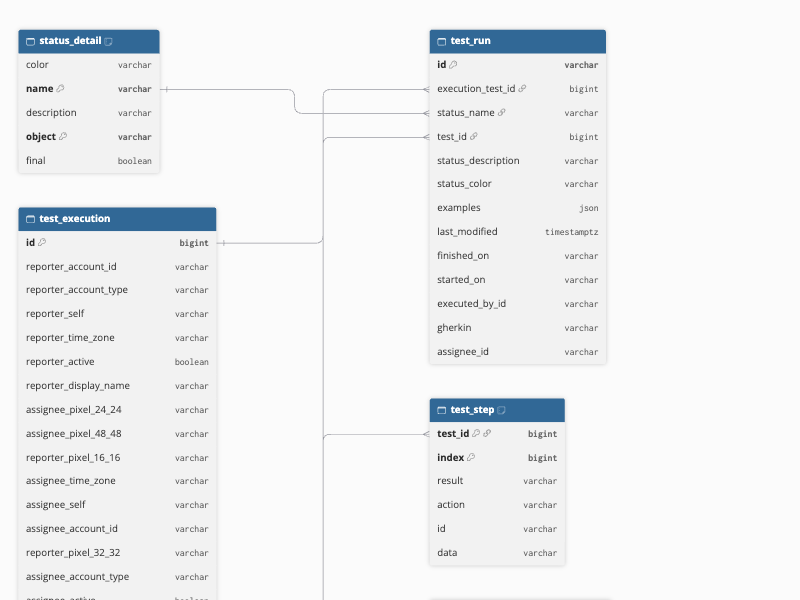
Data Model
The following is the list of tables (objects) that are created at the Destination when you run the Pipeline:
| Object | Description |
|---|---|
| Expanded Test | Contains the tests of your Xray account with the steps of the tests that they call, such as the Jira issue key, summary, and status, the test type, reporter and assignee details, and the warnings returned by Xray. This object has the following child objects: - Expanded Test Step: The steps of an expanded test, including the action, data, expected result, and the IDs of the called and parent tests. - Expanded Test Attachment: The file names of the attachments of the steps of an expanded test. |
| Precondition | Contains the preconditions defined in Xray, including the Jira issue key, summary, and status, the definition, the precondition type, and reporter and assignee details. |
| Status Detail | Contains the test run statuses and test step statuses defined in Xray, such as PASSED and FAILED, with their description, color, and whether the status is final. |
| Test | Contains the tests defined in Xray, such as the Jira issue key, summary, and status, the test type, and reporter and assignee details. This object has the following child objects: - Test Step: The steps of a test, including the step index, action, data, and expected result. - Test Step Attachment: The file names of the attachments of the steps of a test. |
| Test Execution | Contains the test executions, such as the Jira issue key, summary, and status, and reporter and assignee details. This object has a child object, Test Execution Test: The tests linked to each test execution. |
| Test Plan | Contains the test plans, such as the Jira issue key, summary, and status, and reporter and assignee details. This object has a child object, Test Plan Test: The tests linked to each test plan. |
| Test Run | Contains the results of running a test in a test execution, including the status, start and finish times, executor, assignee, Gherkin definition, examples, and the time the run was last modified. |
| Test Set | Contains the test sets, such as the Jira issue key, summary, and status, and reporter and assignee details. This object has a child object, Test Set Test: The tests linked to each test set. |
Additional Information
Read the detailed Hevo documentation for the following related topics:
Handling of Deletes
Hevo captures deletes as follows:
-
For the Status Detail object, whose records Hevo ingests in full in each run, Hevo compares the records fetched from Xray with those in the Destination table. Records that are no longer returned by Xray are marked as deleted by setting the value of the metadata column __hevo__marked_deleted to True.
-
For the Test Run object, Hevo ingests only the new and updated test runs in each run, so it does not capture deleted test runs in these runs. When you resync the object, Hevo ingests all the test runs and marks the runs that are no longer returned by Xray, such as the runs of a deleted test, as deleted.
-
For the objects that Hevo ingests incrementally, such as Test and Test Plan, Hevo does not capture records that are deleted in Xray. These records remain in the Destination.
-
For the child objects, when Hevo ingests a new or updated test, it replaces the steps and step attachments of that test in the Destination. Steps and attachments removed from the test in Xray are removed from the Destination table. Similarly, tests unlinked from a test plan, test set, or test execution are removed from the Test Plan Test, Test Set Test, and Test Execution Test tables.
Source Considerations
- Hevo connects to the global Xray Cloud endpoint, xray.cloud.getxray.app. Xray Cloud accounts that use a regional endpoint, such as eu.xray.cloud.getxray.app or au.xray.cloud.getxray.app, are not supported.