Workday is a cloud-based enterprise platform for human resources, finance, and planning. Its Report-as-a-Service (RaaS) feature lets you publish custom reports as web services, so that external applications can read the report results through a URL.
Hevo uses the Workday RaaS web service to replicate the data of your Workday custom reports to the Destination of your choice. Each report that you add to the Pipeline is loaded to a separate table in the Destination. To ingest data, you must provide Hevo with the username and password of a Workday Integration System User (ISU) and the URL of each report.
Supported Features
| Feature Name | Supported |
|---|---|
| Capture deletes | Yes (for reports without dynamic parameters) |
| History mode | No |
| Custom data (user-configured tables & fields) | Yes |
| Data blocking (skip objects and fields) | Yes |
| Resync (objects and Pipelines) | Yes |
| API configurable | Yes |
Prerequisites
-
An active Workday account from which data is to be ingested.
-
You have the permissions to create an Integration System User and security groups in Workday, to create the Integration System User.
-
One or more Workday custom reports of the Advanced type, with Enable As Web Service selected, to obtain the report URL.
Obtain the Workday Credentials
Hevo connects to Workday with the username and password of an Integration System User, and reads data from the URL of each report. Workday lets you publish custom reports as web services, so that their results are available through a URL.
Create an Integration System User
Perform the following steps to create the user with which Hevo connects to Workday:
-
Log in to your Workday account as an administrator.
-
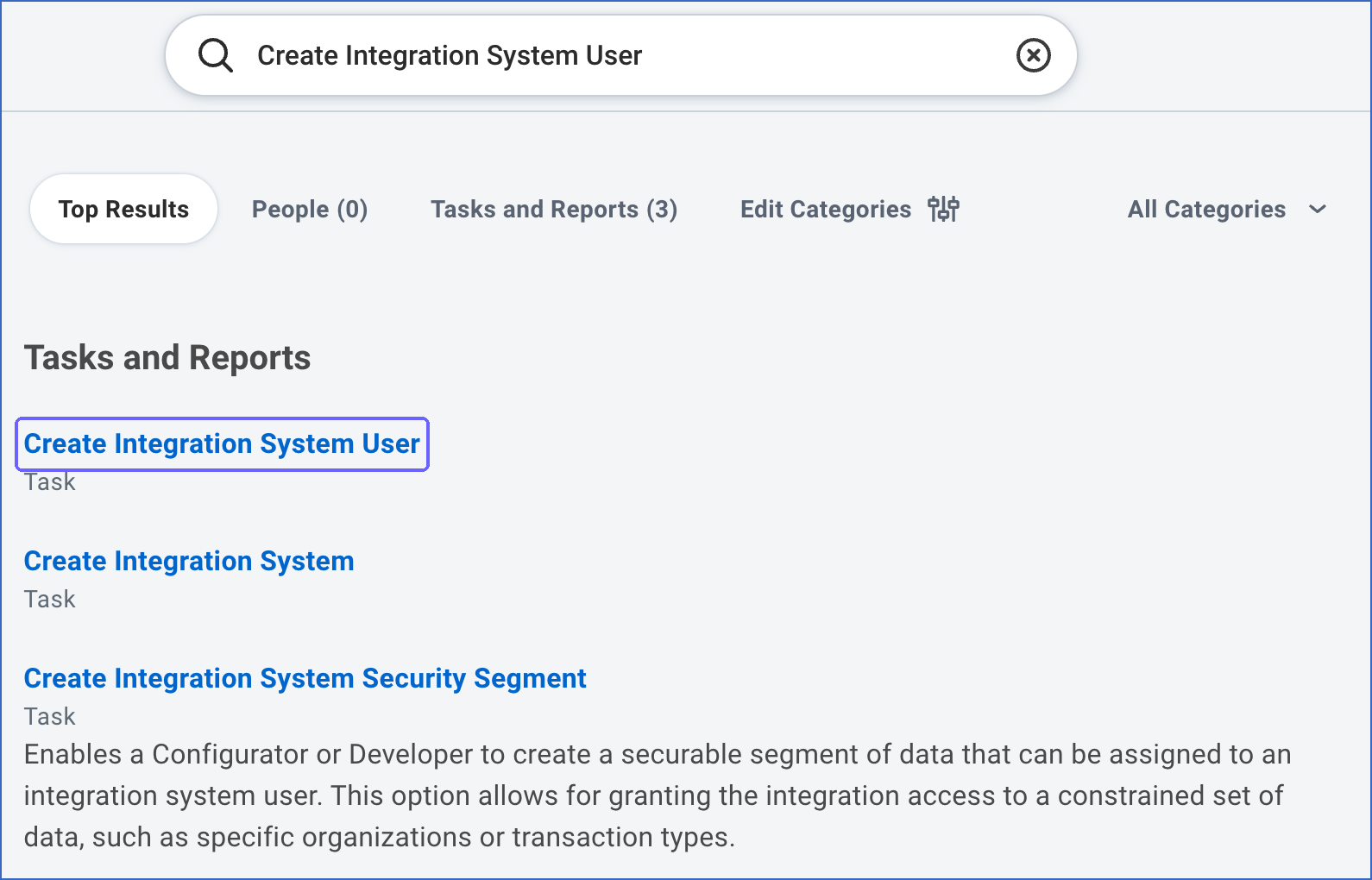
Search for and run the Create Integration System User task.
-
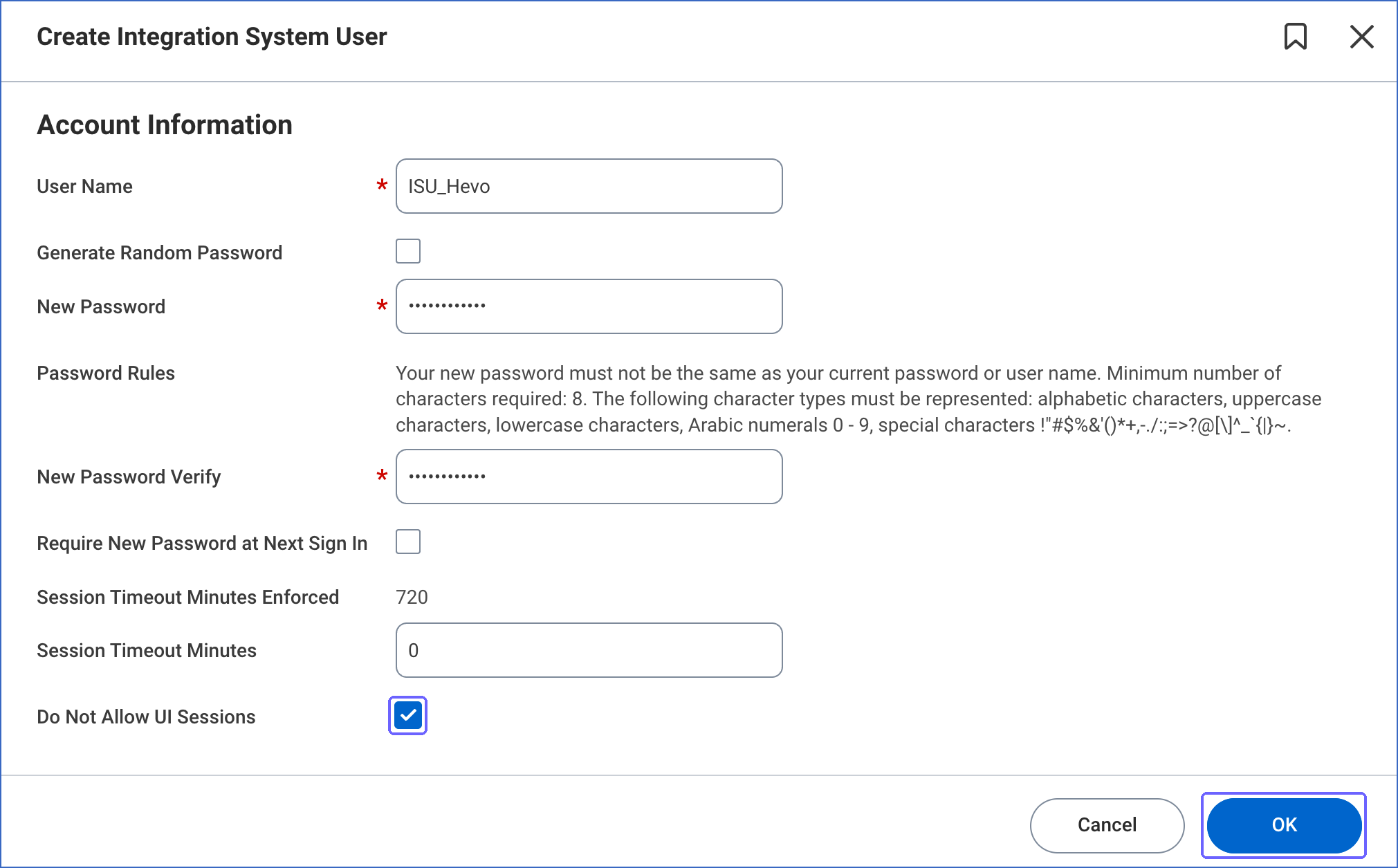
Specify a username and password for the user, select Do Not Allow UI Sessions, and then click OK. Save the username and password securely.
-
Search for and run the Create Security Group task. Create a security group of the Integration System Security Group (Unconstrained) type, and add the Integration System User to it.
-
Grant the security group Get access to the domain security policies of the data in your reports. For example, to ingest worker data, grant access to the Worker Data domains that the report uses.
-
Search for and run the Activate Pending Security Policy Changes task to apply the changes.
Share the Report and Obtain the Report URL
Perform the following steps for each report that you want to ingest:
-
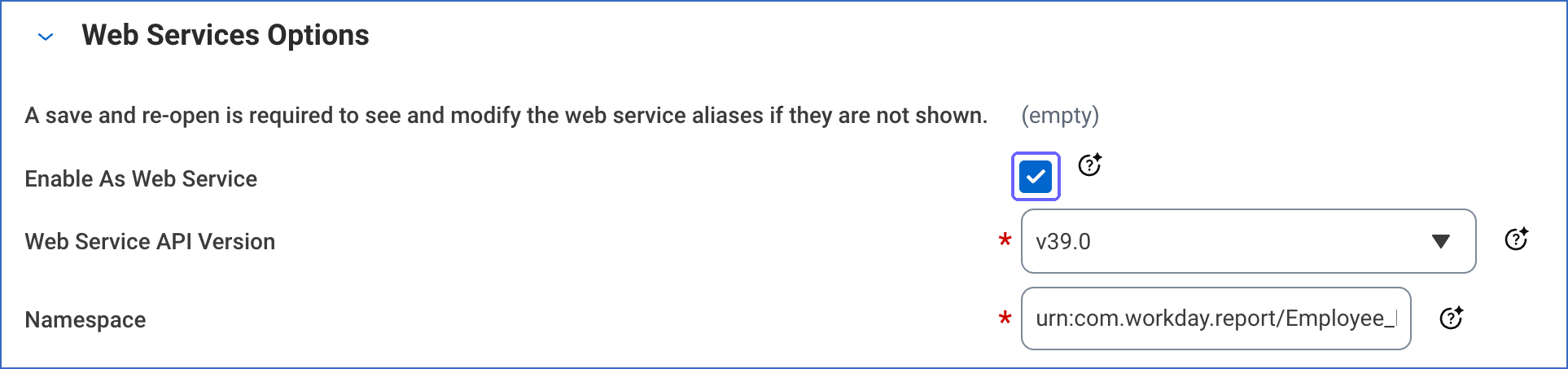
Edit the custom report, and ensure that the report type is Advanced. On the Advanced tab, in the Web Services Options section, ensure that Enable As Web Service is selected.
-
On the Share tab of the report, share the report with the Integration System User.
-
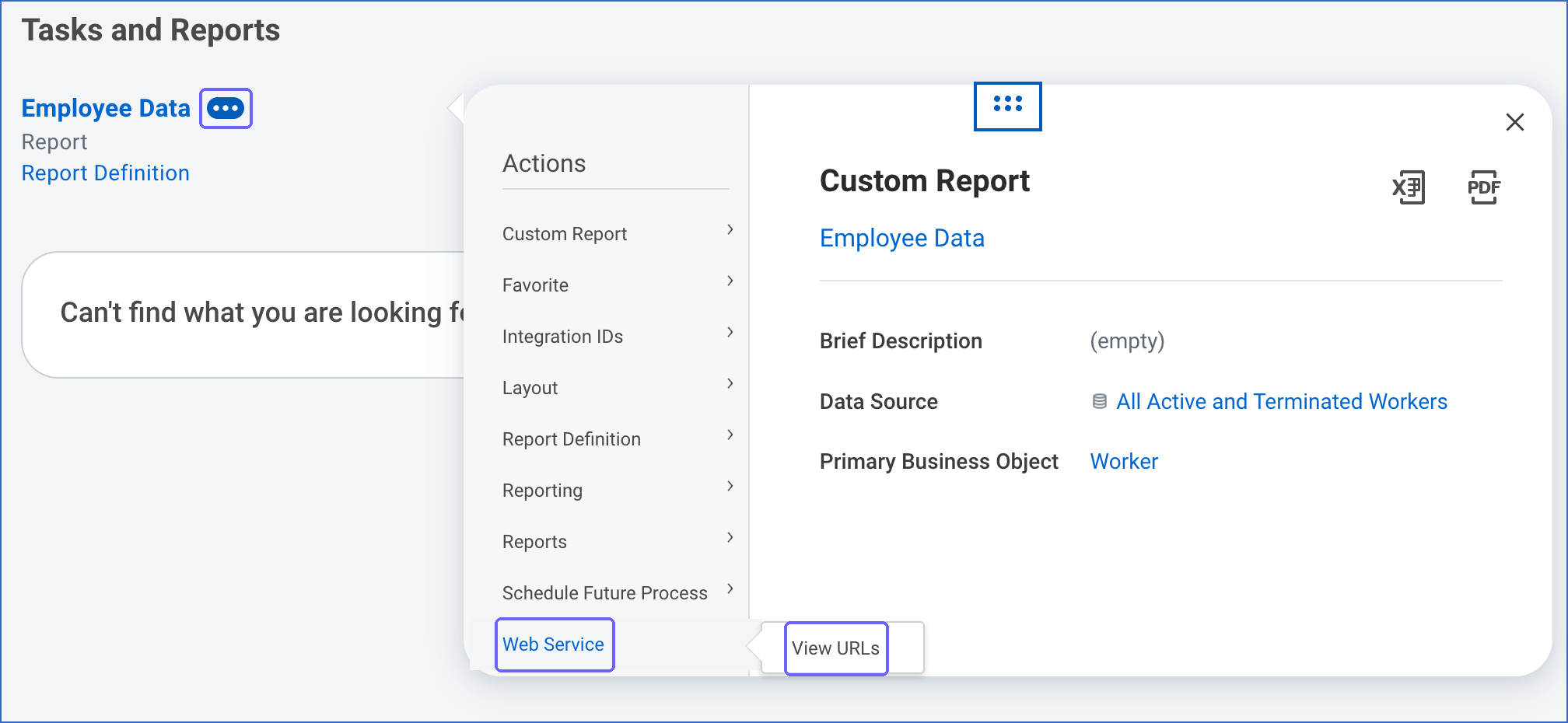
Search for the report. Click the related actions icon next to the report name, and then click Web Service > View URLs.
-
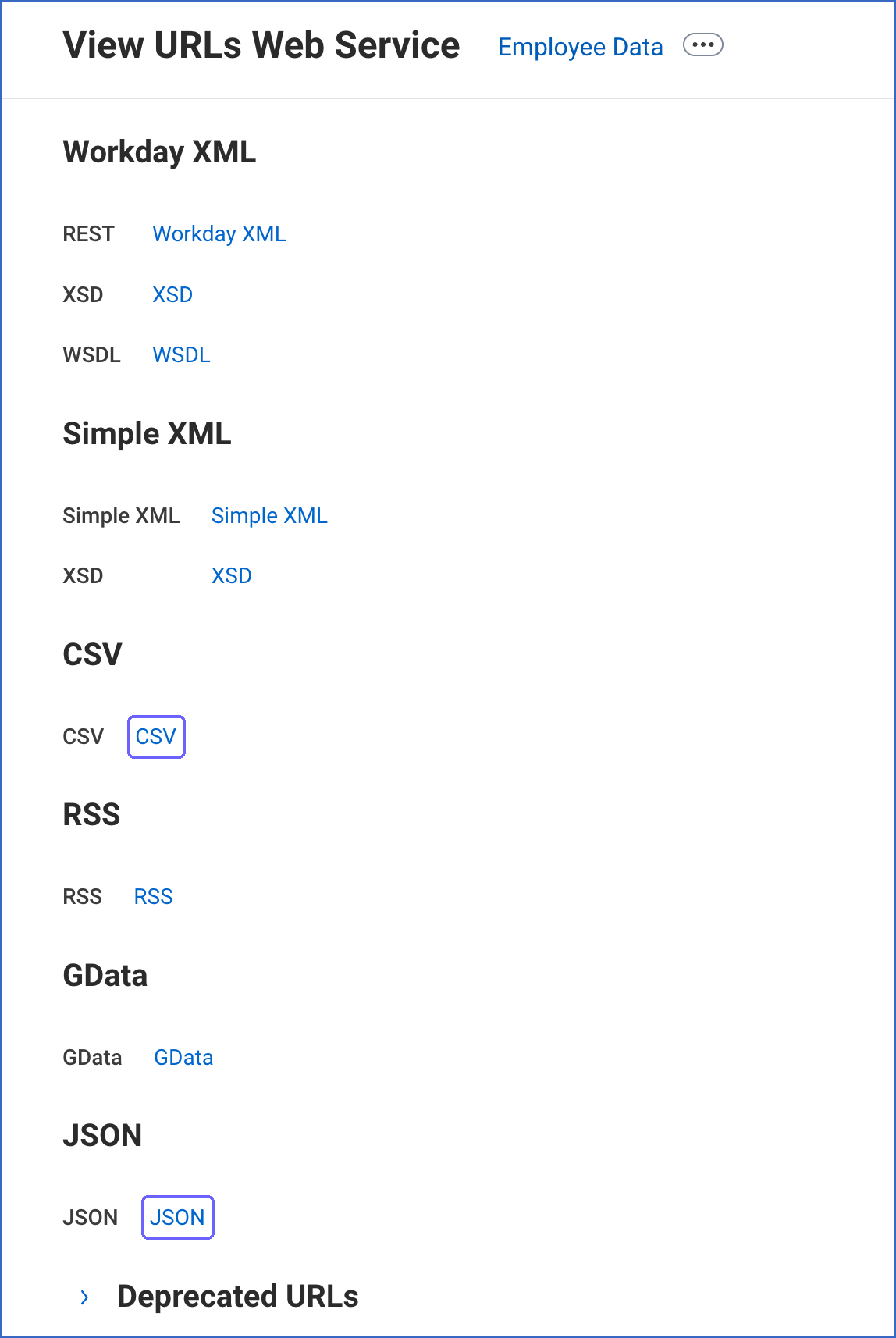
On the View URLs Web Service page, right-click the JSON or CSV link, copy the link address, and save it. The URL has the form https://<host>/ccx/service/customreport2/<tenant>/<report owner>/<report name>?format=json.
-
(Optional) To ingest only the changed data of a report in each Pipeline run, the report must have date prompts, such as a start date and an end date. Note the names of these prompts as they are shown in the report URL, for example, Start_Date and End_Date.
Note: If the password of the Integration System User changes or the user is disabled, Hevo cannot connect to Workday, and the Pipeline stops ingesting data. To resume ingestion, modify the Source configuration with valid credentials.
Configure Workday RaaS as a Source in your Pipeline
Perform the following steps to configure your Workday RaaS Source:
-
Click Pipelines in the Navigation Bar.
-
Click + Create Pipeline in the Pipelines List View.
-
On the Select Source Type page, select Workday RaaS.
-
On the Select Destination Type page, select the type of Destination you want to use.
-
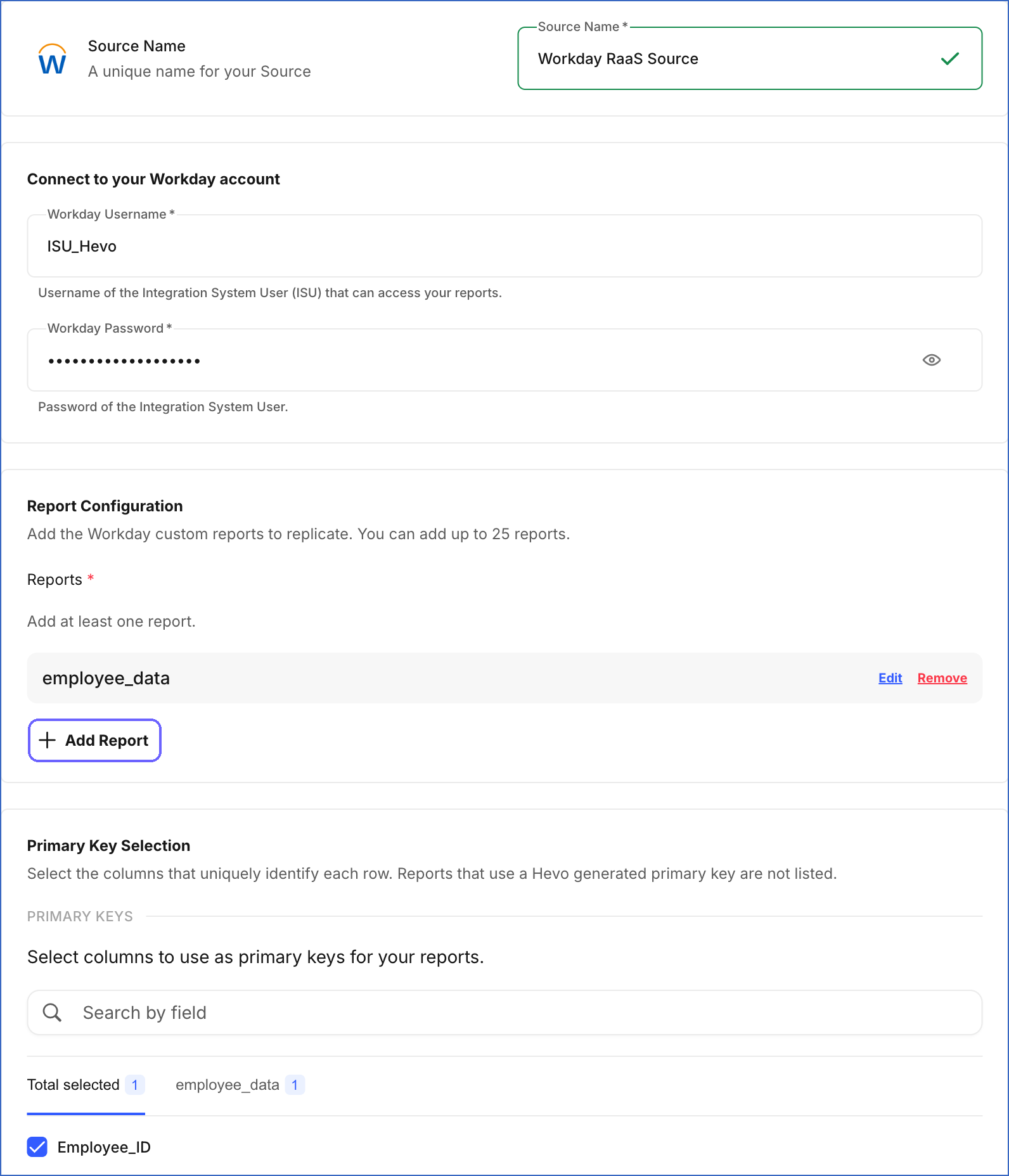
In the Configure Source screen, specify the following:
-
Source Name: A unique name for your Source, not exceeding 255 characters. For example, Workday RaaS Source.
-
In the Connect to your Workday account section, specify the following:
-
Workday Username: The username of the Integration System User that you created.
-
Workday Password: The password of the Integration System User.
-
-
In the Report Configuration section, click Add Report, specify the following, and then click Save. Repeat this step for each report that you want to ingest. You can add up to 25 reports.
-
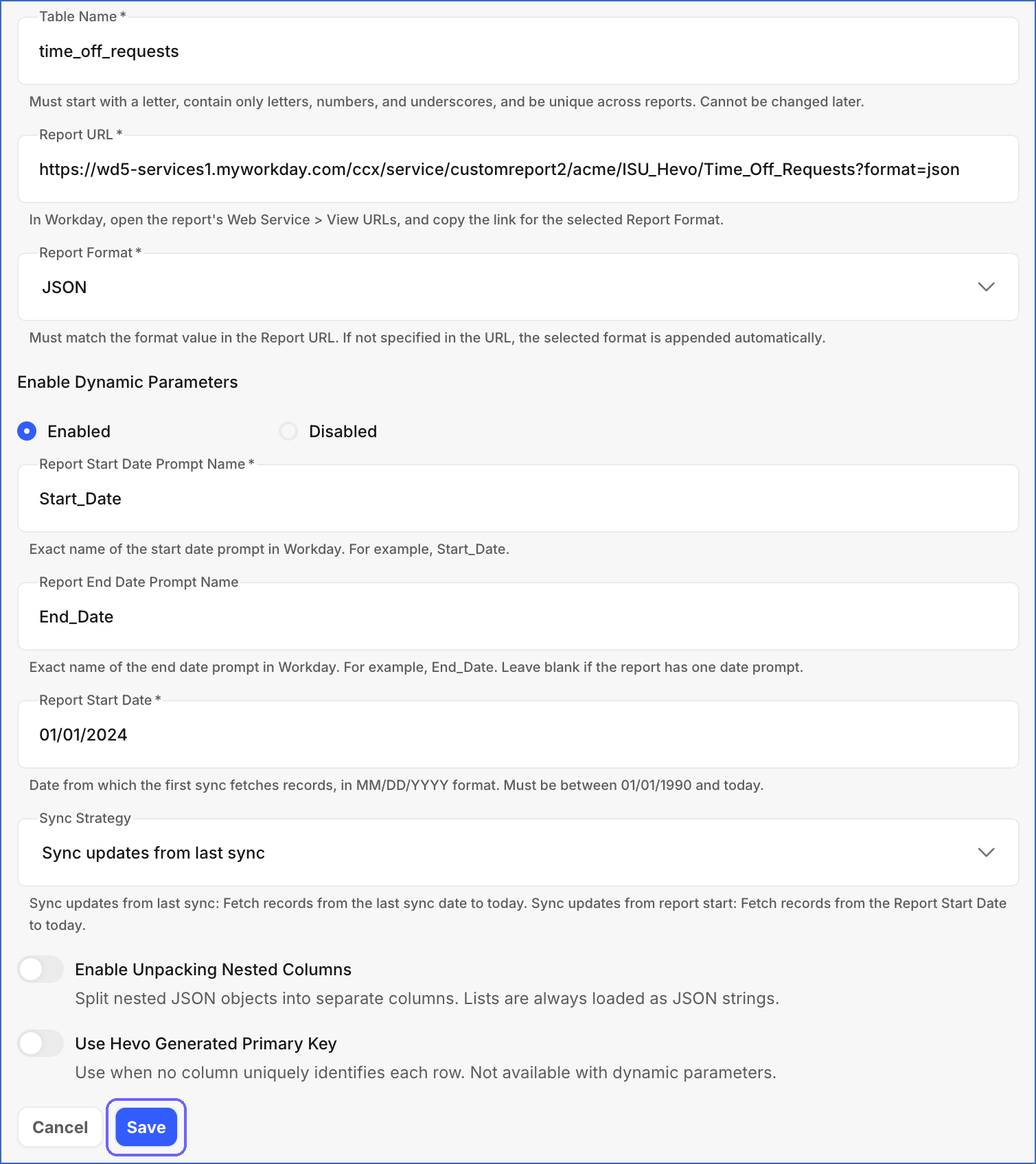
Table Name: The name of the Destination table for the report. The name must start with a letter, contain only letters, numbers, and underscores, and be unique across reports. You cannot change it after you create the Pipeline. For example, employee_data.
-
Report URL: The URL of the report that you copied from Workday.
-
Report Format: The format of the report data. Select JSON or CSV. The format must match the format value in the report URL. If the URL does not contain a format value, Hevo appends the selected format to it. Default value: JSON.
-
Enable Dynamic Parameters: Select Enabled to ingest only the data in a date range in each Pipeline run. Hevo passes the dates to the date prompts of the report. Default value: Disabled. If you select Enabled, specify the following:
-
Report Start Date Prompt Name: The name of the prompt that filters the report by start date, exactly as it is in Workday. For example, Start_Date.
-
Report End Date Prompt Name (Optional): The name of the prompt that filters the report by end date, exactly as it is in Workday. For example, End_Date. Leave this field blank if the report has only one date prompt.
-
Report Start Date: The date from which Hevo ingests data in the first Pipeline run, in the MM/DD/YYYY format. For example, 01/15/2024. The date cannot be later than the current date or earlier than 01/01/1990.
-
Sync Strategy: The date range that Hevo ingests in each subsequent Pipeline run. Select one of the following:
-
Sync updates from last sync: Hevo ingests data from the date of the last Pipeline run to the current date. As a result, the data of the day of the last run is ingested again and merged with the existing records. This is the default value.
-
Sync updates from report start: Hevo ingests data from the Report Start Date to the current date in each Pipeline run.
-
-
-
Enable Unpacking Nested Columns: If enabled, Hevo loads each field of a nested JSON object to a separate column. Else, Hevo loads the nested object as a JSON string. Lists are always loaded as JSON strings. Default value: Disabled.
-
Use Hevo Generated Primary Key: If enabled, Hevo generates the primary key of each record from the values of all its columns. Enable this option if no column or combination of columns uniquely identifies a record in the report. You cannot use this option with dynamic parameters. Default value: Disabled.
-
-
In the Primary Key Selection section, select one or more columns that uniquely identify each record of a report. Each tab shows the columns of one report. Reports for which you enabled Use Hevo Generated Primary Key are not shown.
-
-
Click Test & Continue to test the connection to your Workday RaaS Source. Once the test is successful, you can proceed to set up your Destination.
When you click this button, Hevo checks the following for each report:
-
The Integration System User can access the report URL.
-
The report returns data in the format that Workday RaaS uses.
-
A primary key is selected, or Use Hevo Generated Primary Key is enabled.
-
If dynamic parameters are enabled, the prompt names match the prompts of the report, and the report start date is valid.
-
Data Replication
Hevo replicates data for all the objects selected on the Configure Objects page during Pipeline creation. Each report that you add to the Pipeline is an object. By default, all the reports are selected. However, you can modify this selection while creating or editing the Pipeline.
Hevo ingests the data of each report as per the sync frequency, as follows:
-
Reports without dynamic parameters: Hevo ingests all the data of the report in each Pipeline run.
-
Reports with dynamic parameters: In the first Pipeline run, Hevo ingests the data from the Report Start Date to the current date. In each subsequent run, Hevo ingests the data as per the sync strategy that you selected for the report. Hevo passes the dates to the report prompts in the YYYY-MM-DD format.
You can resync each report.
If Workday rejects a request because too many requests were made, or because the service is temporarily unavailable, Hevo retries the request up to three times, at intervals of 30 seconds. Workday limits the number of requests for each tenant based on the number of workers. For example, for a tenant with fewer than 3,500 workers, Workday allows up to 15,000 requests per hour and 75,000 requests per day. For a tenant with more than 100,000 workers, Workday allows up to 100,000 requests per hour and 350,000 requests per day. To understand how Hevo handles such scenarios, read Handling Rate Limit Exceptions.
Note: You can create a Pipeline with this Source only using the Merge load mode. The Append mode is not supported for this Source.
Schema and Primary Keys
Hevo discovers the columns of each report from the first record that the report returns. As a result, the schema of each Destination table depends on the fields in your Workday report. Hevo loads the data of all the columns as text (VARCHAR).
The primary key of each table is the set of columns that you select in the Primary Key Selection section. If you enable Use Hevo Generated Primary Key for a report, Hevo adds the _hevo_generated_pk column to the table and uses it as the primary key.
Data Model
The following is the list of tables (objects) that are created at the Destination when you run the Pipeline:
| Object | Description |
|---|---|
| Report | Contains the data of a Workday custom report that you add to the Pipeline. Hevo creates one table for each report that you add, with the name that you specify in the Table Name field. |
Additional Information
Read the detailed Hevo documentation for the following related topics:
Handling of Deletes
For reports without dynamic parameters, Hevo uses a full data refresh approach to capture delete actions. During each Pipeline run, Hevo compares the data fetched from the report with the data present in the Destination table. If a record exists in the Destination but is no longer returned by the report, the record is marked as deleted by setting the value of the metadata column __hevo__marked_deleted to True.
For reports with dynamic parameters, Hevo does not capture deletes. Records that are deleted in Workday, or no longer returned by the report, remain in the Destination.
Source Considerations
-
Workday does not return the fields that are empty for a record. As Hevo discovers the columns from the first record of the report, it does not create a column for a field that is empty in that record, and does not load the data of that field.
-
If a primary key column of a record is empty, Hevo does not load the record to the Destination and reports it as an error record.
-
Hevo does not check whether the primary key columns that you select are unique for each record. If multiple records of a report have the same primary key values, Hevo merges them, and only one of them remains in the Destination. To avoid this data loss, select primary key columns that uniquely identify each record, or enable Use Hevo Generated Primary Key, and then resync the report.
-
Hevo does not retain the primary key columns that you selected for a report. If you edit the report in the Source configuration, select its primary key columns again in the Primary Key Selection section.
-
Hevo loads the fields that contain multiple values, such as lists, as JSON strings, even if you enable Enable Unpacking Nested Columns.
-
Workday does not export reports larger than 2 GB. If a report exceeds this limit, enable dynamic parameters for the report so that Hevo ingests the data in smaller date ranges, or add filters to the report in Workday.
-
Workday is unavailable during its weekly scheduled maintenance on Friday nights (Pacific Time). Pipeline runs during this period fail, and Hevo ingests the data in the next run.