Workable is an applicant tracking system (ATS) and hiring platform used by businesses of all sizes to manage their end-to-end recruitment workflows. It enables organizations to create job postings, source and evaluate candidates through customizable hiring pipelines, collaborate across hiring teams, and manage the complete recruitment process from initial application through to offer.
Hevo uses the Workable v3 REST API to replicate data from your Workable account to the Destination of your choice. To ingest data, you must provide Hevo with your Workable access token and the subdomain of your Workable account for authentication.
Supported Features
| Feature Name | Supported |
|---|---|
| Capture deletes | Yes |
| Custom data (user-configured tables & fields) | No |
| Data blocking (skip objects and fields) | Yes |
| Resync (objects and Pipelines) | Yes |
| API configurable | Yes |
| Authorization via API | Yes |
Prerequisites
-
An active Workable account exists from which data is to be ingested.
-
A Workable user account with Admin or Super Admin role is available for generating the access token.
-
The access token and subdomain of your Workable account are available to provide Hevo access to your Workable data.
Obtain the Access Token
To connect Hevo to your Workable account, you must generate an access token. Access tokens can be reused across all your Hevo Pipelines.
Perform the following steps to obtain the access token:
-
Log in to your Workable account as a user with Admin or Super Admin role.
-
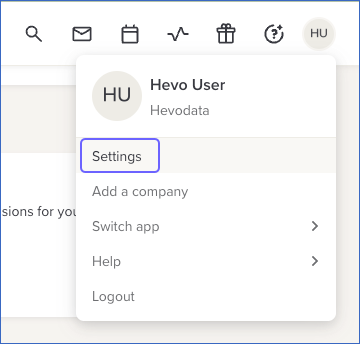
On the Overview page, click your profile icon in the top-right corner, and then click Settings.
-
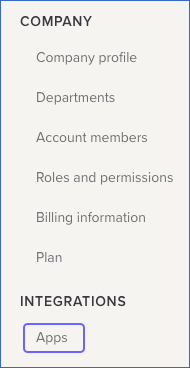
In the left navigation pane, scroll down to the INTEGRATIONS section and click Apps.
-
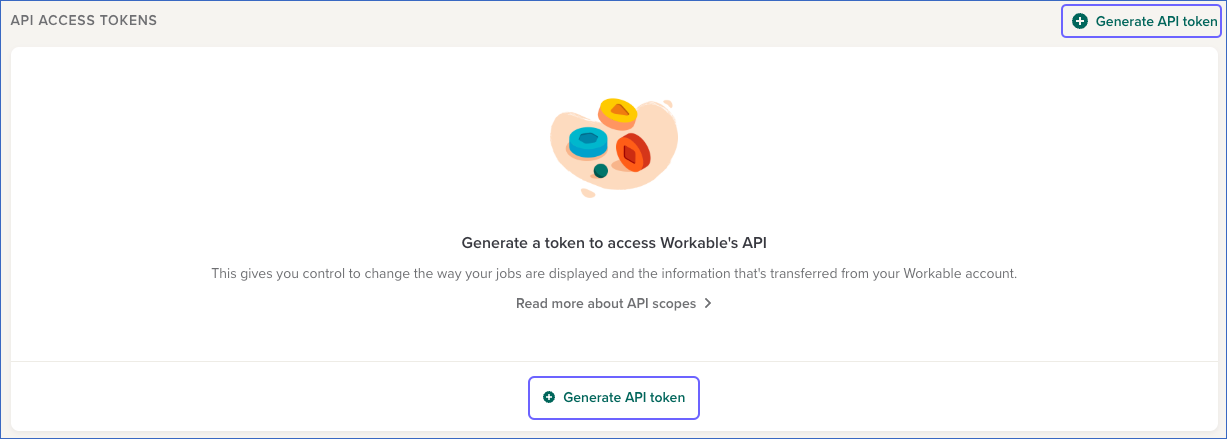
On the Apps page, scroll down to the API ACCESS TOKENS section and click + Generate API token.
-
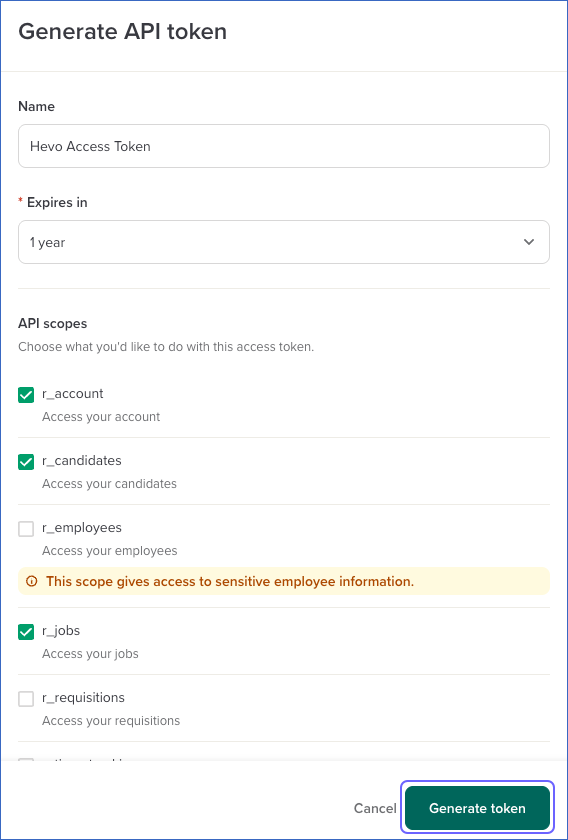
On the Generate API token page, specify the following:
-
Name: A unique name for your API token. For example, Hevo Access Token.
-
Expires In: The token’s expiration period.
-
API scopes: The read permissions for the objects that you want to replicate.
-
-
Click Generate token.
-
Click the Copy icon to copy the API token and save it securely like any other password. Use this token when configuring your Workable Source in Hevo.
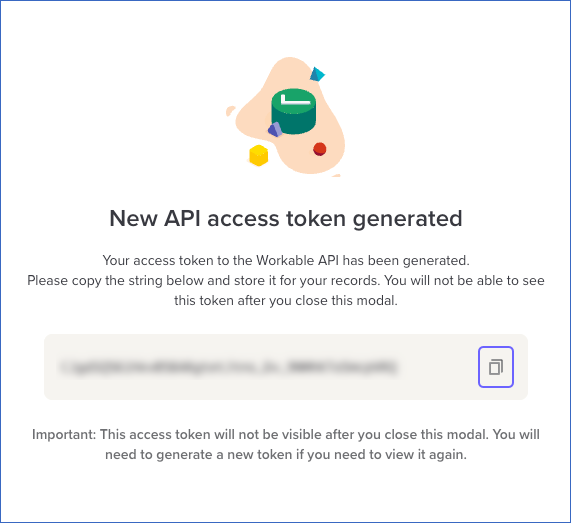
If the access token configured in the Pipeline is revoked manually from your Workable account, Hevo cannot authenticate with the Source. As a result, all active jobs for the Pipeline fail, and no data is replicated. To resume data replication, modify the Source configuration in the Pipeline with a valid access token. Once the updated token is saved, Hevo re-authenticates the Source, and data ingestion resumes from the last saved offset.
Configure Workable as a Source in your Pipeline
Perform the following steps to configure your Workable Source:
-
Click Pipelines in the Navigation Bar.
-
Click + Create Pipeline in the Pipelines List View.
-
On the Select Source Type page, select Workable.
-
On the Select Destination Type page, select the type of Destination you want to use.
-
On the Select Pipeline Type page, click Edge, and then click Continue.
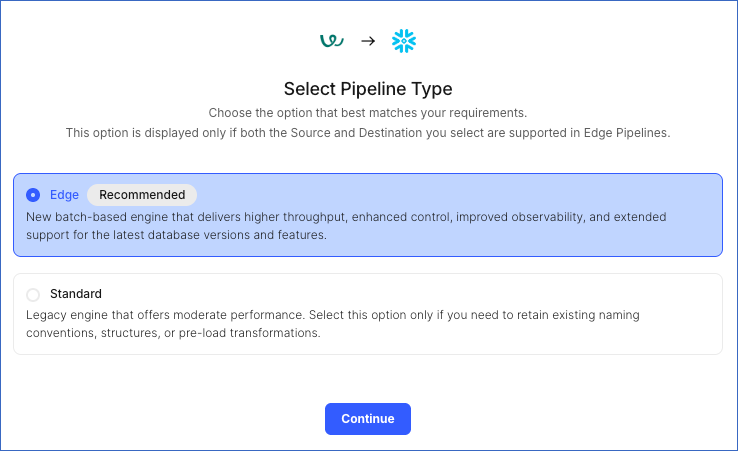
This page appears only if the selected Destination type is supported in Edge and your Team has an existing Workable Pipeline with the same Destination type. Otherwise, you can proceed to create an Edge Pipeline.
-
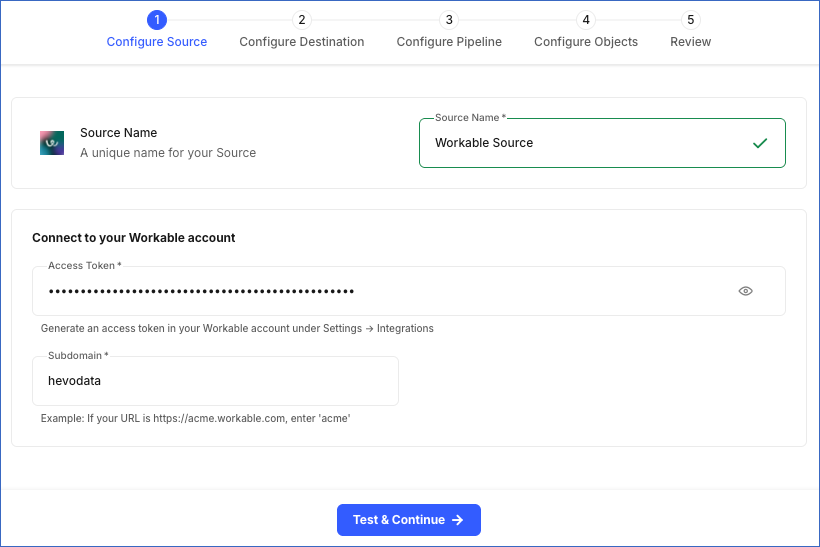
In the Configure Source screen, specify the following:
-
Source Name: A unique name for your Source, not exceeding 255 characters. For example, Workable Source.
-
Access Token: The access token that you generated from your Workable account.
-
Subdomain: The subdomain of your Workable account URL. For example, if your URL is https://xyz.workable.com, enter xyz. This value cannot be changed after the Pipeline is created.
-
-
Click Test & Continue to test the connection to your Workable Source. Once the test is successful, you can proceed to set up your Destination.
Data Replication
Hevo replicates data for all the objects selected on the Configure Objects page during Pipeline creation. By default, all supported objects and their available fields are selected. However, you can modify this selection while creating or editing the Pipeline.
Selecting a parent object automatically includes all its associated child objects for replication. Child objects cannot be selected or deselected individually.
Hevo ingests the following types of data from your Source objects:
-
Historical Data: The first run of the Pipeline ingests all available historical data for the selected objects and loads it into the Destination.
-
Incremental Data: Once the historical load is complete, new and updated records for objects are ingested as per the sync frequency.
For the following objects, Hevo ingests only the incremental data in subsequent Pipeline runs using the updated_at timestamp field:
- Candidate and its child objects:
- Candidate Activity
- Candidate Answer
- Candidate Document Variable
- Candidate Education Entry
- Candidate Experience Entry
- Candidate Offer
- Candidate Offer Document
- Candidate Social Profile
- Job and its child objects:
- Job Activity
- Job Application Field
- Job Application Form
- Job Application Supported File Type
- Job Custom Attribute
- Job Custom Attribute Choice
- Job Custom Attribute File Type
- Job Department Hierarchy
- Job Keyword
- Job Member
- Job Question
- Job Question Choice
- Job Question File Type
- Job Recruiter
- Job Stage
For all other objects, Hevo ingests the entire data during each Pipeline run.
Note: You can create a Pipeline with this Source only using the Merge load mode. The Append mode is not supported for this Source.
Workable currently enforces a rate limit of 10 API requests per 10 seconds. If this limit is exceeded, a rate limit exception occurs. To understand how Hevo handles such scenarios, read Handling Rate Limit Exceptions.
Schema and Primary Keys
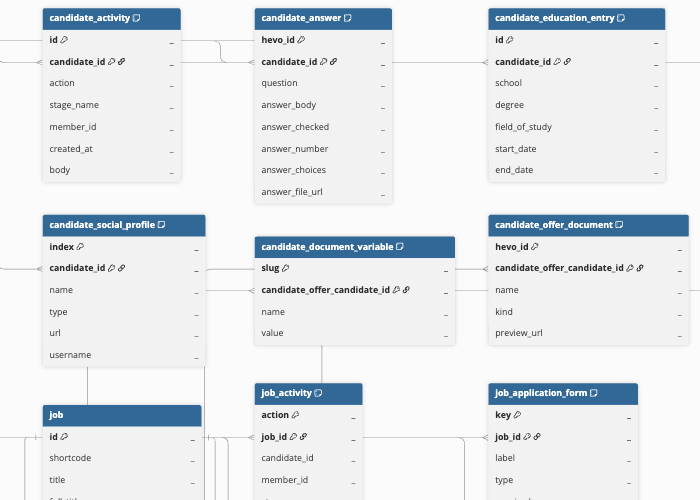
Hevo uses the following schema to upload the records in the Destination. For a detailed view of the objects, fields, and relationships, click the ERD.
Data Model
The following is the list of tables (objects) that are created at the Destination when you run the Pipeline:
| Object | Description |
|---|---|
| Candidate | Contains comprehensive candidate profile information, including personal details, contact information, application stage, skills, disqualification status, and location. This object has the following child objects: - Candidate Activity - Candidate Answer - Candidate Document Variable - Candidate Education Entry - Candidate Experience Entry - Candidate Offer - Candidate Offer Document - Candidate Social Profile |
| Event | Contains interview and meeting events scheduled in Workable, including event title, type, description, start and end times, and the associated job shortcode and candidate. This object has a child object, Event Member. |
| Job | Contains job postings created in Workable, including title, department, employment type, job description, requirements, benefits, location, and the current state of the posting. This object has the following child objects: - Job Activity - Job Application Field - Job Application Form - Job Application Supported File Type - Job Custom Attribute - Job Custom Attribute Choice - Job Custom Attribute File Type - Job Department Hierarchy - Job Keyword - Job Member - Job Question - Job Question Choice - Job Question File Type - Job Recruiter - Job Stage |
| Member | Contains information about Workable account members, including name, email, role, and headline. |
| Recruiter | Contains information about external recruiters associated with the Workable account, including name and email. |
| Requisition | Contains job requisition records, including state, reason, employment type, department, hiring manager, requester details, salary range, and location information. This object has the following child objects: - Requisition Approval Group - Requisition Approver |
| Stage | Contains the interview pipeline stages defined in the Workable account, including the stage name, slug, and position. |
Additional Information
Read the detailed Hevo documentation for the following related topics:
Handling of Deletes
Workable does not explicitly mark records as deleted in its API responses. When a record is deleted, it is no longer returned in subsequent API responses.
Hevo uses a full data refresh approach to capture delete actions for objects where the complete data is ingested during each Pipeline run. During each run, Hevo compares the data fetched from the Source with the data present in the Destination. If a record exists in the Destination but is no longer returned by the Source, the record is marked as deleted by setting the value of the metadata column __hevo__marked_deleted to True. This applies to the following objects:
-
Event
-
Event Member
-
Member
-
Recruiter
-
Requisition
-
Requisition Approval Group
-
Requisition Approver
-
Stage
All the other objects do not support capturing deletes.