Walmart Marketplace is an online platform that allows approved third-party sellers to list and sell their products on Walmart.com. It enables sellers to manage their item catalog, inventory, pricing, orders, returns, and fulfillment, including Walmart Fulfillment Services (WFS).
Hevo uses the Walmart Marketplace Seller APIs to replicate data from your Walmart Marketplace account to the Destination of your choice. To ingest data, you must provide Hevo with the Client ID and Client Secret of a production API key from your Walmart Marketplace account. Hevo uses these credentials to authenticate with the Walmart Token API using the client credentials grant.
Supported Features
| Feature Name | Supported |
|---|---|
| Capture deletes | Yes (for some objects) |
| History mode | No |
| Custom data (user-configured tables & fields) | No |
| Data blocking (skip objects and fields) | Yes |
| Resync (objects and Pipelines) | Yes |
| API configurable | Yes |
Prerequisites
-
An active Walmart Marketplace seller account exists from which data is to be ingested.
-
You can access the API Integration page in your Walmart Seller Center account.
-
The Client ID and Client Secret of your production API key are available.
Obtain the Client ID and Client Secret
Hevo connects to your Walmart Marketplace account using the Client ID and Client Secret of your production API key. Hevo uses these credentials to request an access token from the Walmart Token API and reads your data with it.
Perform the following steps to obtain the Client ID and Client Secret:
-
Log in to your Walmart Seller Center account.
-
Go to the API Integration page, and click API Key Management. The Walmart Developer Portal opens, and you are signed in with your Seller Center credentials.
-
Locate your personal key pair, which has a lock icon next to it, and copy the Client ID and the Client Secret. Save them securely like any other password.
Read Get started as a seller for more information.
Note: Use the keys of your production account. Walmart sandbox keys do not work with Hevo.
If the key is regenerated or revoked in the Walmart Developer Portal, Hevo cannot connect to your account, and the Pipeline fails. To resume data ingestion, modify the Source configuration in the Pipeline with the new Client ID and Client Secret.
Configure Walmart Marketplace as a Source in your Pipeline
Perform the following steps to configure your Walmart Marketplace Source:
-
Click Pipelines in the Navigation Bar.
-
Click + Create Pipeline in the Pipelines List View.
-
On the Select Source Type page, select Walmart Marketplace.
-
On the Select Destination Type page, select the type of Destination you want to use.
-
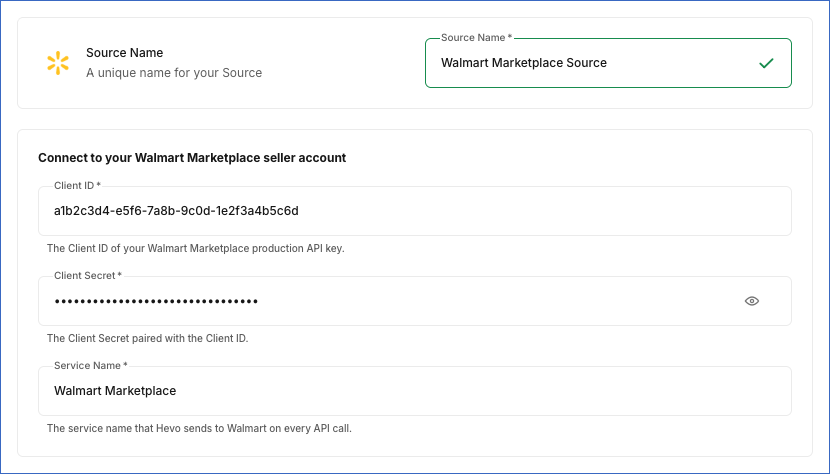
In the Configure Source screen, specify the following:
-
Source Name: A unique name for your Source, not exceeding 255 characters. For example, Walmart Marketplace Source.
-
In the Connect to your Walmart Marketplace seller account section, specify the following:
-
Client ID: The Client ID of your production API key that you obtained from the Walmart Developer Portal. You can change this value after the Pipeline is created.
-
Client Secret: The Client Secret paired with the Client ID. You can change this value after the Pipeline is created.
-
Service Name: The service name that Hevo sends to Walmart in each API request. Default value: Walmart Marketplace. Keep the default value unless Walmart Support has given you a different service name. You can change this value after the Pipeline is created.
-
-
-
Click Test & Continue to test the connection to your Walmart Marketplace Source. Once the test is successful, you can proceed to set up your Destination.
When you click this button, Hevo checks that it can obtain an access token from Walmart with the specified Client ID and Client Secret. If Walmart rejects the credentials, Hevo displays an error message, and you must provide valid production keys.
Data Replication
Hevo replicates data for all the objects selected on the Configure Objects page during Pipeline creation. By default, all supported objects and their available fields are selected. However, you can modify this selection while creating or editing the Pipeline.
You can select or deselect child objects individually. Deselecting a parent object also deselects all its child objects. Re-selecting a parent object does not re-select its child objects; select them again if you need them.
Hevo ingests the following types of data from your Source objects:
-
Historical Data: The first run of the Pipeline ingests all available historical data for the selected objects and loads it into the Destination.
-
Incremental Data: Once the historical load is complete, new and updated records for objects are ingested as per the sync frequency.
Hevo ingests the objects and their child objects as follows:
| Object | Historical data | Incremental data |
|---|---|---|
| Orders | The orders created in the last 180 days. | The orders modified since the previous run, based on the last modified date. |
| Shipment | The WFS inbound shipments created since January 1, 2020. | The shipments created since the previous run. In addition, Hevo ingests all the shipments again once every seven days to capture updates and deletes. Walmart filters shipments only by creation date, so changes to existing shipments, such as status updates, are captured during the weekly re-ingestion. |
| Unpublished Item | The unpublished items since January 1, 2015. | The items unpublished since the previous run. |
| WFS Inventory Log Payload | The WFS inventory changes of the last 365 days. | The inventory changes since the previous run. |
| Seller Listing Quality Score | The current listing quality score. | The current listing quality score, at most once every hour. |
| Feed Status, Fulfillment Order Status, and Available Report Date | All the records available in the Source. | All the records available in the Source. Records that are no longer available in the Source are retained in the Destination. |
| All other objects | All the records available in the Source. | All the records available in the Source. Records that are no longer available in the Source are marked as deleted. |
For the incremental objects, Hevo ingests the data again from 24 hours before the previous run, to include any records that Walmart updated late.
Note: You can create a Pipeline with this Source only using the Merge load mode. The Append mode is not supported for this Source.
Walmart Marketplace enforces a rate limit for each seller and each API, using a token bucket in which each API call uses one token and the tokens are refilled at a fixed rate. Hevo paces its requests to remain within these limits. If Walmart still rejects a request with a rate limit exception, Hevo retries it for up to 10 minutes. If the request continues to fail, Hevo ingests the data in the next Pipeline run. Other applications that use the same seller account share these limits with Hevo.
Schema and Primary Keys
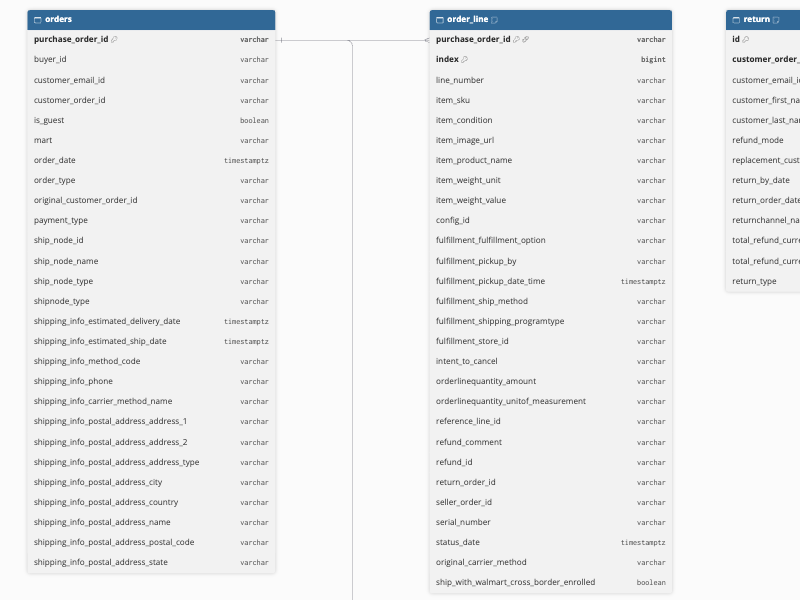
Hevo uses the following schema to upload the records in the Destination. For a detailed view of the objects, fields, and relationships, click the ERD.
Data Model
The following is the list of tables (objects) that are created at the Destination when you run the Pipeline:
| Object | Description |
|---|---|
| Shipment | Contains the Walmart Fulfillment Services (WFS) inbound shipments that you have created, such as the shipment ID, status, carrier, and expected delivery dates. This object has the following child objects: - Shipment Tracking No - Inbound Shipment Item - Carrier Rate Quote - Shipment Package |
| Item | Contains the items in your Walmart catalog, such as the SKU, product name, lifecycle and publish status, price, and GTIN. This object has the following child objects: - Item Unpublished Reason - Item Additional Attribute - Item Additional Attribute Value |
| Inventory | Contains the inventory available for each SKU across your ship nodes (fulfillment centers). This object has a child object, Inventory Node. |
| Unpublished Item | Contains the items that are not published on Walmart.com, along with details about the item and its offer. |
| Lag Time | Contains the lag time (the number of days between receiving an order and shipping it) configured for each SKU. |
| Promotional Price | Contains the promotional prices configured for each SKU. This object has the following child objects: - Promotional Pricing - Promotional Price Additional Attribute |
| WFS Inventory Log Payload | Contains the GTINs for which Walmart Fulfillment Services inventory activity is logged. This object has a child object, WFS Inventory Log. |
| Price Incentive | Contains the price incentives available for the items in your catalog. |
| Feed Status | Contains the status of the feeds that you have submitted to Walmart, such as the feed ID, feed type, and the number of items received, processed, and failed. This object has the following child objects: - Feed Item Status - Feed Item Detail - Feed Item Ingestion Error - Product Identifier |
| Seller Listing Quality Score | Contains the listing quality score of your seller account and its related metrics. |
| Item Count Listing Quality Issue | Contains the listing quality issue types and the count of items affected by each issue. This object has a child object, Quality Issue Product Type. |
| Repricer Strategy Collection | Contains the repricer strategy collections configured for your account. This object has a child object, Repricer Strategy. |
| Item Taxonomy | Contains the product type taxonomy, that is, the categories used to classify items on Walmart Marketplace. This object has a child object, Item Taxonomy Subcategory. |
| Fulfillment Center | Contains the fulfillment centers (ship nodes) configured for your account, such as the ship node ID, name, address, and status. This object has the following child objects: - Distributor Supported Service - Two Day Shipping Detail - Calendar Day Configuration |
| Fulfillment Center Coverage | Contains the coverage areas served by each of your fulfillment centers. This object has a child object, Coverage Area. |
| Third Party Fulfillment Provider | Contains the third-party fulfillment providers available to your account. |
| Carrier Method | Contains the carrier methods that can be used in your shipping configurations. |
| Fulfillment Order Status | Contains the status of the Walmart Multichannel Solutions (MCS) fulfillment orders, such as the seller order ID, status, and the lines and shipments in the order. This object has the following child objects: - Fulfillment Order Line - Fulfillment Order Line Quantity Info - Fulfillment Order Shipment - Fulfillment Order Shipment Line - Fulfillment Order Shipment Date |
| Inbound Shipment Error Payload | Contains the errors reported for your WFS inbound orders, such as the inbound order ID, the error details, and the items affected. This object has the following child objects: - Inbound Shipment Error - Inbound Shipment Order Item - Add On Service - Dimension |
| Available Report Date | Contains the dates for which a reconciliation report is available for your account, along with the rows of the report for each date. This object has a child object, Recon Report. |
| Payment Statement Report | Contains your payment statement for the current cycle. |
| Performance Report | Contains the performance metrics of your seller account. |
| Orders | Contains the orders placed for your items, such as the purchase order ID, order date, customer order ID, and shipping information. This object has the following child objects: - Order Line - Order Line Status - Order Line Charge - Order Line Refund Charge - Order Pickup Person - Label Detail By Purchase Order - Label Detail Box Item - Label Detail Add On |
| Return | Contains the customer returns for your orders, such as the return ID, customer order ID, and return status. This object has the following child objects: - Return Line Group - Return Line - Return Line Label - Return Line Group Carrier Info List - Return Order Line - Return Order Line Charge - Return Order Line Charge Tax - Return Order Line Charge Reference - Return Order Line Charge Total - Return Order Line Refund Channel - Return Order Line Tracking Detail - Return Order Line Tracking Reference - Return Order Line Current Tracking Status |
| Shipping Template | Contains the shipping templates configured for your account, such as the template ID, name, and status. This object has the following child objects: - Shipping Method - Shipping Method Configuration - Shipping Method Address Type - Shipping Method Tiered Shipping Charge - Shipping Method Region - Shipping Method Sub Region - Shipping Method Sub Region State - Shipping Method State Sub Region |
| Shipping Configuration | Contains the account-level shipping configuration of your seller account. This object has the following child objects: - Shipping Configuration Detail - Shipping Configuration Category |
| Partner Configuration Detail | Contains the configuration details of your seller account, such as the partner ID and feed and API throttling configurations. This object has the following child objects: - Partner Configuration - Partner Configuration Value |
Additional Information
Read the detailed Hevo documentation for the following related topics:
Handling of Deletes
Walmart Marketplace does not mark records as deleted in its API responses. When a record is deleted, it is no longer returned by the API. Hence, Hevo captures deletes as follows:
-
Objects ingested in full in each run: For all objects except those listed below, Hevo compares the data fetched from the Source with the data present in the Destination table in each run. If a record exists in the Destination but is no longer returned by the Source, Hevo marks it as deleted by setting the value of the metadata column __hevo__marked_deleted to True. This also applies to their child objects.
-
Child objects of Orders, Shipment, and Fulfillment Order Status: When Hevo ingests an updated parent record in an incremental run, it replaces the child records of that parent. Child records that are no longer present in the parent record are removed from the Destination. During a historical load or a resync, the child records are merged and no records are removed. If you resync with Drop and Load, the tables are recreated with the data that Walmart currently returns.
-
Shipment: Hevo ingests all the shipments and their child objects again once every seven days, and marks the shipments and child records that are no longer returned by the Source as deleted. Deletes are marked only when this weekly re-ingestion completes in a single Pipeline run.
-
Promotional Pricing (child object of Promotional Price) and the Shipping Method child objects of Shipping Template: These records are identified by their position in the Walmart response. When Walmart reorders or removes entries, for example, when a promotion expires, the affected records are marked as deleted and loaded again under their new position.
Hevo does not capture deletes for the following objects. Records deleted in the Source remain in the Destination:
-
Available Report Date and its child object, Recon Report
-
Feed Status and its child objects
-
Fulfillment Order Status
-
Orders
-
Seller Listing Quality Score
-
Unpublished Item
-
WFS Inventory Log Payload and its child object, WFS Inventory Log
Source Considerations
-
Walmart returns only the orders created in the last 180 days. As a result, Hevo ingests only the orders created in this period, and an order is no longer updated in the Destination once it is older than 180 days.
-
Walmart provides the data of the following objects only if your seller account is enrolled in the related Walmart program. If your account is not enrolled, these objects and their child objects are displayed as Inaccessible in the Pipeline, and no data is ingested for them:
Walmart program Objects Walmart Fulfillment Services (WFS) Shipment, WFS Inventory Log Payload, and Inbound Shipment Error Payload Multichannel Solutions (MCS) Fulfillment Order Status Repricer Repricer Strategy Collection To ingest data for these objects, enroll in the program in Walmart Seller Center, and then refresh the schema of the Pipeline.
-
If your API key does not have access to an API, the objects that use the API are displayed as Inaccessible in the Pipeline. To ingest data for them, grant the key access to the API in the Walmart Developer Portal.
-
You can also connect using the API key of a Walmart Solution Provider that you have given delegated access to your seller account. The objects that the Solution Provider key cannot access are displayed as Inaccessible in the Pipeline.
-
Walmart lists only the 2,000 most recent feeds. In each run, Hevo ingests these feeds, and retains the feeds ingested in earlier runs after Walmart stops listing them. Feeds that are older than the 2,000 most recent ones when the Pipeline is created cannot be ingested. If more than 2,000 feeds are submitted between two Pipeline runs, the feeds that are no longer listed cannot be ingested, and Hevo displays a warning in Needs Attention.
-
Walmart returns only the orders created in the last 180 days and the 2,000 most recent feeds. If you resync the Orders or Feed Status object, or the Pipeline, with Drop and Load, older orders and feeds that were previously ingested are removed from the Destination and cannot be ingested again.
-
Walmart provides shipping label data only for the orders that you fulfill. Hence, Hevo does not ingest label data for orders fulfilled by WFS.
-
Hevo uses the same API rate limits as the other applications that use your seller account. Running such applications at the same time as the Pipeline can increase the time taken to ingest data.