UKG Ready is a cloud-based human capital management (HCM) platform that unifies HR, payroll, time and attendance, and scheduling for small and mid-sized businesses. It centralizes employee data in a single record, which it uses to run payroll calculations continuously in the background and to provide employees and managers with self-service HR, time-tracking, and scheduling tools.
Hevo uses the UKG Ready REST API v2 to replicate data from your UKG Ready account to the Destination of your choice. To ingest data, you must provide Hevo with your UKG Ready host, Company ID, Client ID, and Client Secret.
Supported Features
| Feature Name | Supported |
|---|---|
| Capture deletes | Yes |
| History mode | No |
| Data blocking (skip objects and fields) | Yes |
| Resync (objects and Pipelines) | Yes |
| API configurable | Yes |
Prerequisites
-
An active UKG Ready account exists from which data is to be ingested.
-
Access to the Company Setup module in your UKG Ready account to create an OAuth Application.
-
The UKG credentials are available to provide Hevo access to your UKG Ready account data.
Obtain the Client ID and Client Secret
To connect Hevo to your UKG Ready account, you must create an OAuth Application in UKG Ready and generate a Client ID and Client Secret.
Perform the following steps to obtain the OAuth Client ID and Client Secret:
-
Log in to your UKG Ready account.
-
Under Settings, click Global Setup, and then navigate to the Company Setup section.
-
Locate the OAuth Applications widget.
-
Choose the Machine to Machine application type, and generate a Client ID and Client Secret.
Use this Client ID and Client Secret when configuring your UKG Ready Source in Hevo. If the Client Secret configured in the Pipeline is revoked manually from your UKG Ready account, Hevo cannot authenticate with the Source. As a result, all active jobs for the Pipeline fail, and no data is replicated. To resume data replication, modify the Source configuration in the Pipeline with a valid Client Secret. Once the updated key is saved, Hevo re-authenticates the Source, and data ingestion resumes from the last saved offset.
Obtain the Company ID
Perform the following steps to retrieve your Company ID:
-
On the UKG Ready dashboard, click the hamburger menu icon.
-
Under My Team, click My Employees, and then navigate to Employee Info.
-
Click Select Columns.
-
Click Add/Remove Columns, and add the Company System Id column.
-
Click Apply.
Your Company ID is now visible in the employee information view. Use this Company ID while configuring your UKG Source in Hevo.
Configure UKG Ready as a Source in your Pipeline
Perform the following steps to configure your UKG Ready Source:
-
Click Pipelines in the Navigation Bar.
-
Click + Create Pipeline in the Pipelines List View.
-
On the Select Source Type page, select UKG Ready.
-
On the Select Destination Type page, select the type of Destination you want to use.
-
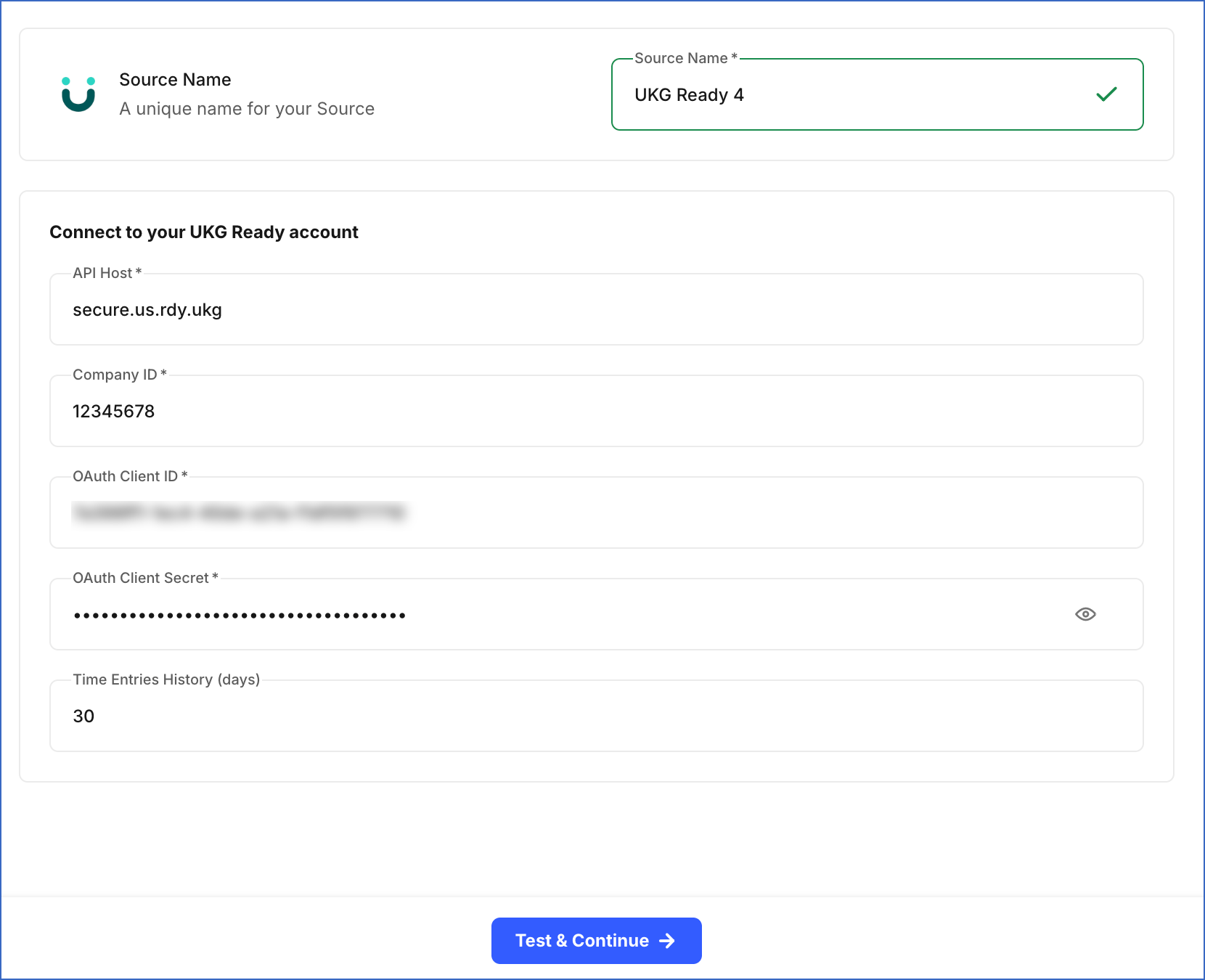
In the Configure Source screen, specify the following:
-
Source Name: A unique name for your Source, not exceeding 255 characters. For example, UKG Ready 4.
-
In the Connect to your UKG Ready account section, specify the following:
-
API Host: The hostname for your UKG Ready account. For example, if the hostname URL is https://secure.us.rdy.ukg/ta/company.login, enter secure.us.rdy.ukg.
-
Company ID: The company ID that you obtained from your account.
-
OAuth Client ID: The Client ID that you obtained from your UKG Ready account.
-
OAuth Client Secret: The Client Secret that you obtained from your UKG Ready account.
-
(Optional) Time Entries History (days): The duration for which you want to ingest historical time-related records from the Source during the first sync. This setting cannot be changed after the Pipeline is created. Minimum value: 1 day. Maximum value: 3650 days. Default duration: Last 90 Days.
-
-
-
Click Test & Continue to test the connection to your UKG Ready Source. Once the test is successful, you can proceed to set up your Destination.
Data Replication
Hevo replicates data for all the objects selected on the Configure Objects page during Pipeline creation. By default, all supported objects and their available fields are selected. However, you can modify this selection while creating or editing the Pipeline.
Hevo ingests the following types of data from your Source objects:
-
Historical Data: The first run of the Pipeline ingests all available historical data for the selected objects and loads it into the Destination. For the Time Entries, Time Off History, Time Entry Notes, and Schedules objects, historical data is ingested based on the time entries history value defined when creating the Pipeline. If no value is defined, Hevo fetches the historical data for the last 90 days for these objects by default.
-
Incremental Data: Once the historical load is complete, new and updated records for objects are ingested as per the sync frequency.
Hevo ingests only the incremental data in subsequent Pipeline runs for the following objects:
-
Employee
-
Schedule
-
Time Entries
-
Time Entry Note
-
Time Off History
For all other objects, Hevo ingests the entire data during each Pipeline run.
Note: You can create a Pipeline with this Source only using the Merge load mode. The Append mode is not supported for this Source.
UKG Ready’s REST API v2 does not publish a fixed numeric rate limit. Instead, when the rate limit is exceeded, the API returns an HTTP 503 response. To understand how Hevo handles rate limits, read Handling Rate Limit Exceptions.
Schema and Primary Keys
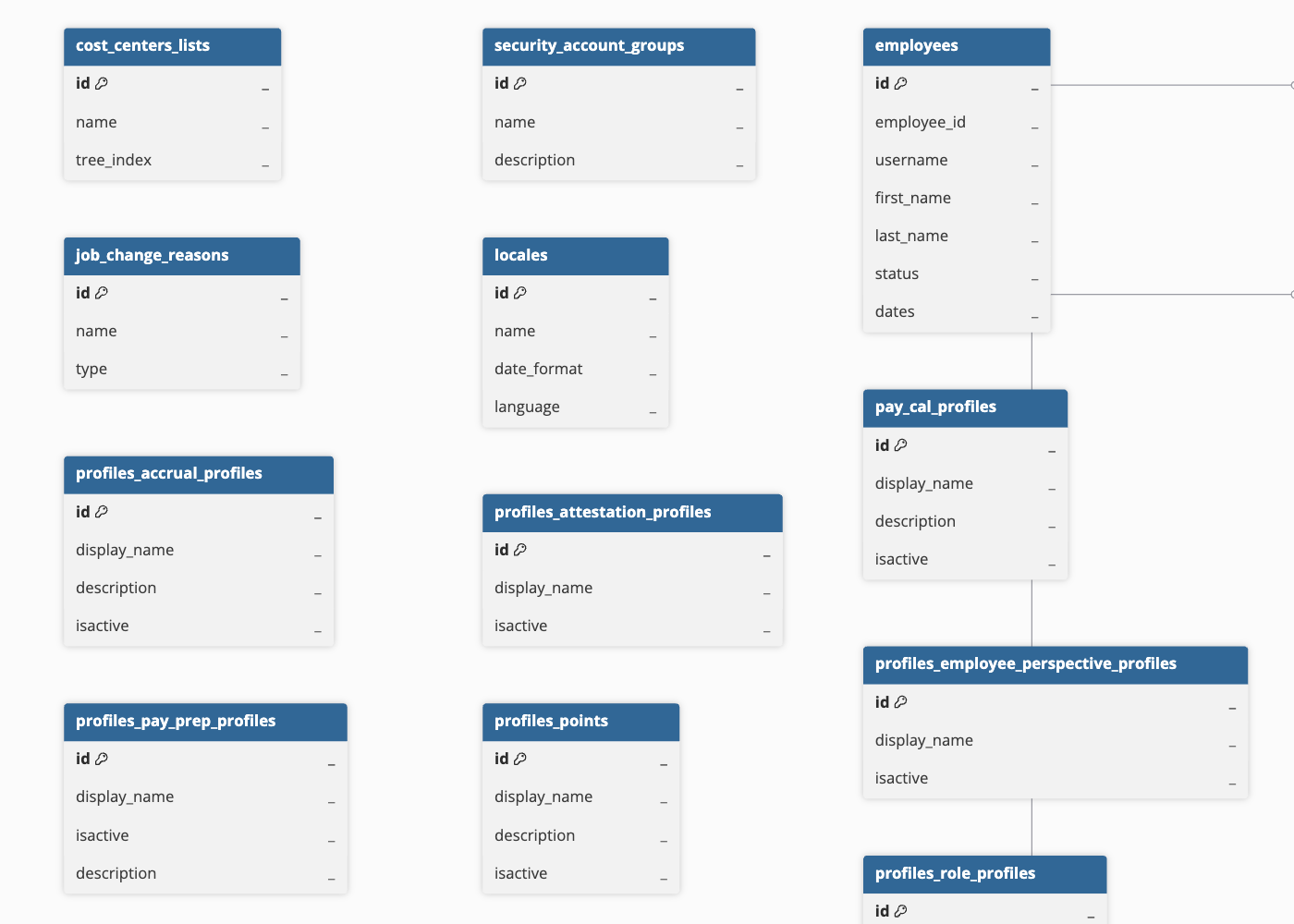
Hevo uses the following schema to upload the records in the Destination. For a detailed view of the objects, fields, and relationships, click the ERD.
Data Model
The following is the list of tables (objects) that are created at the Destination when you run the Pipeline:
| Object | Description |
|---|---|
| Cost Center List | Contains cost center list definitions, including the list name and its position (tree index) within the cost center hierarchy. |
| Security Account Group | Contains the security account groups configured in your UKG Ready account, including group names and descriptions. |
| Employee | Contains employee records, including employee identifiers, name, username, employment status, and key employment dates such as hire and termination dates. |
| EIN | Contains Employer Identification Number (EIN) records, including the EIN name and associated country. |
| Employee Type | Contains the employee type classifications configured in your UKG Ready account. |
| First Screen | Contains the first screen configurations that determine the default landing page shown to employees after login. |
| Job Change Reason | Contains the reasons configured for job change events, along with the reason type. |
| Locale | Contains the locale configurations available in your UKG Ready account, including date format and language settings. |
| Pay Calculation Profile | Contains pay calculation profiles, including the profile name, description, and active status. |
| Pay Period Profile | Contains pay period profile definitions, including their effective date range, period type, and active status. |
| Pay Type | Contains the pay types configured in your UKG Ready account. |
| Profile Specific EIN | Contains EIN records scoped to specific profiles, including the EIN name and country. |
| Employee Accrual Profile | Contains accrual profiles that can be assigned to employees via the Employee Profile Assignment object, including the profile name, description, and active status. |
| Employee Attestation Profile | Contains attestation profiles used for compliance sign-off configurations that can be assigned to employees, including the profile name and active status. |
| Employee Perspective Profile | Contains employee perspective profiles that control what employees can view and access, including the profile name and active status. |
| Employee Holiday Profile | Contains holiday profiles that define company holiday schedules that can be assigned to employees, including the profile name, description, and active status. |
| Employee Pay Calc Profile | Contains pay calculation profiles that can be assigned to employees via the Employee Profile Assignment object, including the profile name, description, and active status. |
| Employee Pay Period Profile | Contains pay period profiles that can be assigned to employees via the Employee Profile Assignment object, including the profile name, description, and active status. |
| Employee Pay Prep Profile | Contains pay preparation profiles that can be assigned to employees, including the profile name, description, and active status. |
| Employee Points Profile | Contains attendance point profiles used to track disciplinary points that can be assigned to employees, including the profile name, description, and active status. |
| Employee Role Profile | Contains role profiles that define user roles and permission sets that can be assigned to employees, including the role name and description. |
| Employee Security Profile | Contains security profiles that define access permissions that can be assigned to employees, including the profile name, description, and active status. |
| Employee System Access Profile | Contains system access profiles that can be assigned to employees, including the profile name and active status. |
| Employee Timesheet Profile | Contains timesheet profiles that define timesheet configuration rules that can be assigned to employees, including the profile name, description, and active status. |
| Employee Timesheet Auto-Population Profile | Contains timesheet auto-population profiles used to automatically populate timesheet entries that can be assigned to employees, including the profile name, description, and active status. |
| Employee Work Schedule Profile | Contains work schedule profiles that can be assigned to employees, including the profile name, description, and active status. |
| Shift Premium | Contains shift premium definitions, including the premium name, code, and description. |
| Skill | Contains the skills configured in your UKG Ready account, including whether the skill is schedulable. |
| Termination Reason | Contains termination reason definitions, including whether an employee is eligible for rehire and whether the reason is currently active. |
| Timezone | Contains the timezone definitions available in your UKG Ready account, including the UTC offset and daylight saving time indicator. |
| Rate Table | Contains rate table configurations used for compensation calculations, including the table name, currency, and cost center association settings. |
| Service Account | Contains service account records used for system integrations, including the username, security profile, and associated account groups. |
| Time Off Request Profile | Contains time off request profiles that define time off request rules, including the profile name, description, and active status. |
| Time Off Definition | Contains the time off type definitions configured in your UKG Ready account, including the payroll code, duration unit, and whether the type is requestable by employees. |
| Attendance | Contains employee attendance status records. |
| Time Entry | Contains employee time entries (timesheet punches), including the entry date, start and end times, calculated totals, approval status, and associated cost centers. |
| Cost Center | Contains the individual cost center records, including their position (tree index) within the cost center hierarchy. |
| Pay Period | Contains pay period records, including the start and end dates, associated EIN, and employee counts for the period. |
| Compensation | Contains employee compensation records, including the compensation amount, currency, and the date from which it is effective. |
| Employee Profile Assignment | Contains the assignment of profiles (such as pay, accrual, or security profiles) to employees, including the effective date and associated rate table. |
| Time Off Request History | Contains the history of time off requests submitted by employees, including the request state, approval or rejection details, and associated cost centers. |
| Rate Schedule | Contains rate schedule line items associated with a rate table, including the rate type, current rate, and effective date range. |
| Time Entry Note | Contains notes attached to specific time entries, referenced by the time_entry_id field. |
| Schedule | Contains employee work schedules, including shift start and end times, job assignment, cost centers, and whether the shift is predicted or confirmed. |
Additional Information
Read the detailed Hevo documentation for the following related topics:
Handling of Deletes
Hevo handles deleted records differently based on how data is ingested for an object.
For the Time Entry, Time Entry Note, Schedule, and Time Off Request History objects, Hevo does not support capturing deletes.
For the Employee object, UKG Ready marks a terminated employee record by setting the status field to Terminated. Hevo ingests these records and marks them as deleted in the Destination by updating the value of the metadata column __hevo__marked_deleted to True for the corresponding record.
For all other objects, Hevo uses a full data refresh approach to capture delete actions for the following objects. During each Pipeline run, Hevo compares the data fetched from the Source object with the data present in the Destination table. If a record exists in the Destination but is no longer returned by the Source, the record is marked as deleted by setting the value of the metadata column __hevo__marked_deleted to True.