Toggl Track is a time-tracking application that helps teams record the time they spend on projects, clients, and tasks. It organizes this data in workspaces that belong to an organization, and supports billable rates, timesheet approvals, and reports.
Hevo uses the Toggl Track API and the Reports API to replicate data from your Toggl Track account to the Destination of your choice. To ingest data, you must provide Hevo with the API token of your Toggl Track user.
Supported Features
| Feature Name | Supported |
|---|---|
| Capture deletes | Yes |
| History mode | No |
| Custom data (user-configured tables & fields) | No |
| Data blocking (skip objects and fields) | Yes |
| Resync (objects and Pipelines) | Yes (for some objects) |
| API configurable | Yes |
Prerequisites
-
An active Toggl Track account from which data is to be ingested.
-
The API token of a Toggl Track user who can view the data that you want to replicate. To ingest the data of all the users, rates, and subscriptions, use the API token of an organization admin.
-
The Premium plan in Toggl Track to ingest the timesheet objects, and the Starter plan or higher to ingest the Rates object.
Obtain the API Token
Hevo connects to your Toggl Track account using the API token of a Toggl Track user. Each user has one API token, which gives access to the data that the user can view in Toggl Track.
Perform the following steps to obtain the API token:
-
Log in to your Toggl Track account.
-
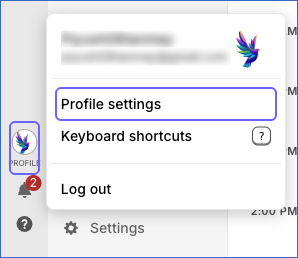
In the bottom left corner, click Profile, and then click Profile settings.
-
In the API Token section, click – Click to reveal –, and then copy the token. Save the token securely like any other password.
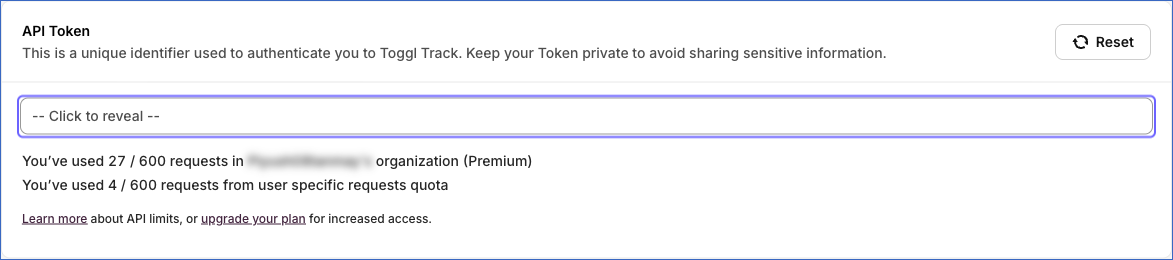
If you click Reset in the API Token section, Toggl Track generates a new token, and the old token stops working. In this case, Hevo cannot connect to your account, and the Pipeline fails. To resume data ingestion, modify the Source configuration with the new token.
Configure Toggl Track as a Source in your Pipeline
Perform the following steps to configure your Toggl Track Source:
-
Click Pipelines in the Navigation Bar.
-
Click + Create Pipeline in the Pipelines List View.
-
On the Select Source Type page, select Toggl Track.
-
On the Select Destination Type page, select the type of Destination you want to use.
-
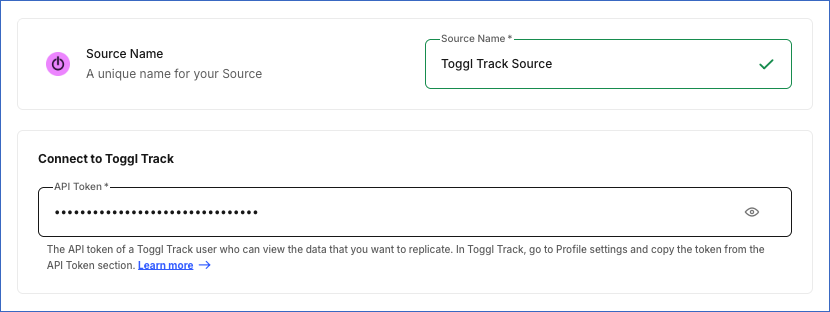
In the Configure Source screen, specify the following:
-
Source Name: A unique name for your Source, not exceeding 255 characters. For example, Toggl Track Source.
-
In the Connect to Toggl Track section, specify the following:
- API Token: The API token that you obtained from Toggl Track.
-
-
Click Test & Continue to test the connection to your Toggl Track Source. Hevo checks whether Toggl Track accepts the API token. If the test fails, Hevo displays the message Check the API token. Once the test is successful, you can proceed to set up your Destination.
Data Replication
Hevo replicates data for all the objects selected on the Configure Objects page during Pipeline creation. By default, all supported objects and their available fields are selected. However, you can modify this selection while creating or editing the Pipeline. To ingest a child object, you must also select its parent object.
Hevo ingests the following types of data from your Source objects:
-
Historical Data: The first run of the Pipeline ingests all the data of the selected objects, including all the time entries recorded in your workspaces.
-
Incremental Data: Once the historical load is complete, Hevo ingests the entire data of all the objects in each run, as per the sync frequency. For the Time Entry Shared With object, Hevo ingests only the time entries changed in the last 89 days.
You can resync only the Clients, Current User, Organizations, Projects, Tags, Task, Time Entry Shared With, Time Entry Workspaces, and Workspaces objects. To resync a child object, resync its parent object.
Toggl Track limits the number of API requests that each user can make in an hour, as per your Toggl Track plan. Read API quota. Each run of the Pipeline can make more than 100 requests, depending on the number of workspaces, projects, time entries, and timesheet periods in your account. If the limit is reached, the affected objects fail with the message Toggl Track API quota reached; the quota resets within an hour, and the next scheduled run continues the ingestion. If you are on the Free or Starter plan, set a longer sync frequency, such as 24 hours, and deselect the objects that you do not need.
Note: You can create a Pipeline with this Source only using the Merge load mode. The Append mode is not supported for this Source.
Schema and Primary Keys
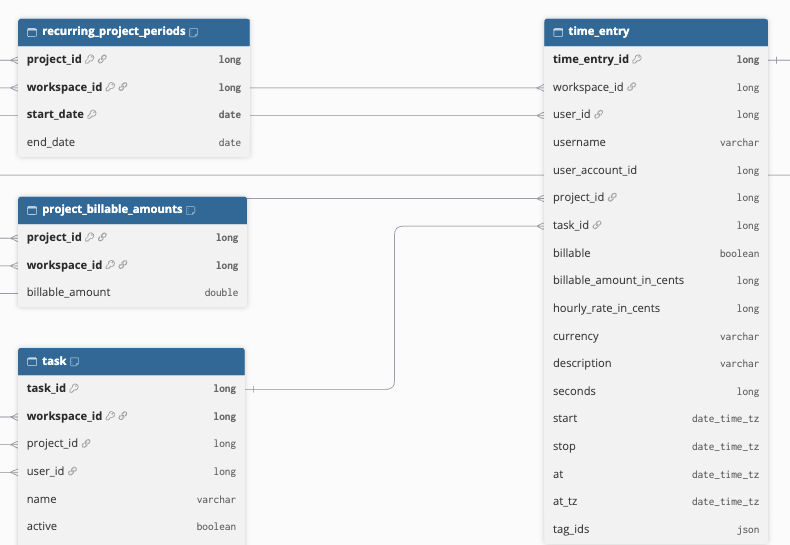
Hevo uses the following schema to upload the records in the Destination. For a detailed view of the objects, fields, and relationships, click the ERD.
Data Model
The following is the list of tables (objects) that are created at the Destination when you run the Pipeline:
| Object | Description |
|---|---|
| Clients | Contains the clients in your workspaces, including their name and archived status. |
| Current User | Contains the details of the user whose API token is used, such as the name, email address, time zone, and default workspace. |
| Organizations | Contains the organizations that the user belongs to, including their pricing plan, trial details, and user count. It includes the following child objects: - Groups - Group User - Group Workspace - Organization Owners - Organization Subscriptions - Subscription Customers |
| Groups | Contains the user groups in each organization. |
| Group User | Contains the users in each group. |
| Group Workspace | Contains the workspaces assigned to each group. |
| Organization Owners | Contains the owner of each organization, including the name and email address. |
| Organization Subscriptions | Contains the subscription of each organization, including the plan, number of seats, billing period, and renewal dates. |
| Subscription Customers | Contains the customer details of each organization’s subscription, such as the customer name, currency, and address. |
| Projects | Contains the projects in your workspaces, including archived projects, with their client, billable settings, estimates, and recurring settings. It includes the following child objects: - Project Billable Amounts - Recurring Project Periods |
| Project Billable Amounts | Contains the billable amount of each project. |
| Recurring Project Periods | Contains all the periods of each recurring project from the start date of the project, with their start and end dates. |
| Tags | Contains the tags in your workspaces. |
| Task | Contains the active and inactive tasks in each workspace, including the project, assignee, and estimated and tracked time of each task. |
| Time Entry Workspaces | Contains the workspaces from which Hevo reads the time entries. It includes the following child objects: - Time Entry - Time Entry Tag |
| Time Entry | Contains the time entries that the user whose API token you provide can see in Toggl Track reports, including the workspace, user, project, task, description, start and stop times, duration, and billable amount of each entry. |
| Time Entry Tag | Contains the tags applied to each time entry. |
| Time Entry Shared With | Contains the users with whom your time entries are shared, for the time entries changed in the last 89 days. |
| Workspaces | Contains the workspaces that the user belongs to, including their settings, default currency and hourly rate, and subscription. It includes the following child objects: - Project Users - Rates - Subscriptions - Time Entry Constraints - Time Entry Invitations - Timesheet - Timesheet Approver - Timesheet Error - Timesheet Review - Timesheet Setups - Timesheet Setup Approvers - Timesheet Setup Errors - Timesheet Time Entries - Users - Users Group - Workspace Activities - Workspace Logos - Workspace Preferences - Workspace Project Group - Workspace Statistics - Workspace Statistics Admins - Workspace Users |
| Project Users | Contains the users and groups assigned to the projects in each workspace, including whether they are project managers and their rates. |
| Rates | Contains the billable rates set at the workspace level, with their amount and the period for which they apply. |
| Subscriptions | Contains the subscription of each workspace, including the plan, number of seats, and renewal dates. |
| Time Entry Constraints | Contains the fields that are required for time entries in each workspace, such as a description, project, task, or tag. |
| Time Entry Invitations | Contains the time entries that other users shared with you in each workspace. |
| Timesheet | Contains the timesheets of each workspace member for each period, including their status, approver, and submission and approval dates. |
| Timesheet Approver | Contains the approvers of each timesheet. |
| Timesheet Error | Contains the errors reported for each timesheet. |
| Timesheet Review | Contains the reviews of each timesheet, including whether the timesheet was approved or rejected. |
| Timesheet Setups | Contains the timesheet approval setups in each workspace, including the member, approver, periodicity, and reminder settings. |
| Timesheet Setup Approvers | Contains the approvers of each timesheet setup. |
| Timesheet Setup Errors | Contains the validation errors of each timesheet setup. |
| Timesheet Time Entries | Contains the time entries included in each timesheet. |
| Users | Contains the users in each workspace, including their role, admin rights, status, and rates. |
| Users Group | Contains the groups that each workspace user belongs to. |
| Workspace Activities | Contains the latest activity of each user in a workspace, such as the project, task, and description of the last time entry. |
| Workspace Logos | Contains the logo of each workspace. |
| Workspace Preferences | Contains the preferences of each workspace. |
| Workspace Project Group | Contains the groups assigned to the projects in each workspace. |
| Workspace Statistics | Contains the number of members and groups in each workspace. |
| Workspace Statistics Admins | Contains the admins of each workspace. |
| Workspace Users | Contains the members of each workspace, including the users who are members through a group. |
Additional Information
Read the detailed Hevo documentation for the following related topics:
Handling of Deletes
Hevo captures deletes by comparing the data ingested from the Source with the data present in the Destination in each run. If a record exists in the Destination but is no longer returned by the Source, Hevo marks it as deleted by setting the value of the metadata column __hevo__marked_deleted to True. The record remains in the Destination with all its data. This applies to all the objects except Time Entry Shared With.
For the Time Entry Shared With object, Hevo marks a record as deleted when Toggl Track returns the time entry as deleted. Records of time entries that were not changed in the last 89 days are not updated or marked as deleted.
Source Considerations
-
Hevo ingests the data that the user whose API token you provide can view in Toggl Track. If the user is not an admin, the Groups, Group User, Group Workspace, Rates, Subscriptions, Subscription Customers, Project Users, Project Billable Amounts, and Workspace Project Group objects are empty. The Projects and Time Entry objects contain only the projects that the user can see, and the time entries on those projects. The billable_amount_in_cents and hourly_rate_in_cents fields of time entries are empty. To ingest all the data, use the API token of an organization admin.
-
If your Toggl Track plan does not include timesheets (Premium plan) or billable rates (Starter plan or higher), the timesheet objects and the Rates object are empty.
-
If an object returns no data because the user is not an admin or the plan does not include the feature, Hevo marks the records of the object ingested in earlier runs as deleted.
-
Toggl Track reports do not include running timers. Hevo ingests a time entry in the first run after the timer is stopped. Time entries with a future date are not ingested.
-
Hevo reads all the data of the selected objects in each run, including all the time entries recorded in your workspaces since 2006 and one request for each member and period of each timesheet. Toggl Track allows 30 API requests per user per hour on the Free plan, 240 on the Starter plan, and 600 on the Premium plan. In accounts with many workspaces, projects, time entries, or timesheets, a run may use up this limit. In this case, the affected objects fail until the limit resets, and the next scheduled run continues the ingestion.
-
The Time Entry Shared With object contains only the time entries of the user whose API token you provide that were changed in the last 89 days. Older shared time entries are not ingested.
-
The Users and Workspace Users objects contain the workspace members, read from two different Toggl Track APIs. Workspace Users also includes the members who belong to a workspace only through a group.
-
Toggl Track returns the date and time fields in the time zone set in the profile of the user whose API token you provide.
-
The amount and rate fields are loaded as floating-point numbers in currency units. These include the rate and fixed_fee fields of Projects, the default_hourly_rate field of Workspaces, the amount field of Rates, the billable_amount field of Project Billable Amounts, and the rate field of Users, Workspace Users, and Project Users. Only the billable_amount_in_cents and hourly_rate_in_cents fields of Time Entry are in cents.
Limitations
- Hevo does not support incremental ingestion for this Source. Each run ingests the entire data of all the selected objects.