TikTok Shop is a social commerce platform that lets sellers sell products directly on TikTok through videos, LIVE sessions, and the shop tab. TikTok Shop Partner Center is the developer platform of TikTok Shop, where sellers create apps that access their shop data through the TikTok Shop APIs.
Hevo uses the TikTok Shop APIs to replicate the order, return, cancellation, promotion, finance, and analytics data of your shop to the Destination of your choice. To connect, you create your own app in Partner Center, provide Hevo with the App Key, App Secret, and Authorization URL of the app, and then authorize Hevo to access your shop.
Supported Features
| Feature Name | Supported |
|---|---|
| Capture deletes | Yes (for some objects) |
| History mode | No |
| Custom data (user-configured tables & fields) | No |
| Data blocking (skip objects and fields) | Yes |
| Resync (objects and Pipelines) | Yes |
| API configurable | No |
Prerequisites
-
An active TikTok Shop seller account from which data is to be ingested. The account must have passed the KYB or KYC verification of TikTok Shop and have an assigned account manager, to register as a seller developer.
-
A Custom app in TikTok Shop Partner Center, with the API scopes required by Hevo enabled.
-
The App Key, App Secret, and Authorization URL of the app are available.
-
You can log in to the main account of the TikTok Shop seller, to authorize Hevo to access your shop. Sub-accounts cannot authorize apps.
Register as a Seller Developer
To create an app, you must register in TikTok Shop Partner Center as a seller developer, with your TikTok Shop seller account. A seller developer can create apps that access only the data of their own shop. If your shop is a US local shop with a US business license, use the US Partner Center. For all other shops, use the Partner Center.
To register, follow the steps in Seller Developer Onboarding. If you are already registered, skip to Create a Custom App in Partner Center.
Create a Custom App in Partner Center
Hevo connects to your shop through an app that you create in TikTok Shop Partner Center. To create the app, follow the steps in Create your App. While you create the app, make sure that:
-
The app type is Custom, and the service category is TikTok Shop Seller.
-
Enable API is turned on, and the Redirect URL is set to https://westeros.hevodata.com/edge/oauth/callback. This URL is the same for all Hevo regions.
-
The API scopes required by Hevo are enabled for the app. Read Access scope for the steps to manage the scopes of your app.
-
The app is published. Sellers can authorize a Custom app only after it is published, as publishing generates its authorization link. Before you can publish the app, it must complete the reviews that Partner Center requires. Read Publish a custom App and App launch overview.
Scopes Required by Hevo
Your Custom app must be granted the scopes that allow Hevo to read data from your shop. Hevo requires the following types of scopes:
-
Mandatory scopes: Allow Hevo to establish a connection with your shop.
-
Optional scopes: Allow Hevo to ingest data from the corresponding objects in your shop.
Mandatory Scopes
Your app must be granted the following scope for Hevo to connect to your shop. If this scope is not granted, the connection test fails when you click Test & Continue while configuring your Source.
| Scope Name | Scope Key |
|---|---|
| Shop Authorized Information | seller.authorization.info |
Optional Scopes
Grant the following scopes based on the objects for which you want Hevo to ingest data. If a scope is not granted, Hevo does not ingest data for the objects associated with it, and marks those objects as Inaccessible on the Configure Objects page.
If your app already has the FS Order&Fulfillment Management scope, Hevo uses it in place of Order Information. Similarly, Hevo uses the Customer Service scope in place of Promotion Information.
| Scope Name | Scope Key | Objects |
|---|---|---|
| Order Information | seller.order.info | orders and external_order |
| Read External Order References | seller.order.ext_ref.read | external_order |
| Promotion Information | seller.promotion.info | coupon |
| Return & Refund Basic | seller.return_refund.basic | return and cancellation |
| Finance Information | seller.finance.info | statement, transactions_by_statement, transactions_by_order_sku_transaction, and payment |
| TikTok Shop Analytics | data.shop_analytics.public.read | shop_product_performance, shop_video_performance, shop_sku_performance_interval, shop_video_performance_detail_interval, and shop_live_performance |
Obtain the App Key, App Secret, and Authorization URL
To configure the Source in Hevo, you need the App key, App secret, and authorization link of your app. You can find these on the details page of your app in Partner Center. Read Authorization overview.
The authorization link contains the service ID of your app. For example, https://services.tiktokshop.com/open/authorize?service_id=<your service id>. For US shops, the link starts with https://services.us.tiktokshop.com. Save these values securely.
Configure TikTok Shop Partner Center as a Source in your Pipeline
Perform the following steps to configure your TikTok Shop Partner Center Source:
-
Click Pipelines in the Navigation Bar.
-
Click + Create Pipeline in the Pipelines List View.
-
On the Select Source Type page, select TikTok Shop Partner Center.
-
On the Select Destination Type page, select the type of Destination you want to use.
-
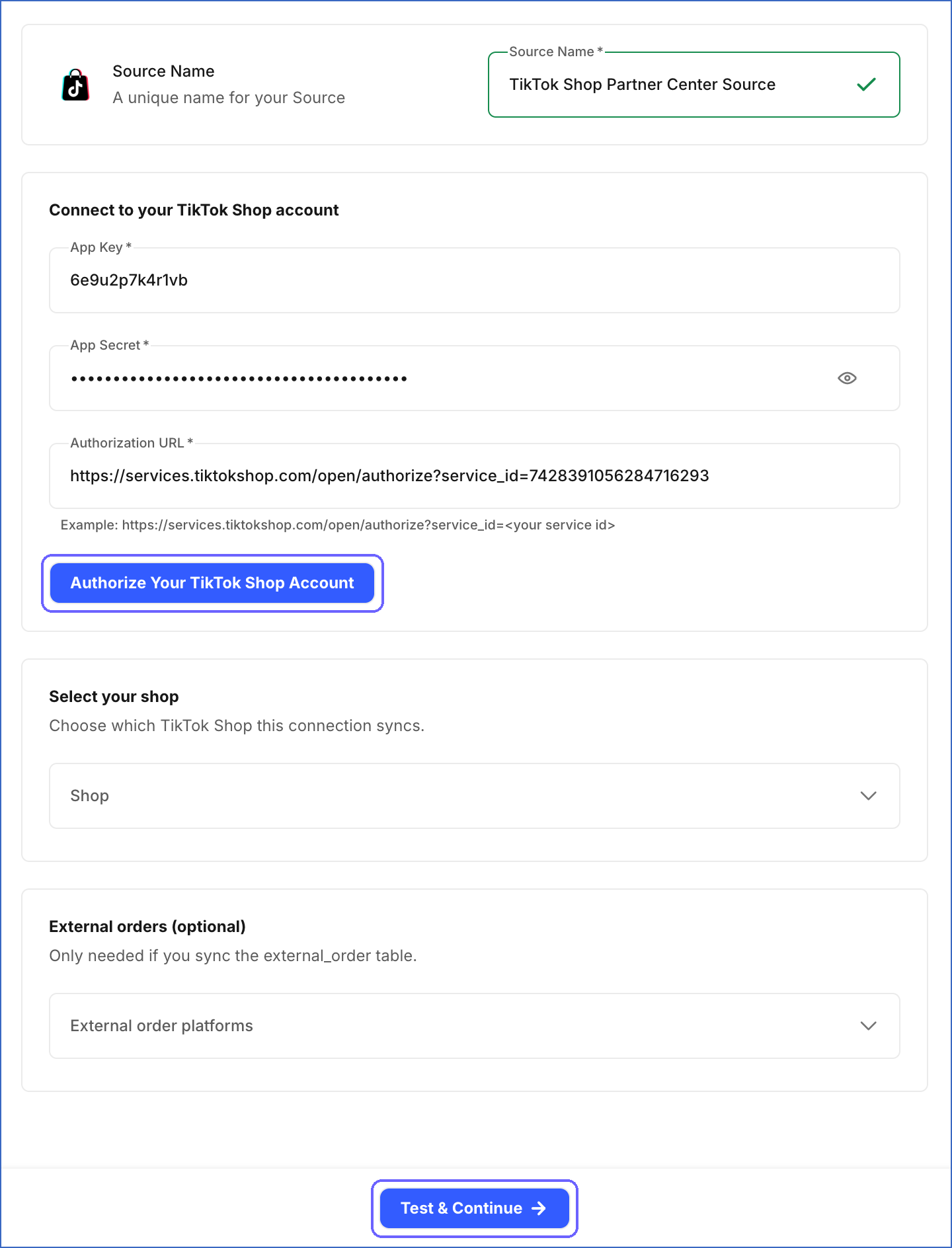
In the Configure Source screen, specify the following:
-
Source Name: A unique name for your Source, not exceeding 255 characters. For example, TikTok Shop Partner Center Source.
-
In the Connect to your TikTok Shop account section, specify the following:
-
App Key: The App key that you obtained from your app in Partner Center.
-
App Secret: The App secret of your app.
-
Authorization URL: The authorization link of your app. For example, https://services.tiktokshop.com/open/authorize?service_id=<your service id>.
-
Click Authorize Your TikTok Shop Account, log in with the main account of your TikTok Shop seller, and authorize the app to access your shop. The button is available once you specify the App Key, App Secret, and Authorization URL.
-
-
In the Select your shop section, which appears after you authorize your account, specify the following:
- Shop: The shop from which you want to ingest data. The list contains the shops that you authorized the app to access. If you authorized only one shop, you can leave this field blank. If you authorized more than one shop, you must select one.
-
(Optional) In the External orders (optional) section, specify the following:
- External order platforms: The systems from which the external order references of your orders were added, such as Shopify or ERP System. You can select one or more platforms. You must select at least one platform to ingest data for the external_order object.
-
-
Click Test & Continue to test the connection to your TikTok Shop Partner Center Source. Once the test is successful, you can proceed to set up your Destination.
Test & Continue
When you click this button, Hevo performs the following validations:
-
The App Key and App Secret are specified, and you authorized your TikTok Shop account.
-
The Shop Authorized Information scope is granted to the app.
-
Hevo can retrieve the list of shops that you authorized, and the authorization includes at least one shop.
-
The shop that you selected is still accessible. If you did not select a shop, the authorization includes only one shop.
Data Replication
Hevo replicates data for all the objects selected on the Configure Objects page during Pipeline creation. By default, all supported objects and their available fields are selected. However, you can modify this selection while creating or editing the Pipeline. To select a child object, you must also select its parent object.
Hevo ingests the following types of data from your Source objects:
-
Historical Data: The first run of the Pipeline ingests all the historical data of the selected objects that is available through the API. For the analytics objects, such as shop_product_performance, Hevo ingests the data from January 1, 2021.
-
Incremental Data: Once the historical load is complete, Hevo ingests new and updated data as per the sync frequency:
-
orders, return, and cancellation: Hevo ingests the records created or updated since the previous run.
-
statement, transactions_by_statement, transactions_by_order_sku_transaction, and payment: Hevo ingests the data since the previous run, and also re-ingests the data of the last 2 days in each run and the last 7 days once a day, to capture late changes.
-
shop_product_performance, shop_video_performance, shop_sku_performance_interval, and shop_live_performance: Hevo re-ingests the data of the last 3 days in each run, and the last 7 days once a day, as TikTok Shop may update recent metrics.
-
external_order: Hevo ingests the external order references of the orders created or updated since the previous run.
-
coupon and shop_video_performance_detail_interval: Hevo ingests the entire data in each run.
-
Note: You can create a Pipeline with this Source only using the Merge load mode. The Append mode is not supported for this Source.
Schema and Primary Keys
Hevo uses the following schema to upload the records in the Destination. For a detailed view of the objects, fields, and relationships, click the ERD.
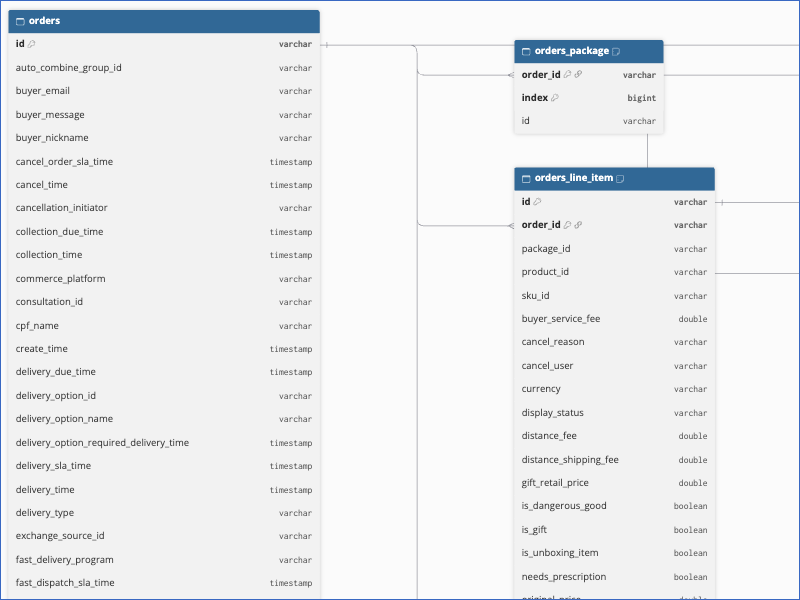
The primary key of most objects is id. The following objects use other primary keys:
-
shop_product_performance and shop_video_performance:
id,start_date, andend_date. -
shop_sku_performance_interval and shop_video_performance_detail_interval: The ID of the SKU or video,
index,start_date, andend_date. -
transactions_by_order_sku_transaction:
order_idandindex. -
external_order:
idandorders_id.
Data Model
The following is the list of tables (objects) that are created at the Destination when you run the Pipeline:
| Object | Description |
|---|---|
| orders | Contains the orders placed in your shop, including the buyer, recipient, delivery, payment, and fulfillment details. It includes the following child objects: - orders_package - orders_line_item - orders_line_item_tax - orders_line_item_sub_item_info |
| external_order | Contains the references that link the orders in your shop to the orders in an external system, such as an order management system. |
| coupon | Contains the coupons created for your shop, along with their configuration and status. It includes the following child objects: - coupon_display_channel - coupon_live_task - coupon_product_id |
| return | Contains the return requests raised for the orders in your shop. It includes the following child objects: - return_line_item - return_sub_line_item - return_discount_amount - return_shipping_fee_amount - return_next_action |
| cancellation | Contains the cancellation requests raised for the orders in your shop. It includes the following child objects: - cancellation_line_item - cancellation_sub_line_item - cancellation_next_action |
| statement | Contains the settlement statements generated for your shop. |
| transactions_by_statement | Contains the statements for which transactions are retrieved. It includes a child object, transactions_by_statement_transaction, which contains the transactions of each statement. |
| transactions_by_order_sku_transaction | Contains the transactions of your shop at the order and SKU level. |
| payment | Contains the automated payments made to the bank account of your shop. |
| shop_product_performance | Contains the daily performance metrics of the products in your shop. |
| shop_sku_performance_interval | Contains the performance metrics of the SKUs in your shop for each time interval. It includes the following child objects: - shop_sku_performance_interval_gmv_breakdown - shop_sku_performance_interval_items_sold_breakdown |
| shop_video_performance | Contains the daily performance metrics of the videos that promote your shop. It includes a child object, shop_video_performance_product, which contains the products linked to each video. |
| shop_video_performance_detail_interval | Contains the detailed performance metrics of each video for each time interval. It includes the following child objects: - shop_video_performance_detail_interval_sales_breakdown - shop_video_performance_detail_viewer_profile |
| shop_live_performance | Contains the daily performance metrics of the LIVE sessions of your shop. |
Additional Information
Read the detailed Hevo documentation for the following related topics:
Handling of Deletes
For the coupon and shop_video_performance_detail_interval objects and their child objects, Hevo uses a full data refresh approach to capture delete actions. If a record exists in the Destination but is no longer returned by the Source, the record is marked as deleted by setting the value of the metadata column __hevo__marked_deleted to True.
For all the other objects, Hevo does not capture deletes. For example, a cancelled order remains in the Destination with its updated status.
Source Considerations
-
Each Pipeline ingests data from one shop. To ingest data from multiple shops, create a Pipeline for each shop.
-
If an API scope is not enabled for your app, Hevo does not ingest the objects that need that scope. To ingest these objects, enable the scope for the app in Partner Center, and then modify the Source configuration to authorize your account again.
-
The access to your shop is valid for the authorization duration that you grant when you authorize the app. Once it expires, or if you revoke the authorization, the Pipeline fails. To resume data ingestion, modify the Source configuration and authorize your account again.
-
TikTok Shop does not provide payment data for shops in Southeast Asian markets. For these shops, the payment object contains no data.
-
In each run, Hevo ingests the entire data of the shop_video_performance_detail_interval object and its child objects from January 1, 2021. This increases the duration of each run and the number of API calls, and Hevo displays a warning for the object. Deselect the object if you do not need it.
-
For the external_order object, Hevo makes one API call for each order and each external order platform that you select. Hevo ingests the references only for the orders created or updated since the previous run. To ingest the references added to an order that is not updated, resync the object. Hevo displays a warning for this object, as the first run for a shop with many orders can take a long time. Deselect the object if you do not need it.
-
TikTok Shop applies dynamic API rate limits, which depend on factors such as the number of authorized shops and the load on the API. If a limit is exceeded, Hevo retries the request. If the limit is still exceeded, Hevo ingests the object in the next run. Read Rate limits.
-
If you added an IP allow list to your app in Partner Center, add Hevo’s IP addresses for your region to it. Otherwise, TikTok Shop blocks the requests from Hevo.
Limitations
-
Hevo does not replicate the product, affiliate, and creator marketplace data of your shop.
-
For the analytics objects, Hevo does not ingest the data before January 1, 2021.