RevenueCat is a subscription management platform for mobile and web apps. It handles in-app purchases across app stores, and lets businesses manage their product catalog, such as products, entitlements, offerings, and packages, and track subscription metrics, such as revenue and active subscriptions.
Hevo uses the RevenueCat REST API v2 to replicate data from your RevenueCat project to the Destination of your choice. To ingest data, you must provide Hevo with a secret API key to authenticate to your RevenueCat project.
Supported Features
| Feature Name | Supported |
|---|---|
| Capture deletes | Yes |
| History mode | No |
| Custom data (user-configured tables & fields) | No |
| Data blocking (skip objects and fields) | Yes |
| Resync (objects and Pipelines) | Yes |
| API configurable | Yes |
| Authorization via API | Yes |
Prerequisites
-
An active RevenueCat account exists with the project from which data is to be ingested.
-
A secret API key for API version 2, with read-only access to the project configuration and charts metrics, is available to provide Hevo access to your RevenueCat project data.
Obtain the API Key
To connect Hevo to your RevenueCat project, you must provide a secret API key created for API version 2 (V2). RevenueCat creates secret API keys for each project, and Hevo can replicate data only from the project for which the key is created. You can use an existing V2 secret API key that has the required permissions, or create one.
Perform the following steps to create a secret API key:
-
Log in to your RevenueCat dashboard.
-
In the project drop-down at the top of the page, select the project from which you want to replicate data.
-
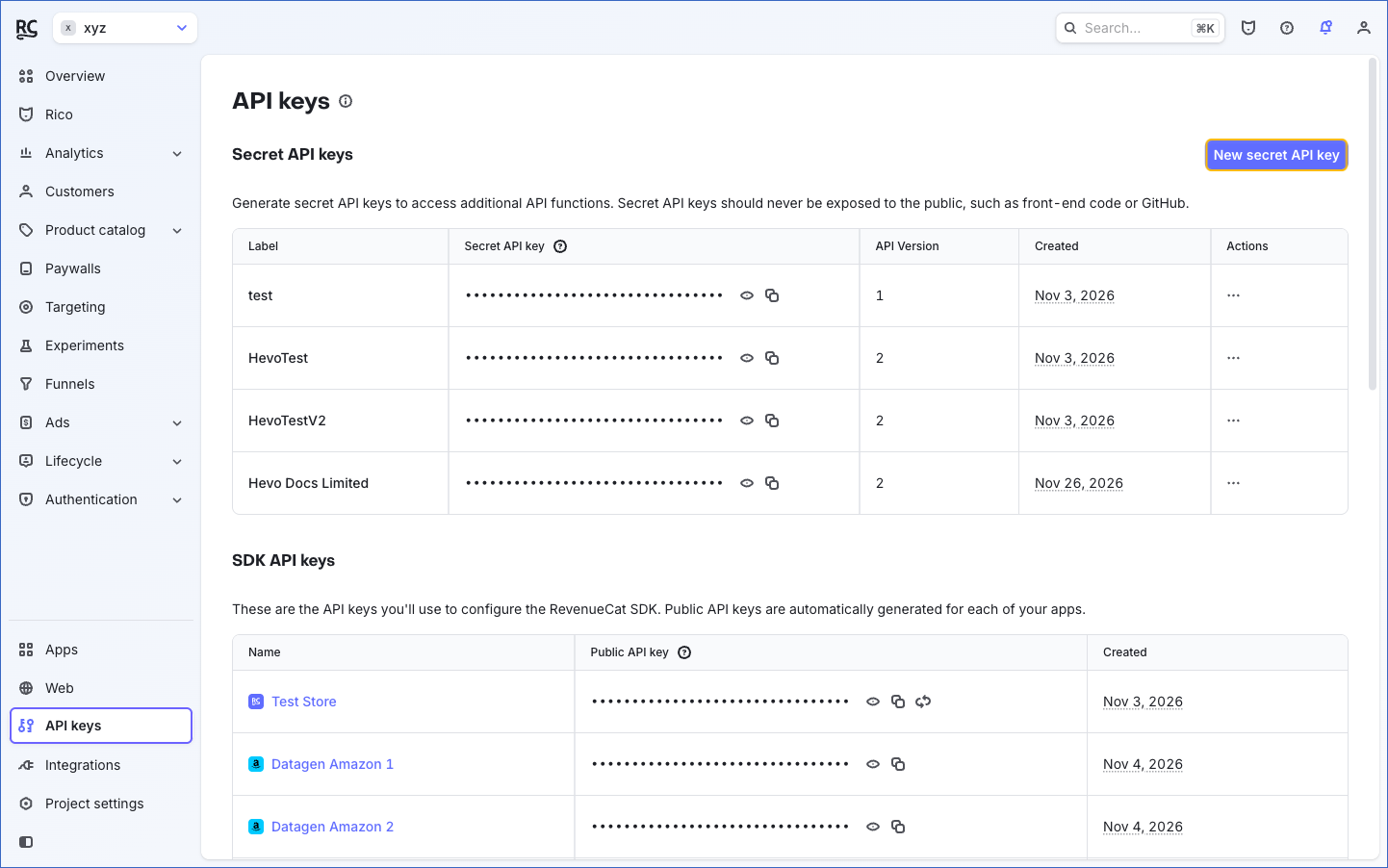
In the left navigation pane, click API keys, and then, in the Secret API keys section, click New secret API key.
-
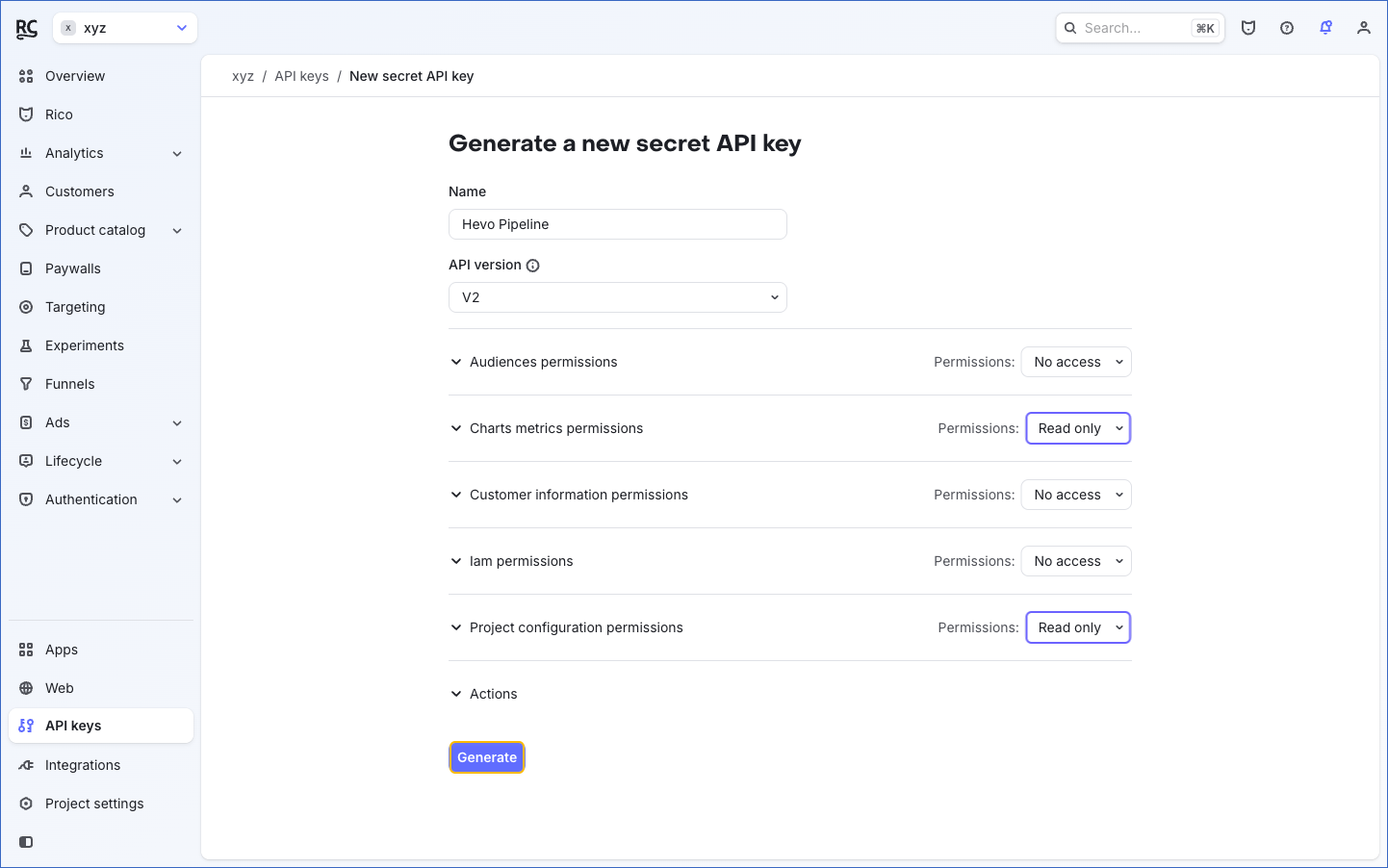
On the Generate a new secret API key page, do the following:
-
Specify the following:
-
Name: A unique name to identify the API key. For example, Hevo Pipeline.
-
API version: Select V2.
-
-
In the Charts metrics permissions and Project configuration permissions sections, select Read only from the Permissions drop-down. Hevo only reads data, so you can leave all the other permissions set to No access.
-
Click Generate.
-
-
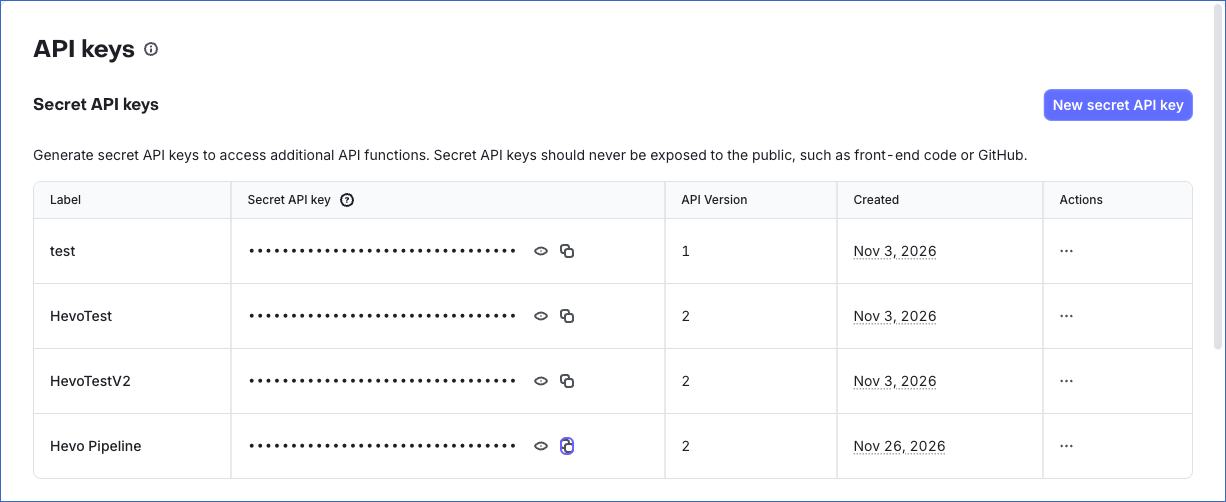
In the Secret API keys section, click the copy (
 ) icon next to the key you created, and save it securely like any other password. Use this key while configuring your RevenueCat Source in the Hevo Pipeline.
RevenueCat secret API keys do not expire. If the API key configured in the Pipeline is revoked in your RevenueCat project, Hevo cannot authenticate with the Source, and the Pipeline fails. To resume data replication, modify the Source configuration in the Pipeline with a valid API key.
Configure RevenueCat as a Source in your Pipeline
Perform the following steps to configure your RevenueCat Source:
-
Click Pipelines in the Navigation Bar.
-
Click + Create Pipeline in the Pipelines List View.
-
On the Select Source Type page, select RevenueCat.
-
On the Select Destination Type page, select the type of Destination you want to use.
-
On the Select Pipeline Type page, click Edge, and then click Continue.
Note: This page appears only if the selected Destination type is supported in Edge and your Team has an existing RevenueCat Pipeline with the same Destination type. Otherwise, you can proceed to create an Edge Pipeline.
-
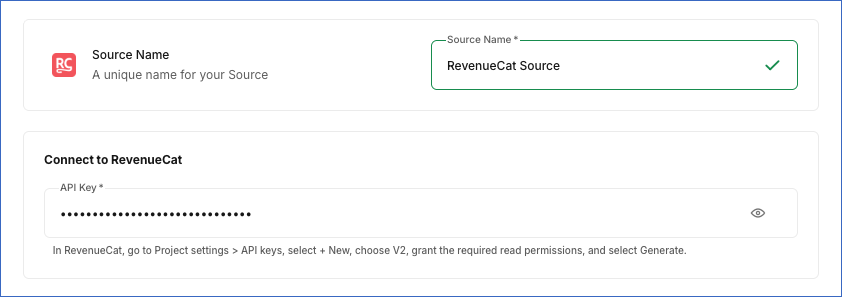
In the Configure Source screen, specify the following:
-
Source Name: A unique name for your Source, not exceeding 255 characters. For example, RevenueCat Source.
-
In the Connect to RevenueCat section:
- API Key: The secret API key that you obtained from your RevenueCat project.
-
-
Click Test & Continue to test the connection to your RevenueCat Source. Once the test is successful, you can proceed to set up your Destination.
Data Replication
Hevo replicates data for all the objects selected on the Configure Objects page during Pipeline creation. By default, all supported objects and their available fields are selected. However, you can modify this selection while creating or editing the Pipeline.
Hevo ingests the following types of data from your Source objects:
-
Historical Data: The first run of the Pipeline ingests all the existing data for the selected objects and loads it into the Destination.
-
Incremental Data: Once the historical load is complete, Hevo ingests the entire data of all the selected objects again in each Pipeline run, as per the sync frequency. New and updated records are loaded to the Destination, and records that no longer exist in the Source are marked as deleted.
All the objects are ingested as children of the Project object. As a result, the Project object is the only object that you can resync, and resyncing it resyncs all the objects in the Pipeline.
RevenueCat enforces a rate limit on the API requests made with each API key. For example, you can make 60 requests per minute for the project configuration objects, such as products and offerings, and 25 requests per minute for the metrics. If this limit is exceeded, a rate limit exception occurs. To understand how Hevo handles such scenarios, read Handling Rate Limit Exceptions.
Note: You can create a Pipeline with this Source only using the Merge load mode. The Append mode is not supported for this Source.
Schema and Primary Keys
Hevo uses the following schema to upload the records to the Destination. For a detailed view of the objects, fields, and relationships, click the ERD.
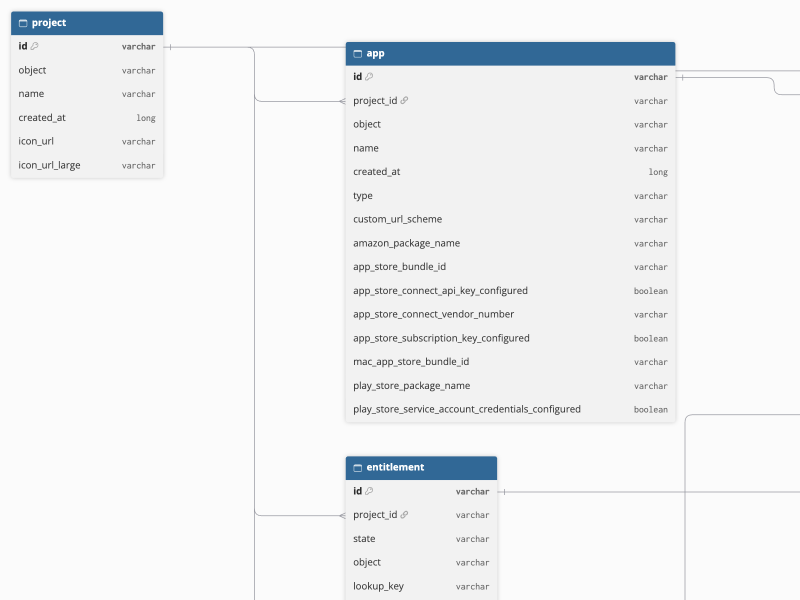
Data Model
The following is the list of tables (objects) that are created at the Destination when you run the Pipeline:
| Object | Description |
|---|---|
| Project | Contains details of the RevenueCat project that the API key belongs to, such as its name, icon, and creation time. |
| App | Contains details of the apps in the project, such as the name, store type, and the store-specific identifiers, such as the bundle ID or package name. |
| Product | Contains details of the products sold through the apps of the project, such as the store identifier, product type, state, and the subscription, trial, and grace period durations. |
| Entitlement | Contains details of the entitlements of the project, which represent the levels of access that customers get after a purchase, such as the lookup key, display name, and state. |
| Entitlement Product | Contains one row for each product attached to an entitlement. |
| Offering | Contains details of the offerings of the project, which are the sets of packages shown to customers on a paywall, such as the lookup key, display name, state, metadata, and whether it is the current offering. |
| Package | Contains details of the packages in each offering, such as the lookup key, display name, and position. |
| Package Product | Contains one row for each product attached to a package, along with the eligibility criteria of the product. |
| Metric Overview | Contains the current values of the overview metrics of the project, such as active trials, active subscriptions, monthly recurring revenue (MRR), revenue, new customers, and active users. |
Additional Information
Read the detailed Hevo documentation for the following related topics:
Handling of Deletes
Deletes in RevenueCat are hard deletes, so deleted records are no longer returned by the API. As Hevo ingests the entire data of all the objects in each Pipeline run, it compares the ingested data with the data in the Destination. Records that are no longer present in the Source are marked as deleted in the Destination using the _hevo_marked_deleted column. For example:
-
If you delete an entitlement, offering, or package, Hevo marks its record as deleted in the Destination.
-
If you detach a product from an entitlement or a package, Hevo marks the corresponding record in the Entitlement Product or Package Product object as deleted.
Archived records, such as archived entitlements, are not deleted in the Source. Hevo continues to ingest them, and their state column is set to inactive.
Source Considerations
-
The Metric Overview object contains only the current values of the overview metrics, and Hevo updates them in each Pipeline run. Hevo does not retain the earlier values of the metrics.
-
The created_at values of all the objects, and the last_updated_at value of the Metric Overview object, are in Unix time, in milliseconds.
Limitations
-
You can replicate data from only one RevenueCat project in a Pipeline, as each secret API key is created for a single project. To replicate data from multiple projects, create a Pipeline for each project.
-
Hevo does not ingest customer and subscription data, such as customers, subscriptions, purchases, and invoices.