Recurly is a subscription management and recurring billing platform. It helps subscription businesses manage plans, billing, invoicing, and payment recovery, and track revenue and customer retention.
Hevo uses the Recurly REST API (v3) to replicate data from your Recurly site to the Destination of your choice. To ingest data, you must provide Hevo with a private API key of your Recurly site and the region in which the site is hosted.
Supported Features
| Feature Name | Supported |
|---|---|
| Capture deletes | Yes (for some objects) |
| History mode | No |
| Custom data (user-configured tables & fields) | Yes (custom fields of the Account, Subscription, Plan, Item, and Charge objects) |
| Data blocking (skip objects and fields) | Yes |
| Resync (objects and Pipelines) | Yes |
| API configurable | Yes |
Prerequisites
-
An active Recurly site exists from which data is to be ingested.
-
You are logged in to your Recurly site as a user who can access the Integrations settings, to create a private API key.
-
The region in which your Recurly site is hosted, that is, United States or Europe.
Create a Private API Key
Hevo connects to your Recurly site using a private API key. A key with read-only access is sufficient, as Hevo only reads data from your Recurly site.
Perform the following steps to create a private API key:
-
Log in to your Recurly site.
-
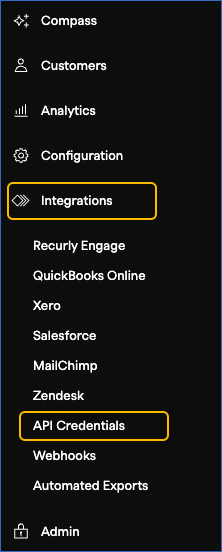
In the left navigation pane, click Integrations, and then click API Credentials.
-
On the API Credentials page, click Add Private API Key.

-
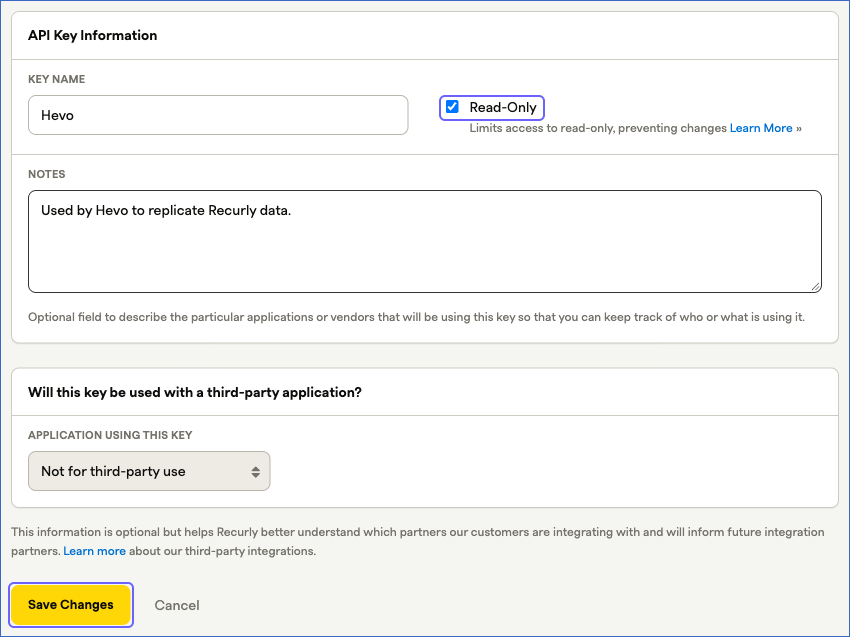
On the Add Private API Key page, do the following:
-
In the Key Name field, specify a name for the key. For example, Hevo.
-
Select the Read-Only check box.
-
(Optional) In the Notes field, describe how the key is used. For example, Used by Hevo to replicate Recurly data.
-
Click Save Changes.
-
-
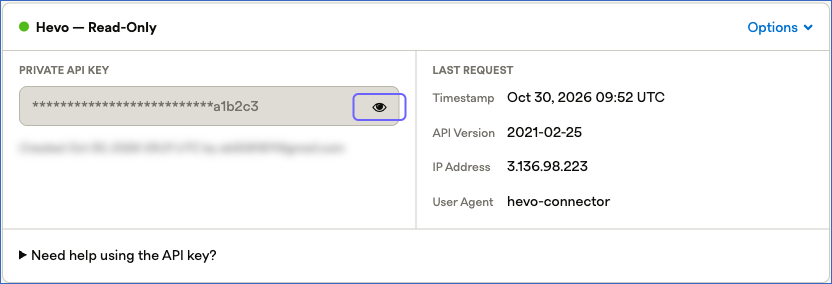
In the card of the key that you created, click the eye icon in the Private API Key field, and copy the API key. Save it securely like any other password. Use this key while configuring your Recurly Source in Hevo.
If the API key configured in the Pipeline is revoked or regenerated in your Recurly site, Hevo cannot connect to the Source, and the Pipeline jobs fail. To resume data replication, modify the Source configuration in the Pipeline with a valid API key. Hevo then resumes data ingestion from the last saved offset.
Configure Recurly as a Source in your Pipeline
Perform the following steps to configure your Recurly Source:
-
Click Pipelines in the Navigation Bar.
-
Click + Create Pipeline in the Pipelines List View.
-
On the Select Source Type page, select Recurly.
-
On the Select Destination Type page, select the type of Destination you want to use.
-
On the Select Pipeline Type page, click Edge, and then click Continue.
Note: This page appears only if the selected Destination type is supported in Edge and your Team has an existing Recurly Pipeline with the same Destination type. Otherwise, you can proceed to create an Edge Pipeline.
-
In the Configure Source screen, specify the following:
-
Source Name: A unique name for your Source, not exceeding 255 characters. For example, Recurly Source.
-
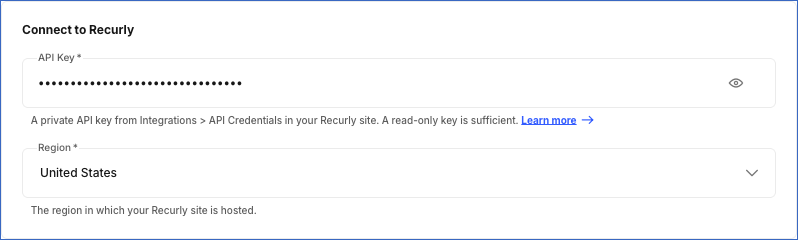
In the Connect to Recurly section, specify the following:
-
API Key: The private API key that you created in your Recurly site. A read-only key is sufficient. The value is masked in the UI.
-
Region: From the drop-down, select the region in which your Recurly site is hosted:
-
United States (default): Hevo connects to v3.recurly.com.
-
Europe: Hevo connects to v3.eu.recurly.com.
-
-
-
-
Click Test & Continue to test the connection to your Recurly Source. Once the test is successful, you can proceed to set up your Destination.
When you click this button, Hevo reads one account from your Recurly site using the API key. The test fails if:
-
The API key is incorrect, revoked, or regenerated.
-
The API key does not have permission to read the data.
If Recurly limits the number of API requests for your site at that time, Hevo retries the request up to two times and does not fail the test.
-
Data Replication
Hevo replicates data for all the objects selected on the Configure Objects page during Pipeline creation. By default, all supported objects and their available fields are selected. However, you can modify this selection while creating or editing the Pipeline. You can select or deselect each object, including the child objects, individually.
Hevo ingests the following types of data from your Source objects:
-
Historical Data: The first run of the Pipeline ingests all the data of the selected objects.
-
Incremental Data: Once the historical load is complete, Hevo ingests the data as per the sync frequency, as follows:
-
Account History, Account Acquisition History, Coupon History, Credit Payment History, Invoice History, Line Item History, Plan History, Plan Add On History, Subscription History, and Transaction: Hevo ingests the records that were created or updated since the previous run, based on the updated_at field. Hevo also re-ingests the last record ingested in the previous run, so that no changes are missed. Records that are created or updated within five minutes before a run starts are ingested in the next run.
-
External Subscription and Gift Card: Hevo ingests the records that were created or updated since the previous run, and ingests the entire data once every 24 hours.
-
Child objects, such as Invoice Line Item and Plan Currency History: Hevo ingests the child records of each parent record that is ingested.
-
Account Balance History, Account Note History, External Account History, and Shipping Address History: Hevo ingests the records of all the accounts in your Recurly site in each run, even if the accounts have not changed.
-
Billing Info History and Coupon Redemption History: Hevo ingests the records of the accounts that were updated since the previous run.
-
Usage Record and its child objects: Hevo ingests the usage of the subscriptions that were updated since the previous run, and re-ingests the unbilled usage of all the live subscriptions once every 24 hours.
-
Recurly limits the number of API requests that can be made for a site. Currently, the limit is 1,000 GET requests per minute for a production site and 400 requests per minute for a sandbox site, measured over a rolling five-minute window. If this limit is reached, Hevo stops ingesting the objects that are in progress and resumes their ingestion from the same point in the next run. Read Rate limits.
You can create a Pipeline with this Source using either the Merge or the Append load mode.
Schema and Primary Keys
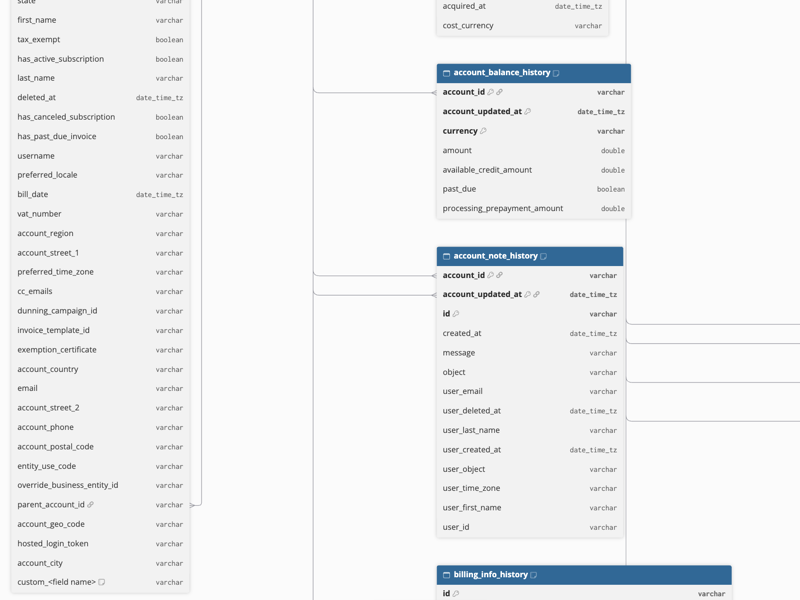
Hevo uses the following schema to upload the records in the Destination. For a detailed view of the objects, fields, and relationships, click the ERD.
Data Model
The following is the list of tables (objects) that are created at the Destination when you run the Pipeline:
| Object | Description |
|---|---|
| Account History | Contains the customer accounts in your Recurly site, including the account code, name, company, state, billing and subscription status flags, and tax details. Each change to an account is stored as a separate record identified by updated_at. |
| Account Acquisition History | Contains the marketing acquisition data recorded for accounts, such as the acquisition channel, subchannel, campaign, cost, and acquisition date. |
| Account Balance History | Contains the balance of each account in each currency, including the amount, available credit, processing prepayment amount, and past due status. |
| Account Note History | Contains the internal notes added to accounts, along with the details of the user who created each note. |
| Billing Info History | Contains the billing information of accounts, such as the payment method details, billing address, validity, and payment gateway references. |
| Bulk Unique Code | Contains the unique coupon codes generated from bulk coupons, along with their state, expiry, and redemption timestamps. |
| Coupon History | Contains the coupons defined in your Recurly site, including the code, discount type, duration, state, and the plans to which the coupon applies. |
| Coupon Discount | Contains the discount of each coupon, such as the amount and currency, percentage, or free trial length. |
| Coupon Plan History | Contains the mapping between coupons and the plans to which they apply. |
| Coupon Redemption History | Contains the redemptions of coupons on accounts and subscriptions, including the state, currency, and the time at which the coupon was redeemed and removed. |
| Credit Payment History | Contains the credit payments applied to or refunded from invoices, including the action, amount, currency, and the related account, invoice, and transaction. |
| External Account History | Contains the external accounts linked to Recurly accounts, such as the external account code and the external connection type. |
| External Subscription | Contains the subscriptions that are managed outside Recurly, such as those from app stores, including the activation, cancellation, and expiry details and the external product. |
| External Subscription Payment Phase | Contains the payment phases of external subscriptions, such as the offer name, offer type, amount, period length, and the billing period of each phase. |
| Gift Card | Contains the gift cards created in your Recurly site, including the balance, currency, delivery details, and the gifter and recipient accounts. |
| Invoice History | Contains the invoices generated for accounts, including the invoice number, type, state, balance, discount, due date, and billing address. Each change to an invoice is stored as a separate record identified by updated_at. |
| Invoice Coupon Redemption History | Contains the mapping between invoices and the coupon redemptions applied to them. |
| Invoice Line Item | Contains the mapping between invoices and their line items. |
| Invoice Subscription History | Contains the mapping between invoices and the subscriptions for which they are generated. |
| Invoice Tax Detail | Contains the taxes applied to invoices, such as the tax name, level, and whether the tax is billable. |
| Invoice Transaction History | Contains the mapping between invoices and the transactions recorded against them. |
| Line Item History | Contains the charges and credits on invoices, including the type, state, plan, quantity, discount, and tax details. |
| Line Item Tax Detail | Contains the taxes applied to line items, such as the tax name, level, rate, region, and amount. |
| Plan History | Contains the plans defined in your Recurly site, including the code, billing interval, pricing model, trial settings, and state. |
| Plan Add On History | Contains the add-ons defined for plans, including the code, add-on type, tier type, default quantity, and state. |
| Plan Add On Currency History | Contains the price of plan add-ons in each currency, such as the unit amount and whether the amount includes tax. |
| Plan Add On Currency Percentage Tier | Contains the percentage tiers of plan add-ons in each currency, such as the ending amount and usage percentage. |
| Plan Add On Tier History | Contains the pricing tiers of plan add-ons, such as the ending quantity, unit amount, and usage percentage. |
| Plan Currency History | Contains the price of plans in each currency, such as the unit amount, price segment, and whether the amount includes tax. |
| Plan Setup Fees | Contains the setup fees of plans in each currency. |
| Shipping Address History | Contains the shipping addresses of accounts, including the recipient name, address, nickname, and contact details. |
| Subscription History | Contains the subscriptions in your Recurly site, including the state, plan, account, billing and renewal settings, pricing, and lifecycle timestamps. Each change to a subscription is stored as a separate record identified by updated_at. |
| Subscription Add On History | Contains the add-ons of subscriptions, including the quantity, unit amount, and add-on source. |
| Subscription Change History | Contains the pending changes to subscriptions, such as the new plan, quantity, and unit amount, and the time at which the change is activated. |
| Subscription Coupon Redemption History | Contains the mapping between subscriptions and the coupon redemptions applied to them. |
| Subscription Gift Card Mapping | Contains the details of subscriptions that were started with a gift card, such as whether the subscription started as a gift and when it was converted. |
| Subscription Ramp Interval | Contains the ramp intervals of subscriptions, such as the starting and ending dates, remaining billing cycles, and unit amount of each interval. |
| Transaction | Contains the payment transactions recorded in your Recurly site, including the type, amount, status, payment method details, gateway response, and the related account and invoice. |
| Transaction Fraud Info Risk Rules Triggered | Contains the fraud risk rules triggered for transactions, such as the rule code and message. |
| Transaction Subscription | Contains the mapping between transactions and the subscriptions for which they are recorded. |
| Usage Record | Contains the usage records reported for subscription add-ons, including the amount, recording time, billing time, and measured unit. |
| Usage Record Percentage Tiers | Contains the percentage tiers applied to usage records, such as the ending amount and usage percentage. |
| Usage Record Tiers | Contains the pricing tiers applied to usage records, such as the ending quantity, unit amount, and usage percentage. |
Custom Fields
Hevo ingests the values of the custom fields defined in your Recurly site. For each custom field, Hevo adds a column, custom_<field name>, of the VARCHAR data type to the following objects:
| Object | Custom fields of |
|---|---|
| Account History | Accounts |
| Subscription History | Subscriptions |
| Plan History | Plans |
| Line Item History | Items and charges |
Hevo uses the API name of the field in lowercase, and replaces any hyphen (-) in it with an underscore (). For example, for a custom field with the API name _Sales-Region, Hevo creates the column custom_sales_region. Hevo does not create columns for the custom fields that are deleted in your Recurly site. In the Destination, the column name follows the naming conventions of the Destination. For example, in Amazon Redshift, a custom field with the API name hevo_e2e_account is loaded to the column custom_hevo_e_2_e_account.
If you create a custom field in Recurly after creating the Pipeline, Hevo adds its column to the object in a later run. You do not need to refresh the schema or resync the object.
If the API key cannot read the custom field definitions of your Recurly site, Hevo ingests these objects without the custom field columns.
You can deselect the custom fields that you do not want to ingest on the Configure Objects page, like any other field.
Note: In Recurly, changing only the value of a custom field of a subscription or a plan does not change the updated_at value of the record. As a result, Hevo does not ingest the change in the incremental runs, and the Destination retains the earlier value until the record is updated again. To ingest the current values, resync the Subscription History or Plan History object with Merge. Hevo updates the current record in the Destination without adding a new version. If you resync with Drop and Load, the earlier versions of the records are replaced with their current state. Changes to the custom fields of an account are ingested in the incremental runs.
Additional Information
Read the detailed Hevo documentation for the following related topics:
Handling of Deletes
Hevo marks a record as deleted by setting the value of the metadata column __hevo__marked_deleted to True. The record remains in the Destination with all its data. Hevo captures deletes as follows:
-
Account History, Plan History, and Plan Add On History: When an account is deactivated, or a plan or add-on is removed in Recurly, Hevo loads the new version of the record with __hevo__marked_deleted set to True. The earlier versions of the record remain unchanged.
-
Account Balance History, Account Note History, and External Account History: When an account is deactivated, Hevo also loads the child records of the new version of the account with __hevo__marked_deleted set to True.
-
Other objects: Hevo does not capture deletes for the other objects, including the other child objects, such as Plan Currency History and Plan Add On Tier History, and the External Subscription, Gift Card, and Subscription Change History objects. Records that are removed in Recurly remain in the Destination with their last values. For example, when you remove a pending change from a subscription, Recurly removes the change instead of marking it as deleted. Recurly does not delete records such as subscriptions, invoices, and transactions, but changes their state, for example, to closed or expired, and Hevo ingests the updated records.
Source Considerations
-
The Account History, Invoice History, Subscription History, and other objects whose names end with History keep each version of a record. When a record changes in Recurly, Hevo loads a new record with the new value of the updated_at field instead of updating the existing record. To query the latest state of a record, use the record with the latest updated_at value for each id. If you resync an object and choose to drop the existing data, Hevo loads only the current version of each record.
-
The child objects of the Account History, Coupon History, Invoice History, Line Item History, Plan History, Plan Add On History, and Subscription History objects, such as Invoice Line Item and Plan Currency History, contain the updated_at value of their parent record, for example, invoice_updated_at, as part of the primary key. Hevo loads a separate set of child records for each version of the parent record. To query the current child records, join them with the latest version of the parent record on the parent ID and the _
_updated_at_ field. -
The primary key of the Plan Currency History object does not include the price segment. If a plan has more than one price segment in the same currency, Hevo retains one record for that currency in each version of the plan.
-
The Account Balance History, Account Note History, External Account History, and Shipping Address History objects are ingested for all the accounts in each run. If you do not need these objects, deselect them to reduce the number of Events that are ingested.
-
The External Subscription and External Subscription Payment Phase objects are available only if the External Resource Tracking feature is enabled for your Recurly site. If the feature is not enabled, Hevo displays these objects as inaccessible and does not ingest them. To ingest these objects, enable the feature in Recurly.
-
Hevo ingests data from one Recurly site in a Pipeline. To ingest data from more than one site, create a Pipeline for each site.
</div>