QuickBooks Online is a cloud-based accounting application from Intuit. Small and mid-sized businesses use it to manage invoices, bills, payments, expenses, inventory, and taxes, and to prepare their financial reports.
Hevo uses the QuickBooks Online Accounting API to replicate data from your QuickBooks Online company to the Destination of your choice. Hevo connects to your company using OAuth 2.0 through an app that you create in your Intuit Developer account. To ingest data, you must provide Hevo with the client ID and client secret of this app, and then authorize Hevo to read the data of your company.
Supported Features
| Feature Name | Supported |
|---|---|
| Capture deletes | Yes (for some objects) |
| History mode | No |
| Custom data (user-configured tables & fields) | Yes (custom fields of sales forms and purchase orders) |
| Data blocking (skip objects and fields) | Yes |
| Resync (objects and Pipelines) | Yes (Pipelines only) |
| API configurable | Yes |
Prerequisites
-
An active QuickBooks Online company from which data is to be ingested. Hevo does not support sandbox companies.
-
The Primary admin or Company admin role in the QuickBooks Online company to authorize Hevo to access its data.
-
An Intuit Developer account to create an app and obtain its production client ID and client secret.
Create an Intuit Developer App
Hevo connects to your QuickBooks Online company through an app that you create in your Intuit Developer account. The app must have the Accounting scope (com.intuit.quickbooks.accounting), and Hevo’s redirect URI must be added to it. Hevo uses the production keys of the app, as it reads data only from QuickBooks Online companies and not from sandbox companies.
Perform the following steps to create an app and obtain its client ID and client secret:
-
Log in to your Intuit Developer account.
-
Create an app for QuickBooks Online with the com.intuit.quickbooks.accounting scope. Read Create an app.
-
In the app, complete the production settings that Intuit requires, such as the app details and the compliance questionnaire, to obtain the production keys. Read Get your app’s production keys.
-
In the app, click Settings, click the Redirect URIs tab, and then click Production. Click Add URI, enter https://westeros.hevodata.com/edge/oauth/callback, and then click Save. This URI is the same for all Hevo regions.

-
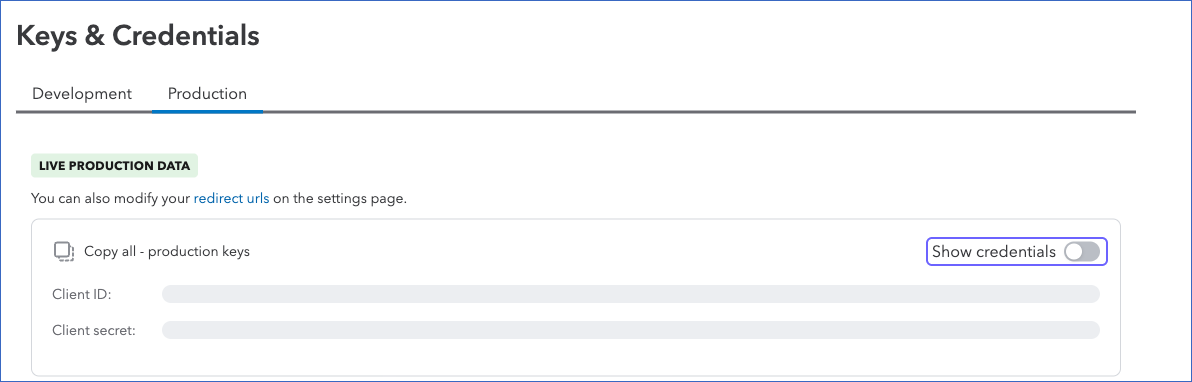
Click Keys and credentials, and then click Production. Turn on Show credentials, and then copy the Client ID and Client secret. Save them securely like any other password.
If you delete the app or reset its client secret in your Intuit Developer account, Hevo cannot connect to your company, and the Pipeline fails. To resume data ingestion, modify the Source configuration with the new credentials, and authorize Hevo again.
Configure QuickBooks Online as a Source in your Pipeline
Perform the following steps to configure your QuickBooks Online Source:
-
Click Pipelines in the Navigation Bar.
-
Click + Create Pipeline in the Pipelines List View.
-
On the Select Source Type page, select QuickBooks Online.
-
On the Select Destination Type page, select the type of Destination you want to use.
-
In the Configure Source screen, specify the following:
-
Source Name: A unique name for your Source, not exceeding 255 characters. For example, QuickBooks Online Source.
-
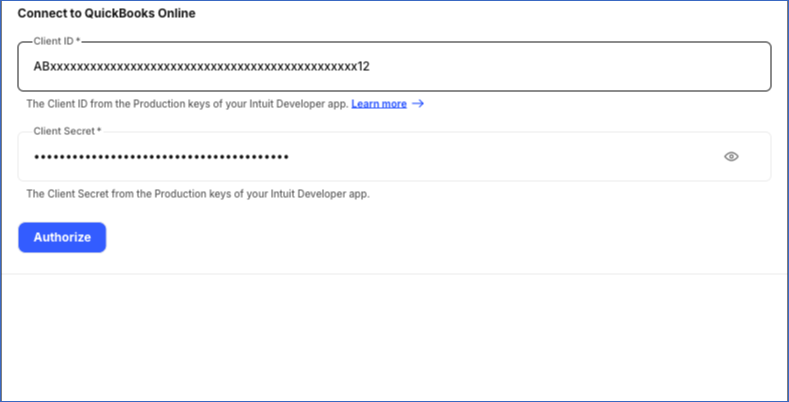
In the Connect to QuickBooks Online section, specify the following:
-
Client ID: The client ID of the app that you created in your Intuit Developer account.
-
Client Secret: The client secret of the app.
-
-
-
Click Authorize, and then do the following in the window that opens:
-
Log in to your QuickBooks Online account as a user with the Primary admin or Company admin role.
-
If you have access to more than one company, select the company whose data you want to replicate.
-
Click Connect to allow Hevo to access the data of the company.
Once the authorization is successful, you are redirected to the Configure Source screen.
-
-
Click Test & Continue to test the connection to your QuickBooks Online Source. Hevo checks the connection by reading the profile of the authorized company. Once the test is successful, you can proceed to set up your Destination.
Data Replication
Hevo replicates data for all the objects selected on the Configure Objects page during Pipeline creation. By default, all supported objects and their available fields are selected. However, you can modify this selection while creating or editing the Pipeline.
Hevo ingests the following types of data from your Source objects:
-
Historical Data: The first run of the Pipeline ingests all the data of the selected objects. For the Exchange Rate object, Hevo ingests the exchange rates of every day since January 1, 1990.
-
Incremental Data: Once the historical load is complete, Hevo ingests the records that were created or updated since the previous run, as per the sync frequency. Hevo also re-ingests the records updated in the five minutes before the previous run started, so that no changes are missed. For the following objects, Hevo ingests the data differently:
-
Company Info and Currency: Hevo ingests the entire data in each run.
-
Exchange Rate: Hevo ingests the exchange rates from three days before the previous run.
-
Child objects, such as Invoice Line: Hevo ingests the child records of each parent record that is ingested, and replaces the existing child records of that parent in the Destination.
-
You cannot resync individual objects of this Source. To ingest the data again, resync the Pipeline.
QuickBooks Online limits the number of API requests that an app can make for a company to 500 requests per minute. If this limit is reached, or if QuickBooks Online returns a temporary server error, Hevo waits and retries the request. If all the retries fail, the Pipeline run stops, and Hevo resumes the ingestion from the same point in the next run. Read API call limits.
You can create a Pipeline with this Source using either the Merge or the Append load mode.
Schema and Primary Keys
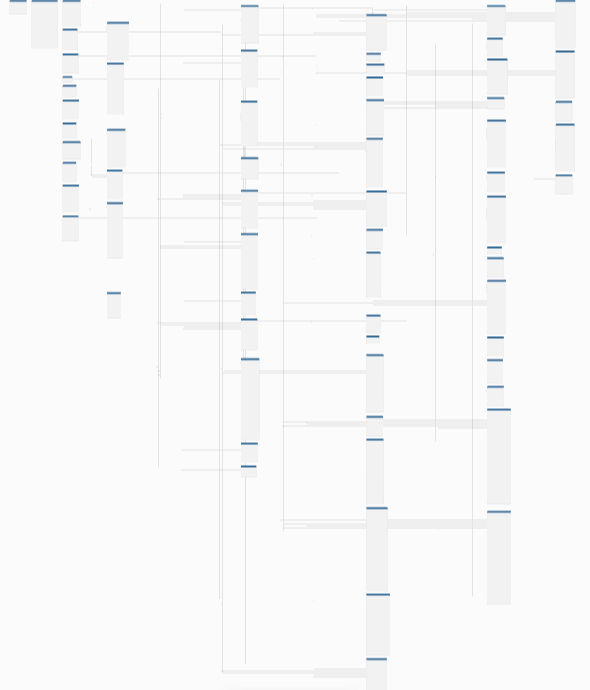
Hevo uses the following schema to upload the records in the Destination. For a detailed view of the objects, fields, and relationships, click the ERD.
Data Model
The following is the list of tables (objects) that are created at the Destination when you run the Pipeline:
| Object | Description |
|---|---|
| Account | Contains the accounts in the chart of accounts of your company, such as bank, income, expense, and liability accounts. |
| Address | Contains the addresses used in your company, such as the billing and shipping addresses of customers, vendors, employees, and transactions, and the addresses of your company. |
| Bill | Contains the bills received from vendors for goods or services. It includes the following child objects: - Bill Line - Bill Linked Txn - Bill Tax Line Detail |
| Bill Line | Contains the lines of each bill, such as the item or account, amount, and quantity. |
| Bill Linked Txn | Contains the transactions linked to each bill, such as the bill payments made against it. |
| Bill Tax Line Detail | Contains the tax lines of each bill. |
| Bill Payment | Contains the payments made against the bills received from vendors. It includes the following child objects: - Bill Payment Line - Bill Payment Line Linked Txn |
| Bill Payment Line | Contains the lines of each bill payment, with the amount and the bill or other transaction that it pays. |
| Bill Payment Line Linked Txn | Contains all the transactions linked to each line of a bill payment. |
| Budget | Contains the budgets of your company, with their period and type. It includes a child object, Budget Detail. |
| Budget Detail | Contains the planned amounts of each budget, by account, customer, class, or department, and date. |
| Class | Contains the classes used to categorize the transactions of your company, such as by product line or business segment. |
| Company Info | Contains the profile of your company, such as its name, addresses, contact details, and fiscal year settings. |
| Credit Card Payment Txn | Contains the payments made from a bank account to pay a credit card balance. |
| Credit Memo | Contains the credit memos issued to customers for refunds or adjustments. It includes the following child objects: - Credit Memo Line - Credit Memo Tax Line Detail |
| Credit Memo Line | Contains the lines of each credit memo. |
| Credit Memo Tax Line Detail | Contains the tax lines of each credit memo. |
| Currency | Contains the home currency of your company and, if multicurrency is turned on, the other currencies that it uses. |
| Customer | Contains the customers of your company, including inactive customers. |
| Customer Type | Contains the types used to group the customers of your company. |
| Department | Contains the locations used to track the transactions of your company, such as stores or regions. QuickBooks Online calls them locations in its UI. |
| Deposit | Contains the deposits made to the bank accounts of your company. It includes the following child objects: - Deposit Line - Deposit Tax Line Detail |
| Deposit Line | Contains the lines of each deposit, such as the payments or other amounts deposited. |
| Deposit Tax Line Detail | Contains the tax lines of each deposit. |
| Employee | Contains the employees of your company, including inactive employees. |
| Estimate | Contains the estimates, or quotes, sent to customers. It includes the following child objects: - Estimate Line - Estimate Linked Txn - Estimate Tax Line |
| Estimate Line | Contains the lines of each estimate. |
| Estimate Linked Txn | Contains the transactions linked to each estimate, such as the invoices created from it. |
| Estimate Tax Line | Contains the tax lines of each estimate. |
| Exchange Rate | Contains the daily exchange rates between the currencies, since January 1, 1990. |
| Invoice | Contains the invoices sent to customers for goods or services. It includes the following child objects: - Invoice Line - Invoice Linked Txn - Invoice Tax Line |
| Invoice Line | Contains the lines of each invoice, such as the item, quantity, and amount. |
| Invoice Linked Txn | Contains the transactions linked to each invoice, such as the payments received against it. |
| Invoice Tax Line | Contains the tax lines of each invoice. |
| Item | Contains the products and services that your company buys or sells, including inactive items. It includes the following child objects: - Bundle - Bundle Item |
| Bundle | Contains the bundles, which are groups of products and services sold together. Bundles are not included in the Item object. |
| Bundle Item | Contains the items in each bundle, with their quantity. |
| Journal Entry | Contains the journal entries recorded in your company. It includes the following child objects: - Journal Entry Line - Journal Entry Tax Line |
| Journal Entry Line | Contains the debit and credit lines of each journal entry. |
| Journal Entry Tax Line | Contains the tax lines of each journal entry. |
| Payment | Contains the payments received from customers. It includes a child object, Payment Line. |
| Payment Line | Contains the lines of each payment, with the amount and the invoice or other transaction that it pays. |
| Payment Method | Contains the payment methods used in your company, such as cash, check, or credit card. |
| Purchase | Contains the expenses of your company, such as checks, cash purchases, and credit card charges. It includes the following child objects: - Purchase Line - Purchase Tax Line |
| Purchase Line | Contains the lines of each purchase. |
| Purchase Tax Line | Contains the tax lines of each purchase. |
| Purchase Order | Contains the purchase orders sent to vendors. It includes the following child objects: - Purchase Order Line - Purchase Order Linked Txn - Purchase Order Tax Line |
| Purchase Order Line | Contains the lines of each purchase order. |
| Purchase Order Linked Txn | Contains the transactions linked to each purchase order, such as the bills created from it. |
| Purchase Order Tax Line | Contains the tax lines of each purchase order. |
| Recurring Transaction | Contains the templates of the transactions that your company creates on a schedule, such as recurring invoices. |
| Refund Receipt | Contains the refunds given to customers. It includes the following child objects: - Refund Receipt Line - Refund Receipt Tax Line |
| Refund Receipt Line | Contains the lines of each refund receipt. |
| Refund Receipt Tax Line | Contains the tax lines of each refund receipt. |
| Sales Receipt | Contains the sales for which payment is received at the time of the sale. It includes the following child objects: - Sales Receipt Line - Sales Receipt Tax Line |
| Sales Receipt Line | Contains the lines of each sales receipt. |
| Sales Receipt Tax Line | Contains the tax lines of each sales receipt. |
| Tax Agency | Contains the agencies to which your company pays the taxes that it collects. |
| Tax Code | Contains the tax codes that determine how tax is applied to transactions. It includes a child object, Tax Rate Detail. |
| Tax Rate Detail | Contains the sales and purchase tax rates of each tax code. |
| Tax Rate | Contains the tax rates used to calculate the tax on transactions, with their tax agency. |
| Term | Contains the payment terms used in sales and purchases, such as the number of days within which payment is due. |
| Time Activity | Contains the time recorded by employees and vendors, with the customer and service it is recorded for. |
| Transfer | Contains the transfers of money between the accounts of your company. |
| Vendor | Contains the vendors from which your company buys goods or services, including inactive vendors. |
| Vendor Credit | Contains the credits received from vendors, such as for returned goods. It includes a child object, Vendor Credit Line. |
| Vendor Credit Line | Contains the lines of each vendor credit. |
The Credit Memo, Estimate, Invoice, Purchase Order, Refund Receipt, and Sales Receipt objects also contain the custom fields of these forms that are named in QuickBooks Online and have the text type. Hevo creates a column custom_<field name> for each of these fields.
Additional Information
Read the detailed Hevo documentation for the following related topics:
Handling of Deletes
Hevo marks a record as deleted by setting the value of the metadata column __hevo__marked_deleted to True. The record remains in the Destination with all its data. Hevo captures deletes as follows:
-
Transactions: For the Bill, Bill Payment, Credit Card Payment Txn, Credit Memo, Deposit, Estimate, Invoice, Journal Entry, Payment, Purchase, Purchase Order, Refund Receipt, Sales Receipt, Time Activity, Transfer, and Vendor Credit objects, Hevo reads the records deleted in QuickBooks Online from its change history, and marks them as deleted. QuickBooks Online keeps this history only for 30 days. If the Pipeline does not run for more than 29 days, the records deleted in this period are not marked as deleted.
-
Lists: QuickBooks Online does not delete records such as accounts, customers, vendors, employees, and items, but makes them inactive. Hevo ingests the inactive records, and the value of their
activefield is false. -
Other objects: Hevo does not mark the records of the Address, Company Info, Currency, Exchange Rate, and Recurring Transaction objects as deleted.
-
Child objects: When Hevo ingests a parent record, it replaces the existing child records of the parent in the Destination. Child records removed from the parent record are marked as deleted. If the parent record is deleted, its child records are not marked as deleted.
Source Considerations
-
Hevo ingests data from one QuickBooks Online company in a Pipeline. To ingest data from more than one company, create a Pipeline for each company.
-
When you re-authorize Hevo for an existing Source, select the same QuickBooks Online company. To ingest data from a different company, create a new Pipeline with a new Source.
-
Hevo keeps its access to your QuickBooks Online company active in each Pipeline run. If the Pipeline does not run for more than 100 days, for example, because it is paused, the authorization expires. In this case, modify the Source configuration and authorize Hevo again.
-
Some objects, such as Budget, Class, Department, and Purchase Order, are available only in some QuickBooks Online plans, or when the related feature, such as class or location tracking, is turned on for your company. If your company cannot access such an object, the ingestion of the object may fail with an error that asks you to re-authorize the Source. Re-authorizing does not resolve this error. Instead, deselect the object. The other objects continue to be ingested.
-
The first run of the Pipeline ingests the exchange rates of every day since January 1, 1990, which can be more than a million records. If you do not need exchange rates, deselect the Exchange Rate object.
-
Hevo reads up to 1,000 records in each API call. QuickBooks Online counts the API calls by Intuit app, so all the Pipelines that use the same Intuit app share its limits. Your Intuit app may also have a monthly limit on API calls, as per its partner program tier.
-
The currency_id fields in the transaction objects contain the currency code, such as USD.