PayPal is a digital payments platform that enables businesses and individuals to send and receive payments online, accept credit and debit card transactions, and manage invoices and subscriptions. It provides merchants with tools to process transactions, issue refunds, handle payment disputes, and reconcile account balances across multiple currencies.
Hevo uses the following PayPal REST APIs to replicate data from your PayPal account to the Destination of your choice:
| API Name | API Endpoint | Description |
|---|---|---|
| Transaction Search API |
/v1/reporting/transactions, /v1/reporting/balances
|
Used to ingest Transaction and Balance object data. |
| Catalog Products API | /v1/catalogs/products |
Used to ingest Product object data. |
| Disputes API | /v1/customer/disputes |
Used to ingest Dispute object data and its related child objects. |
| Invoicing API | /v2/invoicing/invoices |
Used to ingest Invoice object data and its related child objects. |
| Subscriptions API | /v1/billing/plans |
Used to ingest Billing Plan object data and its related child objects. |
To ingest data, Hevo authenticates using the OAuth 2.0 Client Credentials. You must provide the Client ID and Client Secret of a REST API app created in your PayPal Developer Dashboard, which Hevo exchanges for a short-lived access token.
PayPal Environments
PayPal provides two separate environments for testing purposes and production use:
-
Sandbox: This environment is used for development and testing. You can simulate transactions and other activities without processing real payments. Data created in the Sandbox environment is isolated from live data and does not impact actual business operations.
-
Live: This environment is used for real payment processing and contains actual customer and transaction data.
Hevo supports data replication from both the Live and Sandbox environments. You can connect to the environment from which you want to ingest data by selecting it while configuring the Source.
Supported Features
| Feature Name | Supported |
|---|---|
| Capture deletes | Yes |
| History mode | No |
| Custom data (user-configured tables & fields) | No |
| Data blocking (skip objects and fields) | Yes |
| Resync (objects and Pipelines) | Yes |
| API configurable | Yes |
Prerequisites
-
An active PayPal Business account from which data is to be ingested.
-
A REST API app created in the PayPal Developer Dashboard with permission to access the required APIs.
-
The Client ID and Client Secret of the REST API app to provide Hevo access to your PayPal account data.
Obtain the Client ID and Client Secret
To connect Hevo to your PayPal account, you must create a REST API app in the PayPal Developer Dashboard and obtain its Client ID and Client Secret.
Perform the following steps:
-
Log in to the PayPal Developer Dashboard with your PayPal account credentials.
-
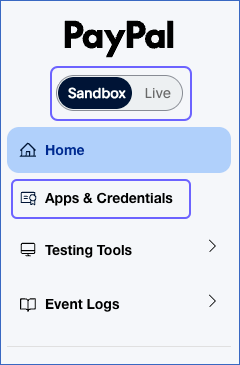
In the left navigation pane, select the Sandbox or Live tab based on the environment you want to connect to, and then click Apps & Credentials.
-
On the API Credentials page, click Create App.

-
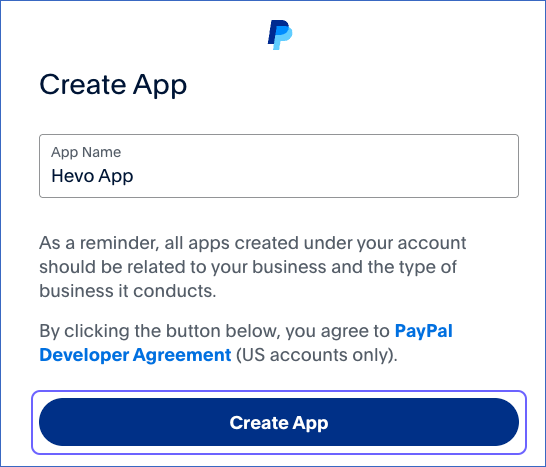
On the Create App pop-up window, enter a name for the app, such as Hevo App, and click Create App.
-
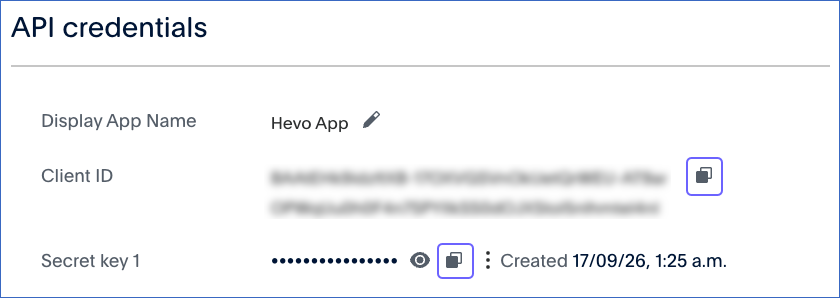
In the API Credentials section, click the copy icon to copy the values in the Client ID and Secret key 1 fields, and store them securely like any other password.
Use these credentials while configuring your PayPal Source in Hevo. If the Client ID or Client Secret configured in the Pipeline is revoked manually from your PayPal account, Hevo cannot authenticate with the Source. As a result, all active jobs for the Pipeline fail, and no data is replicated. To resume data replication, modify the Source configuration in the Pipeline with a valid Client ID and Client Secret. Once the updated credentials are saved, Hevo re-authenticates the Source, and data ingestion resumes from the last saved offset.
Configure PayPal as a Source in your Pipeline
Perform the following steps to configure your PayPal Source:
-
Click Pipelines in the Navigation Bar.
-
Click + Create Pipeline in the Pipelines List View.
-
On the Select Source Type page, select PayPal.
-
On the Select Destination Type page, select the type of Destination you want to use.
-
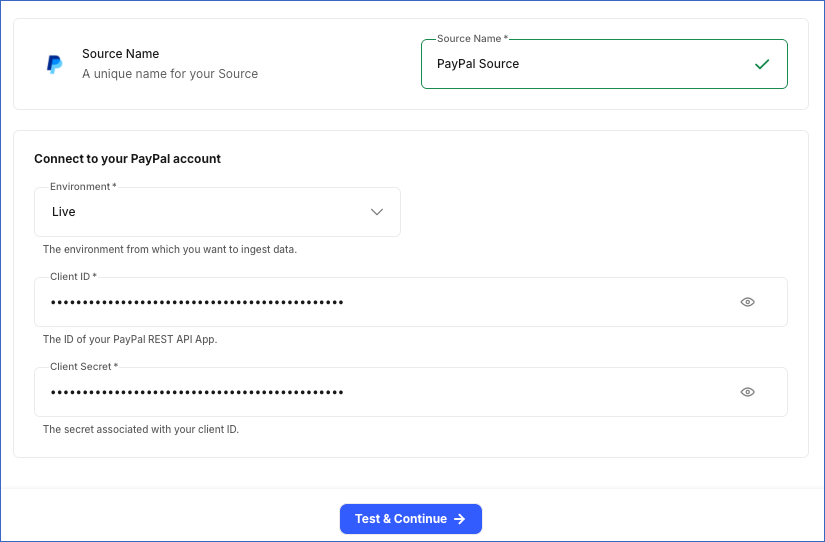
In the Configure Source screen, specify the following:
-
Source Name: A unique name for your Source, not exceeding 255 characters. For example, PayPal Source.
-
In the Connect to your PayPal account section, specify the following:
-
Environment: The PayPal environment you want to connect to and ingest data from.
-
Client ID: The Client ID that you obtained from your PayPal REST API app.
-
Client Secret: The Client Secret that you obtained from your PayPal REST API app.
-
-
-
Click Test & Continue to test the connection to your PayPal Source. Once the test is successful, you can proceed to set up your Destination.
Data Replication
Hevo replicates data for all the objects selected on the Configure Objects page during Pipeline creation. By default, all supported objects and their available fields are selected. However, you can modify this selection while creating or editing the Pipeline.
Hevo ingests the following types of data from your Source objects:
-
Historical Data: The first run of the Pipeline ingests all available historical data for the selected objects and loads it into the Destination.
-
Incremental Data: Once the historical load is complete, new and updated records for objects are ingested as per the sync frequency.
For the following objects, Hevo ingests only the incremental data in subsequent Pipeline runs:
-
Adjudication
-
Balance
-
Balance Detail
-
Dispute
-
Dispute Message
-
Disputed Transaction
-
Disputed Transaction Item
-
Evidence
-
Evidence Info Refund
-
Incentive
-
Money Movement
-
Offer History
-
Supporting Info
-
Tracking Info
-
Transaction
-
Transaction Item Checkout Option
-
Transaction Item Detail
For all other objects, Hevo ingests the entire data during each Pipeline run.
Schema and Primary Keys
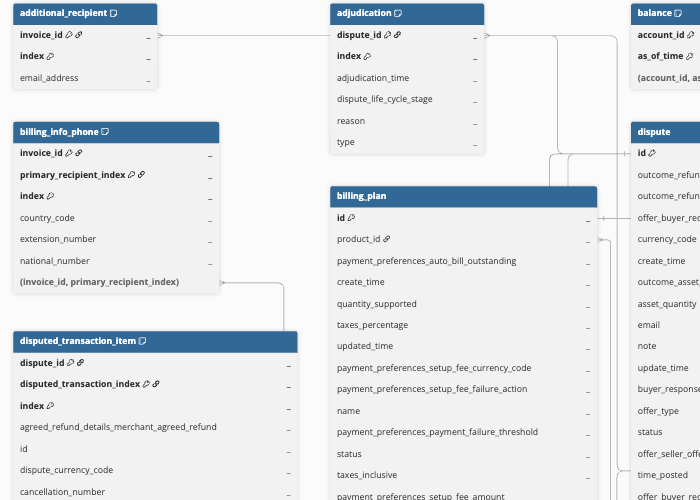
Hevo uses the following schema to upload the records to the Destination. For a detailed view of the objects, fields, and relationships, click the ERD.
Data Model
The following is the list of tables (objects) that are created at the Destination when you run the Pipeline:
| Object | Description |
|---|---|
| Balance | Contains the balance of a PayPal account on a specific date and time, across all currencies held in the account. It includes a child object, Balance Detail. |
| Billing Plan | Contains details of a subscription plan, including its name, status, associated product, and payment preferences. It includes the following child objects: - Billing Cycle - Pricing Tier |
| Dispute | Contains details of a dispute raised by a customer with PayPal, including the reason, status, life cycle stage, and outcome. It includes the following child objects: - Dispute Message - Disputed Transaction - Disputed Transaction Item - Evidence - Evidence Info Refund - Tracking Info - Adjudication - Money Movement - Offer History - Supporting Info |
| Invoice | Contains details of an invoice created in PayPal, including its status, amount due, currency, and payment terms. It includes the following child objects: - Invoice Item - Additional Recipient - Primary Recipient - Invoicer Info Phone - Billing Info Phone - Payment Detail - Refund Detail |
| Product | Contains details of a product or service that can be referenced by a billing plan, including its name, description, category, and type. |
| Transaction | Contains details of an individual PayPal transaction, including payer, shipping, fee, and tax information, and the transaction status. It includes the following child objects: - Transaction Item Detail. - Transaction Item Checkout Option. - Incentive |
Additional Information
Read the detailed Hevo documentation for the following related topics:
Handling of Deletes
For the Product, Invoice, and Billing Plan objects, Hevo uses a full data refresh approach to capture delete actions. During each Pipeline run, Hevo compares the data fetched from the Source object with the data present in the Destination table. If a record exists in the Destination but is no longer returned by the Source, the record is marked as deleted by setting the value of the metadata column __hevo__marked_deleted to True.
For the following child objects, if a record is deleted at the Source and is no longer returned with its parent object’s data, it is automatically removed from the Destination:
-
Invoice Item
-
Additional Recipient
-
Primary Recipient
-
Invoicer Info Phone
-
Billing Info Phone
-
Payment Detail
-
Refund Detail
-
Billing Cycle
-
Pricing Tier
For all other objects, Hevo does not support capturing deletes.
Source Considerations
-
PayPal may take up to three hours to make newly processed Transaction and Balance data available through its APIs.
-
The Transaction Search API provides historical Transaction and Balance data for up to 3 years.