Nium is a global payments infrastructure platform that banks, fintechs, payroll providers, marketplaces, and other businesses use to move money across borders. It provides cross-border payouts, multi-currency wallets and virtual accounts, card issuance, and account verification through a single API.
Hevo uses the Nium API to replicate the client details, balances, prefund requests, customers and their wallets, beneficiaries, cards, and virtual accounts, transactions, remittance statuses, users, account verifications, and reference data of your Nium account to the Destination of your choice. To ingest data, you must provide Hevo with an API key and the Client ID of your Nium account.
Nium Environments
Nium provides two separate environments:
-
Sandbox: An environment for testing your integration with mock data. You get access to it as soon as you sign up with Nium.
-
Production: The live environment that contains your real customers, wallets, and transactions.
Each environment has its own API key and Client ID. Hevo can ingest data from either environment. The API key and Client ID that you provide must belong to the environment that you select while configuring the Source.
Supported Features
| Feature Name | Supported |
|---|---|
| Capture deletes | Yes (for some objects) |
| History mode | No |
| Custom data (user-configured tables & fields) | No |
| Data blocking (skip objects and fields) | Yes |
| Resync (objects and Pipelines) | Yes |
| API configurable | Yes |
Prerequisites
-
An active Nium account exists in the Sandbox or Production environment from which data is to be ingested.
-
You can access the API keys page in the Nium Portal of that environment.
-
The API key and Client ID of the environment are available.
Obtain the API Key and Client ID
Hevo connects to your Nium account using an API key and the Client ID of your account. The Client ID, also known as the clientHashId, identifies your client account in Nium and is not a secret. Both values are specific to an environment, so you must obtain them from the environment from which you want to ingest data.
Perform the following steps to obtain the API key and Client ID:
-
Log in to the Nium Portal of the environment from which you want to ingest data. The environment you are logged in to is displayed at the top right of the portal.
-
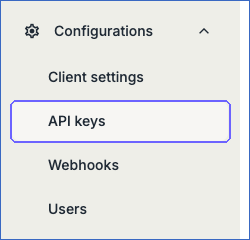
In the left navigation pane, click Configurations, and then click API keys.
-
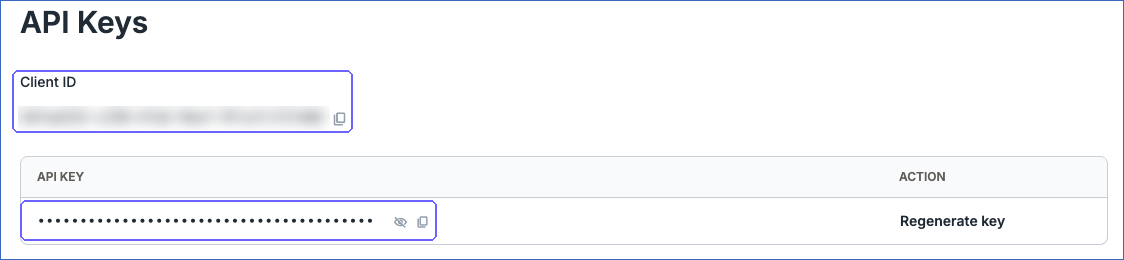
On the API Keys page, do the following:
-
Under Client ID, click the copy icon to copy the Client ID.
-
In the API KEY section, click the copy icon next to the masked key to copy the API key.
Save both values securely to use them while configuring your Nium Source in Hevo.
-
Read Authentication for more information.
If you click Regenerate key on the API Keys page, the API key configured in the Pipeline stops working, Hevo cannot authenticate with Nium, and all active jobs of the Pipeline fail. To resume data replication, modify the Source configuration in the Pipeline with the new API key. Once the updated key is saved, Hevo re-authenticates the Source, and data ingestion resumes from the last saved position.
Note: Treat the API key as a secret. It provides access to all the data of your Nium client account.
Configure Nium as a Source in your Pipeline
Perform the following steps to configure your Nium Source:
-
Click Pipelines in the Navigation Bar.
-
Click + Create Pipeline in the Pipelines List View.
-
On the Select Source Type page, select Nium.
-
On the Select Destination Type page, select the type of Destination you want to use.
-
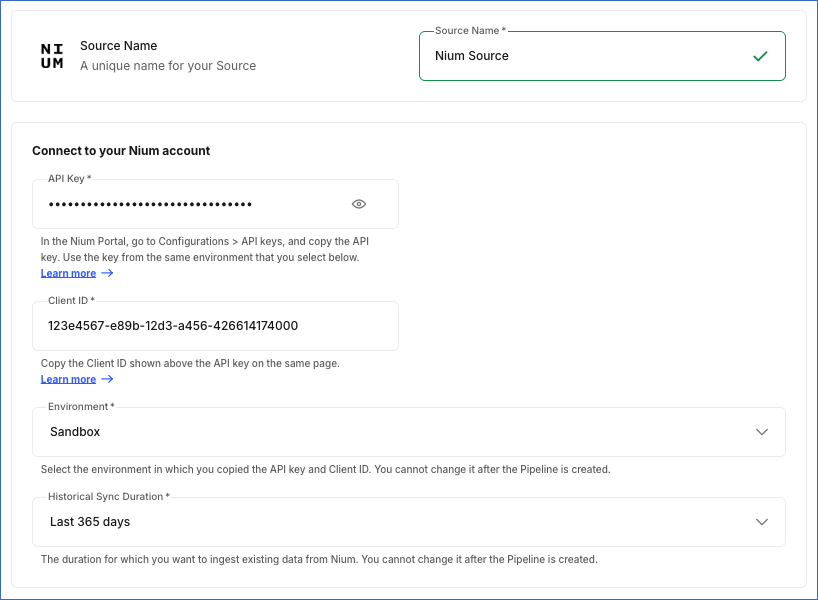
In the Configure Source screen, specify the following:
-
Source Name: A unique name for your Source, not exceeding 255 characters. For example, Nium Source.
-
In the Connect to your Nium account section, specify the following:
-
API Key: The API key that you obtained from the Nium Portal. You can change this value after the Pipeline is created.
-
Client ID: The 36-character Client ID of your Nium account. For example, 123e4567-e89b-12d3-a456-426614174000. You cannot change this value after the Pipeline is created.
-
Environment: The Nium environment from which you want to ingest data, Sandbox or Production. Default value: Sandbox. Select the environment in which you obtained the API key and Client ID. You cannot change this value after the Pipeline is created.
-
Historical Sync Duration: The duration for which Hevo ingests the historical data of the prefund_requests, transactions, and verifications objects in the first run of the Pipeline. You can select Last 45 days, Last 90 days, Last 180 days, or Last 365 days. Default value: Last 365 days. Hevo ingests all the data of the other objects. You cannot change this value after the Pipeline is created.
-
-
-
Click Test & Continue to test the connection to your Nium Source. Once the test is successful, you can proceed to set up your Destination.
When you click this button, Hevo reads your client details from Nium with the specified API key and Client ID in the selected environment. If the test fails, Hevo displays an error message. For example:
-
If the Client ID does not have 36 characters, Hevo asks you to correct it.
-
If Nium rejects the credentials, Hevo asks you to check the API key and the Client ID, and that the selected environment is the one in which you obtained them. Nium returns the same error for an invalid API key and an unknown Client ID.
-
Data Replication
Hevo replicates data for all the objects selected on the Configure Objects page during Pipeline creation. By default, all supported objects and their available fields are selected. However, you can modify this selection while creating or editing the Pipeline.
Child objects are selected and deselected along with their parent object. You cannot select or deselect a child object individually. For example, if you select the customers object, Hevo also ingests its child objects, such as wallets, beneficiaries, and cards. The Data Model lists the child objects of each parent object.
Hevo ingests the following types of data from your Source objects:
-
Historical Data: The first run of the Pipeline ingests the historical data for the selected objects and loads it into the Destination.
-
Incremental Data: Once the historical load is complete, new and updated records for objects are ingested as per the sync frequency.
Hevo ingests the objects as follows:
| Object | Historical data | Incremental data |
|---|---|---|
| prefund_requests | The records created during the period selected in the Historical Sync Duration field. | The records created since the previous run, based on the creation date. In each run, Hevo also reads the records created during the 30 days before the previous run, and all the prefund requests whose status is Pending, irrespective of when they were created. As a result, Hevo captures the status of a prefund request when it is approved or rejected. |
| transactions | The records created during the period selected in the Historical Sync Duration field. | The records created since the previous run, based on the creation date. In each run, Hevo also reads the records created during the 30 days before the previous run, to capture changes to their status, such as a transaction that is settled. |
| remittance_status | The status steps of each remittance transaction that Hevo ingests. | The status steps of each remittance transaction that Hevo ingests. Hevo updates the existing steps and adds the new steps of the transaction in the Destination. |
| verifications | The account verifications performed during the period selected in the Historical Sync Duration field. | The account verifications performed since the previous run. In each run, Hevo also reads the verifications of the one hour before the previous run. |
| All other objects | All the records available in the Source. | All the records available in the Source. Records that are no longer available in the Source are marked as deleted. |
Hevo calculates the Historical Sync Duration and the dates of the incremental data in UTC.
Nium enforces rate limits of 20 requests per second in the Sandbox environment and 100 requests per second in the Production environment. Hevo ingests one object at a time to stay within these limits. If Nium rejects a request with a rate limit or server error, Hevo tries the request up to five times, waiting two seconds between attempts. If the request still fails, Hevo ingests the data of the object again in the next Pipeline run.
Note: You can create a Pipeline with this Source only using the Merge load mode. The Append mode is not supported for this Source.
Schema and Primary Keys
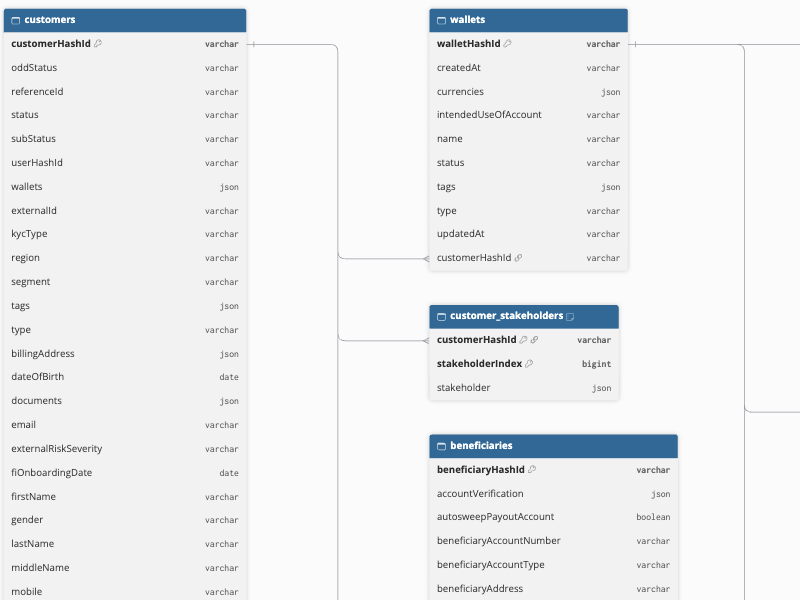
Hevo uses the following schema to upload the records in the Destination. For a detailed view of the objects, fields, and relationships, click the ERD.
Data Model
The following is the list of tables (objects) that are created at the Destination when you run the Pipeline:
| Object | Description |
|---|---|
| bank_accounts | Contains the bank accounts linked to each customer, including the account number, country, currency, routing codes, and verification details. |
| beneficiaries | Contains the beneficiaries to whom each customer can send payouts, including their name, contact, address, and payout details. |
| cards | Contains the cards issued against each wallet, including the card status, renewal date, embossing, and token details. |
| client | Contains the configuration details of your Nium client account, such as the country, currencies, callback URLs, and the features enabled for the account. |
| client_balances | Contains the prefund balances of your client account for each currency and account type. |
| customer_stakeholders | Contains the stakeholders of each business customer, such as directors and shareholders. |
| customers | Contains the individual and business customers onboarded under your client account, including their personal or business details, and their onboarding, KYC, and compliance status. It includes the child objects, bank_accounts, beneficiaries, customer_stakeholders, funding_instruments, rfis, and wallets, and the child objects of wallets. |
| fee_plans | Contains the fee plans that apply to your client account and the products they cover. |
| funding_instruments | Contains the funding instruments, such as cards and bank accounts, that each customer uses to add funds to a wallet. |
| onboarding_applications | Contains the customer onboarding applications submitted through Nium’s hosted onboarding forms, along with their status and submission errors. |
| prefund_requests | Contains the requests made to prefund your client account, including the amount, currency, status, and the dates of creation and transfer. |
| purpose_codes | Contains the purpose codes that Nium supports for payouts, along with their descriptions. |
| remittance_status | Contains the status history of each remittance transaction, with one record for each step of the transfer, including its status, error details, and estimated delivery time. Hevo populates this object only for the transactions whose type starts with Remittance_Debit. |
| rfis | Contains the requests for information (RFIs) that Nium raised for each customer, including the information requested, the status, and the time of response. |
| supported_corridors | Contains the payout corridors available to your client account, including the destination country and currency, payout method, limits, and delivery time. |
| transactions | Contains the transactions of all the customers and wallets under your client account, such as payouts, fund additions, card transactions, and conversions, including the amount, currency, date, and status. It includes the child object, remittance_status. |
| users | Contains the users created under your client account, along with their KYC status. |
| verifications | Contains the account verifications performed under your client account, including the account holder name, country, currency, and the result of each verification. |
| virtual_accounts | Contains the virtual accounts assigned to each wallet for receiving funds, including the bank name, account name, and routing codes. |
| wallet_balances | Contains the balance of each wallet for each currency that it holds. |
| wallets | Contains the wallets of each customer, including the name, type, status, and currencies of each wallet. It includes the child objects, cards, virtual_accounts, and wallet_balances. |
Additional Information
Read the detailed Hevo documentation for the following related topics:
Handling of Deletes
Nium does not provide information about deleted records. Hevo identifies deleted records as follows:
-
client, client_balances, customers, fee_plans, onboarding_applications, purpose_codes, supported_corridors, and users: Hevo ingests all the records of these objects in each run. When a record is no longer available in Nium, Hevo sets the value of the metadata column _hevo_marked_deleted to True for the record in the Destination.
-
Child objects of customers: Hevo ingests the child records of each customer in each run. When a child record is no longer available in Nium, Hevo sets the value of the metadata column _hevo_marked_deleted to True for the record in the Destination.
-
remittance_status: In each incremental run, Hevo updates the existing status steps of a remittance transaction and adds the new ones. A step that is no longer available in Nium remains in the Destination until you resync the transactions object. During the resync, Hevo sets the value of the metadata column _hevo_marked_deleted to True for such steps.
Hevo does not capture deletes for the prefund_requests, transactions, and verifications objects. If such a record is removed from Nium, it remains in the Destination.
Source Considerations
-
Nium filters transactions only by their creation date. As a result, Hevo captures the changes made to a transaction only during the 30 days after it is created. For example, if a transaction is settled 40 days after it is created, its previous status remains in the Destination. To capture such changes, resync the transactions object.
-
If Nium inserts a step in the middle of the status history of a remittance transaction, the existing steps of the transaction in the remittance_status object no longer match the steps in Nium. To correct the data, resync the transactions object.
-
Hevo can ingest the historical data of the prefund_requests, transactions, and verifications objects for at most the last 365 days.
-
Hevo ingests all the records of the customers object and its child objects in each run, and it makes about 10 API calls for each customer that has one wallet. If your account has a large number of customers, each Pipeline run takes longer.
-
If a Nium product, such as cards or funding instruments, is not enabled for your account, Nium returns no records for the corresponding objects, and Hevo does not load any data for them.
-
You cannot change the Client ID and Environment of an existing Pipeline. To ingest data from another client account or environment, create a new Pipeline.