Monday.com is a cloud-based work operating system that enables teams to build, run, and scale their workflows. It allows businesses to manage projects, track task progress, assign ownership, and collaborate across departments through customizable boards and dashboards.
Hevo uses Monday.com’s GraphQL API to replicate data from your Monday.com account to the Destination of your choice. To ingest data, you must provide Hevo with a Personal API Token to authenticate to your Monday.com account.
Supported Features
| Feature Name | Supported |
|---|---|
| Capture deletes | Yes |
| Custom data (user-configured tables & fields) | No |
| Data blocking (skip objects and fields) | Yes |
| Resync (objects and Pipelines) | Yes |
| API configurable | Yes |
| Authorization via API | Yes |
Prerequisites
-
An active Monday.com account exists from which data is to be ingested.
-
The Monday.com user account used to generate the Personal API Token can access the boards and objects you want to replicate.
-
The Personal API Token is available to provide Hevo access to your Monday.com account data.
Obtain the Personal API Token
To connect Hevo to your Monday.com account, you must provide a Personal API Token.
Note: Monday.com Personal API Tokens are tied to individual user accounts and provide API access scoped to that user’s permissions.
Perform the following steps to obtain the Personal API Token:
-
Log in to your Monday.com account.
-
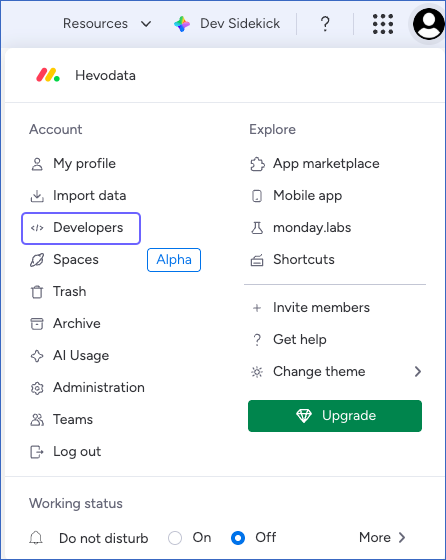
Click your profile icon in the top-right corner of the page, and then click Developers to open the Developer Center.
-
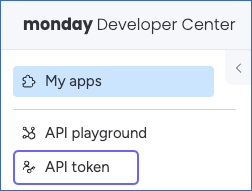
In the left navigation pane, Click API token.
-
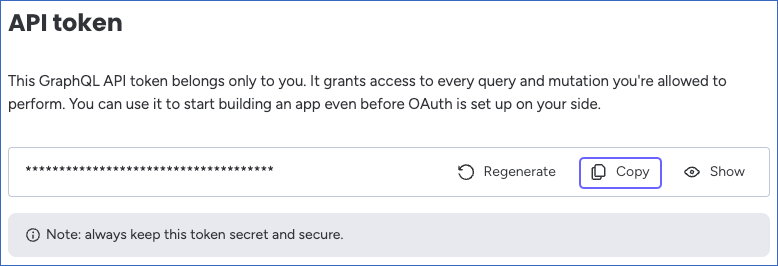
Click Copy to copy your Personal API Token, and save it securely like any other password. Use this token while configuring your Hevo Pipeline.
If the Personal API Token configured in the Pipeline is revoked manually from your Monday.com account, Hevo cannot authenticate with the Source. As a result, all active jobs for the Pipeline fail, and no data is replicated. To resume data replication, modify the Source configuration in the Pipeline with a valid Personal API Token. Once the updated token is saved, Hevo re-authenticates the Source, and data ingestion resumes from the last saved offset.
Configure Monday.com as a Source in your Pipeline
Perform the following steps to configure your Monday.com Source:
-
Click Pipelines in the Navigation Bar.
-
Click + Create Pipeline in the Pipelines List View.
-
On the Select Source Type page, select Monday.
-
On the Select Destination Type page, select the type of Destination you want to use.
-
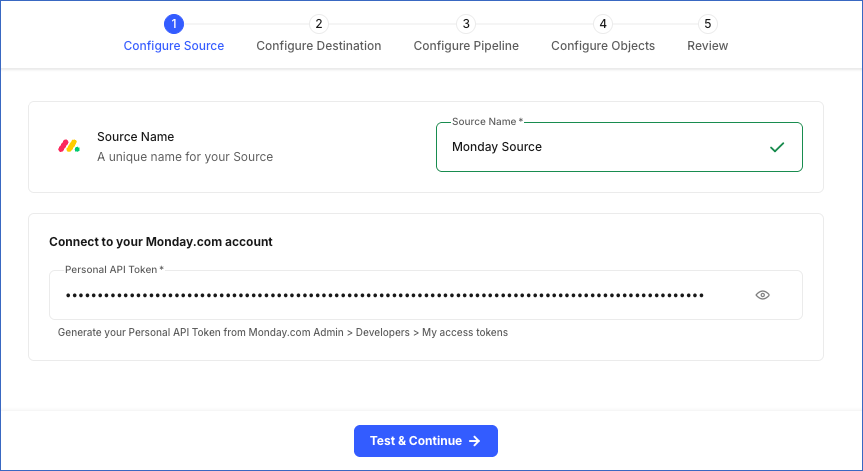
In the Configure Source screen, specify the following:
-
Source Name: A unique name for your Source, not exceeding 255 characters. For example, Monday Source.
-
Personal API Token: The Personal API Token that you obtained from your Monday.com account.
-
-
Click Test & Continue to test the connection to your Monday.com Source. Once the test is successful, you can proceed to set up your Destination.
Data Replication
Hevo replicates data for all the objects selected on the Configure Objects page during Pipeline creation. By default, all supported objects and their available fields are selected. However, you can modify this selection while creating or editing the Pipeline.
Selecting a parent object automatically includes all its associated child objects for replication. Child objects cannot be selected or deselected individually.
Hevo ingests the following types of data from your Source objects:
-
Historical Data: The first run of the Pipeline ingests all available historical data for the selected objects and loads it into the Destination.
-
Incremental Data: Once the historical load is complete, new and updated records for objects are ingested as per the sync frequency.
For the Activity Log object, Hevo ingests only the incremental data in subsequent Pipeline runs. Incremental changes are detected using the lastSyncTimestamp field, which filters activity log events created after the previous sync. On the first Pipeline run, all activity log events from the beginning of the account are fetched.
For all other objects, Hevo ingests the entire data during each Pipeline run.
Note: You can create a Pipeline with this Source only using the Merge load mode. The Append mode is not supported for this Source.
Monday.com enforces API rate limits based on your account plan. To understand how Hevo handles such scenarios, read Handling Rate Limit Exceptions.
Schema and Primary Keys
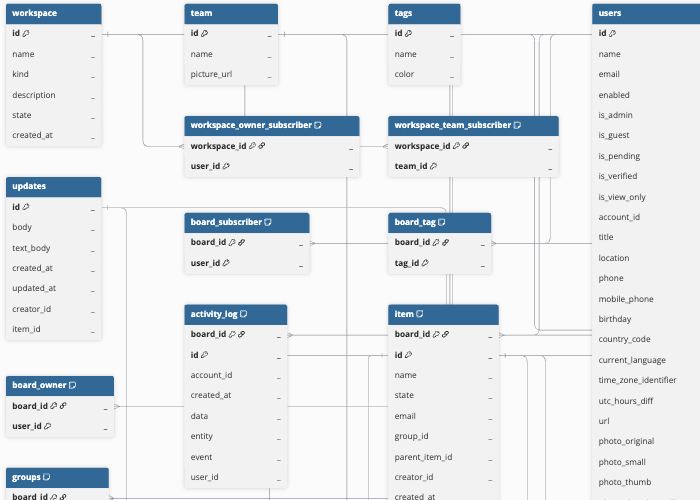
Hevo uses the following schema to upload the records to the Destination. For a detailed view of the objects, fields, and relationships, click the ERD.
Data Model
The following is the list of tables (objects) that are created at the Destination when you run the Pipeline:
| Object | Description |
|---|---|
| workspace | Represents a Monday.com workspace container that holds boards and members. Contains the workspace name, kind (open or closed), description, state (active or archived), and creation timestamp. This object has the following child objects: - workspace_owner_subscriber - workspace_team_subscriber - workspace_user_subscriber |
| team | Represents a team in Monday.com that groups users together. Contains the team name and picture URL. This object has a child object, team_user. |
| tags | Global tags that can be applied to boards. Contains the tag name and color. |
| users | Monday.com account users, including guests and members. Contains user profile information such as name, email, role flags (admin, guest, view-only, pending), account ID, location, phone numbers, time zone, and profile photo URLs. |
| board | A Monday.com board that contains items, groups, columns, and subscribers. Contains the board name, description, kind (public, private, or share), state (active, archived, or deleted), permission level, type, and references to the owning workspace, owner user, and top group. This object has the following child objects: - board_owner - board_subscriber - board_tag - board_update - columns - groups - activity_log - item |
| item | A row or card on a Monday.com board. Contains the item name, state (active, archived, or deleted), group reference, parent item reference for sub-items, creator ID, and creation and update timestamps. This object has the following child objects: - item_subscriber - column_value - column_value_item_id - column_value_mirror_item - person_team - time_tracking_history |
| updates | User-posted update messages on items. Contains the HTML-formatted body, plain text body, creation and update timestamps, creator ID, and the associated item ID. This object has the following child objects: - asset - reply |
Additional Information
Read the detailed Hevo documentation for the following related topics:
Handling of Deletes
For the following objects, the complete data is ingested during each Pipeline run. Hevo identifies deleted records by comparing the latest data fetched from the Source with the data present in the Destination. If a record exists in the Destination but is no longer returned by the Source, Hevo marks the record as deleted by setting the value of the metadata column __hevo__marked_deleted to True:
-
workspace
-
workspace_owner_subscriber
-
workspace_team_subscriber
-
workspace_user_subscriber
-
team
-
team_user
-
tags
-
users
-
board
-
board_owner
-
board_subscriber
-
board_tag
-
board_update
-
columns
-
item_subscriber
-
column_value
-
column_value_item_id
-
column_value_mirror_item
-
person_team
-
updates
-
asset
-
reply
For the item object, Monday.com marks deleted records by setting the state field to deleted and archived records by setting state to archived. For the groups object, Monday.com marks deleted records by setting the deleted field to True. In both cases, Hevo ingests these records and marks them as deleted in the Destination by updating the __hevo__marked_deleted metadata column to True.
The following objects do not support capturing deletes:
-
activity_log
-
time_tracking_history
Source Considerations
-
Monday.com enforces a complexity budget for its GraphQL API. Each query has a limit of 5 million complexity points, and your account has a rolling budget of 10 million complexity points per minute (1 million for free and trial accounts). Queries that exceed this limit result in a GraphQL error. If you encounter continuous complexity errors, consider reducing the number of active objects selected in the Pipeline.
-
On the first Pipeline run, Hevo fetches all activity_log records from the beginning of the account (starting from 1970-01-01T00:00:00Z). For accounts with a large volume of activity log data, the initial load may take longer than subsequent incremental syncs.