Mailgun is an email delivery service by Sinch that businesses use to send, receive, and track transactional and marketing emails through an API or SMTP. Mailgun Send is the part of Mailgun that sends emails and tracks what happens to them, such as deliveries, opens, clicks, and bounces.
Hevo uses the Mailgun API to replicate data from your Mailgun account to the Destination of your choice. To ingest data, you must provide Hevo with a Mailgun API key and the region that hosts your Mailgun account.
Supported Features
| Feature Name | Supported |
|---|---|
| Capture deletes | Yes (for some objects) |
| History mode | No |
| Custom data (user-configured tables & fields) | No |
| Data blocking (skip objects and fields) | Yes |
| Resync (objects and Pipelines) | Yes |
| API configurable | No |
Prerequisites
-
An active Mailgun account from which data is to be ingested.
-
You are assigned the Admin role, or another role that can manage API keys, in your Mailgun account, to create an API key.
Create an API Key
Hevo connects to Mailgun using a Mailgun API key. Perform the following steps to create one:
-
Log in to your Mailgun account.
-
In the upper-right corner, click your profile name, and then click API Security.
-
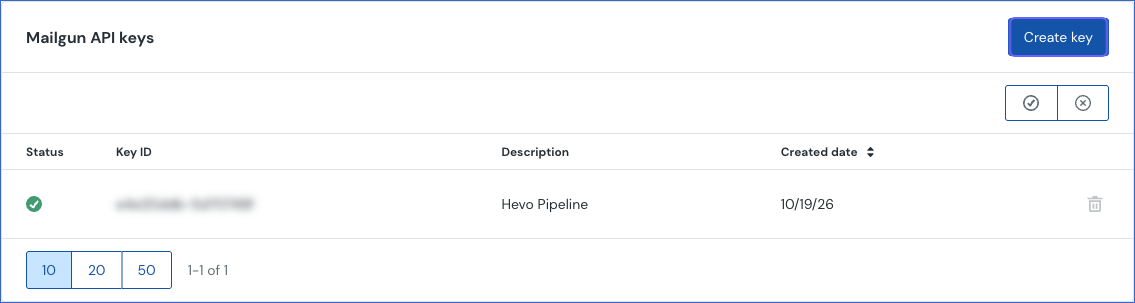
In the Mailgun API keys section, click Create key.
-
In the Create API key dialog, specify a Description for the key, such as Hevo Pipeline, and then click Create Key.
-
Click Copy to clipboard, and save the key securely. Then, click Done.
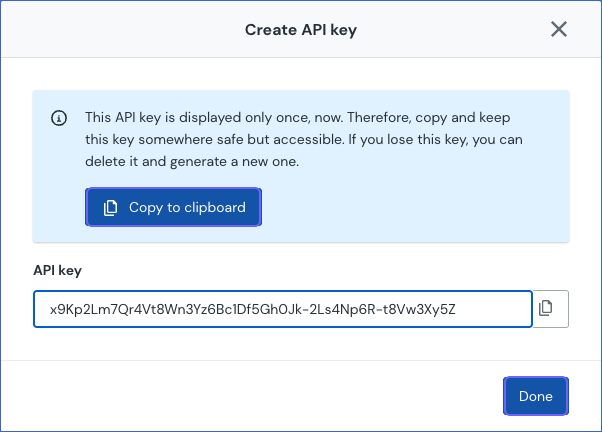
Note: Mailgun shows the API key only when you create it. If you lose the key, delete it and create a new one. If the key is deleted, Hevo cannot connect to Mailgun. To resume ingestion, modify the Source configuration with a valid key.
Configure Mailgun Send as a Source in your Pipeline
Perform the following steps to configure your Mailgun Send Source:
-
Click Pipelines in the Navigation Bar.
-
Click + Create Pipeline in the Pipelines List View.
-
On the Select Source Type page, select Mailgun Send.
-
On the Select Destination Type page, select the type of Destination you want to use.
-
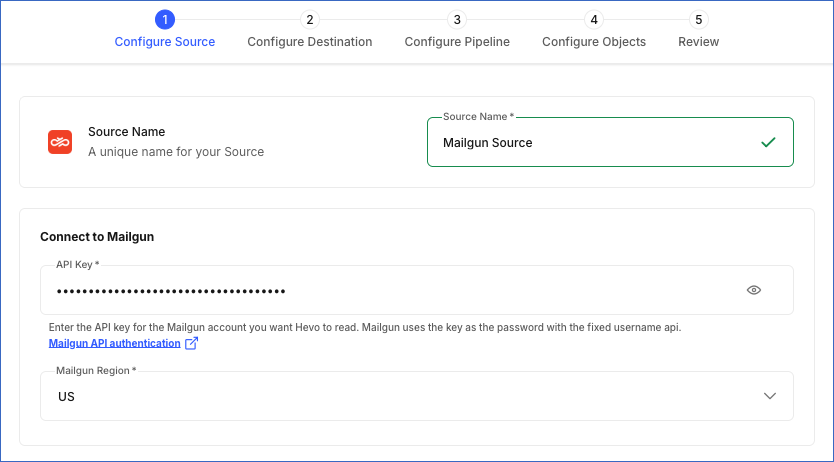
In the Configure Source screen, specify the following:
-
Source Name: A unique name for your Source, not exceeding 255 characters. For example, Mailgun Source.
-
In the Connect to Mailgun section, specify the following:
-
API Key: The API key that you created in Mailgun.
-
Mailgun Region: The region that hosts your Mailgun account, US or EU. The selected region must match the region in which your API key was created. You can see the region of your account next to the flag icon at the top of the Mailgun dashboard.
-
-
-
Click Test & Continue to test the connection to your Mailgun Send Source. Once the test is successful, you can proceed to set up your Destination.
Data Replication
Hevo replicates data for all the objects selected on the Configure Objects page during Pipeline creation. By default, all supported objects and their available fields are selected. However, you can modify this selection while creating or editing the Pipeline.
Hevo ingests the entire data of all the selected objects during each Pipeline run, as per the sync frequency. For the event objects, such as Accepted Event and Delivered Event, Hevo ingests all the events that Mailgun retains at the time of the run.
You can resync only the parent objects, Domain, Mailing List, Route, Inbox Ready Domain, Monitored IP, Seed List, Seed List Result, and Spam Trap Count. When you resync a parent object, Hevo also resyncs its child objects.
Note: You can create a Pipeline with this Source only using the Merge load mode. The Append mode is not supported for this Source.
Schema and Primary Keys
Hevo uses the following schema to upload the records in the Destination. For a detailed view of the objects, fields, and relationships, click the ERD.
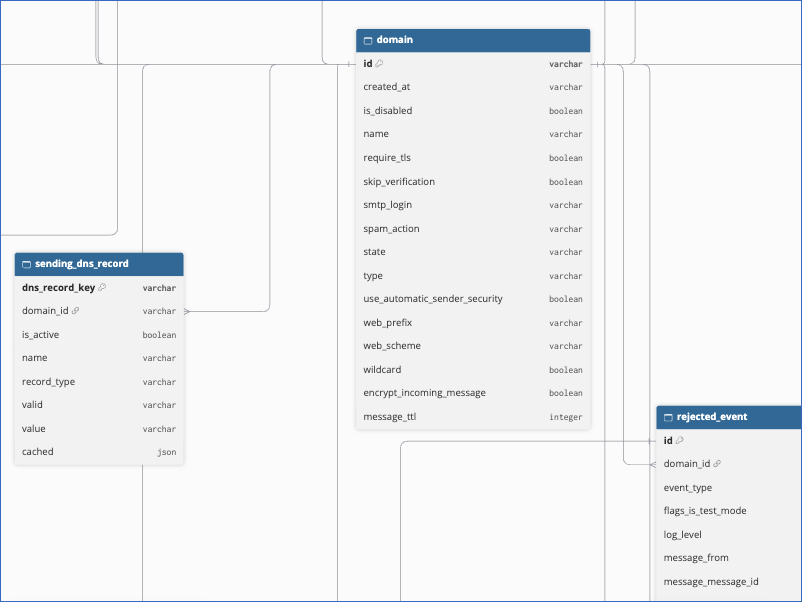
The primary key of most objects is id. The following objects use other primary keys:
-
The tag, message attachment, and message recipient objects of each event type, such as Delivered Event Tag:
event_idandindex. -
Accepted Event Route:
idandevent_id. -
Bounce and Complaint:
domain_idandemail. -
Whitelist:
domain_id,type, andvalue. -
Receiving DNS Record and Sending DNS Record:
dns_record_key, a hash of the domain, record type, name, and value. -
Route Action:
route_action_key, a hash of the route and the action. -
Mailing List:
email, the address of the mailing list. -
Inbox Ready Domain:
name. -
Monitored IP:
ip. Blocklist Event:ipandblocklist. -
Seed List Sending Domain:
seed_list_idanddomain. Seed List Result:result_id. -
Spam Trap Count:
date.
Data Model
The following is the list of tables (objects) that are created at the Destination when you run the Pipeline:
| Object | Description |
|---|---|
| Domain | Contains the sending domains of your Mailgun account, including their state, type, and settings. It includes the following child objects: - Receiving DNS Record - Sending DNS Record - Template - Bounce - Complaint - Whitelist - Accepted Event, Delivered Event, Failed Event, Rejected Event, Opened Event, Clicked Event, Unsubscribed Event, Stored Event, and Complained Event, and their tag, message attachment, message recipient, and route child objects |
| Mailing List | Contains the mailing lists of your account, including their address, access level, and number of members. |
| Route | Contains the routes that process incoming emails, including their priority and filter expression. It includes a child object, Route Action. |
| Inbox Ready Domain | Contains the domains that are monitored in Mailgun Optimize. |
| Monitored IP | Contains the IP addresses that are monitored for blocklistings in Mailgun Optimize. It includes a child object, Blocklist Event. |
| Seed List | Contains the seed lists used for inbox placement tests. It includes a child object, Seed List Sending Domain. |
| Seed List Result | Contains the results of inbox placement tests. |
| Spam Trap Count | Contains the daily number of spam trap hits, by trap type. |
Additional Information
Read the detailed Hevo documentation for the following related topics:
Handling of Deletes
For all the objects except the event objects and Spam Trap Count, Hevo uses a full data refresh approach to capture delete actions. If a record exists in the Destination but is no longer returned by the Source, the record is marked as deleted by setting the value of the metadata column __hevo__marked_deleted to True.
For the event objects and Spam Trap Count, Hevo does not capture deletes. Events that Mailgun no longer retains remain in the Destination.
Source Considerations
-
Mailgun retains events for a limited period, which is at least 3 days and depends on your Mailgun plan. Hevo ingests only the events that Mailgun retains at the time of each Pipeline run. To capture all the events, set a sync frequency shorter than the retention period of your plan.
-
The Spam Trap Count object contains the daily number of spam trap hits for the last 7 days at the time of each Pipeline run. As Hevo does not capture deletes for this object, the counts of earlier days remain in the Destination.
-
The Inbox Ready Domain, Monitored IP, Blocklist Event, Seed List, Seed List Sending Domain, and Seed List Result objects contain data only if the corresponding Mailgun Optimize features are enabled for your account. Otherwise, Hevo creates these tables, but they remain empty.
-
In the Blocklist Event object, the
timestampsfield contains the time at which Mailgun first detected the listing. The time at which Mailgun last detected the listing is stored in thelast_seenfield. -
Mailgun returns the value 0001-01-01T00:00:00Z for some date fields that do not have a value. Hevo loads this value unchanged. In the Blocklist Event object, this value in the
delist_requested_atfield means that a delisting was not requested. In the Seed List object, this value in thelast_result_atfield means that the seed list does not have a result yet. -
The Whitelist object contains the allowlist of each domain, which Mailgun shows as Allowlist in the user interface.
Limitations
-
Hevo does not replicate the members of mailing lists. The Mailing List object contains only the mailing lists and their number of members.
-
Hevo does not replicate the content of stored messages, the tracking settings of domains, the DKIM keys of domains, or account-level templates.