Livestorm is a video engagement platform that businesses use to host webinars, virtual events, and online meetings. Teams create events in Livestorm, schedule one or more sessions for each event, and engage with the participants through chat, questions, and polls. Livestorm also records the sessions and stores the details of the people who register for them.
Hevo uses the Livestorm API to replicate data from your Livestorm workspace to the Destination of your choice. To ingest data, you must provide Hevo with an API token of your Livestorm workspace.
Supported Features
| Feature Name | Supported |
|---|---|
| Capture deletes | Yes (for some objects) |
| History mode | No |
| Custom data (user-configured tables & fields) | No |
| Data blocking (skip objects and fields) | Yes |
| Resync (objects and Pipelines) | Yes (for parent objects) |
| API configurable | Yes |
Prerequisites
-
An active Livestorm workspace from which data is to be ingested.
-
The Owner or Admin role in the Livestorm workspace, to obtain the API token.
-
Enough API calls left in the monthly quota of your Livestorm workspace. Read API Quota.
Obtain the API Token
Hevo connects to Livestorm using an API token of your workspace. The token must have read access to the data that you want to replicate.
Perform the following steps to create an API token:
-
Log in to your Livestorm workspace as an Owner or Admin.
-
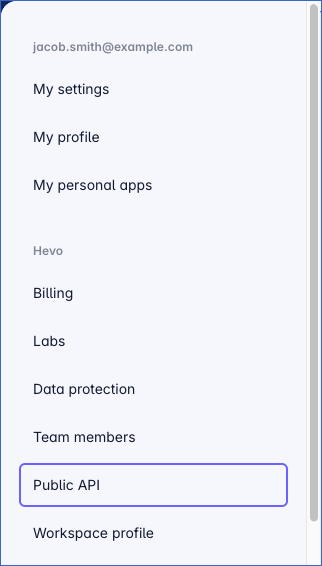
In the bottom-left corner, click your profile picture, and then click Public API.
-
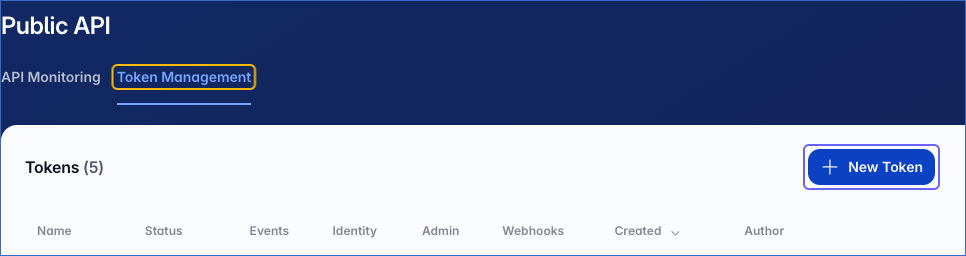
On the Public API page, click the Token Management tab, and then click New Token.
-
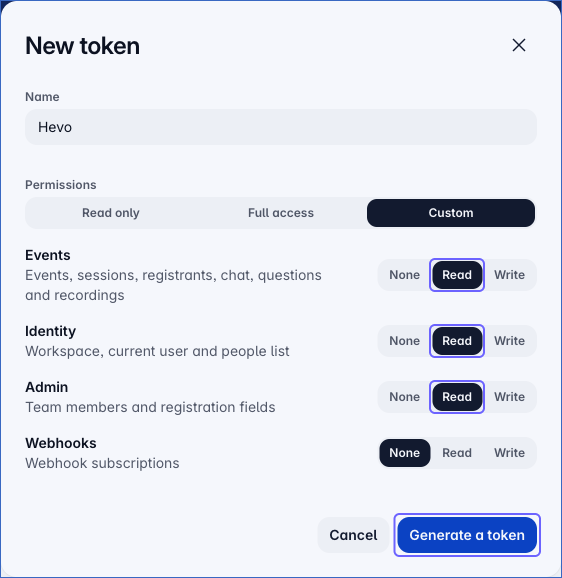
In the New token panel, do the following:
-
In the Name field, specify a name for the token. For example, Hevo.
-
Under Permissions, select Read for Events, Identity, and Admin. Hevo needs Events to ingest the Event and Session objects and their child objects, Identity to ingest the People object, and Admin to ingest the Users object. Hevo does not need access to Webhooks, so you can select None for it.
-
Click Generate a token.
-
-
In the Your token has been created panel, click Copy, and save the token securely like any other password. Livestorm displays the token only once.
Use this API token while configuring your Livestorm Source in Hevo.
Note: If the API token is deleted in Livestorm, Hevo cannot connect to Livestorm, and the Pipeline stops ingesting data. To resume, modify the Source configuration with a valid API token.
Configure Livestorm as a Source in your Pipeline
Perform the following steps to configure your Livestorm Source:
-
Click Pipelines in the Navigation Bar.
-
Click + Create Pipeline in the Pipelines List View.
-
On the Select Source Type page, select Livestorm.
-
On the Select Destination Type page, select the type of Destination you want to use.
-
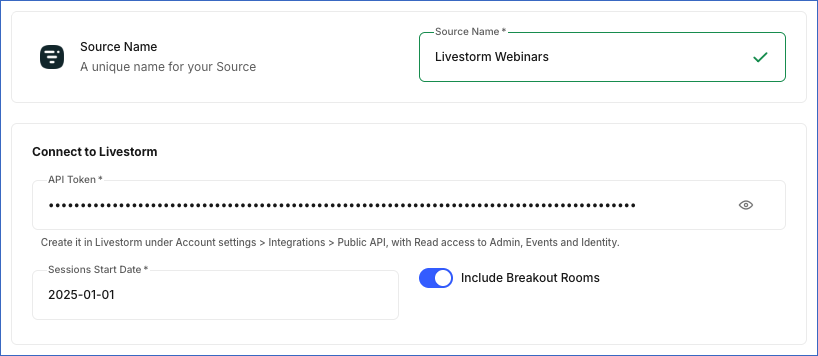
In the Configure Source screen, specify the following:
-
Source Name: A unique name for your Source, not exceeding 255 characters. For example, Livestorm Webinars.
-
In the Connect to Livestorm section, specify the following:
-
API Token: The API token that you created in Livestorm.
-
Sessions Start Date: The date, in the YYYY-MM-DD format, from which Hevo ingests the sessions of your events. Hevo ingests the sessions that are scheduled to start on or after this date. For example, 2025-01-01. To ingest all the sessions in your workspace, specify 2000-01-01. You cannot change this date after you create the Pipeline.
-
Include Breakout Rooms: If enabled, Hevo ingests the breakout room sessions along with the main sessions of your events. This option is enabled by default.
-
-
-
Click Test & Continue to test the connection to your Livestorm Source. Hevo uses the API token to read one event from your workspace and verify that the token is valid. The test does not check the access of the token to the users of your workspace. Once the test is successful, you can proceed to set up your Destination.
Data Replication
Hevo replicates data for all the objects selected on the Configure Objects page during Pipeline creation. By default, all supported objects and their available fields are selected. However, you can modify this selection while creating or editing the Pipeline.
Hevo ingests the following types of data from your Source objects:
-
Historical Data: The first run of the Pipeline ingests the following data:
-
For the Session object and its child objects, the past sessions that are scheduled to start on or after the Sessions Start Date that you specified while configuring the Source.
-
For all the other objects, all the available data.
-
-
Incremental Data: Once the historical load is complete, Hevo ingests data as per the sync frequency as follows:
-
For the Session object, Hevo ingests the past sessions that were updated since the previous run. Changes are identified using the time at which a session was last updated. For each session that is ingested, Hevo also ingests all the records of its child objects, such as the participants, chat messages, questions, and recordings of the session, and replaces the existing child records of that session in the Destination.
-
For all the other objects, Hevo ingests the entire data in each run.
-
You can resync only the parent objects. When you resync a parent object, Hevo also resyncs its child objects.
Note: You can create a Pipeline with this Source only using the Merge load mode. The Append mode is not supported for this Source.
API Quota
Livestorm limits the number of API calls that your workspace can make to 10,000 in a 30-day period, and to 5 requests per second. The monthly quota is shared by all the API tokens and applications that use the API of your workspace. Read Rate limits and quotas.
In each run, Hevo makes API calls for each object, and also one call for each event to ingest its people, and one call for each updated session to ingest each of its child objects. If the monthly quota is used up, the Pipeline stops ingesting data until the quota is reset. To reduce the number of API calls, deselect the objects that you do not need, or set a lower sync frequency.
You can check the API calls used by your workspace in Livestorm, on the API Monitoring tab of the Public API page.
Schema and Primary Keys
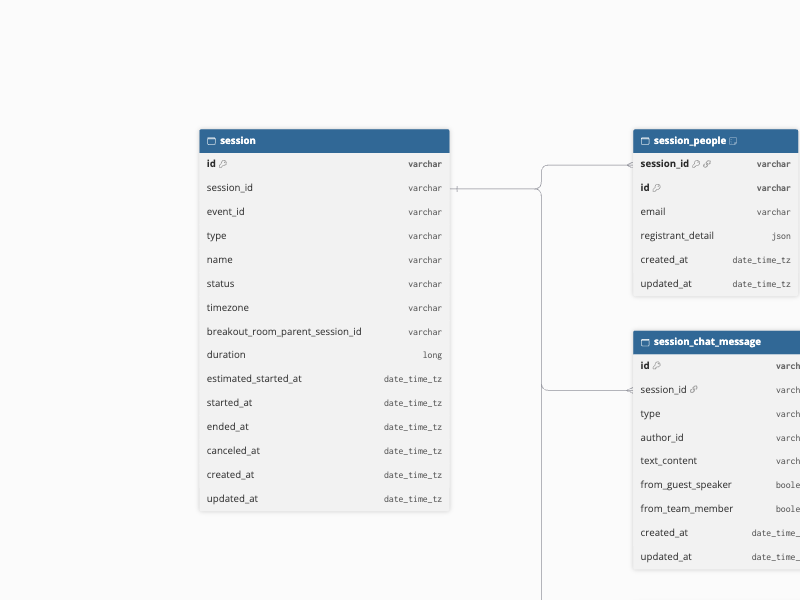
Hevo uses the following schema to upload the records in the Destination. For a detailed view of the objects, fields, and relationships, click the ERD.
Data Model
The following is the list of tables (objects) that are created at the Destination when you run the Pipeline:
| Object | Description |
|---|---|
| Event | Contains the details of the events in your workspace, such as the title, type, status, owner, registration settings, and the time at which each event was published. It includes a child object, Event People, which contains the people registered for each event, such as their email address, type, time zone, and registration details. |
| People | Contains the details of the participants in your workspace, such as their name, email address, role, and time zone. |
| Session | Contains the details of the past sessions of your events, such as the name, status, time zone, duration, and the scheduled and actual start and end times of each session. For breakout room sessions, the breakout_room_parent_session_id field contains the ID of the main session. It includes the following child objects:- Session Chat Message: The messages posted in the chat of each session, such as the text, author, and whether the author is a team member or guest speaker. - Session People: The participants of each session, such as their email address and registration details. - Session Question: The questions asked in each session and their responses. - Session Recording: The recordings of each session, such as the file name, type, and size. |
| Users | Contains the details of the team members of your workspace, such as their name, email address, role, and locale, and whether their invitation is pending. |
Additional Information
Read the detailed Hevo documentation for the following related topics:
Handling of Deletes
For the Event, Event People, People, and Users objects, Hevo uses a full data refresh approach to capture deletes. During each Pipeline run, Hevo compares the data fetched from the Source object with the data present in the Destination table. If a record exists in the Destination but is no longer returned by the Source, the record is marked as deleted by setting the value of the metadata column __hevo__marked_deleted to True.
For the child objects of Session, Hevo replaces the records of a session each time it ingests the session. As a result, a record deleted in Livestorm is removed from the Destination the next time its session is ingested.
For the Session object, Hevo does not capture deletes. Sessions deleted in Livestorm remain in the Destination.
Source Considerations
-
Hevo ingests only the past sessions of your events. Upcoming and live sessions are ingested after they end.
-
Hevo ingests the child records of a session only when the session is updated in Livestorm. Changes to the participants, questions, or recordings of a session that do not update the session itself are ingested only when you resync the Session object.
-
The People object contains the participants of your workspace. The team members of your workspace are in the Users object.
-
The
registrant_detailfield of the Event People and Session People objects contains the registration details of each person as JSON, as returned by Livestorm.
Limitations
-
Hevo replicates data only from the Livestorm workspace to which the API token belongs. To replicate data from more than one workspace, create a separate Pipeline for each workspace.
-
Hevo does not ingest the download links of session recordings.