Linear is a project management and issue tracking platform for software teams. Teams use it to plan and track issues, organize work into projects and cycles, and align their work with company-wide initiatives.
Hevo uses the Linear GraphQL API to replicate data from your Linear workspace to the Destination of your choice. To ingest data, you must provide Hevo with a personal API key of your Linear account.
Supported Features
| Feature Name | Supported |
|---|---|
| Capture deletes | Yes (for some objects) |
| History mode | No |
| Custom data (user-configured tables & fields) | No |
| Data blocking (skip objects and fields) | Yes |
| Resync (objects and Pipelines) | Yes |
| API configurable | Yes |
Prerequisites
-
An active Linear workspace from which data is to be ingested.
-
You are an Admin of the Linear workspace, or a Member in a workspace where an Admin allows members to create API keys, to create a personal API key.
Create a Personal API Key
Hevo connects to your Linear workspace using a personal API key of your Linear account. Hevo ingests the data that your Linear user can access.
Perform the following steps to create a personal API key:
-
Log in to your Linear workspace.
-
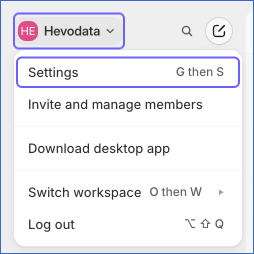
In the top left corner, click your workspace name, and then click Settings.
-
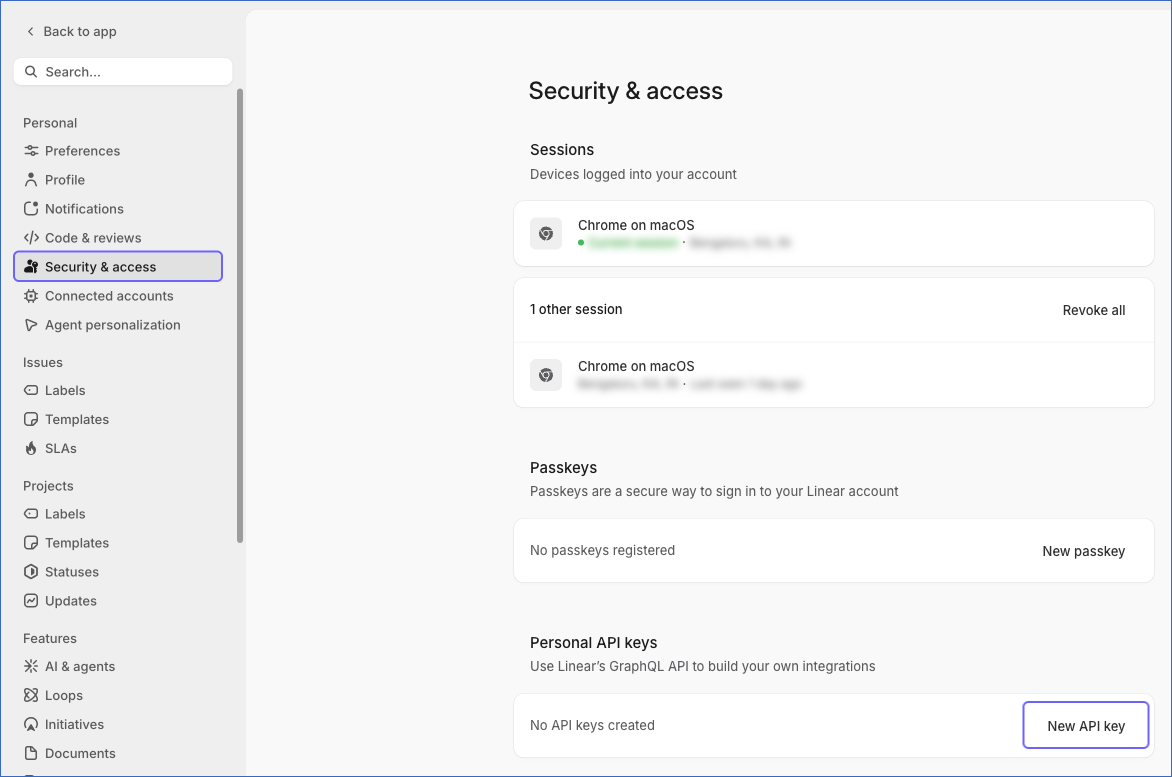
In the left navigation pane, under Personal, click Security & access, and then, in the Personal API keys section, click New API key.
-
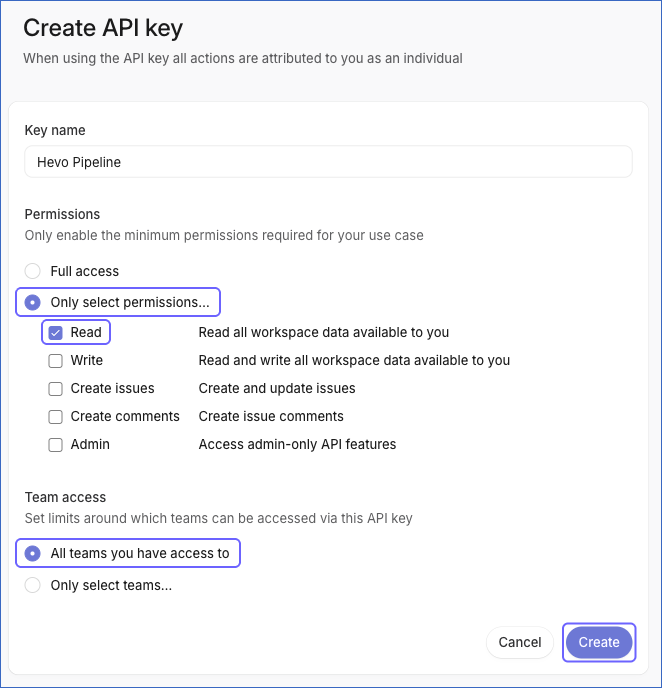
On the Create API key page, do the following:
-
In the Key name field, specify a name for the key. For example, Hevo Pipeline.
-
Under Permissions, click Only select permissions…, and then select the Read check box. Hevo only reads data from Linear, so the key needs only the Read permission.
-
Under Team access, select All teams you have access to. If you click Only select teams… and select specific teams, Hevo ingests only the data of those teams.
-
Click Create.
-
-
Click the Copy (
 ) icon to copy the API key, and save it securely like any other password. Linear does not display the key again once you leave the page.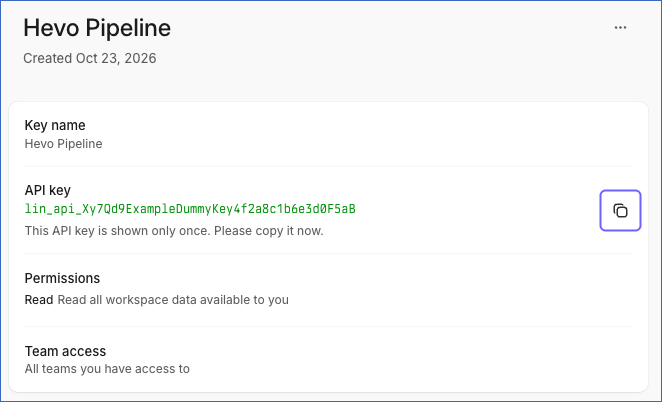
Read API and Webhooks for more information about personal API keys.
If the API key is revoked or deleted in Linear, Hevo cannot connect to your workspace, and the Pipeline fails. To resume data ingestion, create a new key and modify the Source configuration with it.
Configure Linear as a Source in your Pipeline
Perform the following steps to configure your Linear Source:
-
Click Pipelines in the Navigation Bar.
-
Click + Create Pipeline in the Pipelines List View.
-
On the Select Source Type page, select Linear.
-
On the Select Destination Type page, select the type of Destination you want to use.
-
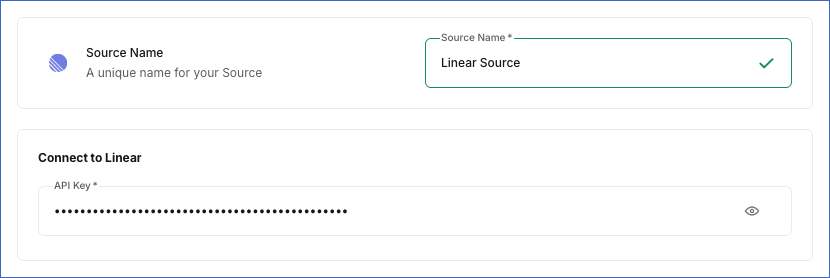
In the Configure Source screen, specify the following:
-
Source Name: A unique name for your Source, not exceeding 255 characters. For example, Linear Source.
-
In the Connect to Linear section, specify the following:
- API Key: The personal API key that you created in Linear.
-
-
Click Test & Continue to test the connection to your Linear Source. Once the test is successful, you can proceed to set up your Destination.
Test & Continue
When you click this button, Hevo checks that Linear accepts the API key by reading the details of the user who created the key. If the key does not have the permission to read this data, the test fails with a permission error.
Data Replication
Hevo replicates data for all the objects selected on the Configure Objects page during Pipeline creation. By default, all supported objects and their available fields are selected. However, you can modify this selection while creating or editing the Pipeline.
Hevo ingests the following types of data from your Source objects:
-
Historical Data: The first run of the Pipeline ingests all the data of the selected objects. For most objects, this includes archived records, which Hevo marks as deleted.
-
Incremental Data: Once the historical load is complete, Hevo ingests data as per the sync frequency:
-
For the following objects, Hevo ingests the records created or updated since the previous run, based on the updated_at field: Attachment, Comment, Customer, Customer Request, Cycle, Initiative, Issue, Issue History, Label, Project, Project Label, Project Milestone, Project Update, and Users.
-
For all the other objects, Hevo ingests the entire data in each run.
Child objects, such as Issue Label, are ingested along with their parent object.
-
Linear limits the number of API requests and the query complexity that a user’s API keys can use in an hour. Read Rate limiting. If a limit is reached, Hevo waits for a short time for the limit to reset. If the limit does not reset in that time, Hevo does the following:
-
During the historical load: Hevo loads the data read so far without deleting or replacing any existing data, displays a warning for the object and its child objects, and reads the object again automatically. For the objects ingested incrementally, Hevo resumes reading from the record at which it stopped.
-
During incremental runs: For the objects ingested incrementally, Hevo loads the data read so far, displays a warning for the object and its child objects, and in the next run, resumes reading from the record at which it stopped. For the objects ingested in full in each run, Hevo does not load any data for the object in that run and reads it again in the next run.
Note: You can create a Pipeline with this Source only using the Merge load mode. The Append mode is not supported for this Source.
Schema and Primary Keys
Hevo uses the following schema to upload the records in the Destination. For a detailed view of the objects, fields, and relationships, click the ERD.
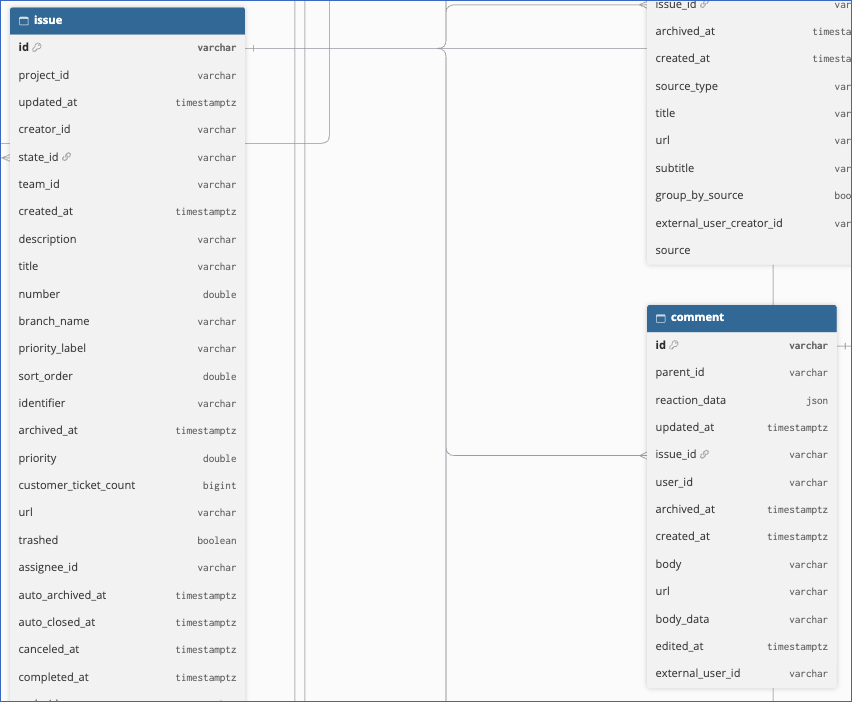
The primary key of most objects is id. The following objects use other primary keys:
-
Attachment Metadata:
attachment_idandname. -
Initiative History:
idandinitiative_id. -
Issue History:
idandissue_id. -
Issue Label:
issue_idandindex. -
Issue Subscriber:
issue_idandsubscriber_id. -
Label Children:
label_idandlabel_children_id. -
Project External Link:
project_idandid. -
Project Label Children:
project_label_idandchild_id. -
Project Label Project:
project_idandproject_label_id. -
Project Member:
project_idandmember_id. -
Project Update Comment:
project_update_idandcomment_id. -
Project Update Reaction:
project_update_idandid.
Data Model
The following is the list of tables (objects) that are created at the Destination when you run the Pipeline:
| Object | Description |
|---|---|
| Attachment | Contains the links to external resources, such as pull requests or support tickets, that are attached to issues. It includes a child object, Attachment Metadata. |
| Comment | Contains the comments on issues, including the body, author, and parent comment. |
| Customer | Contains the customers tracked in your workspace, including their name, domains, status, owner, tier, revenue, size, and the approximate number of requests. |
| Customer Request | Contains the customer requests linked to issues and projects, including the customer and priority. |
| Cycle | Contains the cycles of your teams, including their start and end dates and progress. |
| Document | Contains the documents in your workspace, including their title, content, and project. |
| External User | Contains the external users, such as customers who raise requests through integrations, who are not members of your workspace. |
| Initiative | Contains the initiatives, which group projects toward a larger goal. It includes a child object, Initiative History. |
| Initiative To Project | Contains the links between initiatives and their projects. |
| Integration | Contains the integrations configured in your workspace. |
| Issue | Contains the issues, including their title, description, state, priority, creator, assignee, team, project, and cycle. It includes the following child objects: - Issue Label - Issue Subscriber |
| Issue History | Contains the changes made to issues, such as changes to the state, assignee, priority, and labels. |
| Issue Relation | Contains the relations between issues, such as blocking, related, and duplicate issues. |
| Label | Contains the labels for issues. It includes a child object, Label Children. |
| Project | Contains the projects, including their name, status, lead, progress, scope, and start and target dates. It includes the following child objects: - Project External Link - Project Member |
| Project Label | Contains the labels for projects. It includes the following child objects: - Project Label Children - Project Label Project |
| Project Milestone | Contains the milestones of projects, including their name, description, target date, and project. |
| Project Status | Contains the statuses that can be assigned to projects. |
| Project Update | Contains the status updates posted on projects, including the body, health, and author. It includes the following child objects: - Project Update Comment - Project Update Reaction |
| Roadmap | Contains the roadmaps of your workspace. Linear has deprecated roadmaps in favor of initiatives. |
| Roadmap To Project | Contains the links between roadmaps and their projects. |
| Team Membership | Contains the memberships of users in teams. |
| Users | Contains the users of your workspace, including disabled users. |
| Workflow State | Contains the workflow states, such as Backlog, In Progress, and Done, through which the issues of a team move. |
Additional Information
Read the detailed Hevo documentation for the following related topics:
Handling of Deletes
Hevo marks a record as deleted by setting the value of the metadata column __hevo__marked_deleted to True. Hevo captures deletes as follows:
-
Archived and deleted records: When a record is archived, an issue is deleted, or a customer is merged into another customer in Linear, Hevo marks the record as deleted. For the objects ingested in full in each run, this happens in the next run. For the other objects, this happens when the record is next updated in Linear, or when you resync the object, as Linear does not update the updated_at value of a record when it is archived. The record remains in the Destination with its archived_at value. This applies to the Attachment, Comment, Customer, Customer Request, Cycle, Document, Initiative, Initiative To Project, Issue, Issue History, Issue Relation, Project, Project Milestone, Project Status, and Project Update objects.
-
Objects ingested in full in each run: If a record exists in the Destination but is no longer returned by the Source, Hevo marks the record as deleted.
-
Child objects: Hevo replaces the child records of a parent record when the parent record is ingested. Child records that are removed in Linear are removed from the Destination. This does not apply to the Project Label Project object.
-
Other objects: For the Attachment, Comment, Customer, Customer Request, Cycle, Initiative, Issue, Issue History, Label, Project, Project Label, Project Label Project, Project Milestone, and Project Update objects, Hevo marks the records that are permanently removed from Linear as deleted only when you resync the object. Hevo does not capture deletes for the Users object.
Source Considerations
-
Hevo ingests the data that the user who created the API key can access in Linear. If the key is limited to specific teams, Hevo ingests only the data of those teams.
-
Linear applies its rate limits to all the API keys of a user together. If you use the same user’s keys in other tools, those requests also count toward the limits.
-
For each issue, Hevo ingests the 50 most recent changes into the Issue History object. Older changes to an issue are not ingested. A change that is no longer among the 50 most recent changes of an issue remains in the Destination until you resync the object, after which Hevo marks it as deleted.
-
For the External User, Integration, Label, Project Label, Roadmap, Roadmap To Project, and Team Membership objects, Hevo does not ingest archived records. For the Workflow State object, Hevo ingests archived records but does not mark them as deleted.
-
If customer requests are not enabled in your Linear workspace, Hevo does not ingest any data for the Customer and Customer Request objects. If you disable customer requests after the Pipeline has ingested these objects, the existing records remain in the Destination.
-
Linear has deprecated roadmaps. If Linear removes the roadmaps API, Hevo does not ingest any data for the Roadmap and Roadmap To Project objects.
Limitations
-
Hevo does not replicate the details of your Linear organization and teams as separate objects. The objects contain only their IDs.
-
Hevo ingests the 50 most recently created external links of a project and the 50 most recently created comments on a project update. Older external links and comments are not ingested.
-
The following fields are always empty, as Linear does not provide their values:
-
The invite_hash field in the Team Membership and Users objects.
-
The color field in the Customer Request object.
-
The project_id field in the Initiative object.
-