HiBob (Bob) is a human resources platform that organizations use to manage employee records, compensation, time off, positions, and onboarding and offboarding tasks.
Hevo uses the HiBob API to replicate the employees, employment and compensation history, time off, positions, tasks, and company settings of your HiBob account to the Destination of your choice. Hevo connects to HiBob using a service user, which is an API-only user that HiBob provides for integrations. To ingest data, you must provide Hevo with the ID and token of a service user that has access to the data you want to replicate.
Supported Features
| Feature Name | Supported |
|---|---|
| Capture deletes | Yes, for the objects that Hevo ingests in full in each run |
| History mode | No |
| Custom data (user-configured tables & fields) | Yes, custom employee fields and the definitions of custom tables |
| Data blocking (skip objects and fields) | Yes |
| Resync (objects and Pipelines) | Yes |
| API configurable | Yes |
Prerequisites
-
An active HiBob account exists from which data is to be ingested.
-
You are assigned the Admin permission group in HiBob, so that you can create a service user and a permission group.
-
A service user is created in HiBob, and its ID and token are available.
-
The service user is a member of a permission group that can view the data you want to replicate.
Create a Service User
Hevo reads your HiBob data as a service user. Read API service users.
Perform the following steps to create a service user:
-
Log in to your HiBob account as an admin.
-
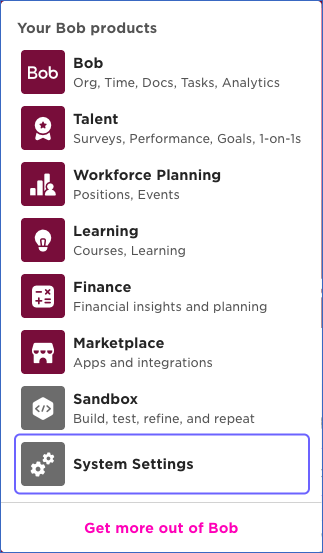
Click the apps icon in the top right corner, and then click System Settings.
-
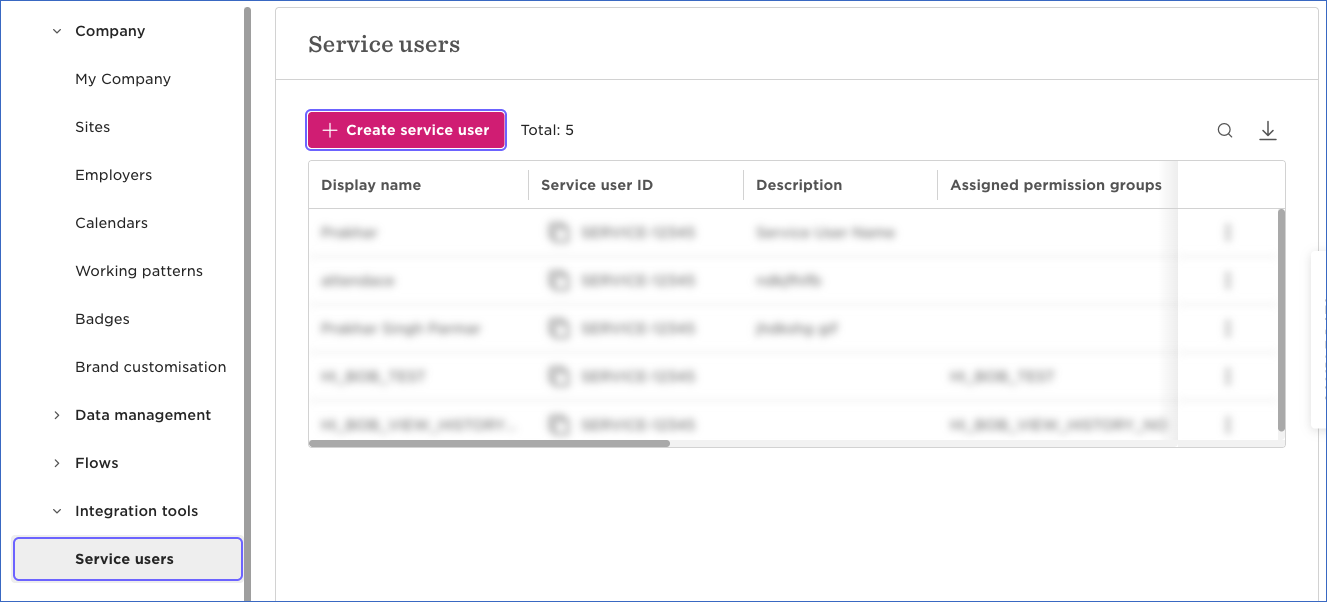
In the left navigation pane, click Integration tools, and then click Service users.
-
On the Service users page, click + Create service user.
-
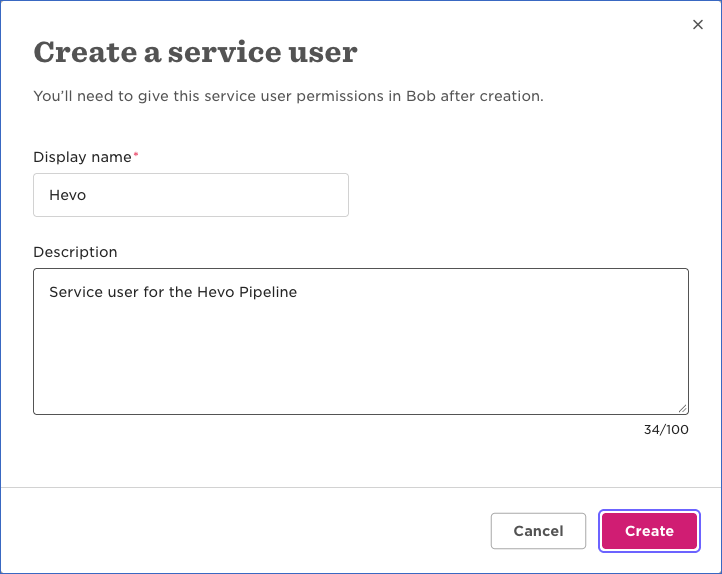
In the Create a service user dialog, specify a Display name for the service user, for example, Hevo, and optionally a Description, and then click Create.
-
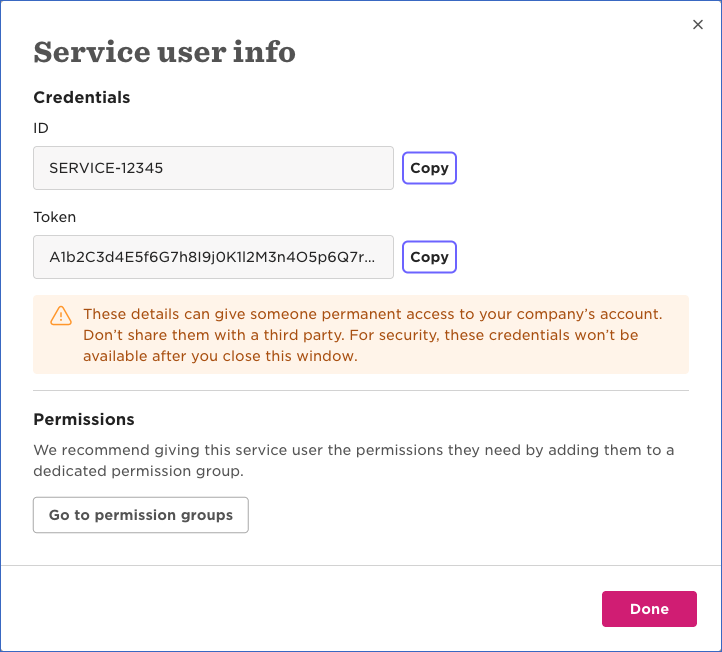
In the Service user info dialog, click Copy next to the ID and the Token, and save them securely like any other password. HiBob does not show the token again after you close this dialog.
-
Click Done.
If you lose the token, you can reset it from the Service users page and update the Pipeline with the new token. If you delete the service user or reset its token, Hevo cannot authenticate with HiBob, and all active jobs of the Pipeline fail. To resume data replication, modify the Source configuration in the Pipeline with valid credentials. Once the updated configuration is saved, Hevo re-authenticates the Source, and data ingestion resumes from the last saved position.
Grant the Service User Access to your Data
A new service user cannot read any data. HiBob returns only the employees, fields, and features that the permission groups of the service user allow. Add the service user to a permission group that can view the data you want to replicate.
Perform the following steps to create a permission group for the service user:
-
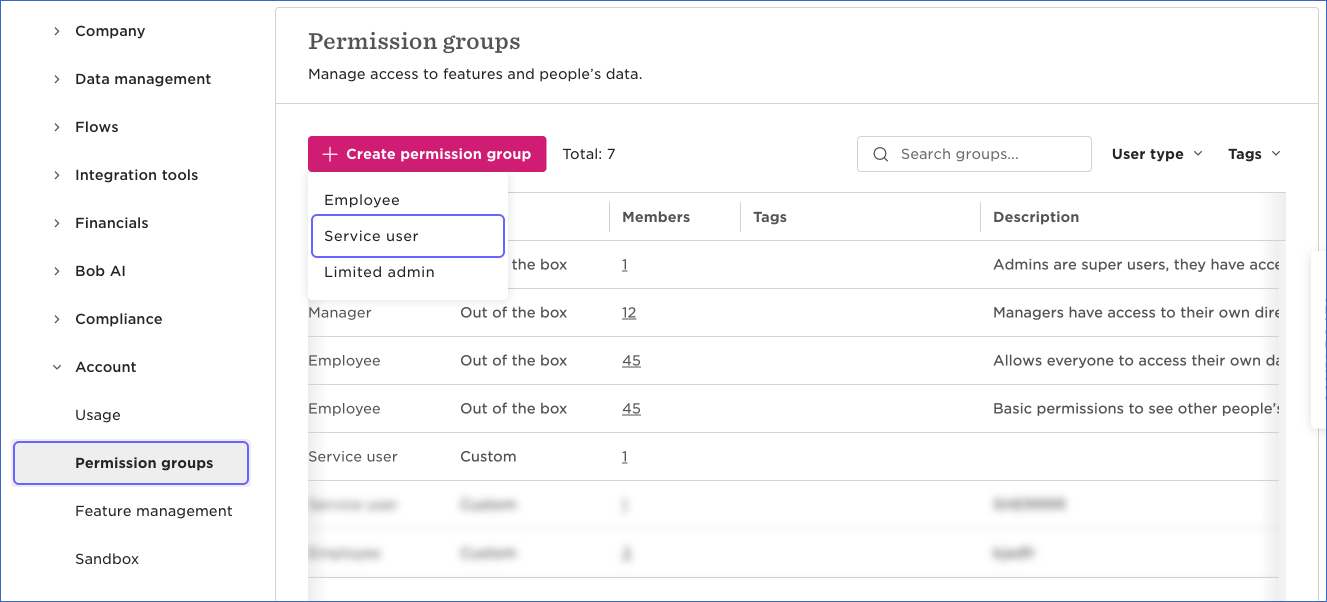
In System Settings, click Account in the left navigation pane, and then click Permission groups.
-
Click + Create permission group, and then click Service user.
-
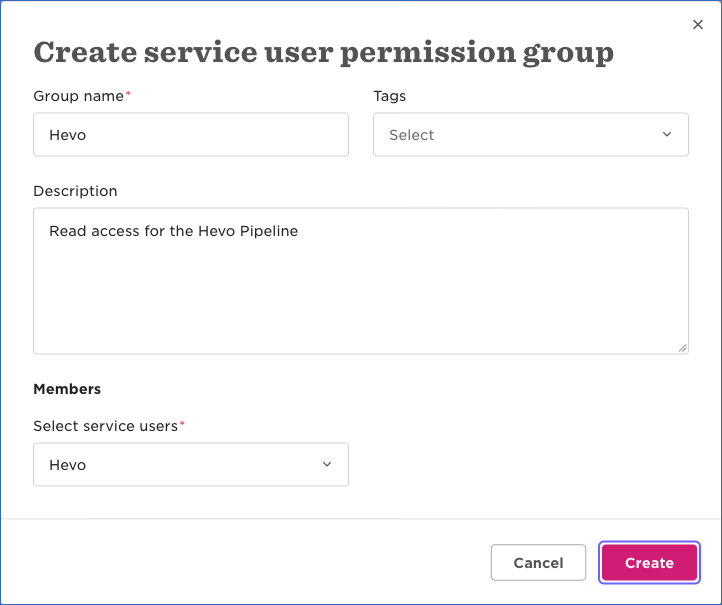
In the Create service user permission group dialog, specify a Group name, for example, Hevo, select the service user that you created in Select service users, and then click Create.
-
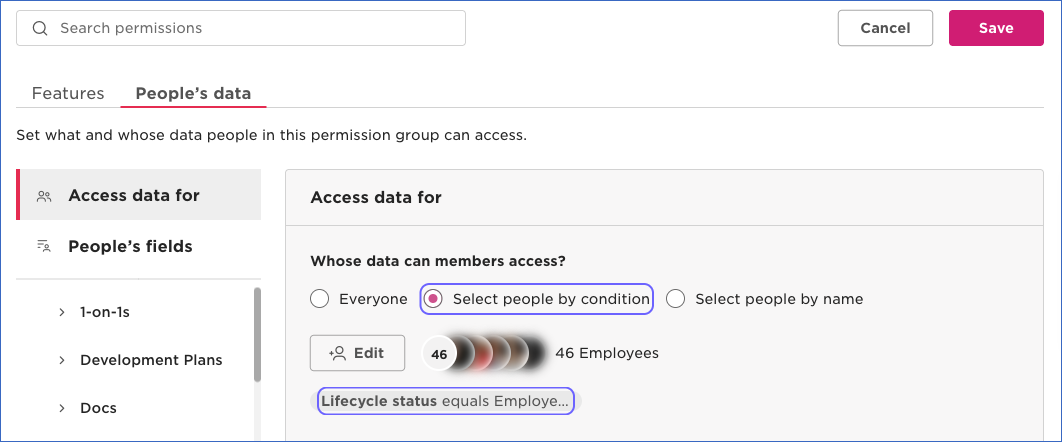
On the People’s data tab of the group, click Access data for, and select the employees whose data the service user can read:
-
Everyone: HiBob applies the condition Lifecycle status equals Employed to this option, so Hevo cannot read the data of employees with any other status, such as former employees.
-
Select people by condition (recommended): Click Edit, select Lifecycle status equals, select all the statuses, such as Employed, Hired, Terminated, Leave, Garden Leave, and Parental Leave, and then click Apply. Use this option to also replicate the data of former employees and of employees on leave.
-
-
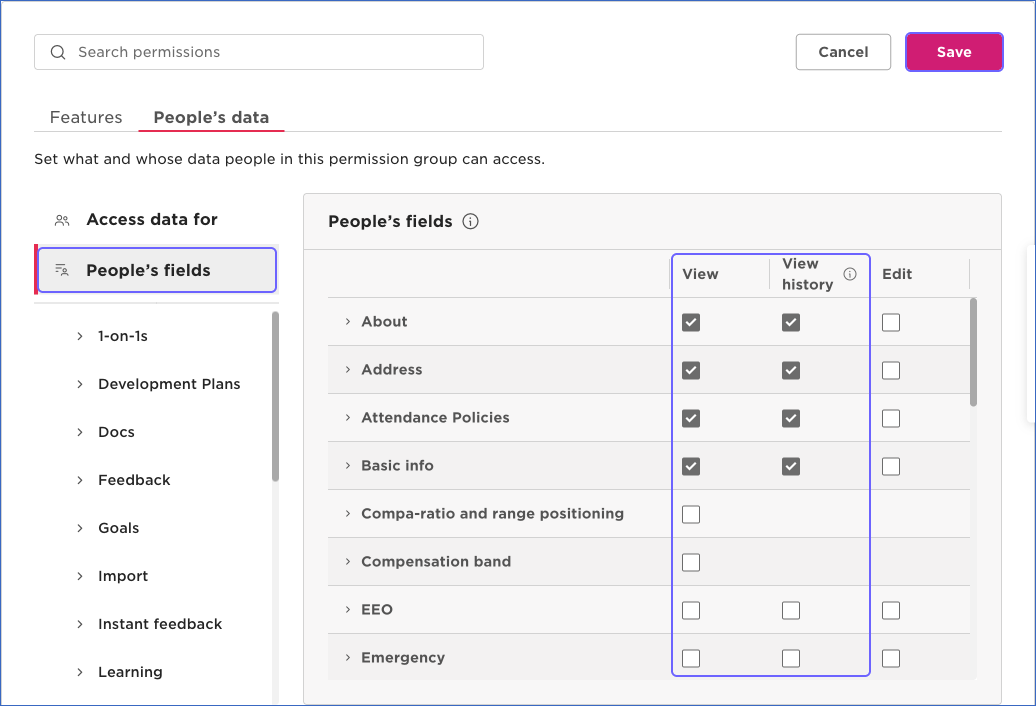
Click People’s fields, and then select the View and View history check boxes for each category of fields you want to replicate, such as Basic info, Work, Employment, Payroll, Lifecycle, Equity, and Training. Hevo needs the View history permission to read the history objects, such as Employee Work History and Employee Salary History. Do not select the Edit check boxes.
-
In the left pane of the People’s data tab, grant the following permissions for the objects you want to replicate:
Section Permission Objects Time off See who’s out today, See who’s out based on their personal working pattern and time off calendar, and See who’s out because of a private policy or policies with a custom name Employee Out Of Office, Employee Out Of Office Detail Time off Create, edit all fields, and cancel people’s requests that haven’t been approved yet Employee Out Of Office Detail. HiBob requires this permission to read a time off request by its ID. Tasks and flows View and mark selected people’s tasks as complete or incomplete Task -
Click the Features tab, click Workforce planning, and then select Manage positions and View positions management. HiBob requires the Manage positions permission to read the Company Position, Company Position Budget, and Company Position Opening objects.
-
Click Save, review the permissions summary, and then click Apply. If the summary shows a warning about access to financial and personally identifiable information, click Yes, apply. HiBob notifies all the admins of your account by email about this change.
HiBob returns only the fields and records that the permission group of the service user allows. If the service user cannot view some fields of an object, the corresponding columns remain empty in the Destination. If the service user cannot access an object at all, Hevo marks the object as inaccessible and does not ingest it. Hevo only reads data from HiBob, even when the permission group allows changes. Read Time off API required permissions.
Configure HiBob as a Source in your Pipeline
Perform the following steps to configure your HiBob Source:
-
Click Pipelines in the Navigation Bar.
-
Click + Create Pipeline in the Pipelines List View.
-
On the Select Source Type page, select HiBob.
-
On the Select Destination Type page, select the type of Destination you want to use.
-
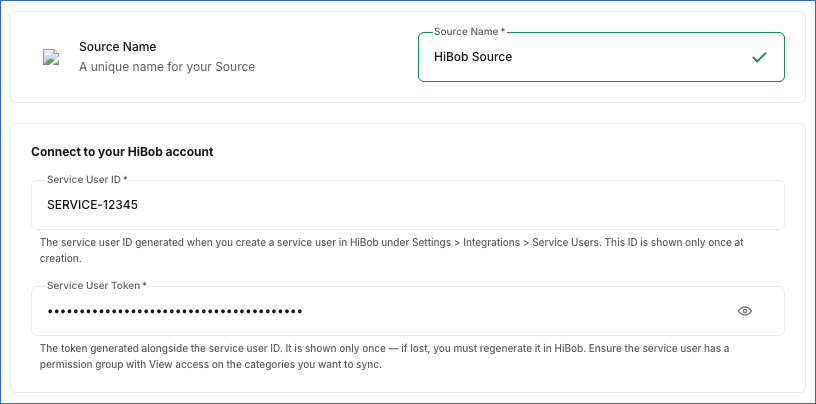
In the Configure Source screen, specify the following:
-
Source Name: A unique name for your Source, not exceeding 255 characters. For example, HiBob Source.
-
In the Connect to your HiBob account section:
-
Service User ID: The ID of the service user that you created.
-
Service User Token: The token of the service user.
-
-
-
Click Test & Continue to test the connection to your HiBob Source. Once the test is successful, you can proceed to set up your Destination.
When you click this button, Hevo checks that the service user can authenticate by reading the employee fields of your HiBob account.
Data Replication
Hevo replicates data for all the objects selected on the Configure Objects page during Pipeline creation. By default, all supported objects and their available fields are selected. However, you can modify this selection while creating or editing the Pipeline. To ingest a child object, you must also select its parent object. For example, to ingest the Employee Custom Field object, you must also select the Employee object. The Data Model lists the child objects of each parent object.
In the first run of the Pipeline, Hevo ingests all the data available for the selected objects in your HiBob account. For the time off objects, the first run ingests the time off requests from January 1, 2015, up to 18 months after the date of the run. In the subsequent runs, as per the sync frequency, Hevo ingests data as follows:
| Ingestion | Parent Objects |
|---|---|
| The time off requests that were approved or canceled since the previous run. HiBob reports a request as changed only when it is approved or canceled, so pending requests are ingested after they are approved. | Employee Out Of Office Detail |
| The time off requests, including pending requests, that start on or after the date of the previous run, up to 18 months after the date of the run | Employee Out Of Office |
| All the records, in each run | All the other parent objects |
Hevo ingests the child objects of a parent object along with it.
For the Employee object, Hevo reads the list of employee fields defined in your HiBob account, including the custom fields, and requests the values of these fields for each employee. Hevo loads the values of the standard fields into the columns of the Employee object, and the values of the custom fields into the Employee Custom Field object, with one record for each employee and custom field.
HiBob limits the number of API calls that a service user can make in a given time period for each endpoint. Read Rate limiting. When the number of remaining requests becomes low, Hevo waits until the limit resets. If HiBob returns a rate limit error, Hevo waits and retries the request. To understand how Hevo handles such scenarios, read Handling Rate Limit Exceptions.
Schema and Primary Keys
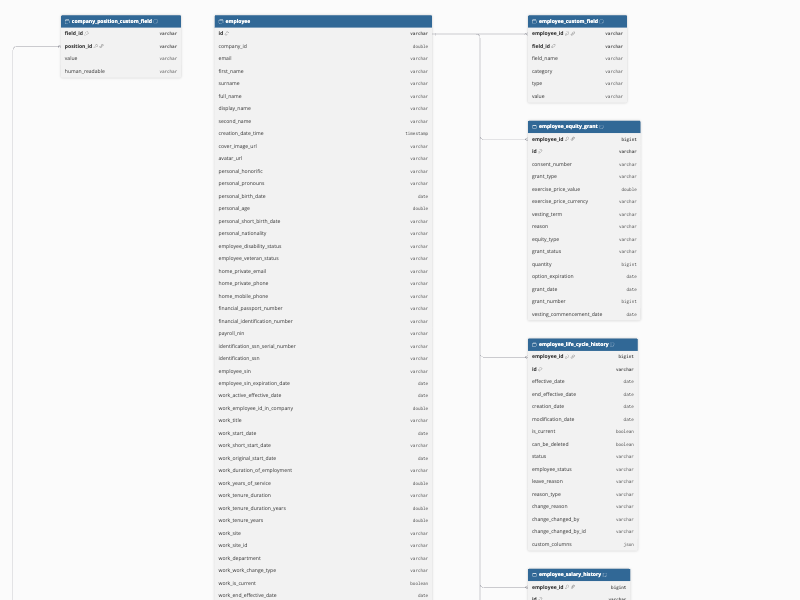
Hevo uses the following schema to upload the records in the Destination. For a detailed view of the objects, fields, and relationships, click the ERD.
Data Model
The following is the list of tables (objects) that are created at the Destination when you run the Pipeline:
| Object | Description |
|---|---|
| Company Field | Contains the definitions of the employee fields in your HiBob account, including the custom fields, such as the name, type, and category of each field. |
| Company List | Contains the lists defined in your HiBob account, such as the lists of departments, sites, and job titles. It includes a child object, Company. |
| Company Position | Contains the positions defined in your HiBob account, such as the job title, department, status, and employee filling each position. It includes a child object, Company Position Custom Field. |
| Company Position Budget | Contains the budget details of the positions, such as the base salary, currency, and pay period. |
| Company Position Opening | Contains the openings of the positions, such as the status and the expected start date of each opening. |
| Custom Table | Contains the definitions of the custom tables in your HiBob account, such as the name and category of each table. It includes a child object, Custom Table Column. |
| Employee | Contains the employees that the service user can access, with the values of the employee fields, such as the personal, work, address, employment, and payroll details. It includes a child object, Employee Custom Field. |
| Employee Equity Grant | Contains the history of the equity grants of the employees, such as the grant type, quantity, and vesting details. |
| Employee Life Cycle History | Contains the history of the lifecycle status of the employees, such as hired, employed, and terminated. |
| Employee Out Of Office | Contains the time off of the employees, such as the policy type, status, and start and end dates of each time off request. |
| Employee Out Of Office Detail | Contains the details of each time off request, such as the duration, approval state, and the time at which it was requested. It includes a child object, Employee Out Of Office Daily Duration. |
| Employee Salary History | Contains the salary history of the employees, such as the base salary, currency, and pay frequency. |
| Employee Training | Contains the training records of the employees, such as the training name, status, cost, and dates. |
| Employee Variable Payment | Contains the history of the variable payments of the employees, such as bonuses and commissions. |
| Employee Work History | Contains the work history of the employees, such as changes in the job title, department, site, and manager. |
| Employment History | Contains the employment history of the employees, such as changes in the employment contract, type, and working pattern. |
| Task | Contains the tasks assigned to the employees, such as onboarding and offboarding tasks. Hevo ingests only the id, title, description, and set fields of each task. |
Additional Information
Read the detailed Hevo documentation for the following related topics:
Handling of Deletes
HiBob does not mark deleted records in its API responses. Hevo captures deletes as follows:
-
Company Field, Company List, Company Position, Company Position Budget, Company Position Opening, Custom Table, Employee, Employee Equity Grant, Employee Life Cycle History, Employee Salary History, Employee Training, Employee Variable Payment, Employee Work History, Employment History, and Task objects and their child objects: Hevo ingests all the records of these objects in each run. If a record that exists in the Destination is not returned by HiBob, Hevo marks it as deleted by setting the value of the metadata column, __hevo__marked_deleted, to True. For example, if you archive a custom field in HiBob, Hevo marks it as deleted in the Company Field object.
-
Employee Out Of Office and Employee Out Of Office Detail objects and their child objects: Hevo does not capture deletes for these objects, so records deleted in HiBob remain in the Destination.
Source Considerations
-
HiBob returns only the data that the permission groups of the service user allow. If you remove a permission from the group, HiBob does not return the corresponding fields or records in the subsequent runs. For the objects that Hevo ingests in full in each run, Hevo marks the records that are no longer returned as deleted. If the service user loses access to an object entirely, Hevo marks the object as inaccessible and stops ingesting it.
-
Hevo ingests the definitions of the custom tables and their columns, but not the entries of the custom tables.
-
The Employee Out Of Office Detail object does not contain the status of a time off request. A canceled request and a pending request both have the value False in the approved column, so you cannot tell them apart.
-
The ID columns that link objects can have different data types in the parent and child objects. For example, the id column of the Employee object is of type VARCHAR, while the employee_id column of the Employee Salary History object is of type BIGINT. Cast the columns to the same data type when you join these objects in your Destination.
-
Hevo creates a table in the Destination only for the objects that have data. For example, if your account does not use positions, the Company Position table is not created.