Roster API is a brand engagement and ambassador marketing platform that helps e-commerce brands turn customers into brand ambassadors, affiliates, and content creators. It enables brands to run referral and affiliate programs, launch ambassador campaigns, distribute and track discount codes, automate rewards and commissions, and build community engagement through posts, comments, and channels.
Hevo uses the Roster REST API to replicate data from your Roster API account to the Destination of your choice. To ingest data, you must provide Hevo with a private access token generated from your Roster API account.
Supported Features
| Feature Name | Supported |
|---|---|
| Capture deletes | Yes |
| History mode | No |
| Data blocking (skip objects and fields) | Yes |
| Resync (objects and Pipelines) | Yes |
| API configurable | No |
Prerequisites
-
An active Roster API account exists from which data is to be ingested.
-
The private access token with read permissions is available to provide Hevo access to your Roster API account data.
Obtain the Private Access Token
To connect Hevo to your Roster API account, you must generate a private access token.
Perform the following steps to obtain the private access token:
-
Log in to your Roster API account.
-
Navigate to the Integration settings page.
-
In the API Access Tokens section, generate a new private access token.
-
Copy the generated token.
Use this private access token when configuring your Roster API Source in Hevo. If the private access token configured in the Pipeline is revoked manually from your Roster API account, Hevo cannot authenticate with the Source. As a result, all active jobs for the Pipeline fail, and no data is replicated. To resume data replication, modify the Source configuration in the Pipeline with a valid private access token. Once the updated token is saved, Hevo re-authenticates the Source, and data ingestion resumes from the last saved offset.
Configure Roster API as a Source in your Pipeline
Perform the following steps to configure your Roster API Source:
-
Click Pipelines in the Navigation Bar.
-
Click + Create Pipeline in the Pipelines List View.
-
On the Select Source Type page, select Roster API.
-
On the Select Destination Type page, select the type of Destination you want to use.
-
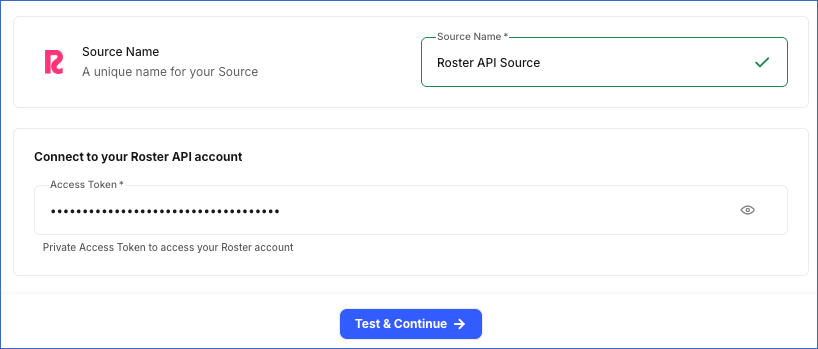
In the Configure Source screen, specify the following:
-
Source Name: A unique name for your Source, not exceeding 255 characters. For example, Roster API Source.
-
In the Connect to your Roster API account section, specify the following:
- Access Token: The private access token that you obtained from your Roster API account.
-
-
Click Test & Continue to test the connection to your Roster API Source. Once the test is successful, you can proceed to set up your Destination.
Data Replication
Hevo replicates data for all the objects selected on the Configure Objects page during Pipeline creation. By default, all supported objects and their available fields are selected. However, you can modify this selection while creating or editing the Pipeline.
Hevo ingests the following types of data from your Source objects:
-
Historical Data: The first run of the Pipeline ingests all available historical data for the selected objects and loads it into the Destination.
-
Incremental Data: Once the historical load is complete, new and updated records for objects are ingested as per the sync frequency.
For the following objects, Hevo ingests only the incremental data in subsequent Pipeline runs:
-
Clicks
-
Events
-
Webhooks
-
Reward Templates
-
Channels
-
Attributions
-
Referral Rewards
Incremental changes are detected using the created_at field for Clicks, Events, Webhooks, Reward Templates, and Channels, and the updated_at field for Attributions and Referral Rewards.
For all other objects, Hevo ingests the entire data during each Pipeline run.
Note: You can create a Pipeline with this Source only using the Merge load mode. The Append mode is not supported for this Source.
Roster API enforces a rate limit based on your Roster API subscription package. If this limit is exceeded, a rate limit exception occurs. To understand how Hevo handles such scenarios, read Handling Rate Limit Exceptions.
Schema and Primary Keys
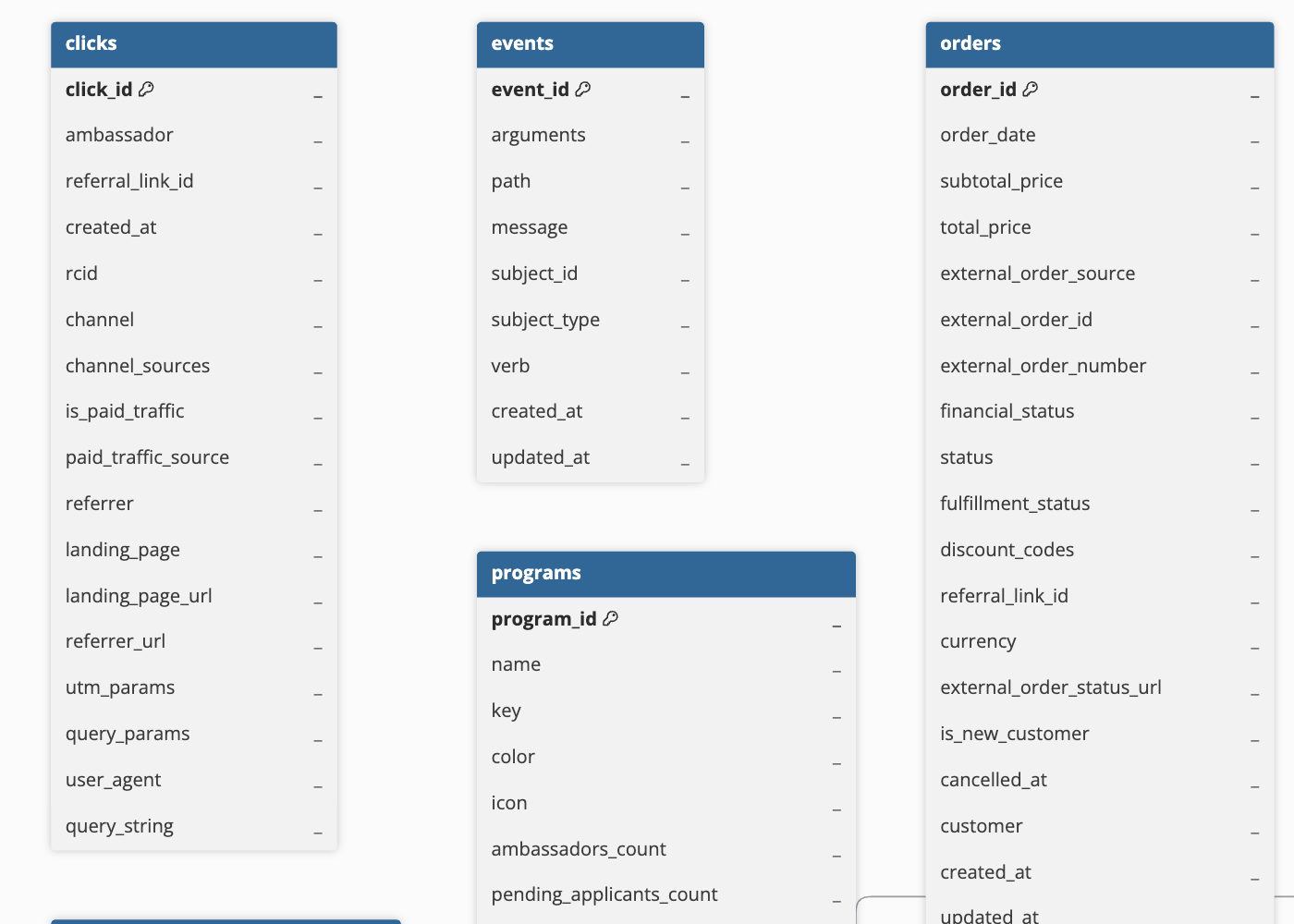
Hevo uses the following schema to upload the records in the Destination. For a detailed view of the objects, fields, and relationships, click the ERD.
Data Model
The following is the list of tables (objects) that are created at the Destination when you run the Pipeline:
| Object | Description |
|---|---|
| Clicks | Contains details about clicks on ambassador referral links, including the referring channel, traffic source, landing page, referrer, and UTM parameter information. |
| Events | Contains a log of events generated by your Roster API account when certain actions occur, such as reward redemptions and order attribution changes. |
| Orders | Contains order details captured from your connected e-commerce store, including pricing, applied discount codes, fulfillment status, and customer information. |
| Rewards | Contains details about rewards issued to ambassadors, including the reward type, status, associated discount code or order, and shipping address for physical rewards. |
| Contacts | Contains details about your ambassador community members, such as personal information, social media handles, referral links, and lifetime points earned. |
| Programs | Contains information about the ambassador programs configured in your Roster API account, including program status and ambassador participation counts. |
| Webhooks | Contains details about the webhooks configured in your Roster API account, including the webhook address and event topic. |
| Campaigns | Contains details about campaigns created to engage ambassadors, including campaign duration, participation limits, and performance statistics. |
| Attributions | Contains details about orders attributed to ambassadors through referrals or personal purchases, including the attribution method and associated order information. |
| Discount Rules | Contains discount rule configurations used to generate ambassador discount codes, including the discount type, usage limits, and the programs or campaigns the rule applies to. This object has a child object, Discount Codes. |
| Referral Rewards | Contains details about rewards issued to ambassadors for referred orders, including the reward type, value, and status. |
| Reward Templates | Contains reward template configurations used to define rewards for campaigns and milestone series, including the reward type and usage statistics. |
| Likes | Contains details about likes on posts or comments within your Roster API community, including the user who liked the content and the associated parent object. |
| Channels | Contains details about community channels used for posts and discussions, including channel visibility, associated programs, and engagement statistics. |
| Comments | Contains comments posted within your Roster API community channels, including the comment author and engagement details such as likes and reply counts. |
| Posts | Contains posts published within your Roster API community channels, including post content, author, view counts, and engagement metrics such as likes and comments. |
Additional Information
Read the detailed Hevo documentation for the following related topics:
Handling of Deletes
Hevo handles deleted records differently based on how data is ingested for an object.
Hevo uses a full data refresh approach to capture delete actions for parent objects. During each Pipeline run, Hevo compares the data fetched from the Source object with the data present in the Destination table. If a record exists in the Destination but is no longer returned by the Source, the record is marked as deleted by setting the value of the metadata column __hevo__marked_deleted to True. This applies to the following objects:
-
Orders
-
Rewards
-
Contacts
-
Programs
-
Campaigns
-
Discount Rules
-
Likes
-
Comments
-
Posts
Roster API sends delete notifications for the Campaign Performance and Discount Code objects, which Hevo uses to mark the corresponding records as deleted in the Destination. Hevo receives these notifications and marks the corresponding records as deleted in the Destination by updating the value of the metadata column __hevo__marked_deleted to True.
Source Considerations
- Events retrieved through the Events object are not immediately available in the Roster API. After an action occurs, it may take a few seconds to a few minutes for the Event to appear.