Fullstory is a digital experience analytics platform that captures how users interact with your websites and mobile apps. It enables teams to analyze user sessions, group users into segments, and apply privacy controls that govern what data is captured.
Hevo uses the Fullstory Server API to replicate data from your Fullstory account to the Destination of your choice. To ingest data, you must provide Hevo with an API key to authenticate to your Fullstory account.
Supported Features
| Feature Name | Supported |
|---|---|
| Capture deletes | Yes (except for the Segment Event object) |
| History mode | No |
| Custom data (user-configured tables & fields) | Yes |
| Data blocking (skip objects and fields) | Yes |
| Resync (objects and Pipelines) | Yes |
| API configurable | Yes |
Prerequisites
-
An active Fullstory account from which data is to be ingested.
-
A user with the Admin role, or the Architect role on Fullstory Enterprise plans, to create the API key.
-
An API key with the Admin or Architect permission level is available to provide Hevo access to your Fullstory account data.
-
The Segment Export add-on is enabled in your Fullstory account to ingest the Segment Event object. This add-on is available only on Fullstory Enterprise and Advanced plans.
Obtain the API Key
To connect Hevo to your Fullstory account, you must provide an API key. You can either use an existing API key or create one if required. The API key must have the Admin or Architect permission level.
Perform the following steps to create an API key:
-
Log in to your Fullstory account as a user with the Admin or Architect role.
-
In the top-left corner, click your account name, and then click Settings.
-
In the left navigation pane, under Integrations, click API Keys.
-
On the API Keys page, click Create key.
-
In the Create API Key side panel, specify a name for the key, and select the Admin permission level. If your account is on a Fullstory Enterprise plan, you can select the Architect permission level instead.
Note: Hevo only reads data from your Fullstory account, irrespective of the permission level of the key.
-
Click Save API Key.
-
Copy the key and store it securely. Fullstory does not display the key again. Use this key while configuring your Fullstory Source in the Hevo Pipeline.
For more information, read Managing API Keys.
Note: If you use an API key with the Standard permission level, Hevo cannot ingest the objects that the key does not have access to. These objects are shown as inaccessible on the Configure Objects page.
If the API key configured in the Pipeline is deleted from your Fullstory account, or the user who created the key is removed from the account, Hevo cannot authenticate with the Source. As a result, all active jobs for the Pipeline fail, and no data is replicated. To resume data replication, modify the Source configuration in the Pipeline with a valid API key. Once the updated key is saved, Hevo re-authenticates the Source, and data ingestion resumes from the last saved offset.
Configure Fullstory as a Source in your Pipeline
Perform the following steps to configure your Fullstory Source:
-
Click Pipelines in the Navigation Bar.
-
Click + Create Pipeline in the Pipelines List View.
-
On the Select Source Type page, select Fullstory.
-
On the Select Destination Type page, select the type of Destination you want to use.
-
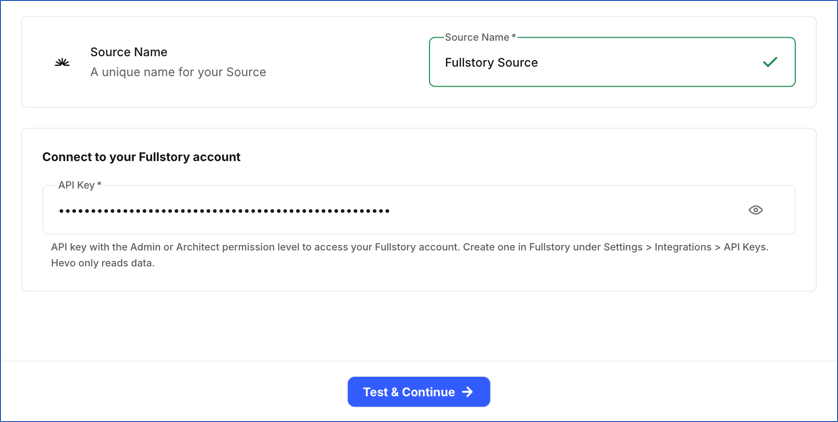
In the Configure Source screen, specify the following:
-
Source Name: A unique name for your Source, not exceeding 255 characters. For example, Fullstory Source.
-
In the Connect to your Fullstory account section, specify the API key that you obtained from your Fullstory account.
-
-
Click Test & Continue to test the connection to your Fullstory Source. Once the test is successful, you can proceed to set up your Destination.
Note: If the API key has the Standard permission level, the test succeeds with a warning. The objects that the key cannot access are shown as inaccessible on the Configure Objects page.
Data Replication
Hevo replicates data for all the objects selected on the Configure Objects page during Pipeline creation. By default, all supported objects and their available fields are selected. However, you can modify this selection while creating or editing the Pipeline.
Hevo ingests the following types of data from your Source objects:
-
Historical Data: The first run of the Pipeline ingests all available historical data for the selected objects and loads it into the Destination.
-
Incremental Data: Once the historical load is complete, new and updated records for objects are ingested as per the sync frequency.
For the Segment Event object, Hevo ingests only the incremental data in subsequent Pipeline runs. The first run of the Pipeline ingests the events from the last 90 days. Each subsequent run ingests the new events.
For all other objects, Hevo ingests the entire data during each Pipeline run.
Note: You can create a Pipeline with this Source only using the Merge load mode. The Append mode is not supported for this Source.
Fullstory enforces rate limits on the number of requests that can be made to its API in a given period of time. These limits are shared by all the applications that access your Fullstory account through the API. If these limits are exceeded, a rate limit exception occurs. To understand how Hevo handles such scenarios, read Handling Rate Limit Exceptions.
Schema and Primary Keys
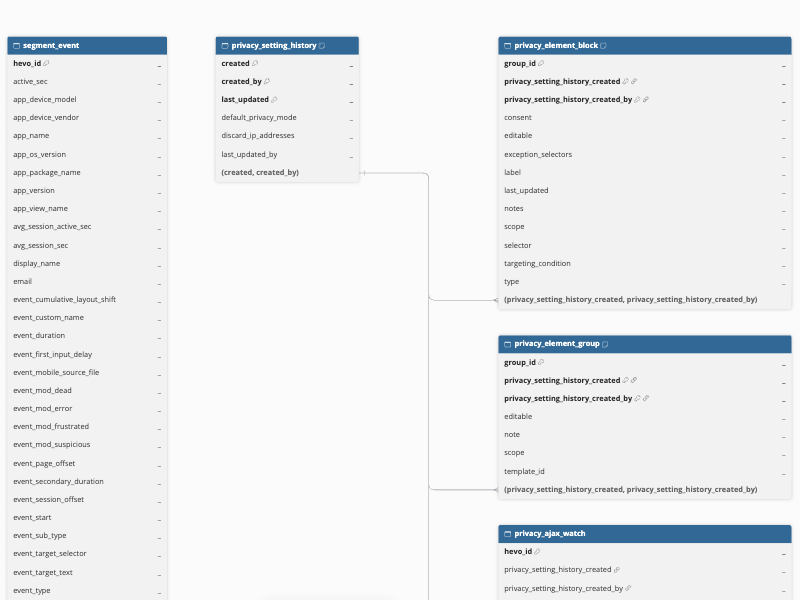
Hevo uses the following schema to upload the records to the Destination. For a detailed view of the objects, fields, and relationships, click the ERD.
Data Model
The following is the list of tables (objects) that are created at the Destination when you run the Pipeline:
| Object | Description |
|---|---|
| Privacy Block Rule History | Contains the versions of your block rules, such as the blocked IP addresses, user agents, and app IDs. |
| Privacy Domain Settings History | Contains the versions of your domain settings, such as the list of domains and whether only known domains are recorded. |
| Privacy Geo Settings History | Contains the versions of your geolocation settings, such as the geo recording mode and geo zones. |
| Privacy Recording Feature History | Contains the versions of your recording feature settings, such as whether the console watcher, AJAX watcher, and rage click capture are enabled. |
| Privacy Setting History | Contains the versions of your privacy settings, such as the default privacy mode and whether IP addresses are discarded. A new version is created whenever the settings change. It includes the following child objects: - Privacy AJAX Watch - Privacy Element Block - Privacy Element Group |
| Segment | Contains the segments defined in your Fullstory account, including the segment name, its creator, and its creation time. |
| Segment Event | Contains the events captured for the users in your Fullstory account, such as page, session, device, browser, location, and error details for each event. The custom variables of each event are currently stored in the custom_variables column in JSON format. |
| Users | Contains the users identified in your Fullstory account, such as their display name, email address, application-specified UID, and app URL. It includes a child object, User Property. |
Additional Information
Read the detailed Hevo documentation for the following related topics:
Handling of Deletes
Hevo uses a full data refresh approach to capture delete actions. During each Pipeline run, Hevo compares the data fetched from the Source object with the data present in the Destination table. If a record exists in the Destination but is no longer returned by the Source, the record is marked as deleted by setting the value of the metadata column __hevo__marked_deleted to True. This applies to all objects except Segment Event.
For the Segment Event object, Hevo does not support capturing deletes.
Source Considerations
-
Fullstory provides Segment Export, which Hevo uses to ingest the Segment Event object, as an add-on for its Enterprise and Advanced plans. If your Fullstory account does not include this add-on, Hevo cannot ingest the Segment Event object.
-
During the first run of the Pipeline and after you resync the object, Hevo ingests the Segment Event data from the last 90 days. If your Fullstory plan retains data for less than 90 days, Hevo ingests only the events that are still retained.
-
Fullstory’s API does not support fetching only new or updated users. As a result, Hevo ingests all the users during each Pipeline run, and for accounts with a large number of users, the sync of the Users object can take a long time.
Limitations
- If a block rule, element group, or AJAX watch rule is removed from your privacy settings, its record in the Privacy Element Block, Privacy Element Group, or Privacy AJAX Watch object is not marked as deleted in the Destination. The record retains the values from the last version of the settings that contained it. This happens because Hevo reads the entire settings history during each Pipeline run, and these records are not linked to a specific version of the settings. In the Privacy AJAX Watch object, editing a rule also retains the earlier version of the rule as a separate record.