Fireworks AI is an AI inference and model customization platform that businesses use to run, fine-tune, and deploy open models. It provides serverless inference, dedicated deployments, and model training, and bills accounts for the usage of each of these services.
Hevo uses the Fireworks AI REST API to replicate data from your Fireworks AI account to the Destination of your choice. This includes the details of your account, users, API keys, quotas, and audit logs, and your billing and usage cost data. To connect to your account, you must provide Hevo with a Fireworks AI API key. Hevo ingests data for each Fireworks AI account that the API key can access.
Supported Features
| Feature Name | Supported |
|---|---|
| Capture deletes | Yes (for some objects) |
| History mode | No |
| Custom data (user-configured tables & fields) | No |
| Data blocking (skip objects and fields) | Yes |
| Resync (objects and Pipelines) | Yes |
| API configurable | Yes |
Prerequisites
-
An active Fireworks AI account exists from which data is to be ingested.
-
You are assigned the Admin role in your Fireworks AI account, or you have access to a service account with this role. Fireworks AI allows only admins to list the API keys and all the users of the account. If the API key that you provide to Hevo does not have the Admin role, Hevo displays a warning when you test the connection and marks the API Key and Query Usage Cost Daily objects as Inaccessible. In this case, the Users object does not contain all the users of your account.
-
Your Fireworks AI account is an Enterprise account, if you want to ingest the Audit Log object. Fireworks AI makes audit logs available only to Enterprise accounts.
-
The API key is available to provide Hevo access to your Fireworks AI account data.
Obtain the API Key
Hevo connects to your Fireworks AI account using an API key. Each API key has the permissions of the role assigned to the user or service account that owns it. A service account is not tied to a person, and it cannot log in to the Fireworks AI dashboard.
Perform the following steps to create an API key for your user:
-
Log in to your Fireworks AI account as a user with the Admin role.
-
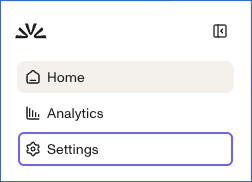
In the left navigation pane, click Settings.
-
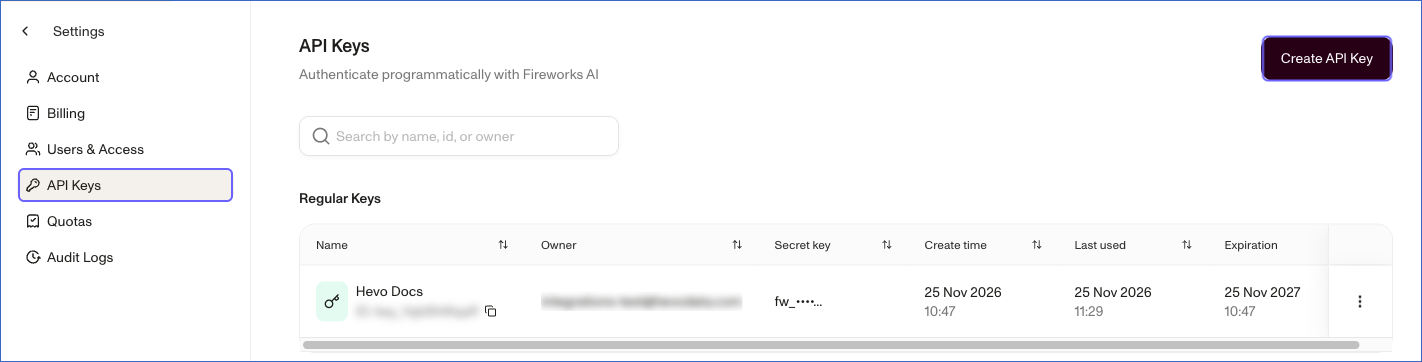
Click API Keys, and then click Create API Key.
-
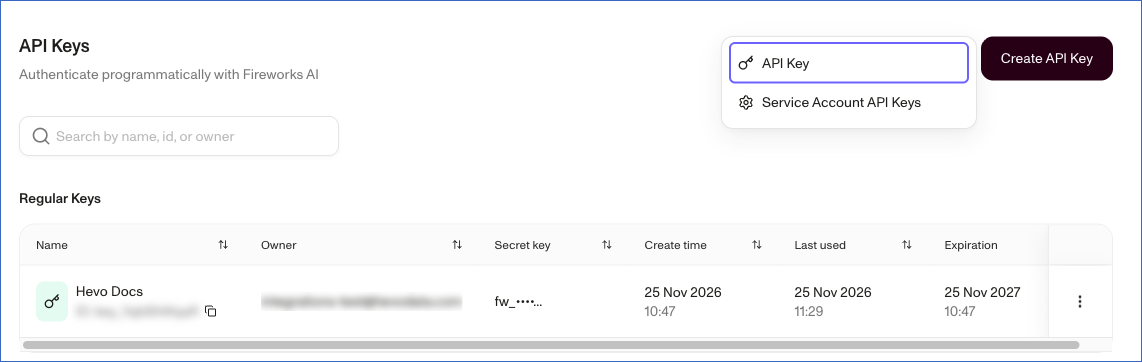
From the drop-down, click API Key.
-
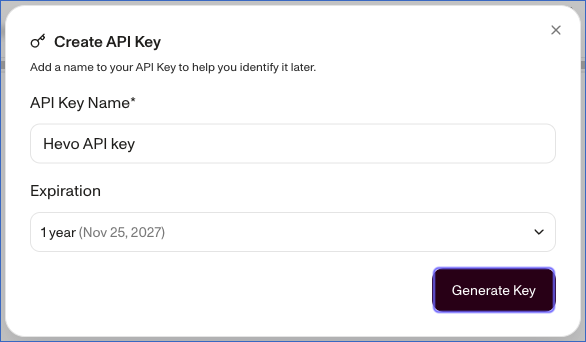
In the Create API Key dialog, do the following:
-
Specify a descriptive API Key Name, such as Hevo API key.
-
From the Expiration drop-down, select how long the API key remains valid. Default value: 1 year.
-
Click Generate Key.
-
-
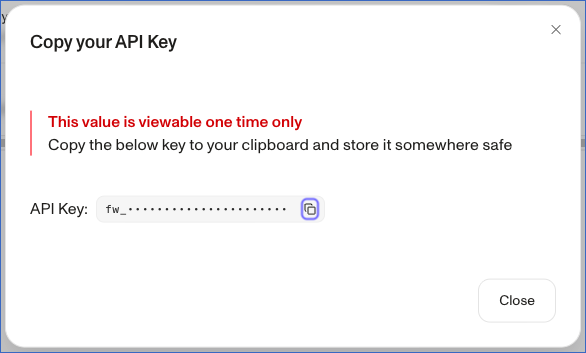
In the Copy your API Key dialog, click the copy icon to copy the API key, and save it securely like any other password. Then, click Close. Fireworks AI displays the API key only once.
Note: To use a service account instead, click Service Account API Keys in Step 4, and select a service account with the Admin role. Fireworks AI assigns the User role to the service accounts that you add from this dialog. To create a service account with the Admin role, use the firectl command-line tool. For example: firectl user create --user-id "hevo-service-account" --service-account --role=admin.
If the API key configured in the Pipeline is revoked or expires, Hevo cannot authenticate with the Source. As a result, all active jobs for the Pipeline fail, and no data is replicated. To resume data replication, modify the Source configuration in the Pipeline with a valid API key. Once the updated key is saved, Hevo re-authenticates the Source, and data ingestion resumes from the last saved offset.
Configure Fireworks AI as a Source in your Pipeline
Perform the following steps to configure your Fireworks AI Source:
-
Click Pipelines in the Navigation Bar.
-
Click + Create Pipeline in the Pipelines List View.
-
On the Select Source Type page, select Fireworks AI.
-
On the Select Destination Type page, select the type of Destination you want to use.
-
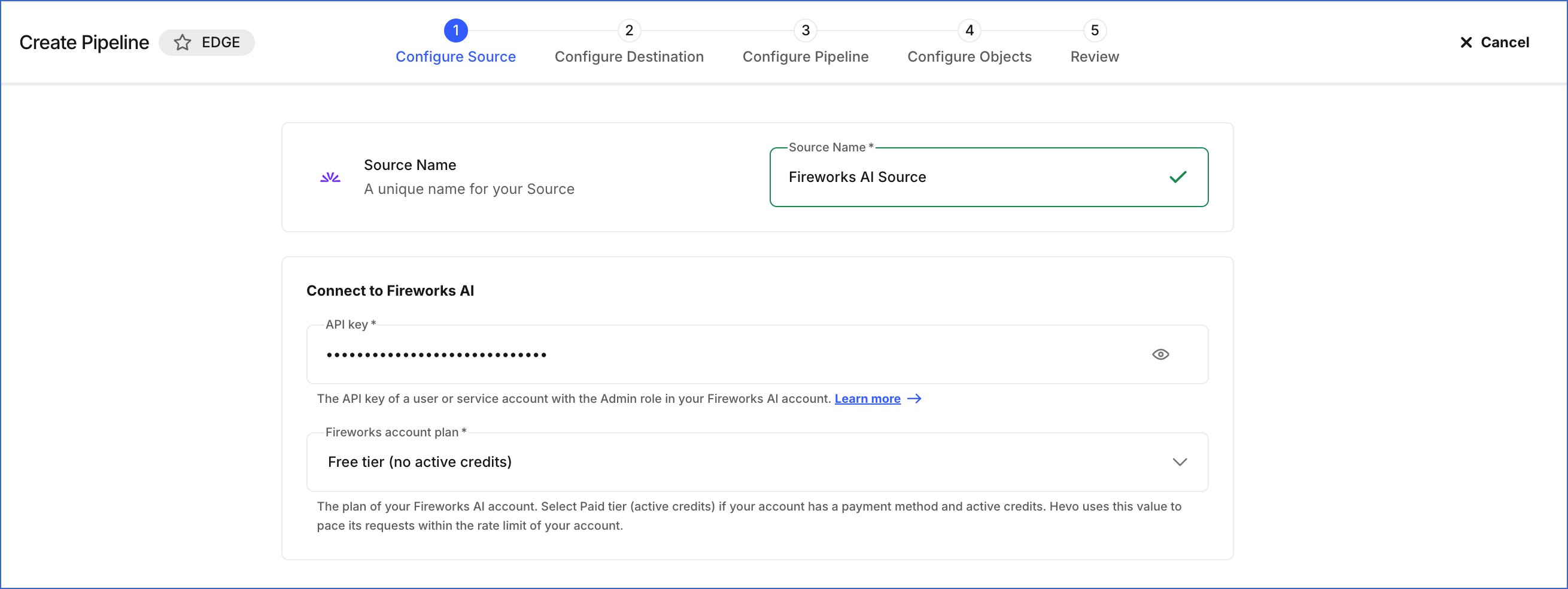
In the Configure Source screen, specify the following:
-
Source Name: A unique name for your Source, not exceeding 255 characters. For example, Fireworks AI Source.
-
In the Connect to Fireworks AI section, specify the following:
-
API key: The API key that you obtained from your Fireworks AI account.
-
From the Fireworks account plan drop-down, select the plan of your Fireworks AI account. Default value: Free tier (no active credits). Hevo uses this value to pace its requests within the rate limit of your account:
-
Free tier (no active credits): Select this option if your account does not have a payment method or active credits. Hevo makes one request every 6 seconds.
-
Paid tier (active credits): Select this option if your account has a payment method and active credits. Hevo makes one request every second.
If you select Free tier (no active credits) for a paid account, data is still replicated, but the Pipeline takes longer to ingest it.
-
-
-
-
Click Test & Continue to test the connection to your Fireworks AI Source. Once the test is successful, you can proceed to set up your Destination.
Note: If Fireworks AI does not allow your account to read the Secret or Audit Log object, Hevo marks the object as Inaccessible, and you cannot select it on the Configure Objects page. For example, Fireworks AI has disabled the secrets API for some accounts, and makes audit logs available only to Enterprise accounts. The other objects are ingested as usual.
Data Replication
Hevo replicates data for all the objects selected on the Configure Objects page during Pipeline creation. By default, all supported objects and their available fields are selected. However, you can modify this selection while creating or editing the Pipeline.
You can select or deselect the child objects individually. You can also resync the child objects individually, except Account Monthly Spend Threshold, which is resynced along with its parent object, Account. Resyncing Billing Usage Serverless Cost or Billing Usage Training Cost also resyncs the other object.
Hevo ingests the following types of data from your Source objects:
-
Historical Data: The first run of the Pipeline ingests the historical data for the selected objects and loads it into the Destination. The duration of the historical data depends on the object:
-
Billing Summary, Billing Usage Dedicated Cost, Billing Usage Serverless Cost, and Billing Usage Training Cost: The last 365 days.
-
Query Usage Cost Daily: The last 99 days. Fireworks AI does not allow reading usage costs for a start time more than 100 days in the past, so older data cannot be ingested for this object.
-
Audit Log: The last 30 days. Fireworks AI returns the audit logs of the last 30 days when no start time is specified.
-
All other objects: All the available data.
-
-
Incremental Data: Once the historical load is complete, new and updated records for objects are ingested as per the sync frequency.
Hevo ingests the objects as follows in the incremental runs:
| Object | Incremental data |
|---|---|
| Audit Log | The log entries recorded since the previous run. Incremental changes are detected using the timestamps field. |
| Billing Summary, Billing Usage Dedicated Cost, Billing Usage Serverless Cost, Billing Usage Training Cost, and Query Usage Cost Daily | The usage and cost records for the period since the previous run, up to the start of the current day in UTC. Hevo also re-reads the records of the three days before the previous run, as Fireworks AI can update the costs of a day after it ends. |
| Account, Account Monthly Spend Threshold, API Key, Quota, Secret, and Users | All the records available in the Source. |
Hevo reads the billing and usage data of each account in time windows of up to 31 days, as required by the Fireworks AI API.
Note: You can create a Pipeline with this Source only using the Merge load mode. The Append mode is not supported for this Source.
Fireworks AI enforces an account-wide rate limit that is shared by all the API requests made from your account. This limit is 10 requests per minute for accounts without a payment method or active credits, and up to 6,000 requests per minute for accounts with a payment method and active credits. If this limit is exceeded, a rate limit exception occurs. Hevo retries each such request up to five times, waiting for the duration that Fireworks AI specifies, or 60 seconds if no duration is specified. To understand how Hevo handles such scenarios, read Handling Rate Limit Exceptions.
Schema and Primary Keys
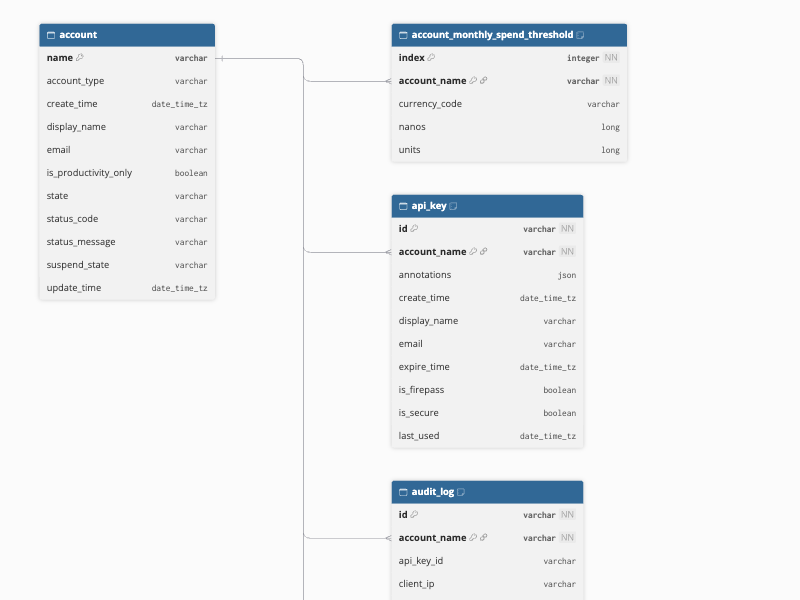
Hevo uses the following schema to upload the records in the Destination. For a detailed view of the objects, fields, and relationships, click the ERD.
Data Model
The following is the list of tables (objects) that are created at the Destination when you run the Pipeline:
| Object | Description |
|---|---|
| Account | Contains the details of the Fireworks AI accounts that the API key can access, such as the account name, display name, email address, account type, state, suspension state, and the creation and update times. It includes the following child objects: - Account Monthly Spend Threshold - API Key - Audit Log - Billing Summary - Billing Usage Dedicated Cost - Billing Usage Serverless Cost - Billing Usage Training Cost - Query Usage Cost Daily - Quota - Secret - Users |
Additional Information
Read the detailed Hevo documentation for the following related topics:
Handling of Deletes
Hevo handles deleted records differently based on how data is ingested for an object.
Hevo ingests all the records of the Account object in each Pipeline run. When a record is no longer available in Fireworks AI, Hevo sets the value of the metadata column _hevo_marked_deleted to True for the record in the Destination.
For the Account Monthly Spend Threshold, API Key, Quota, Secret, and Users objects, Hevo replaces the data in the Destination table with the data ingested from Fireworks AI in each Pipeline run. As a result, the records deleted in Fireworks AI are removed from the Destination.
The following objects do not support capturing deletes:
-
Audit Log
-
Billing Summary
-
Billing Usage Dedicated Cost
-
Billing Usage Serverless Cost
-
Billing Usage Training Cost
-
Query Usage Cost Daily
If a record of these objects is deleted in Fireworks AI, it remains in the Destination.
Source Considerations
-
Fireworks AI has disabled the secrets API for some accounts. If the secrets API is disabled for your account, Hevo cannot ingest the Secret object. The other objects are ingested as usual.
-
Fireworks AI makes audit logs available only to Enterprise accounts. If your account is not an Enterprise account, Hevo cannot ingest the Audit Log object. The other objects are ingested as usual.
-
Fireworks AI allows reading usage costs only for the last 100 days. If the Pipeline is paused for more than 100 days, Hevo cannot ingest the usage costs of the days older than 100 days for the Query Usage Cost Daily object.
Limitations
-
Hevo does not ingest the values of your API keys and secrets. For the API Key object, Hevo ingests the key ID and the details of the key, and for the Secret object, the secret ID and key name.
-
Hevo does not ingest data from Fireworks AI resources other than those listed in the Data Model section, such as models, deployments, datasets, and fine-tuning jobs.