Fairing is a post-purchase survey and attribution measurement platform. It uses in-moment surveys, called Question Streams, placed on order confirmation pages and other checkout touchpoints to collect direct-from-consumer feedback, helping marketing teams understand which channels and touchpoints actually drove a customer’s purchase decision.
Hevo uses Fairing’s REST API to replicate data from your Fairing account to the Destination of your choice. To ingest data, you must provide Hevo with a Fairing secret token for authentication.
Supported Features
| Feature Name | Supported |
|---|---|
| Capture deletes | Yes |
| History mode | No |
| Data blocking (skip objects and fields) | Yes |
| Resync (objects and Pipelines) | Yes |
| API configurable | No |
| Authorization via API | Yes |
Prerequisites
-
An active Fairing account exists from which data is to be ingested.
-
A secret token to provide Hevo access to your Fairing account data.
Obtain the Secret Token
To connect Hevo to your Fairing account, you must obtain your secret token from the Fairing dashboard.
Perform the following steps to obtain the secret token:
-
Log in to your Fairing account.
-
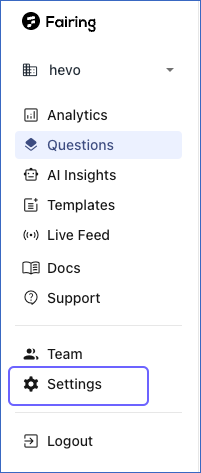
In the left navigation pane, click Settings.
-
On the page that appears, in the API Credentials section, click the copy icon to copy the Secret Token and save it securely like any other password.
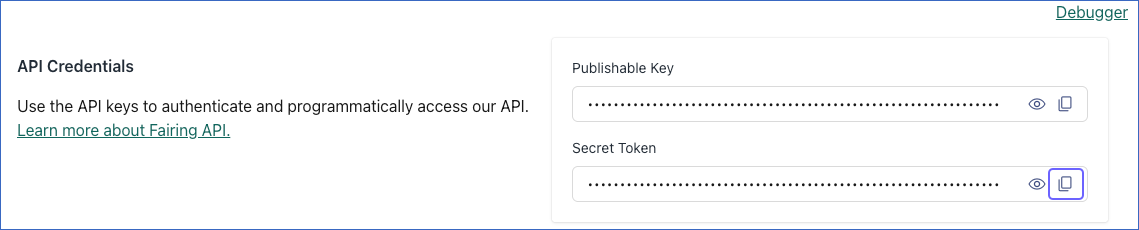
Use this Secret Token while configuring your Fairing Source in Hevo. If the secret token configured in the Pipeline is revoked manually from your Fairing account, Hevo cannot authenticate with the Source. As a result, all active jobs for the Pipeline fail, and no data is replicated. To resume data replication, modify the Source configuration in the Pipeline with a valid secret token. Once the updated token is saved, Hevo re-authenticates the Source, and data ingestion resumes from the last saved offset.
Configure Fairing as a Source in your Pipeline
Perform the following steps to configure your Fairing Source:
-
Click Pipelines in the Navigation Bar.
-
Click + Create Pipeline in the Pipelines List View.
-
On the Select Source Type page, select Fairing.
-
On the Select Destination Type page, select the type of Destination you want to use.
-
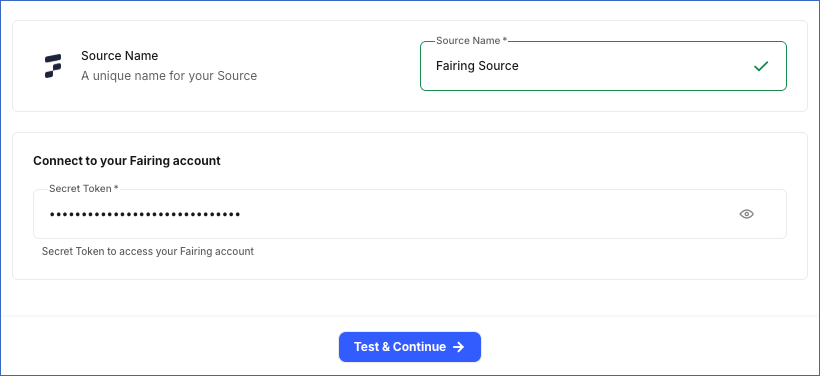
In the Configure Source screen, specify the following:
-
Source Name: A unique name for your Source, not exceeding 255 characters. For example, Fairing Source.
-
In the Connect to your Fairing account section, specify the following:
- Secret Token: The secret token that you obtained from your Fairing account.
-
-
Click Test & Continue to test the connection to your Fairing Source. Once the test is successful, you can proceed to set up your Destination.
Data Replication
Hevo replicates data for all the objects selected on the Configure Objects page during Pipeline creation. By default, all supported objects and their available fields are selected. However, you can modify this selection while creating or editing the Pipeline.
Hevo ingests the following types of data from your Source objects:
-
Historical Data: The first run of the Pipeline ingests all available historical data for the selected objects and loads it into the Destination.
-
Incremental Data: Once the historical load is complete, new and updated records for objects are ingested as per the sync frequency.
For all objects, Hevo ingests only the incremental data in subsequent Pipeline runs using the updated_at field.
Fairing currently enforces a rate limit of 100 requests per minute per store, shared across all API endpoints. If this limit is exceeded, a rate limit exception occurs. To understand how Hevo handles such scenarios, read Handling Rate Limit Exceptions.
Note: You can create a Pipeline with this Source only using the Merge load mode. The Append mode is not supported for this Source.
Schema and Primary Keys
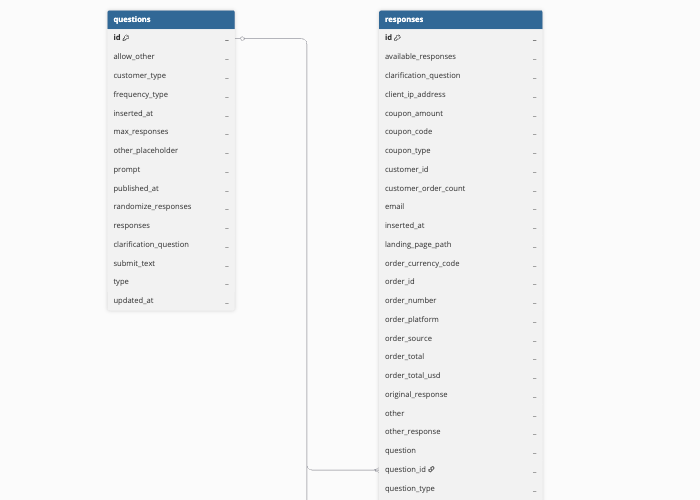
Hevo uses the following schema to upload the records to the Destination. For a detailed view of the objects, fields, and relationships, click the ERD.
Data Model
The following is the list of tables (objects) that are created at the Destination when you run the Pipeline:
| Object | Description |
|---|---|
| Questions | Contains the survey questions configured in your Fairing Question Stream, including the question prompt, question type, response options, and randomization settings. |
| Responses | Contains customer responses submitted to Question Stream questions, including the response value, associated order and customer details, and coupon information. Each response is linked to the question it answers through the question_id field. |
Additional Information
Read the detailed Hevo documentation for the following related topics: