Facebook Ads is Meta’s advertising platform that lets businesses create, manage, and measure ad campaigns across Facebook, Instagram, Messenger, and the Audience Network. It provides tools to define target audiences, set budgets and bidding strategies, and use creative formats such as images, videos, and carousels, along with detailed performance reporting to measure the impact of ad spend.
Hevo uses the Facebook Marketing API (Graph API) to replicate data from your Facebook Ads account to the Destination of your choice. To connect, you must authenticate using one of the following methods:
-
Open Authorization (OAuth): Allows Hevo to connect to your account through an authorization flow, where you sign in to Facebook and grant Hevo access to your account data. This is the recommended method for most users.
-
System user token: Provide a system user access token generated in Meta Business Manager. This is the recommended method for agencies managing multiple ad accounts.
-
OAuth app: Provide the client ID, client secret, and access token of an OAuth app that you create in Meta.
Note: To create a Pipeline with Facebook Ads as the Source using an OAuth app, you must use the Create a Pipeline endpoint through the Hevo API. This method is not available in the Hevo UI. Read Creating a Pipeline with Hevo API for the steps to create the Pipeline.
Supported Features
| Feature Name | Supported |
|---|---|
| Capture deletes | Yes |
| History mode | No |
| Custom data (user-configured tables & fields) | Yes |
| Data blocking (skip objects and fields) | Yes |
| Resync (objects and Pipelines) | Yes |
| API configurable | Yes |
Prerequisites
-
An active Facebook Ads account exists from which data is to be ingested.
-
You have Admin access to the Facebook Business Manager or ad account to grant OAuth permissions or generate a system user access token.
-
(Optional) If you are authenticating using a user token, ensure that the system user access token is available to provide Hevo access to your Facebook Ads account data.
Obtain the System User Access Token (Optional)
A system user access token allows Hevo to access your Facebook Ads account without requiring OAuth authorization. This is useful if you manage multiple ad accounts or use a shared Meta Business Manager account. To use this authentication method, generate a system user access token in Meta Business Manager and ensure it has the required permissions for your ad accounts.
Use this token when configuring your Facebook Ads Source in Hevo. If the system user access token configured in the Pipeline is revoked manually from your Facebook Ads account, Hevo cannot authenticate with the Source. As a result, all active jobs for the Pipeline fail, and no data is replicated. To resume data replication, modify the Source configuration in the Pipeline with a valid system user access token. Once the updated token is saved, Hevo re-authenticates the Source, and data ingestion resumes from the last saved offset.
Configure Facebook Ads as a Source in your Pipeline
Perform the following steps to configure your Facebook Ads Source:
-
Click Pipelines in the Navigation Bar.
-
Click + Create Pipeline in the Pipelines List View.
-
On the Select Source Type page, select Facebook Ads.
-
On the Select Destination Type page, select the type of Destination you want to use.
-
On the Select Pipeline Type page, click Edge, and then click Continue.
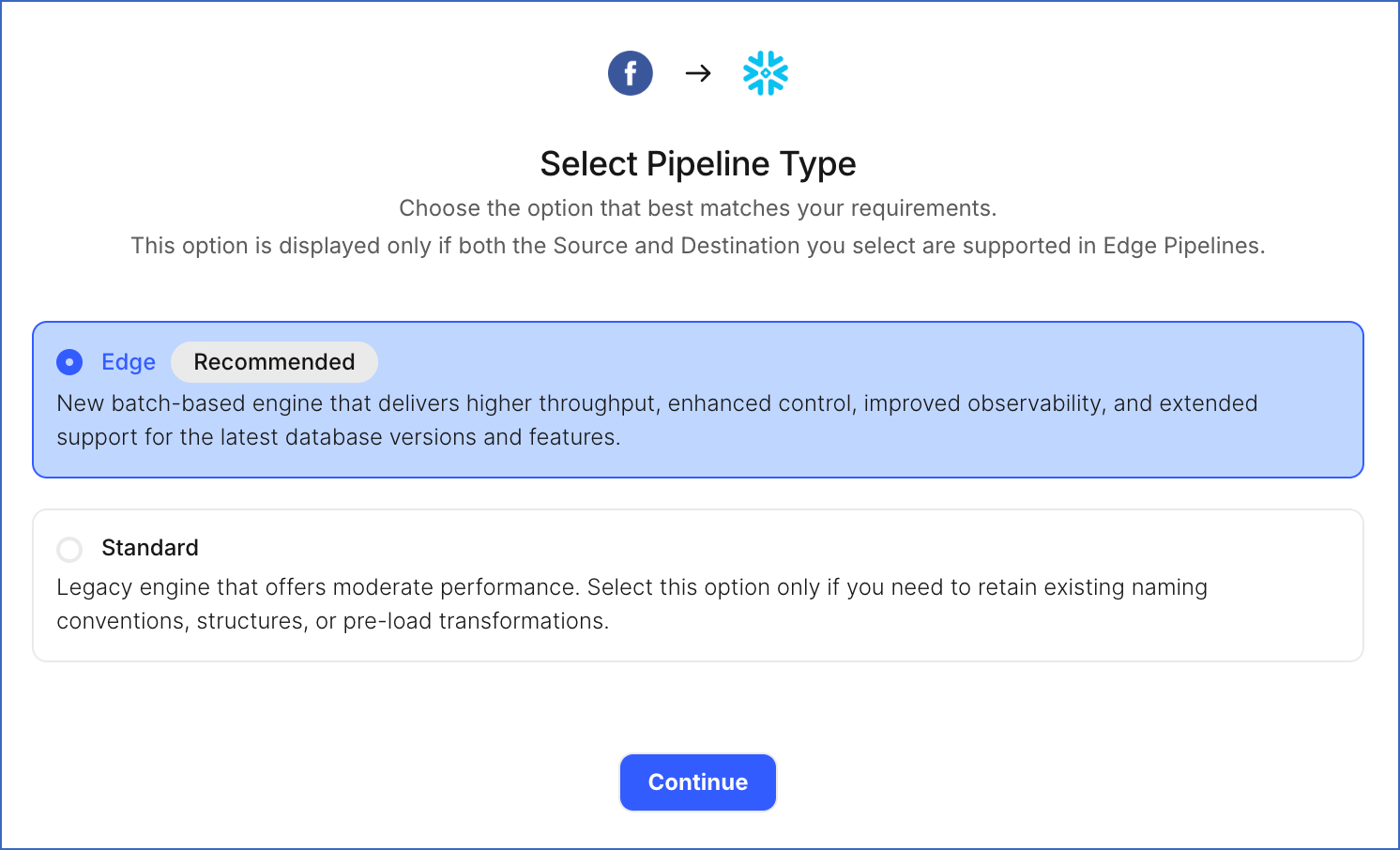
Note: This page appears only if the selected Destination type is supported in Edge and your Team has an existing Facebook Ads Pipeline with the same Destination type. Otherwise, you can proceed to create an Edge Pipeline.
-
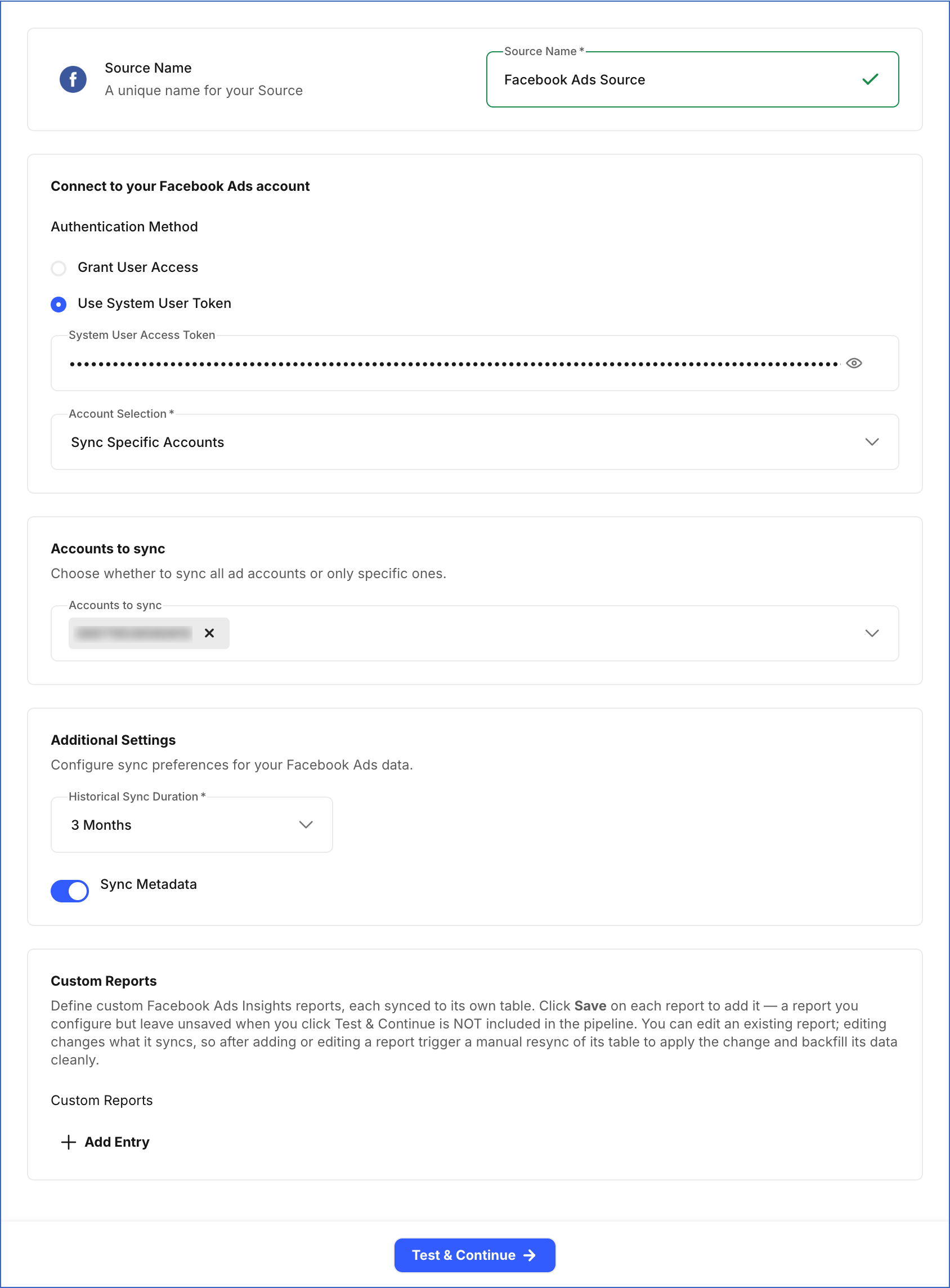
In the Configure Source screen, specify the following:
-
Source Name: A unique name for your Source, not exceeding 255 characters. For example, Facebook Ads Source.
-
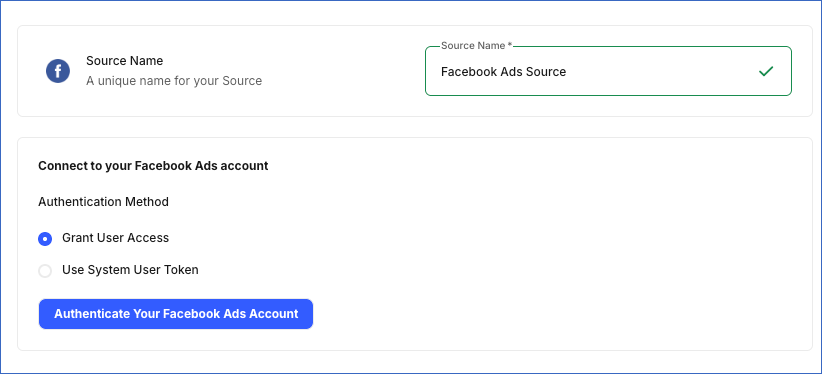
Authentication Method: Select how you want to authenticate your Facebook Ads account:
-
Grant User Access: Recommended for most users. Click the Authenticate your Facebook Ads account button to connect your Facebook Ads account with Hevo. In the pop-up window, log in to your Facebook account, review the permissions Hevo requests to access your ad account data, and grant the required permissions to complete the authorization.
-
Use System User Token: Recommended for agencies managing multiple ad accounts. Paste the access token generated from your Meta Business Manager account.
-
-
Account Selection: From the drop-down, select whether to sync all ad accounts accessible to your authenticated account or only specific ones:
-
Sync All Accounts: Hevo syncs data for all ad accounts accessible to your authorized Facebook account, including any accounts added later.
-
Sync Specific Accounts: Select the ad accounts you want to sync from the Accounts to sync drop-down for which you want to ingest the data.
-
-
Historical Sync Duration: The duration for which you want to ingest existing data from the Source. This cannot be changed after the Pipeline is created. Default value: 3 Months.
-
Sync Metadata: Syncs metadata objects, such as Ads, Ad Sets, Campaigns, and their related objects, in addition to Ads Insights data. This option is enabled by default.
-
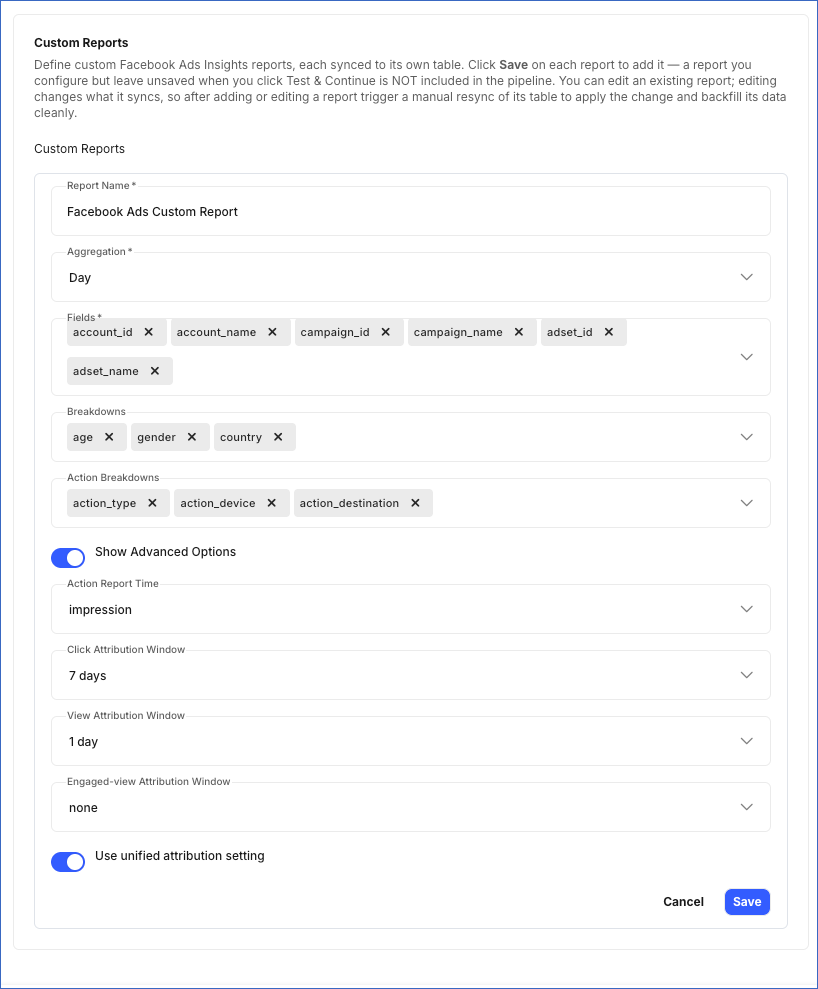
Custom Reports: Hevo allows you to create your own reports by choosing relevant report fields. Each report syncs to its own Destination table. For each report, specify the following:
-
Report Name: Specify a unique name for the Destination table where Hevo loads the data for this report.
-
Aggregation: Determines how data is grouped by time in the report. Default value: Day.
-
Fields: The metrics and dimensions to include in the report. At least one field is required.
-
Breakdowns (Optional): Categories used to group your report data, such as age, gender, country, region, or platform.
-
Action Breakdowns (Optional): Categories used to group action and conversion metrics by attributes such as action type, device, or destination.
-
Show Advanced Options: Enable this toggle to specify the following attribution settings:
-
Action Report Time: Determines when actions and conversions are counted in the report. Default value: impression.
-
Click Attribution Window: The number of days between a person clicking your ad and taking an action, such as an install or subscribe. Default value: 7 days.
-
View Attribution Window: The number of days between a person viewing your ad (without clicking it) and taking an action, such as an install or subscribe. Default value: 7 days.
-
Engaged-view Attribution Window: The number of days between a person having an engaged view of your ad and taking an action. Default value: None.
-
Use unified attribution setting: When enabled, results use the unified attribution settings defined at the ad set level rather than account-level settings. Default value: disabled.
-
Note:
-
Click Save after configuring each report. Reports that are not saved before you click Test & Continue are not included in the Pipeline.
-
If you add a new report or edit an existing one, trigger a manual resync of its Destination table to apply the changes and load the data using the updated configuration.
-
-
-
Click Test & Continue to test the connection to your Facebook Ads Source.
Note: If any custom report is configured incorrectly, such as with an unsupported field and breakdown combination, an invalid aggregation, or a duplicate table name, clicking Test & Continue fails the Source configuration. Hevo lists all configuration issues in your custom reports. You can fix these issues by editing the reports before retrying.
Data Replication
Hevo replicates data for all the objects selected on the Configure Objects page during Pipeline creation. By default, all supported objects and their available fields are selected. However, you can modify this selection while creating or editing the Pipeline.
Hevo ingests the following types of data from your Source objects:
-
Historical Data: The first run of the Pipeline ingests all available historical data for the selected objects and loads it into the Destination.
-
Incremental Data: Once the historical load is complete, new and updated records for objects are ingested as per the sync frequency.
For the following objects, Hevo ingests only the incremental data in subsequent Pipeline runs using the updated_time field.
-
Ad
-
Ad Set
-
Ad Label
-
Campaign
-
Custom Audience
For all other objects, Hevo ingests the entire data during each Pipeline run.
Facebook Ads currently enforces rate limits at the ad account level. If this limit is exceeded, a rate limit exception occurs. To understand how Hevo handles such scenarios, read Handling Rate Limit Exceptions.
Note: You can create a Pipeline with this Source only using the Merge load mode. The Append mode is not supported for this Source.
Schema and Primary Keys
Hevo uses the following schema to upload the records to the Destination. For a detailed view of the objects, fields, and relationships, click the ERD.
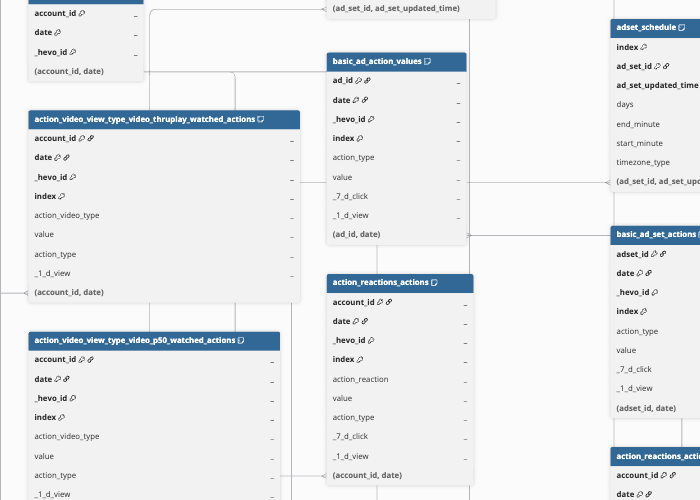
Data Model
The following is the list of tables (objects) that are created at the Destination when you run the Pipeline:
Metadata Objects
Hevo ingests the following entity metadata objects in addition to the Ads Insights Reports, when the Sync Metadata option is enabled:
| Object | Description |
|---|---|
| Ad Account | Contains details of a Facebook ad account, including business information, currency, spend limit, funding source, and account status. This object has the following child objects: - Failed Delivery Check - Reach and Frequency |
| Ad Activity | Contains a log of change events performed on objects within an ad account, including the actor, event type, affected object, and the time the action was taken. |
| Ad Study | Contains details of experiments run on your Facebook Ads account, such as split tests, conversion lift studies, and brand lift studies, including their type, schedule, and status. This object has the following child objects: - Ad Study Cell - Ad Study Objective - Ad Study Objective Result |
| Ad | Contains details of individual ads in your Facebook Ads account, including the associated ad set, creative, bid information, and delivery status. This object has the following child objects: - Ad Conversion - Ad Label - Ad Group Issues Info - Ad Recommendation - Ad Tracking |
| Ad Set | Contains details of ad sets in your Facebook Ads account, such as the budget, bid strategy, billing event, targeting, and scheduling configuration shared by the ads within it. This object has the following child objects: - Ad Set Label - Ad Campaign Issues Info - Ad Set Attribution - Ad Set Custom Audience - Ad Set Schedule - Ad Rotation Interval - Creative Sequence - Frequency Control - Pacing Type - Targeting Optimization Types |
| Ad Image | Contains details of images uploaded to your Facebook Ads account for use in ad creatives, including image dimensions, hash, and URL. |
| Ad Video | Contains details of videos uploaded to your Facebook Ads account for use in ad creatives, including video format, length, and processing status. |
| Campaign | Contains details of campaigns in your Facebook Ads account, including objective, budget, buying type, and status. This object has a child object, Campaign Label. |
| Custom Conversion | Contains details of custom conversions defined in your Facebook Ads account to track specific actions or events. |
| Custom Audience | Contains details of custom and lookalike audiences created in your Facebook Ads account, including audience size, subtype, and data source. This object has the following child objects: - Lookalike Origin - Lookalike Target Country - Lookalike Target Country Name |
| Ad Video Thumbnail | Contains details of thumbnail images generated for videos uploaded to your Facebook Ads account. |
| Ad Label | Contains details of labels used to organize and group campaigns, ad sets, ads, and creatives in your Facebook Ads account. |
| Lead | Contains details of leads generated through Facebook Lead Ads, including the associated ad, ad set, campaign, and lead form. This object has the following child objects: - Lead Field Data - Lead Custom Disclaimer Response |
| Ad Creative | Contains details of ad creatives in your Facebook Ads account, including the creative title, body text, call-to-action, and linked assets. This object has the following child objects: - Creative Label - Ad Asset Feed Spec Ad Format - Ad Asset Feed Spec Asset Customization Rule - Ad Asset Feed Spec Autotranslate - Ad Asset Feed Spec Body - Ad Asset Feed Spec Call to Action - Ad Asset Feed Spec Caption - Ad Asset Feed Spec Description - Ad Asset Feed Spec Event - Ad Asset Feed Spec Group Rule - Ad Asset Feed Spec Image - Ad Asset Feed Spec Link URL - Ad Asset Feed Spec Message Extension - Ad Asset Feed Spec Onsite Destination - Ad Asset Feed Spec Title - Ad Asset Feed Spec Upcoming Event - Ad Asset Feed Spec Video |
| Performance Recommendation | Contains performance recommendations generated by Facebook for improving the delivery and results of your ad account. |
Ads Insights Reports
Hevo ingests the following Ads Insights reporting objects, each showing ad performance metrics grouped by a different breakdown. All the objects use the same Facebook Marketing API Ads Insights endpoint, with the selected breakdown determining the data returned.
| Object | Description |
|---|---|
| Basic Ad Insights | Contains ad-level performance metrics, such as impressions, reach, clicks, and spend. This object has the following child objects: - Basic Ad Actions - Basic Ad Action Values - Basic Ad Cost Per Action Type |
| Basic Ad Set Insights | Contains ad set-level performance metrics, such as impressions, reach, clicks, and spend. This object has the following child objects: - Basic Ad Set Actions - Basic Ad Set Cost Per Action Type |
| Basic All Levels Insights | Contains performance metrics aggregated across the account, campaign, ad set, and ad levels. This object has the following child objects: - Basic All Levels Actions - Basic All Levels Cost Per Action Type |
| Basic Campaign Insights | Contains campaign-level performance metrics, such as impressions, reach, clicks, and spend. This object has the following child objects: - Basic Campaign Actions - Basic Campaign Cost Per Action Type |
| Delivery by Device | Contains ad performance metrics broken down by the impression device. This object has the following child objects: - Delivery Device Actions - Delivery Device Cost Per Action Type |
| Delivery by Platform | Contains ad performance metrics broken down by publisher platform, such as Facebook, Instagram, or Audience Network. This object has the following child objects: - Delivery Platform Actions - Delivery Platform Cost Per Action Type |
| Delivery by Platform and Device | Contains ad performance metrics broken down by both publisher platform and impression device. This object has the following child objects: - Delivery Platform and Device Actions - Delivery Platform and Device Cost Per Action Type |
| Delivery Purchase ROAS | Contains return on ad spend (ROAS) metrics for purchase actions attributed to your ads. This object has the following child objects: - Delivery Purchase ROAS Outbound Clicks - Delivery Purchase ROAS Mobile App Purchase ROAS - Delivery Purchase ROAS Website Purchase ROAS |
| Demographics by Age | Contains ad performance metrics broken down by the age of the audience. This object has the following child objects: - Demographics Age Actions - Demographics Age Cost Per Action Type |
| Demographics by Age and Gender | Contains ad performance metrics broken down by both the age and gender of the audience. This object has the following child objects: - Demographics Age and Gender Actions - Demographics Age and Gender Cost Per Action Type |
| Demographics by Country | Contains ad performance metrics broken down by the country of the audience. This object has the following child objects: - Demographics Country Actions - Demographics Country Cost Per Action Type |
| Demographics by Comscore Market | Contains ad performance metrics broken down by Comscore designated market area (DMA). This object has the following child objects: - Demographics Comscore Market Actions - Demographics Comscore Market Cost Per Action Type |
| Demographics by Gender | Contains ad performance metrics broken down by the gender of the audience. This object has the following child objects: - Demographics Gender Actions - Demographics Gender Cost Per Action Type |
| Demographics by Region | Contains ad performance metrics broken down by the region of the audience. This object has the following child objects: - Demographics Region Actions - Demographics Region Cost Per Action Type |
| Action Canvas Component | Contains ad performance metrics broken down by Canvas (Instant Experience) component. This object has the following child objects: - Action Canvas Component Outbound Clicks - Action Canvas Component Mobile App Purchase ROAS - Action Canvas Component Website Purchase ROAS |
| Action Carousel Card | Contains ad performance metrics broken down by individual carousel ad card. This object has the following child objects: - Action Carousel Card Outbound Clicks - Action Carousel Card Mobile App Purchase ROAS - Action Carousel Card Website Purchase ROAS |
| Action Product ID | Contains ad performance metrics broken down by product ID for catalog and dynamic product ads. This object has the following child objects: - Action Product ID Outbound Clicks - Action Product ID Mobile App Purchase ROAS - Action Product ID Website Purchase ROAS |
| Action Conversion Device | Contains ad performance metrics broken down by the device used for conversion. This object has the following child objects: - Action Conversion Device Outbound Clicks - Action Conversion Device Mobile App Purchase ROAS - Action Conversion Device Website Purchase ROAS |
| Action Reactions | Contains ad performance metrics broken down by Page reaction type. This object has the following child objects: - Action Reactions Actions - Action Reactions Action Values |
| Action Video Sound | Contains video ad performance metrics broken down by whether the video was played with sound on or off. This object has the following child objects: - Action Video Sound Video 30 Sec Watched Actions - Action Video Sound Video Avg Time Watched Actions - Action Video Sound Video P100 Watched Actions - Action Video Sound Video P25 Watched Actions - Action Video Sound Video P50 Watched Actions - Action Video Sound Video P75 Watched Actions - Action Video Sound Video Thruplay Watched Actions |
| Action Video View Type | Contains video ad performance metrics broken down by view type, such as click-to-play or auto-play. This object has the following child objects: - Action Video View Type Video 30 Sec Watched Actions - Action Video View Type Video Avg Time Watched Actions - Action Video View Type Video P100 Watched Actions - Action Video View Type Video P25 Watched Actions - Action Video View Type Video P50 Watched Actions - Action Video View Type Video P75 Watched Actions - Action Video View Type Video Thruplay Watched Actions |
| Marketing Mix Modeling | Contains ad performance metrics broken down by placement, publisher platform, device platform, and region, used for marketing mix modeling analysis. |
Additional Information
Read the detailed Hevo documentation for the following related topics:
Handling of Deletes
Hevo captures deleted records only for the following objects:
-
Ad History
-
Ad Set History
-
Campaign History
-
Creative History
Hevo identifies deleted records using the object’s status field. When a record is deleted in Facebook Ads, the status field is updated to REMOVED. Hevo syncs this value to the Destination, allowing you to identify deleted records.
For the associated child objects, Hevo re-ingests the complete dataset from the parent object on every Pipeline run. As a result, if a child record is deleted at the Source, it is automatically removed from the Destination on the next sync.
For all other objects, Hevo does not support capturing deletes.
Source Considerations
- The amount of historical data you can ingest depends on how long Meta retains Ads Insights data. Most report data is available for up to 37 months, while some metrics and breakdowns are available for only 13 months or 6 months. If you request data older than the supported period, Meta rejects the request.