Datadog is a monitoring and security platform for cloud applications. It collects metrics, logs, and traces from your infrastructure and services, and lets you build dashboards, set up monitors and service level objectives (SLOs), and manage incidents.
Hevo uses the Datadog API to replicate the dashboards, monitors, incidents, logs, metrics, SLOs, synthetic tests, integrations, and access management data of your Datadog organization to the Destination of your choice. To ingest data, you must provide Hevo with an API key and an application key of your Datadog organization, and the Datadog site where your organization is hosted.
Supported Features
| Feature Name | Supported |
|---|---|
| Capture deletes | Yes |
| History mode | No |
| Custom data (user-configured tables & fields) | No |
| Data blocking (skip objects and fields) | Yes |
| Resync (objects and Pipelines) | Yes |
| API configurable | Yes |
Prerequisites
-
An active Datadog account from which data is to be ingested.
-
An API key and an application key of your Datadog organization. Read Create the API Key and Application Key.
-
The Datadog site of your organization. Read Identify your Datadog Site.
Create the API Key and Application Key
Hevo connects to your Datadog organization using two keys:
-
API key: Identifies your Datadog organization.
-
Application key: Gives Hevo access to the data of your organization. An application key has the permissions of the user who creates it, unless you limit it with scopes. Hevo can read only the data that the application key can access.
Create an API key
Perform the following steps to create an API key:
-
Log in to your Datadog account as a user who has the permissions to create API keys and application keys.
-
Go to Organization Settings, and then click API Keys.
-
Click New Key.
-
Enter a name for the key. For example, Hevo.
-
Click Create API key.
-
Copy the key, and save it securely like any other password.
Read Add an API key for more information.
Create an application key
Perform the following steps to create an application key:
-
Go to Organization Settings, and then click Application Keys.
-
Click New Key.
-
Enter a name for the key, for example, Hevo, and create the key.
-
Copy the key, and save it securely like any other password. Depending on the settings of your organization, Datadog may not show the key again after you close the dialog.
-
(Optional) To limit the access of the key, edit the scopes of the key, and select the read scopes for the data that you want to replicate. You do not need to add the write scopes. The following table lists the read scopes that Hevo needs for each object:
Scope Objects apm_api_catalog_readorsynthetics_global_variable_readSynthetic Variable apm_readSpan Event and Span Metric apm_retention_filter_readAPM Retention apm_service_catalog_readService Definition audit_logs_readAudit aws_configuration_readAWS Integration and AWS Log Integration azure_configuration_readAzure Integration billing_readHistorical Cost Usage ci_visibility_readCI Visibility Pipeline ci_visibility_readortest_optimization_readCI Visibility Test cloud_cost_management_readCloud Cost Management AWS CUR Config and Cloud Cost Management Azure CUR Config dashboards_readDashboard and Dashboard List data_scanner_readScanning Group and Standard Pattern events_readEvent gcp_configuration_readGCP Integration hosts_readHost incident_readIncident and Incident User Defined Field Definition integrations_readCloudflare Integration, Confluent Cloud, Fastly Account, Okta Integration, and Opsgenie Integration logs_read_archivesLog Archive logs_read_configLog Index, Log Metric, Log Pipeline, and Log Restriction Query logs_read_dataLog metrics_readMetric monitors_downtimeDowntime monitors_readMonitor org_managementIP Allow List and Organization rum_apps_readRUM Application and RUM Event security_monitoring_filters_readSecurity Monitoring Filter security_monitoring_rules_readSecurity Monitoring Rule slos_readService Level Objective and Service Level Objective Correction synthetics_private_location_readSynthetic Location synthetics_readSynthetic Test teams_readTeam timeseries_queryQuery Timeseries usage_readHistorical Cost Usage and Hourly Usage Attribution user_access_readAuthN Mapping, Permission, Role, and User The Container, Container Image, Incident Service, LLM Observability Span, and Metric Volume objects do not require a scope.
Read Add application keys and Scope application keys for more information.
If you delete or revoke the API key or the application key in Datadog, Hevo cannot connect to your organization, and the Pipeline fails. To resume data ingestion, create a new key and modify the Source configuration with it.
Identify your Datadog Site
Datadog hosts each organization on one of its sites, and Hevo must send its requests to the site of your organization. To identify your site, log in to Datadog and check the URL in your browser:
| URL of your Datadog account | Datadog Site |
|---|---|
| https://app.datadoghq.com | datadoghq.com |
| https://us3.datadoghq.com | us3.datadoghq.com |
| https://us5.datadoghq.com | us5.datadoghq.com |
| https://app.datadoghq.eu | datadoghq.eu |
| https://ap1.datadoghq.com | ap1.datadoghq.com |
| https://ap2.datadoghq.com | ap2.datadoghq.com |
| https://app.ddog-gov.com | ddog-gov.com |
Read Getting Started with Datadog Sites for more information.
Configure Datadog as a Source in your Pipeline
Perform the following steps to configure your Datadog Source:
-
Click Pipelines in the Navigation Bar.
-
Click + Create Pipeline in the Pipelines List View.
-
On the Select Source Type page, select Datadog.
-
On the Select Destination Type page, select the type of Destination you want to use.
-
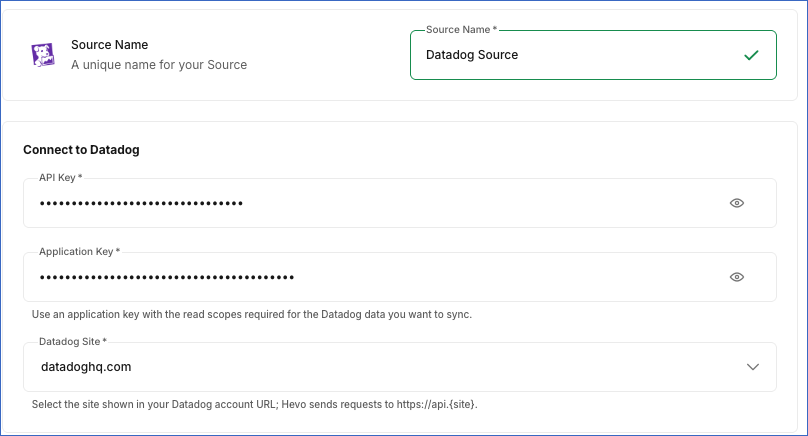
On the Configure Source page, specify the following:
-
Source Name: A unique name for your Source, not exceeding 255 characters. For example, Datadog Source.
-
In the Connect to Datadog section:
-
API Key: The API key of your Datadog organization.
-
Application Key: The application key that you created in your Datadog organization.
-
Datadog Site: The site on which your Datadog organization is hosted. Default value: datadoghq.com.
-
-
-
Click Test & Continue to test the connection to your Datadog Source. Once the test is successful, you can proceed to set up your Destination.
Data Replication
Hevo replicates data for all the objects selected on the Configure Objects page during Pipeline creation. By default, all supported objects and their available fields are selected. However, you can modify this selection while creating or editing the Pipeline.
In each run, as per the sync frequency, Hevo ingests data as follows:
| Ingestion | Objects |
|---|---|
| New records, based on the time of each record | Audit, CI Visibility Pipeline, CI Visibility Test, Event, Hourly Usage Attribution, Log, RUM Event, and Span Event |
| All the records, in each run | All other objects |
The first run of the Pipeline ingests the following data for the objects that are ingested based on time:
| Data ingested in the first run | Objects |
|---|---|
| All the available data | Audit and Event |
| The data of the last 30 days | RUM Event |
| The data of the last 14 days | CI Visibility Pipeline, CI Visibility Test, Log, and Span Event |
| The data of the last 72 hours | Hourly Usage Attribution |
For some objects, such as Incident, Metric, Role, and Service Level Objective, Hevo reads the child objects of each record with a separate API request. As a result, the number of API requests in each run increases with the number of these records.
You can resync any object.
Note: You can create a Pipeline with this Source only using the Merge load mode. The Append mode is not supported for this Source.
Schema and Primary Keys
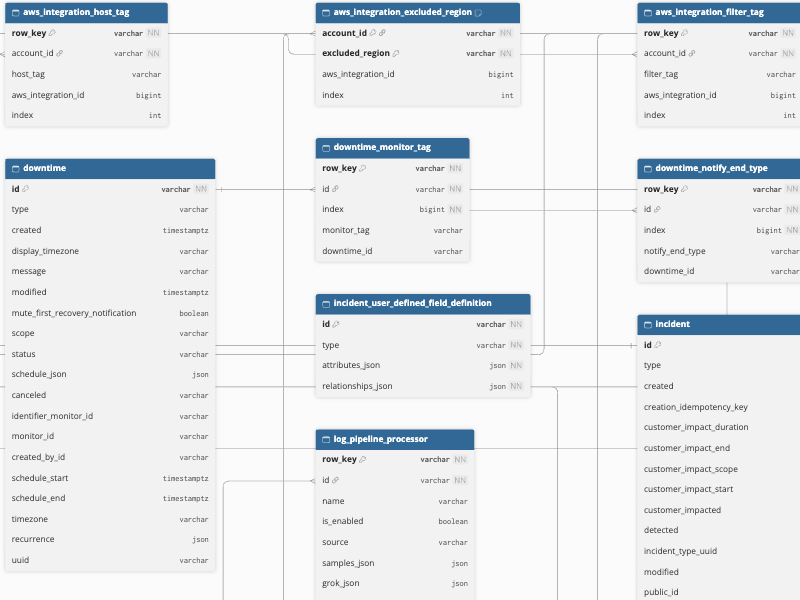
Hevo uses the following schema to upload the records in the Destination. For a detailed view of the objects, fields, and relationships, click the ERD.
Data Model
The following is the list of tables (objects) that are created at the Destination when you run the Pipeline:
| Object | Description |
|---|---|
| APM Retention | Contains the APM retention filters, including the filter query, type, sample rate, execution order, and whether each filter is enabled. |
| Audit | Contains the Audit Trail events of your organization, including the message, service, and timestamp of each event. It includes the child objects, Audit Attribute and Audit Tag. |
| AuthN Mapping | Contains the mappings of SAML attributes to Datadog roles, including the attribute key and value and the role assigned. |
| AWS Integration | Contains the AWS accounts integrated with Datadog, including the role name and the metric and resource collection settings of each account. It includes the child objects, AWS Integration Excluded Region, AWS Integration Filter Tag, AWS Integration Host Tag, and AWS Integration Namespace Rule. |
| AWS Log Integration | Contains the AWS accounts configured for log collection, including the services that forward logs to Datadog. It includes the child objects, AWS Log Integration Lambda, AWS Log Integration Service, and AWS Log Integration Service Trigger. |
| Azure Integration | Contains the Azure tenants integrated with Datadog, including the client ID, host filters, and the metric and resource collection settings. It includes a child object, Azure Integration Error. |
| CI Visibility Pipeline | Contains the CI Visibility pipeline events, including the pipeline level, attributes, and tags of each event. |
| CI Visibility Test | Contains the Test Optimization (CI Visibility) test events, including the test level, attributes, and tags of each event. |
| Cloud Cost Management AWS CUR Config | Contains the AWS Cost and Usage Report (CUR) configurations of Cloud Cost Management, including the bucket, report name, and status. It includes a child object, Cloud Cost Management AWS CUR Config Error Message. |
| Cloud Cost Management Azure CUR Config | Contains the Azure cost export configurations of Cloud Cost Management, including the storage account, export path, and status. It includes a child object, Cloud Cost Management Azure CUR Config Error Message. |
| Cloudflare Integration | Contains the Cloudflare accounts integrated with Datadog, including the account name and email address. It includes the child objects, Cloudflare Integration Resource and Cloudflare Integration Zone. |
| Confluent Cloud | Contains the Confluent Cloud accounts integrated with Datadog. It includes the child objects, Confluent Cloud Resource, Confluent Cloud Resource Tag, and Confluent Cloud Tag. |
| Container | Contains the containers that the Datadog Agent reports, including the host, image, state, and start time of each container. It includes the child objects, Container Image Associated Tag and Container Tag. |
| Container Image | Contains the container images that the Datadog Agent reports, including the registry, repository, container count, and vulnerability counts. It includes the child objects, Container Image Built, Container Image Flavor, Container Image Image Tag, Container Image OS Architecture, Container Image OS Name, Container Image OS Version, Container Image Size, Container Image Source, and Container Image Tag. |
| Dashboard | Contains the dashboards of your organization, including the title, author, layout type, and URL of each dashboard. |
| Dashboard List | Contains the dashboard lists of your organization, including the author and the number of dashboards in each list. |
| Downtime | Contains the downtimes scheduled for monitors, including the scope, schedule, status, and message of each downtime. It includes the child objects, Downtime Monitor Tag, Downtime Notify End State, Downtime Notify End Type, and Downtime Recurrence. |
| Embedded Graph | Contains the embeddable graphs of your organization, including the dashboard, title, and HTML embed code of each graph. |
| Event | Contains the events of your organization, including the message, tags, and timestamp of each event. |
| Fastly Account | Contains the Fastly accounts integrated with Datadog. It includes the child objects, Fastly Account Service and Fastly Account Service Tag. |
| GCP Integration | Contains the Google Cloud projects integrated with Datadog, including the service account email, host filters, and resource collection settings. It includes the child objects, GCP Integration Account Tag, GCP Integration Cloud Run Revision Filter, and GCP Integration Host. |
| Historical Cost Usage | Contains the monthly cost of your Datadog organization, by organization and region. It includes a child object, Historical Cost Usage Charge. |
| Host | Contains the hosts that report to Datadog, including the name, cloud IDs, mute status, last reported time, and CPU and load metrics. It includes the child objects, Host Alias, Host App, Host Metadata, Host Source, and Host Tag Source. |
| Hourly Usage Attribution | Contains the hourly usage of each product, attributed to your usage attribution tags. |
| Incident | Contains the incidents of your organization, including the title, severity, customer impact, and detection, resolution, and repair times. It includes the child objects, Incident Attachment, Incident Field, Incident Impact, Incident Impact Summary, Incident Impact Summary Field, Incident Integration, Incident Notification, Incident Responder, and Incident User Defined Field. |
| Incident Service | Contains the services defined for incidents, including the name and the creation and modification details of each service. |
| Incident User Defined Field Definition | Contains the definitions of the custom fields for incidents. |
| IP Allow List | Contains the IP allowlist setting of your organization, including whether it is enabled. It includes a child object, IP Allow List Entry. |
| LLM Observability Span | Contains the LLM Observability spans, including the application, model, span kind, duration, status, and trace of each span. It includes the child objects, LLM Observability Span Evaluation, LLM Observability Span Input Message, LLM Observability Span Output Message, LLM Observability Span Tag, and LLM Observability Span Tool Definition. |
| Log | Contains the logs of your organization, including the message, service, host, status, tags, and timestamp of each log. |
| Log Archive | Contains the log archives of your organization, including the query, state, and destination of each archive. It includes the child objects, Log Archive Destination and Log Archive Rehydration Tag. |
| Log Index | Contains the log indexes of your organization, including the filter query, daily limit, and retention period of each index. It includes a child object, Log Index Exclusion Filter. |
| Log Metric | Contains the log-based metrics, including the filter query and the aggregation type of each metric. It includes a child object, Log Metric Group By. |
| Log Pipeline | Contains the log processing pipelines, including the filter query and whether each pipeline is enabled. It includes the child objects, Log Pipeline Processor and Log Pipeline Tag. |
| Log Restriction Query | Contains the log restriction queries that limit the logs that users can read. |
| Metric | Contains the metrics actively queried in your organization. It includes the child objects, Metric Tag, Metric Tag Tag, Metric Volume, and Metric Volume Attribute. |
| Monitor | Contains the monitors of your organization, including the name, type, query, message, priority, and overall state of each monitor. It includes the child objects, Monitor Matching Downtime, Monitor Matching Downtime Scope, Monitor Option, and Monitor Tag. |
| Okta Integration | Contains the Okta accounts integrated with Datadog, including the domain and authentication method. |
| Opsgenie Integration | Contains the Opsgenie services integrated with Datadog, including the name and region of each service. |
| Organization | Contains the details of your Datadog organization, including the name, subscription, billing, and SAML settings. It includes a child object, Organization SAML User Domain. |
| Permission | Contains the permissions available in Datadog, including the name, group, and description of each permission. |
| Query Timeseries | Contains the average number of running Datadog Agents per host over the last hour, as a time series. It includes the child objects, Query Timeseries Unit and Query Timeseries Value. |
| Role | Contains the roles of your organization, including the number of users and teams assigned to each role. It includes a child object, Role Permission. |
| RUM Application | Contains the Real User Monitoring (RUM) applications, including the name, type, and status of each application. |
| RUM Event | Contains the Real User Monitoring (RUM) events, including the service, tags, and timestamp of each event. |
| Scanning Group | Contains the scanning groups of Sensitive Data Scanner. It includes the child objects, Scanning Group Attribute and Scanning Group Relationship. |
| Security Monitoring Filter | Contains the security filters of Cloud SIEM, including the query and the data type filtered by each filter. It includes a child object, Security Monitoring Exclusion Filter. |
| Security Monitoring Rule | Contains the detection rules of Cloud SIEM and Workload Protection, including the name, type, and status of each rule. It includes the child objects, Security Monitoring Rule Case, Security Monitoring Rule Case Notification, Security Monitoring Rule Default Tag, Security Monitoring Rule Filter, Security Monitoring Rule Group Signal, Security Monitoring Rule Option, Security Monitoring Rule Query, and Security Monitoring Rule Tag. |
| Service Definition | Contains the service definitions of the Software Catalog, including the team, tier, lifecycle, and schema version of each service. It includes the child objects, Service Definition Schema Contact, Service Definition Schema Language, Service Definition Schema Link, Service Definition Schema Tag, and Service Definition Warning. |
| Service Level Objective | Contains the service level objectives (SLOs), including the type, query, timeframe, and target and warning thresholds of each SLO. It includes the child objects, Service Level Objective Group, Service Level Objective History, Service Level Objective History Denominator Value, Service Level Objective History Denominator Value Unit, Service Level Objective History Groups, Service Level Objective History Monitor, Service Level Objective History Numerator Value, Service Level Objective History Numerator Value Unit, Service Level Objective History Series Time, Service Level Objective History Threshold, Service Level Objective Monitor, Service Level Objective Monitor Tag, Service Level Objective Tag, and Service Level Objective Threshold. |
| Service Level Objective Correction | Contains the status corrections of SLOs, including the category, time range, and recurrence rule of each correction. |
| Span Event | Contains the APM spans, including the service, resource, environment, host, and trace of each span. |
| Span Metric | Contains the span-based metrics, including the filter query and the aggregation type of each metric. It includes a child object, Span Metric Group By. |
| Standard Pattern | Contains the standard patterns of Sensitive Data Scanner, including the regular expression, priority, and description of each pattern. It includes the child objects, Standard Pattern Keyword and Standard Pattern Tag. |
| Synthetic Location | Contains the public and private locations from which Synthetic tests can run. |
| Synthetic Test | Contains the Synthetic tests, including the name, type, status, configuration, and options of each test. It includes the child objects, Synthetic Test Assertion, Synthetic Test Config Request, Synthetic Test Config Variable, Synthetic Test Location, Synthetic Test Option, Synthetic Test Step, Synthetic Test Tag, and Synthetic Test Variable. |
| Synthetic Variable | Contains the global variables of Synthetic tests, including the name, type, and the test that each variable is extracted from. It includes a child object, Synthetic Variable Tag. |
| Team | Contains the teams of your organization, including the name, handle, and description of each team. It includes the child objects, Team Hidden Module and Team Visible Module. |
| User | Contains the users of your organization, including the name, email address, status, and the last time each user logged in. It includes the child objects, Other User, User Other Organization, and User Role. |
Additional Information
Read the detailed Hevo documentation for the following related topics:
Handling of Deletes
Hevo captures the deletes of the Datadog objects as follows:
| Deletes Captured | Objects |
|---|---|
| In each run, by comparing the data | All the objects that Hevo ingests in full in each run, except the child objects that contain lists of values, such as tags. Hevo ingests all the records of these objects in each run, and marks the records that are no longer returned by Datadog as deleted by setting the value of the metadata column _hevo_marked_deleted to True. For example, a monitor that you delete in Datadog is marked as deleted in the next run. |
| In each run, by replacing the data | The child objects that contain lists of values, such as Host Alias, Monitor Tag, and Synthetic Test Location. Hevo replaces the records of these objects for a parent record with the records that it ingests in each run. |
| Not captured | The objects that Hevo ingests based on time, such as Audit, Event, and Log, and the Historical Cost Usage and LLM Observability Span objects. |
Source Considerations
-
Some objects contain data only for a fixed period:
-
LLM Observability Span: The spans of the last 14 days, in each run. Spans older than 14 days are not ingested.
-
Service Level Objective History: The history of the last 7 days of each SLO.
-
Query Timeseries: The values of the last hour of the avg:datadog.agent.running{*} by {host} metric query.
-
Historical Cost Usage: The cost data from November 2025.
-
-
The Metric object contains only the metrics that were queried in Datadog recently. Read Get a list of metrics.
-
If your Datadog organization does not use a feature, such as Cloud SIEM, IP allowlist, or CI Visibility, or the application key does not have the scope for an object, the object contains no data.
-
Datadog limits the number of API requests that your organization can make for each endpoint. If the limit is exceeded, Hevo waits and retries the request. Read Rate Limits.