Cal.com is a scheduling platform that lets people book meetings with you through booking pages. You define the types of events that people can book, connect your calendars to avoid conflicts, and manage the resulting bookings.
Hevo uses the Cal.com API v2 to replicate the bookings, event types, calendars, profile, and teams of your Cal.com account to the Destination of your choice. To ingest data, you must provide Hevo with an API key of your Cal.com account.
Supported Features
| Feature Name | Supported |
|---|---|
| Capture deletes | Yes |
| History mode | No |
| Custom data (user-configured tables & fields) | No |
| Data blocking (skip objects and fields) | Yes |
| Resync (objects and Pipelines) | Yes |
| API configurable | Yes |
Prerequisites
-
An active Cal.com account from which data is to be ingested.
-
An API key of your Cal.com account. Read Create an API Key.
Create an API Key
Hevo connects to your Cal.com account using an API key. The API key gives Hevo access to the data of the user who creates it, so create the key as the user whose bookings, event types, and calendars you want to replicate.
Perform the following steps to create an API key:
-
Log in to your Cal.com account.
-
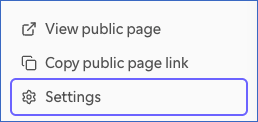
In the left navigation pane, click Settings.
-
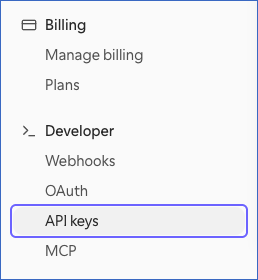
In the left navigation pane, under Developer, click API keys.
-
On the API keys page, click + New.

-
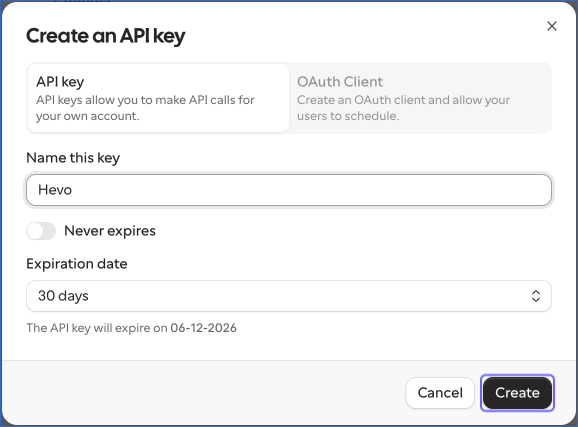
In the Create an API key dialog, do the following:
-
Select API key.
-
In the Name this key field, enter a name for the key. For example, Hevo.
-
Turn on Never expires, or select an Expiration date for the key. If the key expires, the Pipeline fails until you update the Source with a new key.
-
Click Create.
-
-
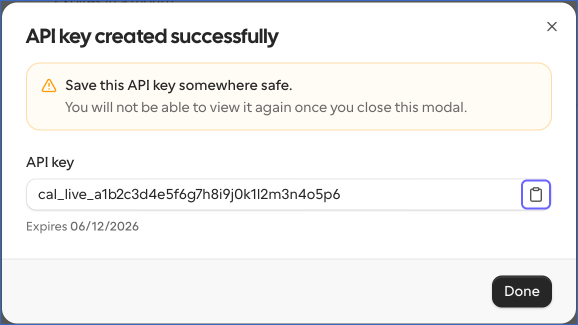
In the API key created successfully dialog, click the copy icon next to the API key, and save the key securely like any other password. Cal.com does not show the key again after you close the dialog.
-
Click Done.
Read API Keys for more information.
If the API key expires or is deleted in Cal.com, Hevo cannot connect to your account, and the Pipeline fails. To resume data ingestion, create a new API key and modify the Source configuration with it.
Configure Cal.com as a Source in your Pipeline
Perform the following steps to configure your Cal.com Source:
-
Click Pipelines in the Navigation Bar.
-
Click + Create Pipeline in the Pipelines List View.
-
On the Select Source Type page, select Cal.
-
On the Select Destination Type page, select the type of Destination you want to use.
-
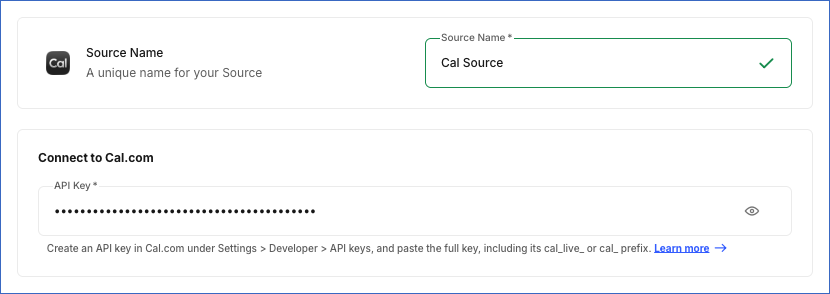
On the Configure Source page, specify the following:
-
Source Name: A unique name for your Source, not exceeding 255 characters. The name can contain letters, numbers, spaces, underscores (_), and hyphens (-). For example, Cal Source.
-
In the Connect to Cal.com section:
- API Key: The API key that you created in your Cal.com account, including its cal_live_ or cal_ prefix.
-
-
Click Test & Continue to test the connection to your Cal.com Source. Once the test is successful, you can proceed to set up your Destination.
Data Replication
Hevo replicates data for all the objects selected on the Configure Objects page during Pipeline creation. By default, all supported objects and their available fields are selected. However, you can modify this selection while creating or editing the Pipeline.
The first run of the Pipeline ingests all the data of the selected objects. In the subsequent runs, as per the sync frequency, Hevo ingests data as follows:
| Ingestion | Objects |
|---|---|
| New and updated records, based on the time each record was last updated | Booking and its child objects |
| All the records, in each run | All other objects |
For each booking that Hevo ingests, Hevo reads its attendees, Cal Video sessions, recordings, and references with a separate API request each. As a result, the number of API requests in each run increases with the number of new and updated bookings.
You can resync any object.
Note: You can create a Pipeline with this Source only using the Merge load mode. The Append mode is not supported for this Source.
Schema and Primary Keys
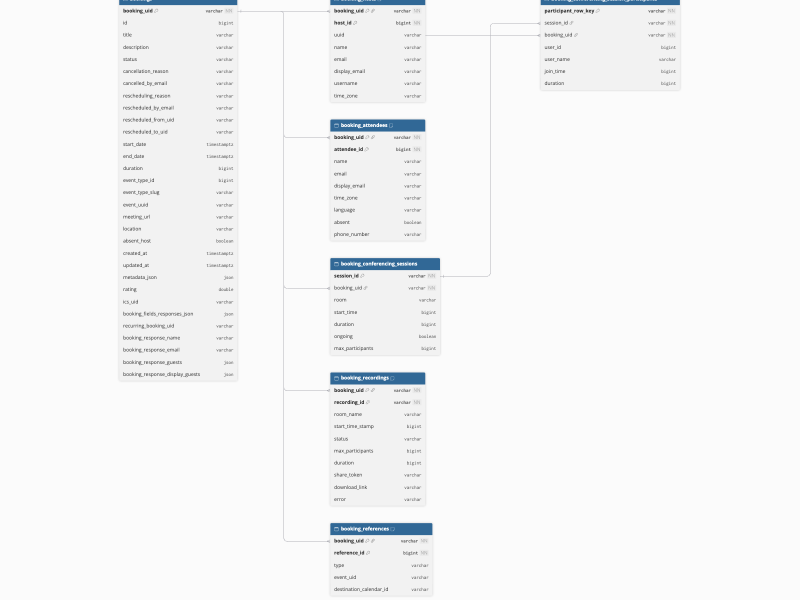
Hevo uses the following schema to upload the records in the Destination. For a detailed view of the objects, fields, and relationships, click the ERD.
Data Model
The following is the list of tables (objects) that are created at the Destination when you run the Pipeline:
| Object | Description |
|---|---|
| Booking | Contains the bookings made on your event types, including the title, status, start and end times, location, meeting URL, the event type, and the responses that the attendee entered while booking. |
| Booking Attendee | Contains the attendees of each booking, including their name, email address, time zone, language, and whether they were absent. |
| Booking Conferencing Session | Contains the Cal Video sessions of each booking, including the start and end times and the duration of each session. |
| Booking Conferencing Session Participant | Contains the participants of each Cal Video session, including the time each participant joined and how long they stayed. |
| Booking Host | Contains the hosts of each booking, including their name, email address, username, and time zone. |
| Booking Recording | Contains the Cal Video recordings of each booking, including the status, duration, and download link of each recording. |
| Booking Reference | Contains the references that link each booking to the calendar events and video meetings created for it in connected apps. |
| Calendar | Contains the calendar connections of your Cal.com account, such as Google Calendar or Outlook, including the integration, the primary calendar, and the credential of each connection. |
| Calendar Property | Contains the calendars available in each calendar connection, including whether each calendar is primary, selected for conflict checking, or read-only. |
| Destination Calendar | Contains the calendar to which Cal.com adds new bookings, including the integration and the email address of the calendar. |
| Event Type | Contains the event types of your account, including the title, slug, length, scheduling and booking limits, and the confirmation, seats, and recurrence settings of each event type. |
| Event Type Booking Field | Contains the fields that the booking form of each event type asks for, including the type, label, and whether each field is required or hidden. |
| Event Type Booking Window | Contains the booking window of each event type, which sets how far into the future attendees can book. |
| Event Type Location | Contains the locations of each event type, such as an address, a phone number, a link, or a video conferencing app. |
| Event Type User | Contains the users who host each event type. |
| Profile | Contains the profile of the user who owns the API key, including the username, email address, time zone, language, and organization. |
| Team | Contains the teams that you belong to, including the name, slug, branding, privacy settings, and time zone of each team. |
Additional Information
Read the detailed Hevo documentation for the following related topics:
Handling of Deletes
Hevo captures the deletes of the Cal.com objects as follows:
| Deletes Captured | Objects |
|---|---|
| In each run, by comparing the data |
Calendar, Calendar Property, Destination Calendar, Event Type and its child objects, Profile, and Team. Hevo ingests all the records of these objects in each run, and marks the records that are no longer returned by Cal.com as deleted by setting the value of the metadata column __hevo__marked_deleted to True. For example, an event type that you delete in Cal.com is marked as deleted in the next run. |
| Not captured | Booking and its child objects. Cal.com does not delete a booking when it is cancelled. Instead, Hevo updates the status of the booking to cancelled in the Destination. |
Source Considerations
-
Hevo ingests the data that the user who created the API key can access in Cal.com:
-
Booking and its child objects: The bookings in which the user is the host or an attendee. If the user is an admin or owner of a team or organization, Cal.com also returns the bookings of that team or organization.
-
Event Type and its child objects: The personal event types of the user. Hevo does not ingest the event types of teams.
-
Team: The teams of which the user is a member.
-
Calendar, Calendar Property, Destination Calendar, and Profile: The data of the user.
To replicate the data of another user, use an API key created by that user.
-
-
The Booking Conferencing Session, Booking Conferencing Session Participant, and Booking Recording objects contain data only for bookings that use Cal Video as the location.
-
Cal.com allows an API key to make 120 API requests per minute. If the limit is exceeded, Hevo waits and retries the request. Read Rate limits.