ADP is a cloud-based human capital management (HCM) platform that provides payroll processing, human resources, talent management, benefits administration, and time and attendance solutions for organizations of all sizes. It enables businesses to manage their entire workforce lifecycle from a single, unified system.
Hevo uses the ADP Workforce Now APIs to replicate data from your ADP account to the Destination of your choice. To ingest data, you must provide Hevo with your ADP Client ID, Client Secret, a private key, and a Web Services (WS) Certificate.
Supported Features
| Feature Name | Supported |
|---|---|
| Capture deletes | Yes |
| History mode | No |
| Custom data (user-configured tables & fields) | No |
| Data blocking (skip objects and fields) | Yes |
| Resync (objects and Pipelines) | Yes |
| API configurable | No |
Prerequisites
-
An active ADP account exists from which data is to be ingested.
-
The ADP credentials are available to provide Hevo access to your ADP account data.
Obtain the ADP Credentials
To connect Hevo to your ADP account, you need a Client ID, Client Secret, a private key, and a Web Services (WS) Certificate.
ADP does not allow you to register an API client yourself. Contact your ADP account representative to register an API client for your ADP Workforce Now account and obtain the Client ID and Client Secret.
To obtain the private key and WS Certificate, generate a private key and a certificate signing request (CSR), and submit the CSR to ADP. ADP signs the CSR and returns a WS Certificate in .pem format.
Use these credentials when configuring your ADP Source in Hevo. If the Client Secret, private key, or Web Services Certificate configured in the Pipeline is revoked manually from your ADP account, Hevo cannot authenticate with the Source. As a result, all active jobs for the Pipeline fail, and no data is replicated. To resume data replication, modify the Source configuration in the Pipeline with valid credentials. Once the updated credentials are saved, Hevo re-authenticates the Source, and data ingestion resumes from the last saved offset.
Configure ADP as a Source in your Pipeline
Perform the following steps to configure your ADP Source:
-
Click Pipelines in the Navigation Bar.
-
Click + Create Pipeline in the Pipelines List View.
-
On the Select Source Type page, select ADP.
-
On the Select Destination Type page, select the type of Destination you want to use.
-
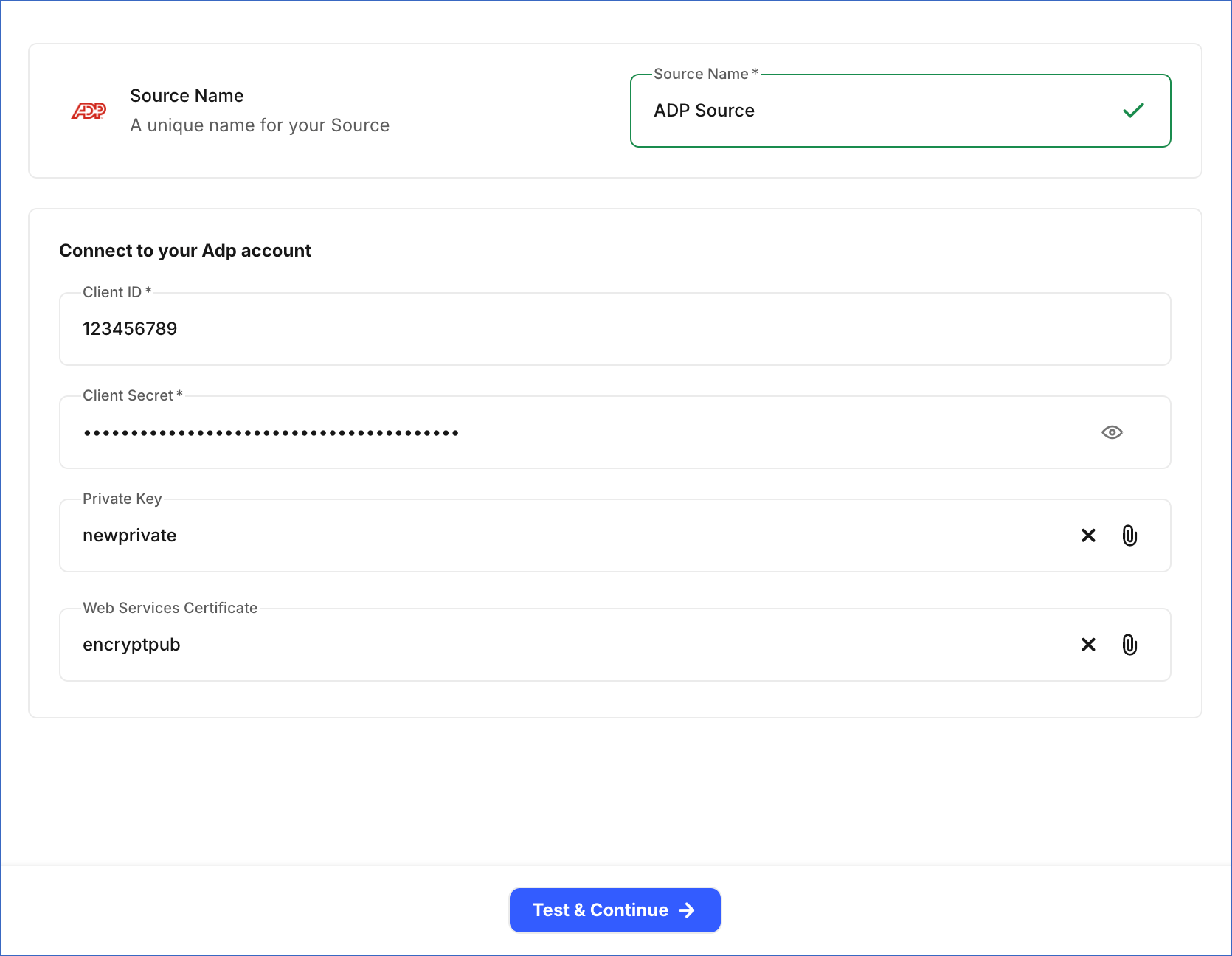
In the Configure Source screen, specify the following:
-
Source Name: A unique name for your Source, not exceeding 255 characters. For example, ADP Source.
-
In the Connect to your ADP account section, specify the following:
-
Client ID: The Client ID that you obtained from your ADP account.
-
Client Secret: The Client Secret that you obtained from your ADP account.
-
Private Key: Upload the private key file that you generated.
-
Web Services Certificate: Upload the Web Services Certificate file signed by ADP.
-
-
-
Click Test & Continue to test the connection to your ADP Source. Once the test is successful, you can proceed to set up your Destination.
Data Replication
Hevo replicates data for all the objects selected on the Configure Objects page during Pipeline creation. By default, all supported objects and their available fields are selected. However, you can modify this selection while creating or editing the Pipeline.
Hevo ingests the following types of data from your Source objects:
-
Historical Data: The first run of the Pipeline ingests all available historical data for the selected objects and loads it into the Destination.
-
Incremental Data: Once the historical load is complete, new and updated records for objects are ingested as per the sync frequency.
Hevo ingests the entire data for all objects during each Pipeline run.
ADP enforces a rate limit on API requests. To understand how Hevo handles such scenarios, read Handling Rate Limit Exceptions.
Schema and Primary Keys
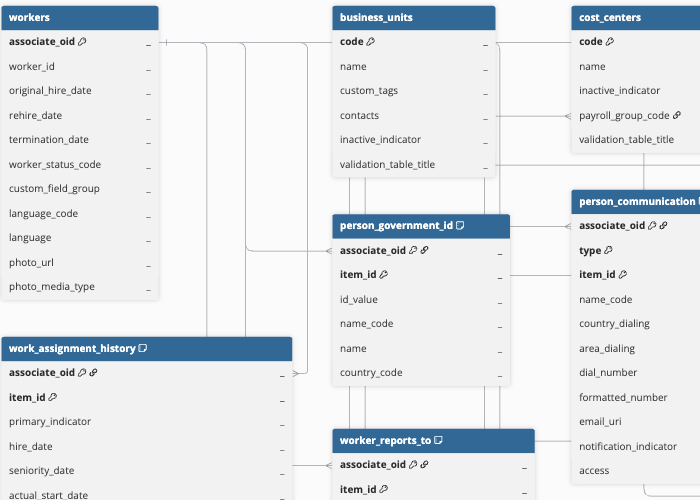
Hevo uses the following schema to upload the records to the Destination. For a detailed view of the objects, fields, and relationships, click the ERD.
Data Model
The following is the list of tables (objects) that are created at the Destination when you run the Pipeline:
| Object | Description |
|---|---|
| Workers | Contains details of individual workers in your ADP Workforce Now account, including the associate OID, worker ID, original hire date, rehire date, termination date, worker status, and preferred language. This object has the following child objects: - Work Assignment History - Person Government ID - Person Communication - Person Military Classification - Person History - Business Communication - Worker Reports To - Worker Home Organizational Unit - Worker Assigned Organizational Unit |
| Business Units | Contains the business units configured in your ADP Workforce Now account, including the business unit code, name, and associated contacts. |
| Cost Centers | Contains the cost centers configured in your ADP Workforce Now account, including the cost center code, name, and associated payroll group. |
| Departments | Contains the departments configured in your ADP Workforce Now account, including the department code, name, and associated payroll group. |
| Jobs | Contains the job codes configured in your ADP Workforce Now account, including the job name, job function, pay scale, pay grade, and wage law coverage. |
| Cost Numbers | Contains the cost number codelist values used for worker management in your ADP Workforce Now account, including the associated foreign key. |
| Union Codes | Contains the union codelist values configured in your ADP Workforce Now account. |
| Union Locals | Contains the union local codelist values configured in your ADP Workforce Now account. |
| Pay Grades | Contains the pay grade codelist values configured in your ADP Workforce Now account. |
| Locations | Contains the location codelist values configured in your ADP Workforce Now account. |
| Data Control | Contains the data control codelist values used for payroll instruction management in your ADP Workforce Now account. |
| Pay Groups | Contains the pay group codelist values configured in your ADP Workforce Now account. |
| Currencies | Contains the currency codelist values configured in your ADP Workforce Now account. |
| Wage Entities | Contains the wage entity codelist values configured in your ADP Workforce Now account. |
| Local Tax Jurisdictions | Contains the local tax jurisdiction codelist values configured in your ADP Workforce Now account. |
| State Tax Jurisdictions | Contains the state tax jurisdiction codelist values configured in your ADP Workforce Now account. |
| SUI/SDI Tax Jurisdictions | Contains the State Unemployment Insurance (SUI) and State Disability Insurance (SDI) tax jurisdiction codelist values configured in your ADP Workforce Now account. |
Additional Information
Read the detailed Hevo documentation for the following related topics:
Handling of Deletes
ADP does not explicitly mark records as deleted in its API responses. When a record is deleted, it is no longer returned in subsequent API responses.
For all objects, Hevo uses a full data refresh approach to capture delete actions for all objects. During each Pipeline run, Hevo compares the data fetched from the Source object with the data present in the Destination table. If a record exists in the Destination but is no longer returned by the Source, the record is marked as deleted by setting the value of the metadata column __hevo__marked_deleted to True.