ActiveCampaign is a customer experience automation platform that combines email marketing, marketing automation, and sales CRM. Businesses use it to manage contacts and accounts, run email campaigns and automations, and track deals through sales pipelines.
Hevo uses the ActiveCampaign API to replicate data from your ActiveCampaign account to the Destination of your choice. To ingest data, you must provide Hevo with your ActiveCampaign API key and account name.
Supported Features
| Feature Name | Supported |
|---|---|
| Capture deletes | Yes (for some objects) |
| History mode | No |
| Custom data (user-configured tables & fields) | No |
| Data blocking (skip objects and fields) | Yes |
| Resync (objects and Pipelines) | Yes |
| API configurable | Yes |
Prerequisites
-
An active ActiveCampaign account from which data is to be ingested.
-
Access to the Settings page of your ActiveCampaign account, to obtain the API key and account name.
Obtain the API Key and Account Name
Each ActiveCampaign user has their own API key. Hevo can read the data that the user whose API key you provide can access.
Perform the following steps to obtain the API key and account name:
-
Log in to your ActiveCampaign account.
-
In the upper-right corner, click the Settings (gear) icon.

-
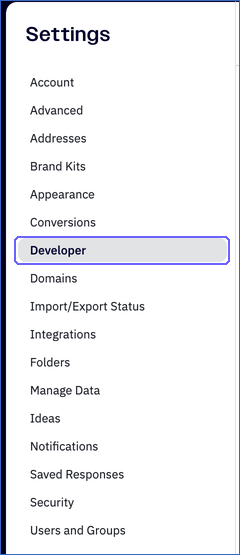
In the Settings pane, click Developer.
-
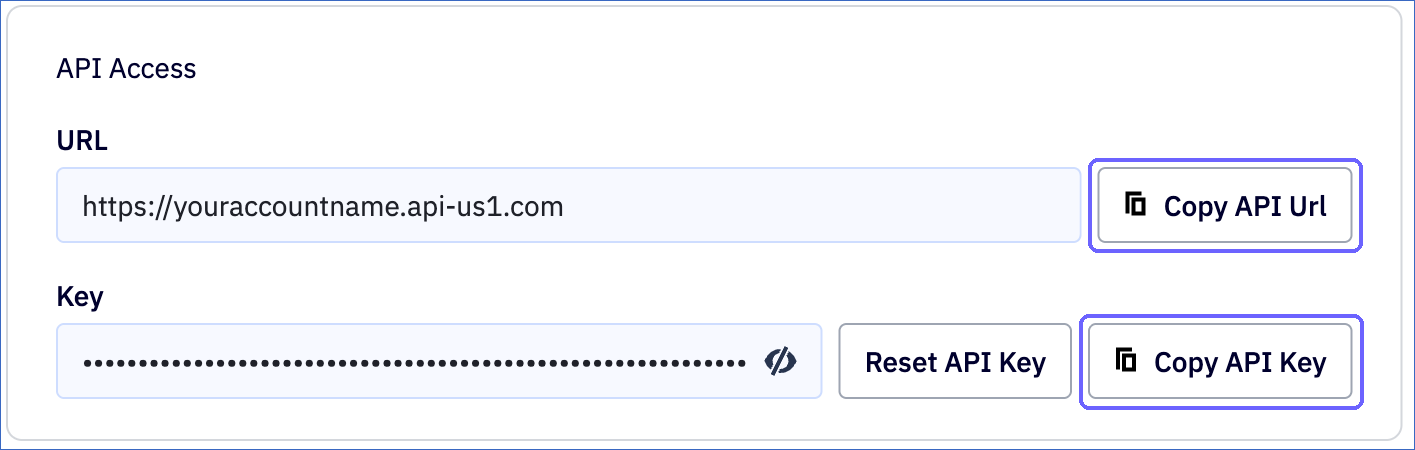
In the API Access section, copy the following values and save them securely:
-
URL: Your API URL, for example, https://youraccountname.api-us1.com. The account name is the part of the URL before .api-us1.com. For example, youraccountname. Click Copy API Url to copy it.
-
Key: Your API key. Click Copy API Key to copy it.
-
Note: If the user whose API key you use is deleted, or if the key is reset from the Developer page, Hevo cannot connect to ActiveCampaign. To resume ingestion, modify the Source configuration with a valid API key.
Configure ActiveCampaign as a Source in your Pipeline
Perform the following steps to configure your ActiveCampaign Source:
-
Click Pipelines in the Navigation Bar.
-
Click + Create Pipeline in the Pipelines List View.
-
On the Select Source Type page, select ActiveCampaign.
-
On the Select Destination Type page, select the type of Destination you want to use.
-
On the Select Pipeline Type page, click Edge, and then click Continue.
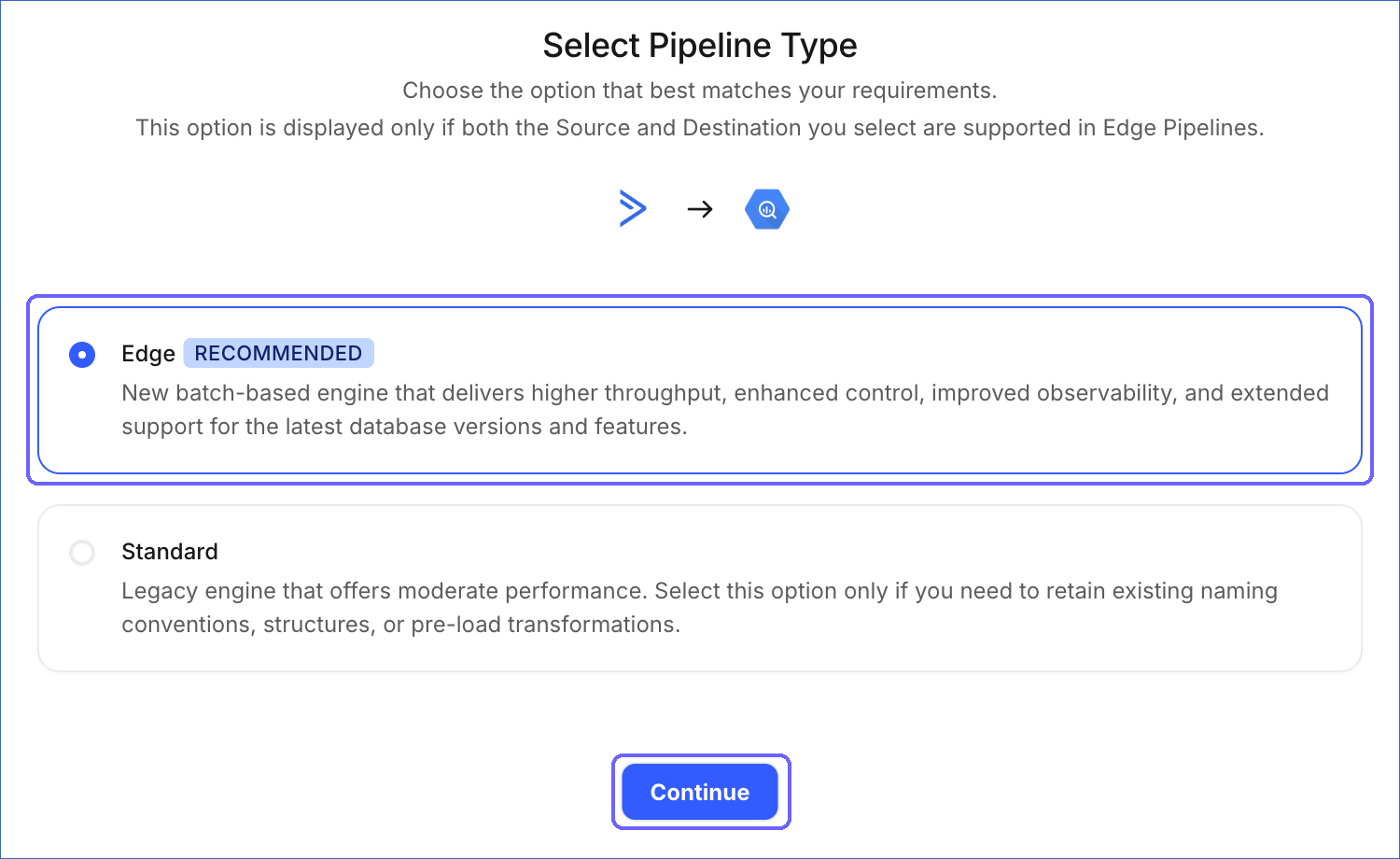
This page appears only if the selected Destination type is supported in Edge and your Team has an existing ActiveCampaign Pipeline with the same Destination type. Otherwise, you can proceed to create an Edge Pipeline.
-
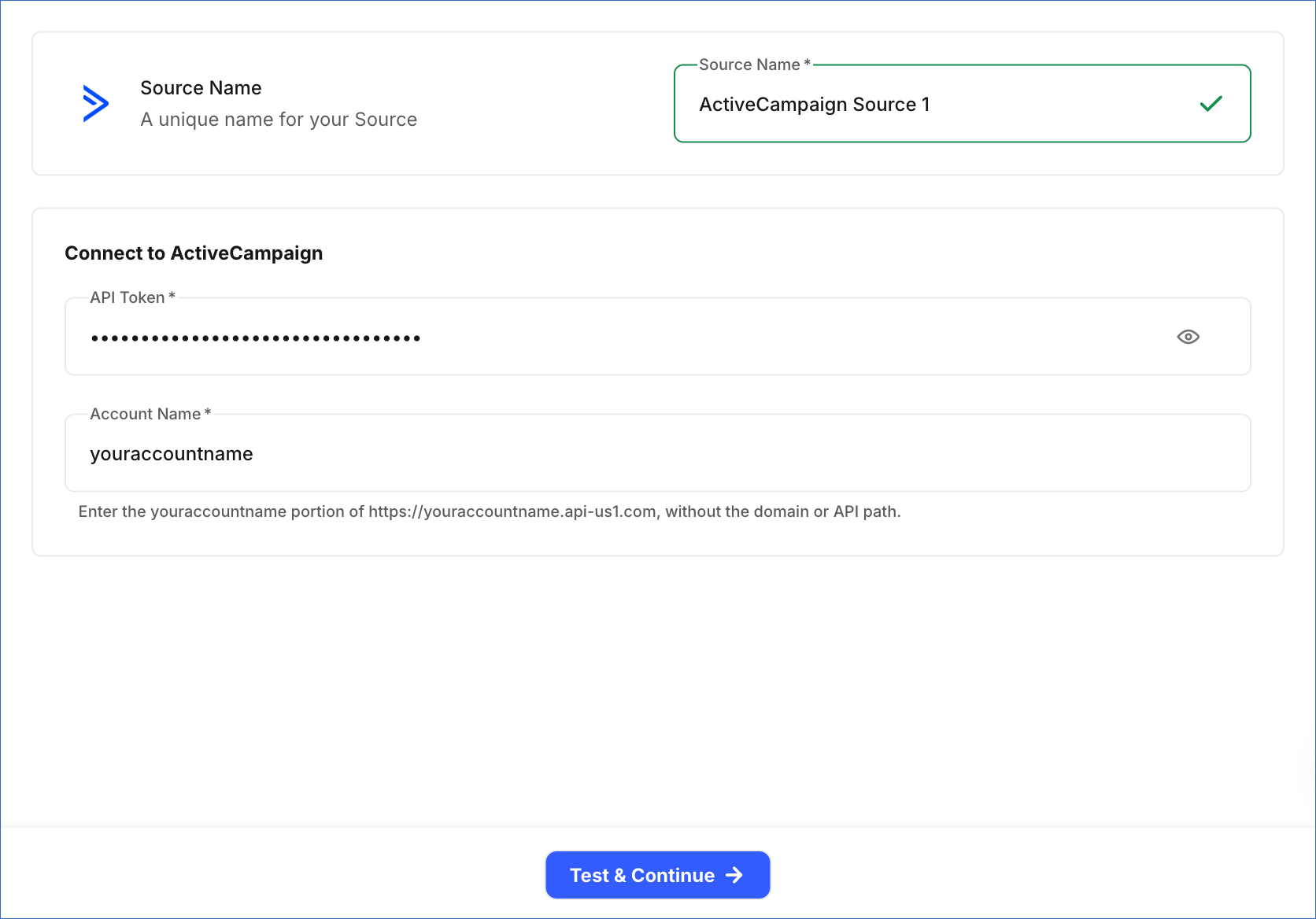
In the Configure Source screen, specify the following:
-
Source Name: A unique name for your Source, not exceeding 255 characters. For example, ActiveCampaign Source.
-
In the Connect to ActiveCampaign section, specify the following:
-
API Token: The API key that you copied from the Developer page of your ActiveCampaign account.
-
Account Name: The account name part of your API URL. For example, if your API URL is https://youraccountname.api-us1.com, enter youraccountname. Do not include the domain or the API path.
-
-
-
Click Test & Continue to test the connection to your ActiveCampaign Source. Once the test is successful, you can proceed to set up your Destination.
Data Replication
Hevo replicates data for all the objects selected on the Configure Objects page during Pipeline creation. By default, all supported objects and their available fields are selected. However, you can modify this selection while creating or editing the Pipeline.
For the Contacts and Deals objects, Hevo ingests new and updated records in each Pipeline run, as per the sync frequency. Changes are identified using the date on which a record was last updated. In each run, Hevo also ingests again the records updated on the day before the last saved update date, to avoid missing changes.
For all the other objects, Hevo ingests the entire data during each Pipeline run.
You can resync only the parent objects. When you resync a parent object, Hevo also resyncs its child objects.
ActiveCampaign limits API requests to 5 requests per second per account. If this limit is exceeded, a rate limit exception occurs. To understand how Hevo handles such scenarios, read Handling Rate Limit Exceptions.
Note: The Email Activities object uses the Append load mode, and all the other objects use the Merge load mode. You cannot change the load mode of an object. As Hevo reads all the email activities in each run and the object has no primary key, its Destination table contains the same email activities again after each run.
Schema and Primary Keys
Hevo uses the following schema to upload the records in the Destination. For a detailed view of the objects, fields, and relationships, click the ERD.
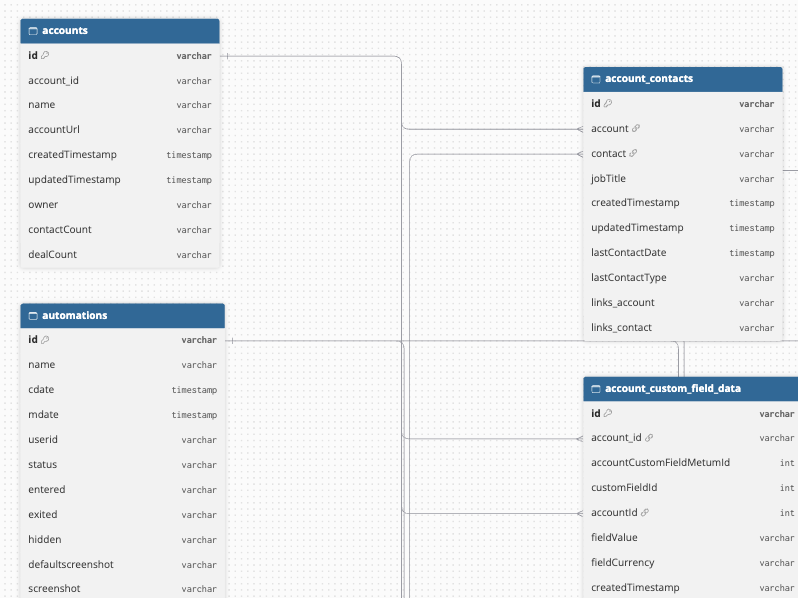
The primary key of most objects is id. The following objects use a different primary key:
-
Custom Fields:
custom_field_id. Custom Field Relations:custom_field_idandrelation_id. -
Custom Object Schemas:
custom_object_schema_id. Its child objects usecustom_object_schema_idwithfield_idorrelationship_id. -
Account Custom Field Options and Deal Custom Field Options: the ID of the custom field and
option. -
Pipeline Deal Stages:
deal_group_idanddeal_stage_id. -
Form Actions and Form Cfields:
row_key, a key that Hevo generates from the content of each record. -
Email Activities: no primary key.
Data Model
The following is the list of tables (objects) that are created at the Destination when you run the Pipeline:
| Object | Description |
|---|---|
| Account Contacts | Contains the associations between contacts and accounts, including the job title of the contact at the account. |
| Account Custom Field Meta | Contains the custom fields defined for accounts. It includes a child object, Account Custom Field Options. |
| Accounts | Contains the accounts (companies) in your CRM, including their name, URL, and owner. It includes a child object, Account Custom Field Data. |
| Addresses | Contains the mailing addresses configured in your account, which are used in the footer of your campaigns. |
| Automations | Contains your automations, including their name, status, and the number of contacts in them. |
| Brandings | Contains the branding settings of your account, such as logo and colors. |
| Calendars | Contains the calendar feeds configured in your account. |
| Campaign List Associations | Contains the lists to which each campaign is sent. |
| Campaigns | Contains your email campaigns, including their type, status, and send statistics. |
| Connections | Contains the integrations, such as ecommerce stores, connected to your account. |
| Contact Deals | Contains the secondary contacts associated with deals. |
| Contact List Memberships | Contains the lists that each contact is subscribed to, including the subscription status. |
| Contact Tags | Contains the tags applied to each contact. |
| Contact Tracking Logs | Contains the tracked activities of contacts, such as site visits and events. |
| Contacts | Contains your contacts, including their email address, name, phone number, and engagement details. |
| Custom Fields | Contains the custom fields defined for contacts. It includes a child object, Custom Field Relations. |
| Custom Field Values | Contains the values of contact custom fields. |
| Custom Object Schemas | Contains the custom objects defined in your account. It includes the following child objects: - Custom Object Schema Fields - Custom Object Schema Relationships |
| Deal Activities | Contains the recent activity of deals, such as stage changes and notes. |
| Deal Custom Fields | Contains the custom fields defined for deals. It includes a child object, Deal Custom Field Options. |
| Deal Custom Field Values | Contains the values of deal custom fields. |
| Deal Roles | Contains the roles that contacts can have in a deal. |
| Deal Stages | Contains the stages of your deal pipelines. |
| Deal Task Types | Contains the types of tasks that can be created for deals, such as calls and emails. |
| Deal Tasks | Contains the tasks created for deals and contacts, including their due date and status. |
| Deals | Contains your deals, including their value, stage, owner, and status. |
| Ecommerce Customers | Contains the customers synced from your connected ecommerce stores. |
| Ecommerce Order Products | Contains the products in each ecommerce order. |
| Ecommerce Orders | Contains the orders synced from your connected ecommerce stores. |
| Email Activities | Contains the email activities, such as emails sent to and received from contacts. |
| Forms | Contains the sign-up forms in your account. It includes the following child objects: - Form Actions - Form Cfields |
| Group Limits | Contains the limits that apply to each user group. |
| Groups | Contains the user groups (permission groups) in your account. |
| Link Data | Contains the clicks and reads of the links in your campaigns by each contact, including the number of times, IP address, and time. |
| Links | Contains the links tracked in your campaigns. |
| Lists | Contains your contact lists. |
| Messages | Contains the email messages used in your campaigns, including their subject and sender. |
| Notes | Contains the notes added to contacts, accounts, and deals. |
| Pipelines | Contains your deal pipelines. It includes a child object, Pipeline Deal Stages, which maps each pipeline to its deal stages. |
| Saved Responses | Contains the saved email responses that users can reuse. |
| Scores | Contains the contact and deal scoring rules. |
| Segments | Contains the saved segments of your account. The conditions of the segments and their matching contacts are not included. |
| Tags | Contains the tags defined in your account. |
| Task Outcomes | Contains the outcomes that can be recorded for deal tasks. |
| User Groups | Contains the groups that each user belongs to. |
| Users | Contains the users of your ActiveCampaign account. |
Additional Information
Read the detailed Hevo documentation for the following related topics:
Handling of Deletes
For the following objects, Hevo uses a full data refresh approach to capture deletes: Automations, Brandings, Calendars, Campaign List Associations, Campaigns, Contact Deals, Contact List Memberships, Contact Tags, Contact Tracking Logs, Custom Object Schemas and their child objects, Account Custom Field Options, Deal Custom Field Options, Deal Custom Field Values, Deal Roles, Deal Stages, Deal Tasks, Ecommerce Orders, Forms, Group Limits, Groups, Link Data, Links, Messages, Notes, Pipelines, Pipeline Deal Stages, Scores, Segments, Task Outcomes, User Groups, and Users. If a record exists in the Destination but is no longer returned by the Source, the record is marked as deleted by setting the value of the metadata column __hevo__marked_deleted to True.
For the Contacts and Deals objects, which are ingested incrementally, Hevo does not capture deletes. Hevo also does not capture deletes for the Account Contacts, Account Custom Field Meta, Account Custom Field Data, Accounts, Addresses, Connections, Custom Fields, Custom Field Relations, Custom Field Values, Deal Activities, Deal Custom Fields, Deal Task Types, Ecommerce Customers, Ecommerce Order Products, Lists, Saved Responses, Tags, and Email Activities objects. Records deleted in ActiveCampaign remain in the Destination.
For the Form Actions and Form Cfields objects, Hevo replaces the records of a form each time it ingests the form.
Source Considerations
-
The API key belongs to a user. Hevo reads only the data that this user can access in ActiveCampaign. For example, if the user cannot manage deals in a pipeline, the deals of that pipeline contain only their ID and title, and the stages of that pipeline are not returned.
-
The Contacts object does not include archived contacts.
-
Some objects, such as Ecommerce Orders, Ecommerce Customers, and Custom Object Schemas, are populated only if you use the related ActiveCampaign feature. Otherwise, these objects are created in the Destination without any records.