Effective Release 2.48.3, Hevo has updated its Zendesk integration to use OAuth-based authentication to comply with Zendesk’s security requirements. Token-based authentication is no longer supported and has been removed from the Zendesk Source configuration.
If your existing Pipelines use token-based authentication, you must reauthorize them using OAuth. Refer to the Upgrading Pipelines from Token-based Authentication to OAuth section for the steps to do this. Pipelines that are not upgraded may fail due to authentication issues.
This enhancement applies to all new and existing Pipelines.
You can load the data of your Zendesk tickets and user information into the Destination of your choice using Hevo Pipelines.
Prerequisites
-
You are an Administrator in Zendesk to access your data through APIs.
-
You are assigned the Team Administrator, Team Collaborator, or Pipeline Administrator role in Hevo to create the Pipeline.
Configuring Zendesk as a Source
Perform the following steps to configure Zendesk as a Source in your Pipeline:
Note: The Source configuration no longer includes the Email and API Token fields. Authentication is now handled through OAuth.
-
Click Pipelines in the Navigation Bar.
-
Click + Create Pipeline in the Pipelines List View.
-
On the Select Source Type page, select Zendesk.
-
On the Select Destination Type page, select the type of Destination you want to use.
-
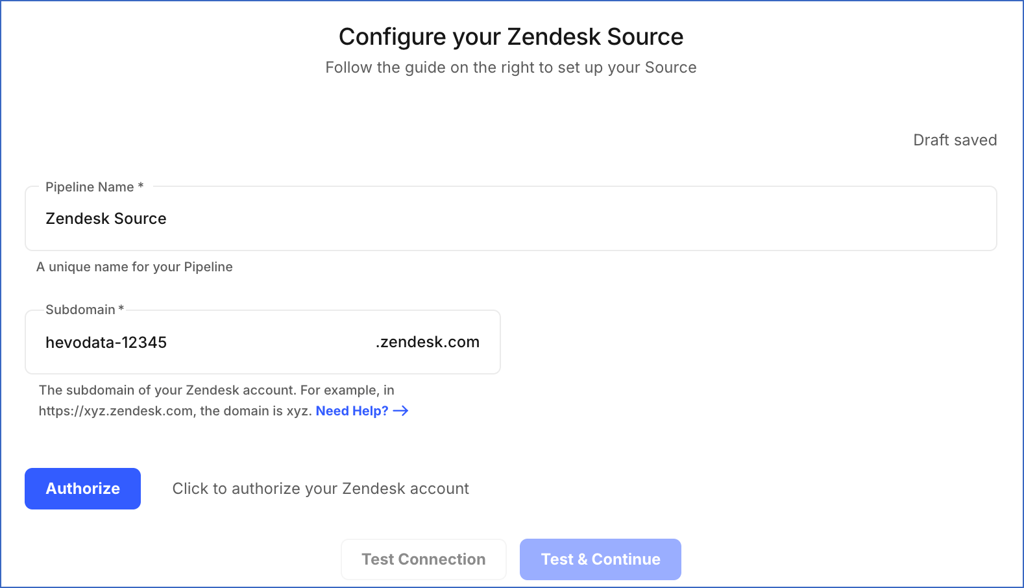
On the Configure your Zendesk Source page, specify the following:
-
Pipeline Name: A unique name for your Pipeline, not exceeding 255 characters. For example, Zendesk Source.
-
Subdomain: The unique identifier for your Zendesk account. For example, if your Zendesk URL is https://xyz.zendesk.com, the subdomain is xyz.
-
-
Click Authorize and perform the following steps to allow Hevo to connect to your Zendesk account:
-
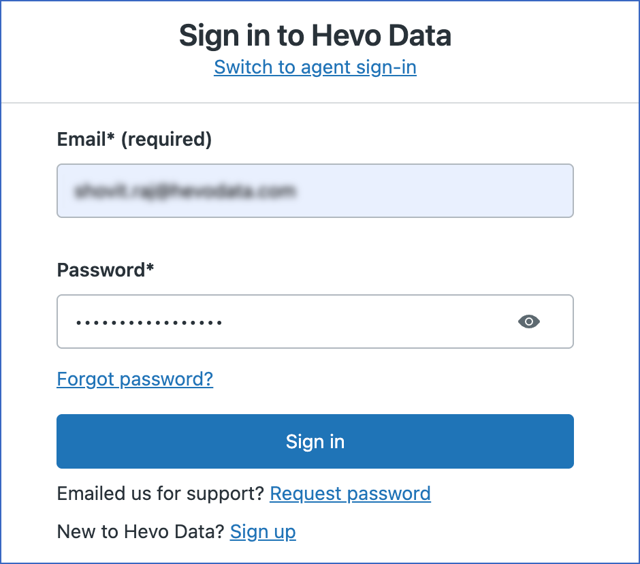
If you are not already signed in to your Zendesk account, sign in when prompted. Otherwise, proceed to step 2.
-
Click Allow to authorize Hevo to access your Zendesk account data.
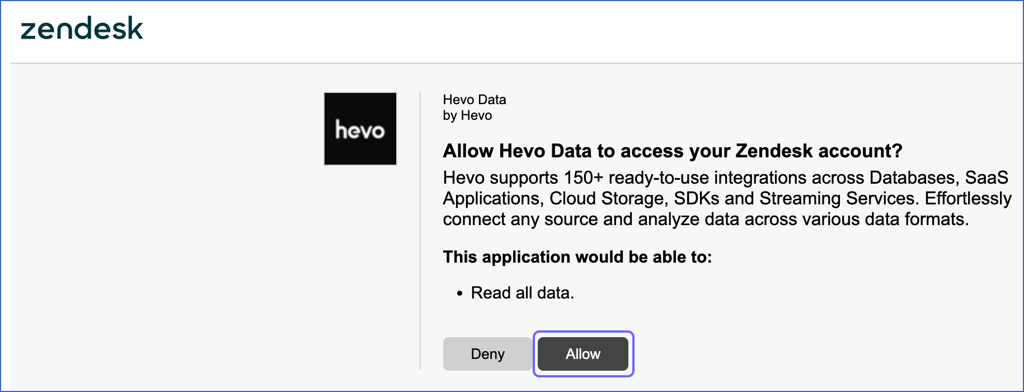
You are redirected to the Configure your Zendesk Source page.
-
-
Click Test & Continue to test the connection to your Zendesk Source.
-
Proceed to configuring the data ingestion and setting up the Destination.
Upgrading Pipelines from Token-based Authentication to OAuth
Effective Release 2.48.3, Hevo supports OAuth-based authentication for the Zendesk Source. If your existing Pipeline uses token-based authentication, you must upgrade it to OAuth to ensure uninterrupted data ingestion.
Once the upgrade is successful, data ingestion resumes from the last saved offset. No historical data is re-ingested, and no further action is required. Pipelines that continue to use token-based authentication may fail due to authentication issues.
Perform the following steps to upgrade your Pipeline:
-
Click Pipelines in the Navigation Bar.
-
In the Pipelines List View, select the Pipeline created with the Zendesk Source that you want to upgrade.
-
In the Pipeline Detailed View, click the Settings (
 ) icon next to the Source name.
-
In the hover window that appears, click the Edit (
 ) icon.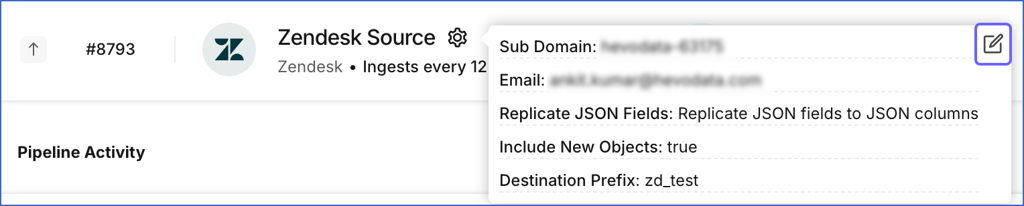
-
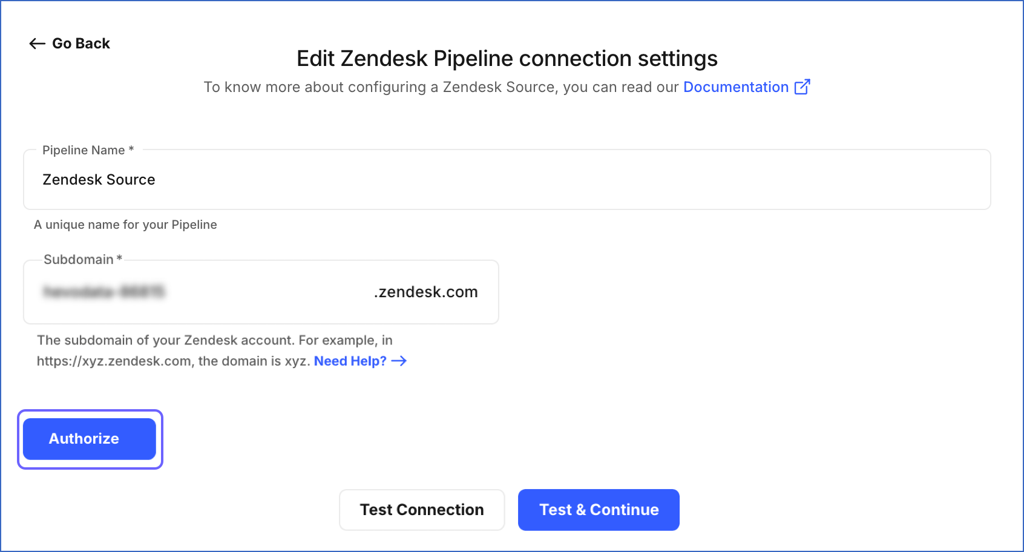
On the Edit Zendesk Pipeline connection settings page, click Authorize to authenticate your Zendesk account using OAuth.
-
If you are not already signed in to your Zendesk account, sign in when prompted. Otherwise, proceed to step 7.
-
Click Allow to authorize Hevo to access your Zendesk account data.
You are redirected to the Edit Zendesk Pipeline connection settings page.
-
Click Test & Continue to test the connection to your Zendesk Source.
Your Pipeline is now upgraded to OAuth-based authentication.
Data Replication
| For Teams Created | Default Ingestion Frequency | Minimum Ingestion Frequency | Maximum Ingestion Frequency | Custom Frequency Range (in Hrs) |
|---|---|---|---|---|
| Before Release 2.21 | 12 Hrs | 5 Mins | 24 Hrs | 1-24 |
| After Release 2.21 | 12 Hrs | 30 Mins | 24 Hrs | 1-24 |
-
Historical Data: In the first run of the Pipeline, Hevo ingests the data of the past one year for all the selected objects in your Zendesk account. From Release 1.76 onwards, for all existing and new Pipelines, Hevo ingests your historical data using the Recent Data First approach. This enables you to have quicker access to the most recent data.
-
Incremental Data: Once the historical load is complete, data is ingested as per the ingestion frequency in Full Load or Incremental mode, as mentioned in the table below.
Data Model
Hevo supports the Zendesk Support, Talk, and Help Centre APIs for fetching data for various objects.
Using the Zendesk Support API, the following tables (objects) are created in the Destination when you run the Pipeline:
| Objects | Mode | Description |
|---|---|---|
| Brands | Full Load | Contains details of the customer-facing identities (URLs) of your company. |
| Custom Roles | Full Load | Contains details of the custom roles created for your Support agents and the access that these roles have. For example, you can create a role Contributor and assign it to agents who can make only internal comments on a ticket. |
| Groups | Full Load | Contains details of the groups into which your agents and tickets can be organized. |
| Group Memberships | Full Load | Contains details of the groups to which an agent is linked. |
| Organizations | Incremental | Contains details of the organizations into which your customers are segregated, to route tickets created by them for better support. |
| Organization Memberships | Full Load | Contains details of the organization of which your user(s) is a member. |
| Satisfaction Ratings | Incremental | Contains details of the feedback given by your customers about their experience with your Support team by rating their solved tickets. |
| Schedules | Full Load | Contains details of the schedules that you have created to indicate your Support team’s availability. |
| SLA Policies | Full Load | Contains details of the service level agreement between you and your customers that specifies performance measures for support. For example, the SLA for urgent tickets could be to respond within 10 minutes and resolve or mitigate the ticket within 2 hours. |
| Tickets | Incremental | Contains details of the communication between your customers and your Support agents. |
| Ticket Events | Incremental | Contains details such as response times, agent work times, and requester wait times. |
| Ticket Fields | Full Load | Contains details of the ticket, such as requester or assignee. |
| Ticket Forms | Full Load | Contains details of the collection of ticket fields that are visible to the Support agent as well as the end-user. |
| Users | Incremental | Contains details of your Zendesk Support users based on their type: - End Users: Your customers who request support using tickets. - Agents: Your Zendesk Support agents who resolve customer tickets. - Administrators: Your Zendesk Support agents with administrative abilities. |
Using the Zendesk Talk API, the following tables (objects) are created in the Destination when you run the Pipeline:
| Objects | Mode | Description |
|---|---|---|
| Addresses | Full Load | Contains details of addresses associated with a profile. They are often used to verify a business while purchasing Talk phone numbers in certain countries to meet regulatory requirements. |
| Calls | Incremental | Contains details of the calls received or made to/from your Talk number. |
| Greetings | Full Load | Contains details of the recorded messages used to greet customers when they contact support via phone or chat. These can be either default Zendesk greetings or custom ones. |
| IVRs | Full Load | Contains details of the keypad tones or voice commands used to direct customers to an agent or department, provide recorded responses to FAQs, and deflect calls from users by switching interactions to text. These tones and commands are part of Zendesk’s Interactive Voice Response (IVR) automated phone system. |
| Legs | Incremental | Contains details of the interaction between your agent and customer during a call, or any action the system took on the call. |
| Lines | Full Load | Contains details of the available phone numbers and virtual phone lines in your Zendesk account. |
Using the Zendesk Help Center API, the following tables (objects) are created in the Destination when you run the Pipeline:
| Objects | Mode | Description |
|---|---|---|
| Articles | Incremental | Contains details of the content items such as help topics or technical notes included in sections. |
| Posts | Full Load | Contains details of the content, such as posts, post comments, or article comments, shared by a user with the community. |
| Topics | Full Load | Contains details of a collection of community posts on a subject or theme. |
Limitations
-
Hevo does not support ingesting data from custom objects. As a workaround, you can create a Pipeline with REST API as the Source and use the Zendesk Custom Objects API to retrieve the required data.
-
Hevo does not load data from a column into the Destination table if its size exceeds 16 MB, and skips the Event if it exceeds 40 MB. If the Event contains a column larger than 16 MB, Hevo attempts to load the Event after dropping that column’s data. However, if the Event size still exceeds 40 MB, then the Event is also dropped. As a result, you may see discrepancies between your Source and Destination data. To avoid such a scenario, ensure that each Event contains less than 40 MB of data.
See Also
- Metrics and attributes for Zendesk Talk
- Zendesk Incremental Export API
- Zendesk Talk Incremental Export API
Revision History
Refer to the following table for the list of key updates made to this page:
| Date | Release | Description of Change |
|---|---|---|
| May-25-2026 | 2.48.3 | - Updated the warning container in the page overview and Configuring Zendesk as a Source section to reflect the support for OAuth-based authentication. - Removed sections, Generating a Zendesk API Token and Migrating Pipelines to Upgraded Zendesk Source. - Added section, Upgrading Pipeline from Token-Based Authentication to OAuth. |
| Nov-07-2025 | NA | Updated the document as per the latest Hevo UI. |
| Sep-18-2025 | NA | Updated section, Configuring Zendesk as a Source as per the latest UI. |
| Jul-24-2025 | NA | Added a limitation about custom objects. |
| Jul-07-2025 | NA | Updated the Limitations section to inform about the max record and column size in an Event. |
| May-22-2025 | NA | Updated section, Custom frequency for Full Load objects to add a note about the behavior of manual ingestion actions. |
| Jan-07-2025 | NA | Added a limitation about Event size. |
| Jul-29-2024 | 2.26 | - Added section, Migrating Pipelines to Upgraded Zendesk Source. - Updated section, Data Model to add information about new objects. |
| Jul-15-2024 | 2.25.2 | Updated section, Data Replication to change the default ingestion frequency to 12 Hrs. |
| Mar-05-2024 | 2.21 | - Updated the ingestion frequency table in the Data Replication section. - Updated the Custom frequency for Full Load objects section with suggested frequencies for teams before and after Release 2.21. |
| Nov-28-2023 | 2.18 | Added section, Custom frequency for Full Load objects to inform users about the option to change ingestion frequency for Full Load objects. |
| Dec-14-2022 | NA | Updated section, Configuring Zendesk as a Source to reflect the latest Hevo UI. |
| Dec-07-2022 | NA | Updated section, Data Replication to reorganize the content for better understanding and coherence. |
| Jul-12-2022 | NA | Updated section, Data Model to segregate objects according to the API they belong to. |
| May-10-2022 | NA | Updated the steps to generate the Zendesk API Token. |
| Feb-07-2022 | 1.81 | - Organized content for clarity and coherence. - Added section, Data Model and included the Zendesk Voice objects, calls, and legs that are supported from Release 1.81 onwards. |
| Jan-07-2022 | 1.76 | Added information about reverse historical load in the Data Replication section. |
| Oct-25-2021 | 1.74 | - Updated the Data Replication section with information about the list of objects that Hevo fetches and the historical and incremental data load. - Added the Pipeline frequency information in the Data Replication section. |