Release Version 2.54
The content on this site may have changed or moved since you last viewed it. As a result, some of your bookmarks may become obsolete. Therefore, we recommend accessing the latest content via the Hevo Docs website.
This release note also includes the fixes provided in all the minor releases since 2.53.
To know the complete list of features available for early adoption before these are made generally available to all customers, read our Early Access page.
In this Release
Early Access Features
Transformations
Support for Databricks in Transformations (Edge)
NewHevo now supports Databricks Destination for Transformations, allowing you to build clean, analytics-ready tables from the raw data loaded into your Destination tables. Use this Destination while creating or modifying an environment to run your dbt models on it.
Note: Databricks is currently available for early access.
Transformations →Refer to the Early Access page for the complete list of features available for early access.
Activate
Support for Reverse ETL with Activate (Edge)
NewHevo now supports Activate, which enables Reverse ETL (Extract, Transform, and Load) to send data from Amazon Redshift and Snowflake to HubSpot.
With this feature, you can connect a supported Source, define the data you want to send using an SQL query or a selected table, and connect a HubSpot Target to receive it. You can control how existing records are synchronized, map your data to fields in HubSpot, and schedule or manually trigger syncs. You can also monitor each run and download an error report for troubleshooting.
You can contact your Hevo account executive or the Support team to enable Activate for your team.
Destinations
Support for Databricks as a Destination (Edge)
NewHevo now supports Databricks as a Destination for creating Edge Pipelines. Databricks is a cloud-based platform that combines a data warehouse and a data lake into a single lakehouse architecture and stores your data in the open Delta Lake format.
You can replicate data from your Sources into the tables that Hevo creates in a SQL warehouse or an all-purpose cluster in your Databricks workspace. Hevo supports both Unity Catalog and the legacy Hive Metastore.
Support for Snowflake Iceberg as a Destination (Edge)
NewHevo now supports Snowflake Iceberg as a Destination for creating Pipelines. Snowflake Iceberg combines Snowflake’s data management and query capabilities with the open Apache Iceberg table format.
You can replicate data from your Sources into Snowflake-managed Iceberg tables stored in your Amazon S3 bucket.
Sources
Support for Attentive as a Source (Edge)
NewHevo now supports Attentive as a Source for creating Pipelines. Attentive is a marketing platform that brands use to send personalized SMS and email messages to their subscribers. You can replicate your product catalog uploads and the subscription, message, link click, and custom attribute events that Attentive sends through webhooks into your Destination.
Attentive →Support for MongoDB as a Source (Edge)
NewHevo now supports MongoDB as a Source for creating Pipelines. MongoDB is a document-oriented NoSQL database that supports high-volume data storage. It organizes data into collections and documents instead of tables and rows. Hevo reads changes from MongoDB through Change Streams.
You can replicate data from your MongoDB Atlas or Generic MongoDB database into your Destination.
New and Changed Features
Hevo API
Upgraded Version of the Hevo API (Edge)
EnhancedHevo has upgraded its API for Edge Pipelines and Destinations to version 2 to include new features and capabilities. You can now use the Hevo API to:
- Create Pipelines with all Sources and Destinations available to your team.
- Connect supported SaaS Sources without signing in through a browser, using an API token from the Source or the credentials of your own OAuth app.
- View the configuration settings supported by a connector before building an API request.
- Track replication progress for each object in a Pipeline.
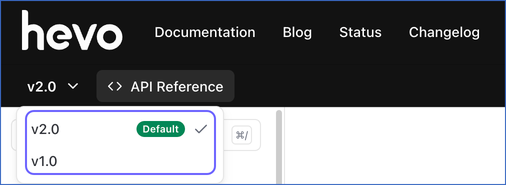
API requests in version 2 use the /api/v2/ path. For example, https://us.hevodata.com/api/v2/pipelines. You can switch between the versions using the drop-down on the API documentation site.
API documentation →Pipelines
Priority-First Sync for Amazon Selling Partner and Zendesk Support (Edge)
EnhancedHevo now supports priority-first sync in Pipelines created with Amazon Selling Partner or Zendesk Support as the Source. Hevo first loads the data created in the last 7 days (Amazon Selling Partner) or 15 days (Zendesk Support) for a defined set of objects, and then loads the older data, starting in the first run of the Pipeline. This allows you to start analyzing your most recent data from the first run.
Priority-First Sync →Support for Changing the Connection Settings in Database Sources (Edge)
EnhancedHevo now lets you change the connection settings of a database Source while you are creating your Pipeline, and after the Pipeline is created. Earlier, you could not modify settings such as the database host, port, and user once the Pipeline was created, so you had to create a new Pipeline to migrate to a different server. With this enhancement, for Pipelines configured with MySQL, Oracle, PostgreSQL, and SQL Server Sources, you can:
- Connect your Pipeline to a different database server.
- Connect using a different database user.
- Change the publication that defines the tables Hevo replicates for PostgreSQL Sources.
Your Pipeline continues to use its existing configuration while you make these changes, and Hevo saves them only after the connection test succeeds.
Modifying the Source Configuration →Support for Priority-First Sync (Edge)
NewHevo now supports priority-first sync in Pipelines created with Stripe as the Source. Previously, no data was available in your Destination until the historical data of all the objects was ingested, which could take several hours or even days. With priority-first sync, Hevo first loads the data created in the last 30 days for a defined set of objects, and then loads the older data, starting in the first run of the Pipeline. This allows you to start analyzing your most recent data from the first run.
Priority-First Sync →Sources
Support for ActiveCampaign as a Source (Edge)
NewHevo now supports ActiveCampaign as a Source for creating Pipelines. ActiveCampaign is a customer experience automation platform that combines email marketing, marketing automation, and sales CRM. You can replicate data from your ActiveCampaign account, including contact, account, deal, campaign, automation, and ecommerce details, into your Destination.
ActiveCampaign →Support for Amplitude Analytics as a Source (Edge)
NewHevo now supports Amplitude Analytics as a Source for creating Pipelines. Amplitude is a product analytics platform that helps teams track user actions, analyze user behavior, and group users into cohorts to improve their product experiences. You can replicate data from one or more Amplitude projects, including event details, event types, and behavioral cohorts, into your Destination.
Amplitude Analytics →Support for Apple Search Ads as a Source (Edge)
NewHevo now supports Apple Search Ads as a Source for creating Pipelines. Apple Search Ads is Apple’s advertising platform that lets you promote your apps at the top of App Store search results and measure how your ads perform. You can replicate data from your Apple Search Ads account, including campaign, ad group, keyword, and creative details, along with performance, search term, and impression share reports, into your Destination.
Apple Search Ads →Support for Auth0 as a Source (Edge)
NewHevo now supports Auth0 as a Source for creating Pipelines. Auth0 is an identity and access management platform that helps businesses add sign-in, user management, and access control to their applications. You can replicate data from your Auth0 account, including user, application, role, and organization details, along with account activity logs and daily statistics, into your Destination.
Auth0 →Support for Campaign Monitor as a Source (Edge)
NewHevo now supports Campaign Monitor as a Source for creating Pipelines. Campaign Monitor is an email marketing platform that helps businesses and agencies create, send, and track email campaigns. You can replicate data from your Campaign Monitor account, including client, campaign, subscriber list, segment, and template details, along with campaign recipients, opens, bounces, and unsubscribes, into your Destination.
Campaign Monitor →Support for Checkout.com as a Source (Edge)
NewHevo now supports Checkout.com as a Source for creating Pipelines. Checkout.com is a global payments platform that helps businesses accept payments, manage disputes, and move money. You can replicate data from your Checkout.com account, including payment, dispute, balance, and customer details, along with the line items of your financial reports, into your Destination.
Checkout.com →Support for Customer.io as a Source (Edge)
NewHevo now supports Customer.io as a Source for creating Pipelines. Customer.io is a customer engagement platform that helps businesses send targeted, personalized messages across channels such as email, SMS, push notifications, and in-app messages. You can replicate data from your Customer.io account, including customer, campaign, broadcast, and segment details, along with message delivery and customer lifecycle events, into your Destination.
Customer.io →Support for Fullstory as a Source (Edge)
NewHevo now supports Fullstory as a Source for creating Pipelines. Fullstory is a digital experience analytics platform that captures how users interact with websites and mobile apps. You can replicate data from your Fullstory account, including user, segment, segment event, and privacy settings details, into your Destination.
Fullstory →Support for GitHub as a Source (Edge)
NewHevo now supports GitHub as a Source for creating Pipelines. GitHub is a developer platform that hosts Git repositories and provides tools for code review, issue tracking, project planning, CI/CD automation, and security scanning. You can authenticate using GitHub OAuth, personal access tokens, or a GitHub App, and replicate data from your GitHub account, including Repositories, Commits, Issues, Pull Requests, Workflows, and Releases, into your Destination.
GitHub →Support for Infobip as a Source (Edge)
NewHevo now supports Infobip as a Source for creating Pipelines. Infobip is a cloud communications platform that businesses use to engage with their customers over channels such as SMS, WhatsApp, voice, email, and live chat. You can replicate data from your Infobip account, including agent, conversation, message, queue, conversation form, person, and company details, into your Destination.
Infobip →Support for Jira Cloud as a Source (Edge)
NewHevo now supports Jira Cloud as a Source for creating Pipelines. Jira Cloud is Atlassian’s cloud-based work management platform that teams use to plan, track, and manage issues, projects, sprints, and service requests. You can replicate data from your Jira Cloud site, including issues and their change history, projects, boards and sprints, worklogs, and users, along with Jira Service Management requests and Assets objects, into your Destination.
Jira Cloud →Support for Linear as a Source (Edge)
NewHevo now supports Linear as a Source for creating Pipelines. Linear is a project management and issue tracking platform for software teams. You can replicate data from your Linear workspace, including issue, project, cycle, initiative, comment, and user details, into your Destination.
Linear →Support for Livestorm as a Source (Edge)
NewHevo now supports Livestorm as a Source for creating Pipelines. Livestorm is a video engagement platform that businesses use to host webinars, virtual events, and online meetings. You can replicate data from your Livestorm workspace, including event, session, participant, chat message, question, recording, people, and user details, into your Destination.
Livestorm →Support for Mailgun Send as a Source (Edge)
NewHevo now supports Mailgun Send as a Source for creating Pipelines. Mailgun is an email delivery service that businesses use to send, receive, and track emails through an API or SMTP. You can replicate data from your Mailgun account, including domain, email event, template, suppression, mailing list, and route details, into your Destination.
Mailgun Send →Support for Metaplane as a Source (Edge)
NewHevo now supports Metaplane as a Source for creating Pipelines. Metaplane is a data observability platform that monitors your data warehouse and other data tools for issues, such as freshness delays, volume changes, and schema changes. You can replicate data from your Metaplane account, including connection, connection sync status, and monitor details, into your Destination.
Metaplane →Support for Microsoft Dynamics 365 Business Central as a Source (Edge)
NewHevo now supports Microsoft Dynamics 365 Business Central as a Source for creating Pipelines. Business Central is a cloud-based business management solution that brings together finance, sales, purchasing, inventory, and project management for small and mid-sized businesses. You can replicate data from the companies in your Business Central environment, including general ledger, customer, vendor, item, sales, purchase, and inventory details, into your Destination. Hevo uses the Hevo Business Central extension to read your data and to capture the records deleted in Business Central.
Microsoft Dynamics 365 Business Central →Support for Microsoft Teams as a Source (Edge)
NewHevo now supports Microsoft Teams as a Source for creating Pipelines. Microsoft Teams is a collaboration platform that brings together chats, channel conversations, meetings, and calls in a single workspace. You can replicate data from your Microsoft 365 tenant, including team, channel, member, tag, tab, channel message, chat, user, app, and call record details, into your Destination. Hevo connects to Microsoft Teams through an app that you register in Microsoft Entra ID.
Microsoft Teams →Support for Notion as a Source (Edge)
NewHevo now supports Notion as a Source for creating Pipelines. Notion is a connected workspace in which teams write documents, build wikis, and manage projects and tasks. You can replicate data from your Notion workspace, including page, block, comment, data source, database, view, and user details, into your Destination.
Notion →Support for Paddle as a Source (Edge)
NewHevo now supports Paddle as a Source for creating Pipelines. Paddle is a Merchant of Record platform that manages payments, subscriptions, tax, compliance, and billing for digital product businesses. You can replicate data from your Paddle production or sandbox environment, including products, prices, customers, subscriptions, transactions, and adjustments, into your Destination.
Paddle →Support for PayPal as a Source (Edge)
NewHevo now supports PayPal as a Source for creating Pipelines. PayPal is a digital payments platform that helps businesses accept online payments, manage invoices and subscriptions, and handle refunds and disputes. You can replicate data from your PayPal account, including transaction, balance, invoice, and dispute details, along with product and billing plan information, into your Destination.
PayPal →Support for Permit.io as a Source (Edge)
NewHevo now supports Permit.io as a Source for creating Pipelines. Permit.io is an authorization-as-a-service platform that helps teams manage fine-grained access control for their applications, APIs, and AI agents. You can replicate data from your Permit.io account, including project, environment, user, role, and resource details, along with activity and API event logs, into your Destination.
Permit.io →Support for Pinterest Ads as a Source (Edge)
NewHevo now supports Pinterest Ads as a Source for creating Pipelines. Pinterest Ads is Pinterest’s advertising platform that helps businesses promote their Pins to people who are searching for and saving ideas on Pinterest. You can replicate data from your Pinterest Ads account, including ad account, campaign, ad group, and ad details, along with performance reports, into your Destination.
Pinterest Ads →Support for Pylon as a Source (Edge)
NewHevo now supports Pylon as a Source for creating Pipelines. Pylon is a customer support platform for B2B companies. You can replicate data from your Pylon organization, including account, contact, user, team, audit log, survey, and ticket form details, into your Destination.
Pylon →Support for Recharge as a Source (Edge)
NewHevo now supports Recharge as a Source for creating Pipelines. Recharge is a subscription management platform that enables e-commerce brands to build, manage, and scale recurring revenue programs. You can replicate data from your Recharge account, including subscription, customer, charge, order, address, and payment method details, along with discounts, products, and events, into your Destination.
Recharge →Support for sevdesk as a Source (Edge)
NewHevo now supports sevdesk as a Source for creating Pipelines. sevdesk is a cloud accounting and invoicing software for small businesses and freelancers in Germany and Austria. You can replicate data from your sevdesk account, including contact, invoice, order, credit note, voucher, and payment account details, into your Destination.
sevdesk →Support for SharePoint as a Source (Edge)
NewHevo now supports SharePoint as a Source for creating Pipelines. SharePoint is a Microsoft 365 service that organizations use to store, organize, and share files in document libraries within SharePoint sites. You can replicate data from the CSV and TSV files in a SharePoint document library into your Destination, using rules that determine the folders to read files from, the format of those files, and how they are mapped to tables.
SharePoint →Support for SQL Server Database Version 2025 (Edge)
NewIntroduced support for creating Pipelines with SQL Server database version 2025. This applies to Pipelines created with any variant of the SQL Server Source.
SQL Server →Support for Statuspage as a Source (Edge)
NewHevo now supports Statuspage as a Source for creating Pipelines. Statuspage is an Atlassian product that companies use to communicate the status of their services to users. You can replicate data from your Statuspage organization, including page, component, incident, subscriber, metric, and user details, into your Destination.
Statuspage →Support for Supabase as a PostgreSQL Source (Edge)
NewHevo now supports Supabase as a PostgreSQL Source for creating Pipelines. Supabase is an open-source backend platform built on PostgreSQL. To connect to a Supabase PostgreSQL database, use the Generic PostgreSQL Source.
PostgreSQL →Support for Teamwork.com as a Source (Edge)
NewHevo now supports Teamwork.com as a Source for creating Pipelines. Teamwork.com is a project management and client work platform that teams use to plan projects, track tasks and milestones, log time and expenses, and manage budgets and invoices. You can replicate data from your Teamwork.com site, including project, task, milestone, time tracking, user, team, and workflow details, into your Destination.
Teamwork.com →Support for TikTok Shop Partner Center as a Source (Edge)
NewHevo now supports TikTok Shop Partner Center as a Source for creating Pipelines. TikTok Shop is a social commerce platform that lets sellers sell products directly on TikTok, and Partner Center is its developer platform for accessing shop data through APIs. You can replicate data from your TikTok Shop, including order, return, cancellation, coupon, finance, and shop analytics details, into your Destination.
Note: This Source is currently in BETA. To enable it for your team, contact Hevo Support.
TikTok Shop Partner Center →Support for QuickBooks Online as a Source (Edge)
NewHevo now supports QuickBooks Online as a Source for creating Pipelines. QuickBooks Online is a cloud-based accounting application from Intuit that businesses use to manage their invoices, bills, payments, expenses, and taxes. You can replicate data from your QuickBooks Online company, including account, customer, vendor, invoice, bill, payment, journal entry, and item details, into your Destination.
QuickBooks Online →Support for Rollbar as a Source (Edge)
NewHevo now supports Rollbar as a Source for creating Pipelines. Rollbar is an error monitoring platform that software teams use to find, group, and fix the errors in their applications. You can replicate data from your Rollbar account, including project, item, occurrence, deploy, environment, version, team, and user details, into your Destination.
Rollbar →Support for Toggl Track as a Source (Edge)
NewHevo now supports Toggl Track as a Source for creating Pipelines. Toggl Track is a time-tracking application that teams use to record the time they spend on projects, clients, and tasks. You can replicate data from your Toggl Track account, including time entry, project, client, task, tag, timesheet, user, workspace, and organization details, into your Destination.
Toggl Track →Support for SendGrid as a Source (Edge)
NewHevo now supports SendGrid as a Source for creating Pipelines. SendGrid is an email delivery and marketing platform from Twilio that businesses use to send transactional and marketing emails. You can replicate data from your SendGrid account, including contact, list, segment, Single Send, sender, template, email statistics, and email event details, into your Destination.
SendGrid →Support for Workday RaaS as a Source (Edge)
NewHevo now supports Workday RaaS as a Source for creating Pipelines. Workday is a cloud-based platform for human resources, finance, and planning, and its Report-as-a-Service (RaaS) feature lets you publish custom reports as web services. You can replicate the data of up to 25 Workday custom reports, such as worker and organization data, into your Destination, and ingest only the data in a date range using dynamic parameters.
Workday RaaS →Support for Zoho Desk as a Source (Edge)
NewHevo now supports Zoho Desk as a Source for creating Pipelines. Zoho Desk is a customer service platform that businesses use to manage support tickets, customers, and agents across channels such as email, phone, and chat. You can replicate data from your Zoho Desk portal, including ticket, comment, contact, account, agent, department, product, contract, and time entry details, into your Destination.
Zoho Desk →Support for Increase as a Source (Edge)
NewHevo now supports Increase as a Source for creating Pipelines. Increase is a banking platform that provides APIs to open bank accounts, move money, and issue cards. You can replicate data from your Increase account, including account, transaction, transfer, card, entity, and event details, into your Destination.
Increase →Support for Bitly as a Source (Edge)
NewHevo now supports Bitly as a Source for creating Pipelines. Bitly is a link management platform that businesses use to create short links, branded links, and QR codes. You can replicate the account data of your Bitly organization, including group, organization, user, campaign, and channel details, into your Destination.
Bitly →Support for Buzzsprout as a Source (Edge)
NewHevo now supports Buzzsprout as a Source for creating Pipelines. Buzzsprout is a podcast hosting platform that creators use to upload, publish, and promote podcast episodes. You can replicate the podcasts and episodes of your Buzzsprout account into your Destination.
Buzzsprout →Support for Shortcut as a Source (Edge)
NewHevo now supports Shortcut as a Source for creating Pipelines. Shortcut is a project management platform that software teams use to plan, track, and deliver work. You can replicate the data of your Shortcut workspace, including stories, epics, iterations, objectives, teams, and members, into your Destination.
Shortcut →Support for Persona as a Source (Edge)
NewHevo now supports Persona as a Source for creating Pipelines. Persona is an identity verification platform that businesses use to verify the identities of their users and run know your customer (KYC) and anti-money laundering (AML) checks. You can replicate the data of your Persona organization, including accounts, inquiries, verifications, documents, reports, cases, lists, and transactions, into your Destination.
Persona →Support for Open Exchange Rates as a Source (Edge)
NewHevo now supports Open Exchange Rates as a Source for creating Pipelines. Open Exchange Rates is a currency data provider that publishes the latest and historical foreign exchange rates of world currencies. You can replicate the list of currencies, the latest exchange rates, and the daily historical exchange rates from a year of your choice into your Destination.
Open Exchange Rates →Support for Mailjet as a Source (Edge)
NewHevo now supports Mailjet as a Source for creating Pipelines. Mailjet is an email marketing and delivery platform that businesses use to send marketing campaigns and transactional emails and track their delivery and engagement. You can replicate the data of your Mailjet account, including campaigns, campaign drafts, contacts, contact lists, messages, templates, and email statistics, into your Destination.
Mailjet →Support for PagerDuty as a Source (Edge)
NewHevo now supports PagerDuty as a Source for creating Pipelines. PagerDuty is an incident management platform that engineering and operations teams use to detect and respond to incidents, manage on-call schedules and escalations, and analyze their incident response. You can replicate the data of your PagerDuty account, including incidents, log entries, services, on-call schedules, escalation policies, teams, users, audit records, and incident analytics, into your Destination.
PagerDuty →Support for CircleCI as a Source (Edge)
NewHevo now supports CircleCI as a Source for creating Pipelines. CircleCI is a continuous integration and continuous delivery (CI/CD) platform that software teams use to build, test, and deploy their code automatically. You can replicate the data of your CircleCI account, including organizations, contexts, projects, pipelines, workflows, jobs, deploy components, and Insights metrics, into your Destination.
CircleCI →Support for WorkOS as a Source (Edge)
NewHevo now supports WorkOS as a Source for creating Pipelines. WorkOS is a developer platform that adds enterprise features, such as single sign-on (SSO), directory sync, user management, role-based access control, and audit logs, to applications. You can replicate data from your WorkOS environment, including organization, user, invitation, directory, role, and permission details, along with feature flags and data integrations, into your Destination.
WorkOS →Support for Yotpo as a Source (Edge)
NewHevo now supports Yotpo as a Source for creating Pipelines. Yotpo is an e-commerce marketing platform that helps online stores collect and display product reviews and ratings, and run loyalty, referral, and SMS programs. You can replicate data from your Yotpo store, including customer, product, product variant, and review details, into your Destination.
Yotpo →Support for Zendesk Support as a Source (Edge)
NewHevo now supports Zendesk Support as a Source for creating Pipelines. Zendesk Support is a cloud-based customer service and support ticketing platform that helps businesses manage customer interactions through tickets, automation, and reporting. This integration supports replicating data from your account into your Destination using the Zendesk REST API via OAuth 2.0 authentication.
Zendesk Support →Transformations
Role-Based Access Control for Transformations (Edge)
EnhancedHevo now lets you control who can create, edit, view, or delete Transformation projects, environments, and jobs based on their assigned role within the team. This ensures that only authorized users can modify your transformation logic, helping you maintain data integrity and governance across your organization.
User Roles and Workspaces →User Experience
Overview Tab in Pipelines Detailed View (Edge)
NewHevo now displays the current health and sync activity of your Pipeline in a new Overview tab, eliminating the need to review individual sync jobs to check their status. You can view the status of the last, current, and upcoming runs, along with a 7-day summary of Events ingested, loaded, and failed. You can also track ingestion and loading activity for runs currently in progress, and click a run to view its type, status, and job ID.
Pipeline Overview →Quicker Access to Account Options from the Navigation Bar
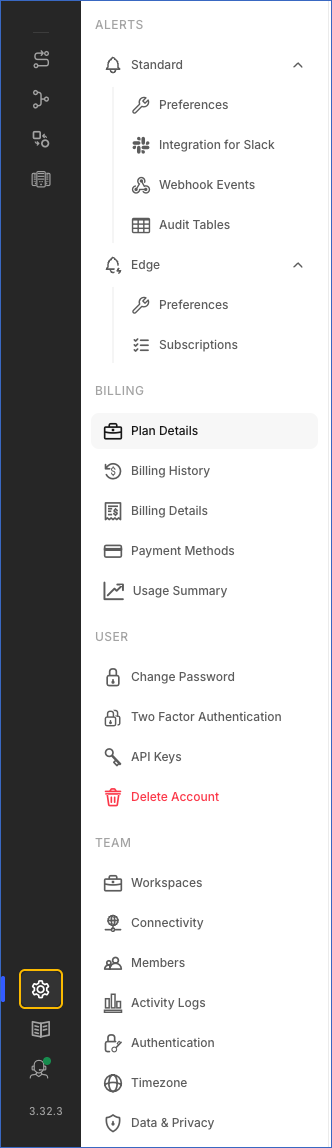
EnhancedManaging your Hevo account is now faster and simpler. Your alert preferences, billing, user account, and team options are grouped in one sidebar that opens with a single click on the Settings (  ) icon in the Navigation Bar. Earlier, these options were available in the drop-down next to your username in the User Information Panel, which now focuses on switching between the Light and Dark modes and logging out of Hevo.
The Delete Account option is also easier to find, under the User section next to your other personal account options.