SCORM Cloud is a cloud-hosted e-learning platform by Rustici Software that businesses use to host, deliver, and track SCORM, xAPI, AICC, and cmi5 courses. You can launch courses directly from SCORM Cloud or dispatch them to other learning management systems (LMSs), and track each learner’s registration, progress, and results.
Hevo uses the SCORM Cloud REST API to replicate the courses, dispatch destinations, dispatches, registrations, learner activity, and xAPI statements of a SCORM Cloud application to the Destination of your choice. To ingest data, you must provide Hevo with the App ID and a Secret Key of the application.
Supported Features
| Feature Name | Supported |
|---|---|
| Capture deletes | Yes |
| History mode | No |
| Custom data (user-configured tables & fields) | No |
| Data blocking (skip objects and fields) | Yes |
| Resync (objects and Pipelines) | Yes |
| API configurable | Yes |
Prerequisites
-
An active SCORM Cloud account exists from which data is to be ingested.
-
The App ID and a Secret Key of the SCORM Cloud application whose data you want to replicate are available.
Obtain the App ID and Secret Key
SCORM Cloud stores courses, registrations, and dispatches separately for each application in your account. Hevo replicates the data of only the application whose App ID and Secret Key you provide. Use the application that contains the courses and registrations you want to replicate.
Perform the following steps to obtain the App ID and Secret Key:
-
Log in to your SCORM Cloud account.
-
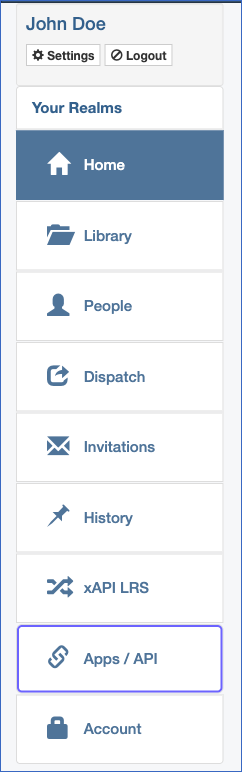
In the left navigation pane, click Apps / API.
-
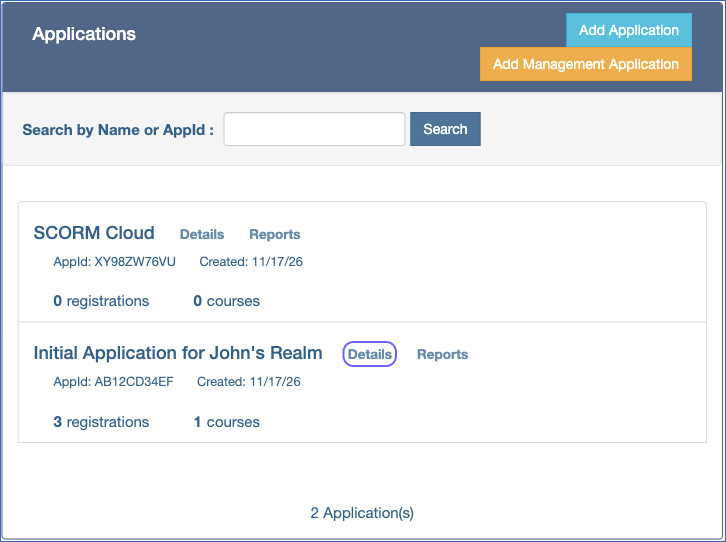
In the Applications section, click Details next to the application whose data you want to replicate. Each application shows the number of its registrations and courses.
-
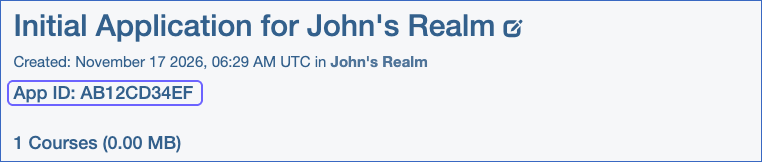
On the application details page, copy the App ID shown below the application name.
-
In the Authorization Keys section, copy the Secret Key of a key that is turned on, and save it securely like any other password. To create a new key for Hevo, click Add Key.

Use these credentials when configuring your SCORM Cloud Source in Hevo.
Configure SCORM Cloud as a Source in your Pipeline
Perform the following steps to configure your SCORM Cloud Source:
-
Click Pipelines in the Navigation Bar.
-
Click + Create Pipeline in the Pipelines List View.
-
On the Select Source Type page, select SCORM Cloud.
-
On the Select Destination Type page, select the type of Destination you want to use.
-
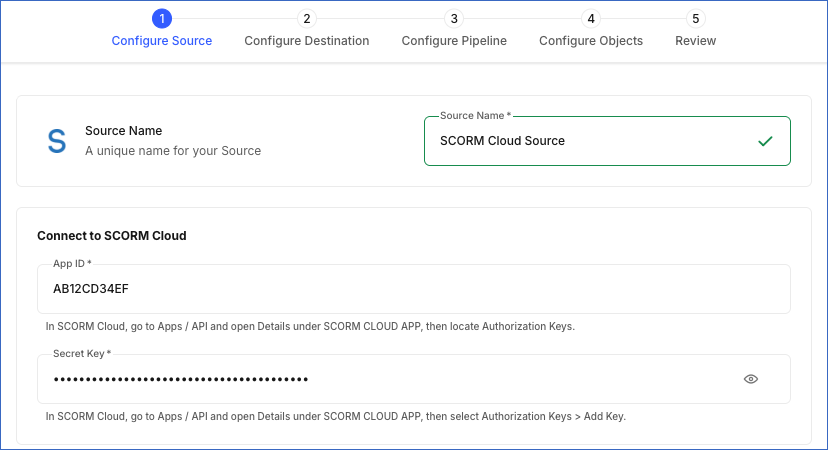
In the Configure Source screen, specify the following:
-
Source Name: A unique name for your Source, not exceeding 255 characters. For example, SCORM Cloud Source.
-
In the Connect to SCORM Cloud section:
-
App ID: The App ID of the SCORM Cloud application that you obtained.
-
Secret Key: A Secret Key of the same application.
-
-
-
Click Test & Continue to test the connection to your SCORM Cloud Source. Once the test is successful, you can proceed to set up your Destination.
Data Replication
Hevo replicates data for all the objects selected on the Configure Objects page during Pipeline creation. By default, all supported objects and their available fields are selected. However, you can modify this selection while creating or editing the Pipeline. You can select a child object only when its parent object is selected. The Data Model lists the child objects of each parent object.
In each run of the Pipeline, as per the sync frequency, Hevo ingests the entire data of all the selected objects. This Source does not support incremental data.
You can resync the Course, Destination, Dispatch, and Registration objects. Resyncing a parent object also resyncs its child objects.
If SCORM Cloud rejects a request with a rate limit or server error, or the request times out, Hevo retries it up to six times, waiting 30 seconds between attempts. To understand how Hevo handles rate limit exceptions, read Handling Rate Limit Exceptions.
Note: You can create a Pipeline with this Source only using the Merge load mode. The Append mode is not supported for this Source.
Schema and Primary Keys
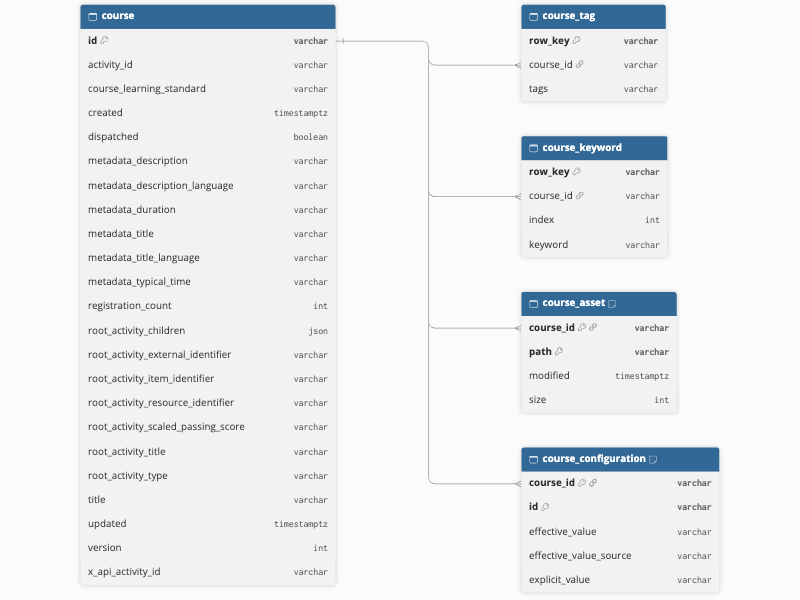
Hevo uses the following schema to upload the records in the Destination. For a detailed view of the objects, fields, and relationships, click the ERD.
Data Model
The following is the list of tables (objects) that are created at the Destination when you run the Pipeline:
| Object | Description |
|---|---|
| Course | Contains the courses in the SCORM Cloud application, such as the course title, learning standard, version, registration count, course metadata, and the details of the root activity. It includes the following child objects: - Course Asset - Course Configuration - Course Keyword - Course Tag |
| Destination | Contains the dispatch destinations, which represent the external LMSs or clients that you dispatch courses to, such as the destination name, launch authorization settings, and LTI 1.3 settings. It includes the following child object: - Destination Tag |
| Dispatch | Contains the dispatches, each of which makes a course available to a destination, such as the course and destination IDs, registration cap and count, expiration date, and whether the dispatch is enabled. It includes the following child object: - Dispatch Tag |
| Registration | Contains the registrations, each of which links a learner to a course, such as the completion and success status, score, time tracked, access and completion dates, and activity details. It includes the following child objects: - Learner Tag - Registered Learner - Registration Activity Learner Comment - Registration Activity LMS Comment - Registration Activity Objective - Registration Activity Runtime Interaction - Registration Activity Runtime Objective - Registration Global Objective - Registration Launch History - Registration Shared Data - Registration Statement, which includes the Registration Object Activity, Registration Object Activity Definition, Registration Statement Attachment, and Registration Verb child objects - Registration Tag |
Additional Information
Read the detailed Hevo documentation for the following related topics:
Handling of Deletes
Hevo uses a full data refresh approach to capture delete actions for all the objects. During each Pipeline run, Hevo compares the data fetched from SCORM Cloud with the data present in the Destination tables. If a record exists in the Destination but is no longer returned by SCORM Cloud, the record is marked as deleted by setting the value of the metadata column _hevo_marked_deleted to True. For example, if you remove a tag from a registration, the tag record is marked as deleted in the Registration Tag table in the next Pipeline run.