Persona is an identity verification platform that businesses use to verify the identities of their users, run know your customer (KYC) and anti-money laundering (AML) checks, and review cases of suspected fraud.
Hevo uses the Persona API to replicate the accounts, inquiries, verifications, documents, reports, cases, lists, and transactions of your Persona organization to the Destination of your choice. To ingest data, you must provide Hevo with an API key of the Persona environment from which you want to replicate data.
Supported Features
| Feature Name | Supported |
|---|---|
| Capture deletes | Yes |
| History mode | No |
| Custom data (user-configured tables & fields) | No |
| Data blocking (skip objects and fields) | Yes |
| Resync (objects and Pipelines) | Yes |
| API configurable | Yes |
Prerequisites
-
An active Persona organization from which data is to be ingested.
-
The Admin role or a custom role with API key permissions is assigned to you in Persona to create an API key.
-
An API key of the Persona environment from which data is to be ingested is available.
Obtain the API Key
Hevo connects to your Persona organization using an API key. Each Persona environment, Sandbox or Production, has its own API keys, and an API key can read data only from the environment in which it is created.
Perform the following steps to create an API key:
-
Log in to your Persona dashboard.
-
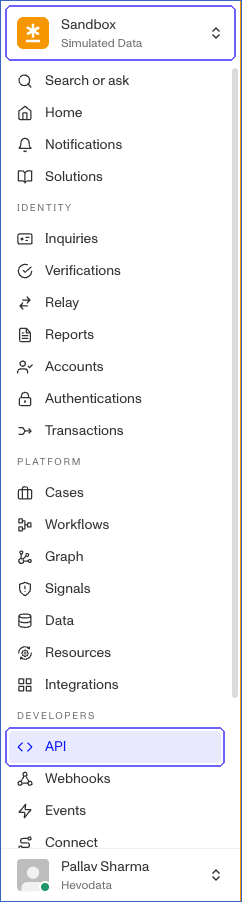
In the top-left corner, select the environment from which you want to replicate data, and then in the left navigation pane, under DEVELOPERS, click API.
-
On the Keys tab of the API page, click + Create API key.

-
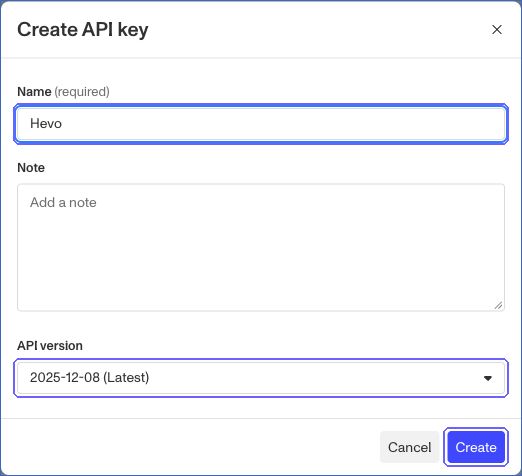
In the Create API key dialog, do the following:
-
Specify a Name for the API key. For example, Hevo.
-
Keep the default API version.
-
Click Create.
-
-
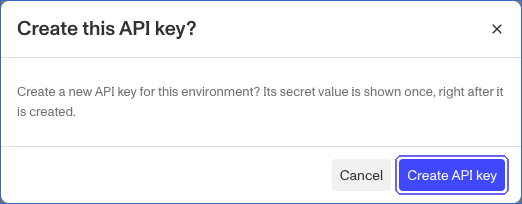
In the Create this API key? dialog, click Create API key.
-
In the Confirm your password dialog, enter the password of your Persona account and confirm.
-
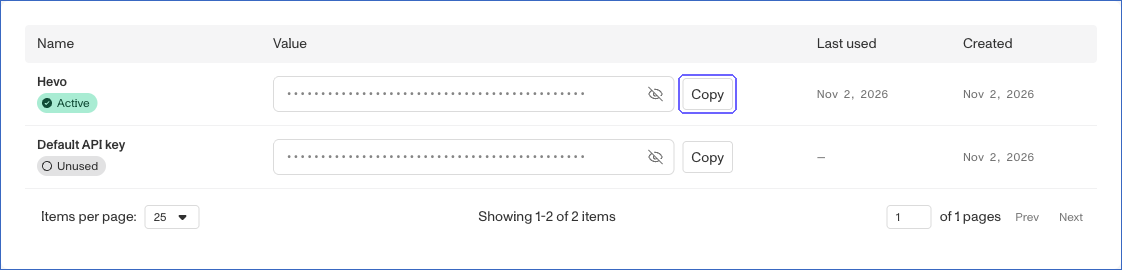
On the Keys tab, click Copy next to the API key that you created, and save it securely like any other password.
By default, a new API key has the permissions to read all the objects that Hevo ingests, such as accounts, inquiries, verifications, documents, reports, cases, lists, and transactions. If you restrict the permissions of the API key, Hevo cannot ingest the objects that the key cannot read. Read API Keys for the list of permissions.
Note: Do not change the Key inflection of the API key from its default value, Kebab. Persona uses the key inflection to format the field names in its API responses, and Hevo reads the field names in the kebab-case format, such as created-at.
Configure Persona as a Source in your Pipeline
Perform the following steps to configure your Persona Source:
-
Click Pipelines in the Navigation Bar.
-
Click + Create Pipeline in the Pipelines List View.
-
On the Select Source Type page, select Persona.
-
On the Select Destination Type page, select the type of Destination you want to use.
-
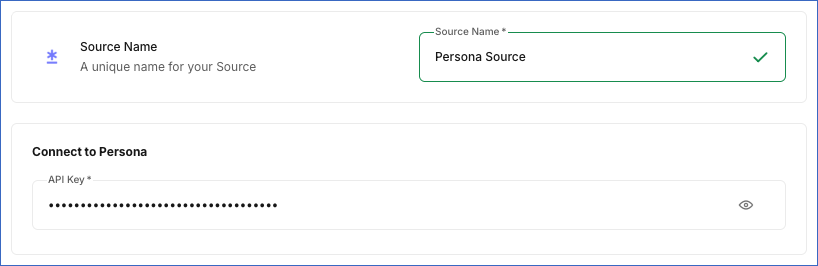
In the Configure Source screen, specify the following:
-
Source Name: A unique name for your Source, not exceeding 255 characters. For example, Persona Source.
-
In the Connect to Persona section, specify the following:
- API Key: The API key that you obtained from Persona.
-
-
Click Test & Continue to test the connection to your Persona Source. Once the test is successful, you can proceed to set up your Destination.
Data Replication
Hevo replicates data for all the objects selected on the Configure Objects page during Pipeline creation. By default, all supported objects and their available fields are selected. However, you can modify this selection while creating or editing the Pipeline. To ingest a child object, you must also select its parent object. For example, to ingest the Verifications object, you must also select the Inquiries object. The Data Model lists the child objects of each parent object.
Hevo ingests the entire data of all the selected objects in each run, as per the sync frequency.
You can resync the Cases, Inquiries, Inquiry Sessions, List, Reports, Transaction, and User Audit Log objects. Resyncing a parent object also resyncs its child objects.
By default, Persona allows up to 300 API requests per minute for all the API keys of a production environment. Read Rate Limiting.
Note: You can create a Pipeline with this Source only using the Merge load mode. The Append mode is not supported for this Source.
Schema and Primary Keys
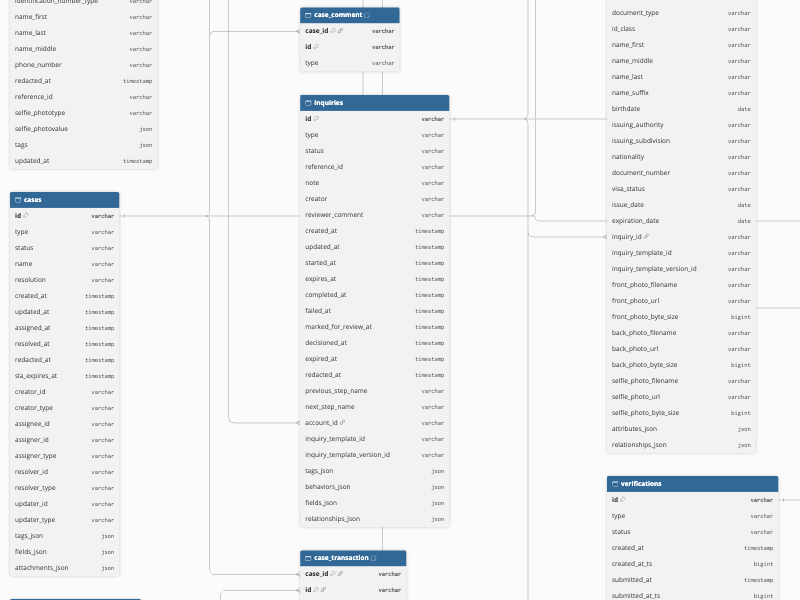
Hevo uses the following schema to upload the records in the Destination. For a detailed view of the objects, fields, and relationships, click the ERD.
Data Model
The following is the list of tables (objects) that are created at the Destination when you run the Pipeline:
| Object | Description |
|---|---|
| Account | Contains the accounts of the individuals that you verify, including the reference ID, account type, status, name, birthdate, address, email address, phone number, and the creation and redaction timestamps of each account. It includes a child object, Identification Number. |
| Identification Number | Contains the identification numbers stored for each account, including the identification class, number, and issuing country. |
| Cases | Contains the cases created for manual review, including the name, status, resolution, SLA expiry, and the creator, assignee, and resolver of each case. It includes the child objects, Case Account, Case Comment, Case Inquiry, Case Report, Case Verification, and Case Transaction. |
| Case Account | Contains the IDs of the accounts linked to each case. |
| Case Comment | Contains the IDs of the comments added to each case. |
| Case Inquiry | Contains the IDs of the inquiries linked to each case. |
| Case Report | Contains the IDs of the reports linked to each case. |
| Case Verification | Contains the IDs of the verifications linked to each case. |
| Case Transaction | Contains the IDs of the transactions linked to each case. |
| Inquiries | Contains the inquiries, which are the identity verification flows that your users complete, including the status, reference ID, inquiry template, account, reviewer comment, and the start, completion, decision, and expiry timestamps of each inquiry. It includes the child objects, Inquiry Document and Inquiry Relationship Verification. |
| Inquiry Document | Contains the IDs of the documents collected in each inquiry. It includes a child object, Documents. |
| Documents | Contains the documents collected in inquiries, such as government IDs, including the document type, status, extracted name, birthdate, document number, issuing authority, issue and expiry dates, and the file names and URLs of the front, back, and selfie photos. It includes a child object, File. |
| File | Contains the files uploaded for each document, including the file name, URL, and size. |
| Inquiry Relationship Verification | Contains the IDs of the verifications run in each inquiry. It includes a child object, Verifications. |
| Verifications | Contains the verifications run in inquiries, such as government ID, selfie, and database verifications, including the status, capture method, verified name, birthdate, identification number, contact details, similarity scores, checks, and photo URLs of each verification. It includes a child object, Verification Photo URL. |
| Verification Photo URL | Contains the photos captured in each verification, including the page, file name, URL, and size of each photo. |
| Inquiry Sessions | Contains the sessions in which users access inquiries, including the status, threat level, browser, operating system, device, IP address, network, and location details of each session. |
| List | Contains the lists that you use to allow or block values in verifications, such as email addresses and countries, including the name, type, and status of each list. It includes a child object, List Item Data. |
| List Item Data | Contains the IDs and types of the active items in each list. |
| Reports | Contains the reports run on individuals, such as watchlist and address lookup reports, including the report template, status, match result, the details of the individual, and the account, inquiry, and transaction linked to each report. |
| Transaction | Contains the transactions that you send to Persona for review, including the status, reference ID, transaction type, label, fields, tags, and reviewer of each transaction. It includes a child object, Transaction Relationship Object. |
| Transaction Relationship Object | Contains the IDs and types of the objects related to each transaction. |
| User Audit Log | Contains the actions that the users of your organization perform in the Persona dashboard, including the request path, method, parameters, IP address, and user of each action. |
Additional Information
Read the detailed Hevo documentation for the following related topics:
Handling of Deletes
Hevo captures deletes by comparing the data ingested from the Source with the data present in the Destination in each run. How Hevo handles a deleted record depends on the object:
-
Identification Number, File, List Item Data, and Verification Photo URL: Hevo replaces the child records of each parent record in every run. A child record that is no longer returned by the Source, such as an archived list item, is removed from the Destination. However, if a parent record no longer has any child records, Hevo does not remove its previous child records from the Destination. For example, if you archive all the items of a list, the archived items remain in the List Item Data table.
-
Transaction Relationship Object and User Audit Log: Hevo does not capture deletes for these objects.
-
All other objects: If a record exists in the Destination but is no longer returned by the Source, Hevo marks it as deleted by setting the value of the metadata column __hevo__marked_deleted to True. The record remains in the Destination with all its data.
Source Considerations
-
Persona contains personal data of your users, such as names, birthdates, addresses, identification numbers, and the URLs of document and selfie photos. You can deselect the fields that you do not want to replicate to your Destination.
-
An API key created in the Sandbox environment reads only the sample data of that environment. To replicate the data of your live users, use an API key created in the Production environment.
-
When you redact an account in Persona, Persona removes its personal data but continues to return the account. In the next run, Hevo updates the account in the Destination with empty values for the redacted fields, such as the name, email address, and phone number, and the redacted_at field contains the time of redaction. Hevo does not mark redacted accounts as deleted.
Limitations
-
Hevo can ingest the User Audit Log object only with an API key of a Production environment. Persona does not provide user audit logs in the Sandbox environment, and it returns only the user audit logs of the last six months.
-
Hevo does not ingest the templates, workflows, webhooks, events, API logs, devices, or graph data of your Persona organization.