Open Exchange Rates is a currency data provider that publishes the latest and historical foreign exchange rates of world currencies, as well as alternative and digital currency rates, through its API.
Hevo uses the Open Exchange Rates API to replicate the list of currencies, the latest exchange rates, and the daily historical exchange rates of your Open Exchange Rates account to the Destination of your choice. To ingest data, you must provide Hevo with an App ID of your Open Exchange Rates account.
Supported Features
| Feature Name | Supported |
|---|---|
| Capture deletes | No |
| History mode | No |
| Custom data (user-configured tables & fields) | No |
| Data blocking (skip objects and fields) | Yes |
| Resync (objects and Pipelines) | Yes |
| API configurable | Yes |
Prerequisites
-
An active Open Exchange Rates account from which data is to be ingested.
-
An App ID of your Open Exchange Rates account is available.
-
Your Open Exchange Rates plan has enough monthly API requests for the historical data that you want to ingest. Read API Requests and the Historical Data Start Year.
Obtain the App ID
Hevo connects to your Open Exchange Rates account using an App ID. Open Exchange Rates creates an App ID when you sign up, and you can create more App IDs, up to the limit of your plan.
Perform the following steps to obtain the App ID:
-
Log in to your Open Exchange Rates account.
-
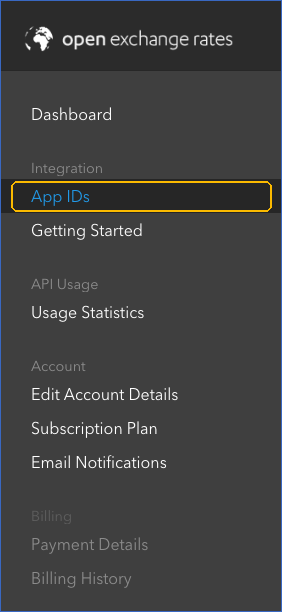
In the left navigation pane, under Integration, click App IDs.
-
On the App IDs page, copy the App ID that you want to use, and save it securely like any other password.
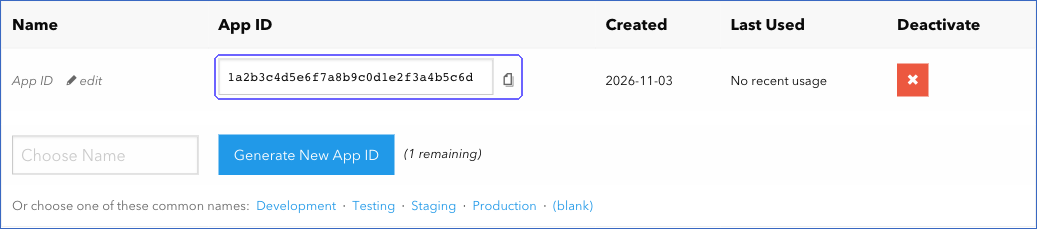
Note: To use a separate App ID for Hevo, specify a name for the App ID, and then click Generate New App ID. All the App IDs of your account share the same monthly request quota.
API Requests and the Historical Data Start Year
Open Exchange Rates counts each request to its latest and historical exchange rates as one API request against the monthly quota of your plan. Requests for the list of currencies are not counted. For example, the Free plan allows 1,000 requests per month. Read What counts as an API request.
Hevo makes the following requests:
-
Historical data: One request for each day of historical exchange rates, starting from 1 January of the Historical Data Start Year that you select while configuring the Source. For example, if you select 2010, the first run of the Pipeline makes more than 6,000 requests, which exceeds the quota of the Free plan. If you select the current year, Hevo makes one request for each day of the current year that has ended.
-
Incremental data: In each subsequent run, one request for each day that has ended since the last ingested day, and one request for the latest exchange rates.
Select a start year that your plan’s monthly quota can support, as you cannot change the Historical Data Start Year after you create the Pipeline. Hevo also makes one request for each day of historical data when you resync the Historical Rates object.
Configure Open Exchange Rates as a Source in your Pipeline
Perform the following steps to configure your Open Exchange Rates Source:
-
Click Pipelines in the Navigation Bar.
-
Click + Create Pipeline in the Pipelines List View.
-
On the Select Source Type page, select Open Exchange Rates.
-
On the Select Destination Type page, select the type of Destination you want to use.
-
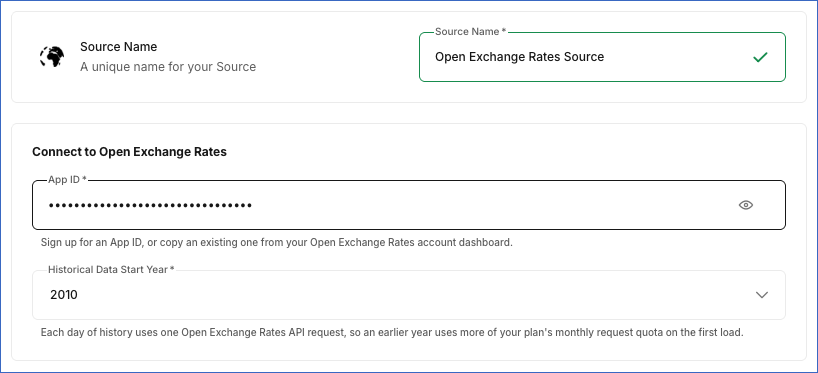
In the Configure Source screen, specify the following:
-
Source Name: A unique name for your Source, not exceeding 255 characters. For example, Open Exchange Rates Source.
-
In the Connect to Open Exchange Rates section, specify the following:
-
App ID: The App ID that you obtained from Open Exchange Rates.
-
Historical Data Start Year: The year from which Hevo must ingest the daily historical exchange rates. Hevo ingests the rates starting from 1 January of this year. Default value: 2010. You cannot change this value after you create the Pipeline. Read API Requests and the Historical Data Start Year to choose a value that your plan supports.
-
-
-
Click Test & Continue to test the connection to your Open Exchange Rates Source. Once the test is successful, you can proceed to set up your Destination.
Data Replication
Hevo replicates data for all the objects selected on the Configure Objects page during Pipeline creation. By default, all supported objects and their available fields are selected. However, you can modify this selection while creating or editing the Pipeline.
Hevo replicates data in the following ways:
-
Historical data: In the first run of the Pipeline, Hevo ingests the daily exchange rates of each day from 1 January of the Historical Data Start Year up to the last day that has ended in Coordinated Universal Time (UTC).
-
Incremental data: In each subsequent run, as per the sync frequency:
-
For the Historical Rates object, Hevo ingests the daily exchange rates of each day that has ended since the last ingested day. Hevo does not ingest the rates of the current UTC day until the day ends.
-
For the Currencies and Latest Exchange Rates objects, Hevo ingests the entire data of the object and replaces the existing record in the Destination.
-
You can resync all the objects.
Note: You can create a Pipeline with this Source only using the Merge load mode. The Append mode is not supported for this Source.
Schema and Primary Keys
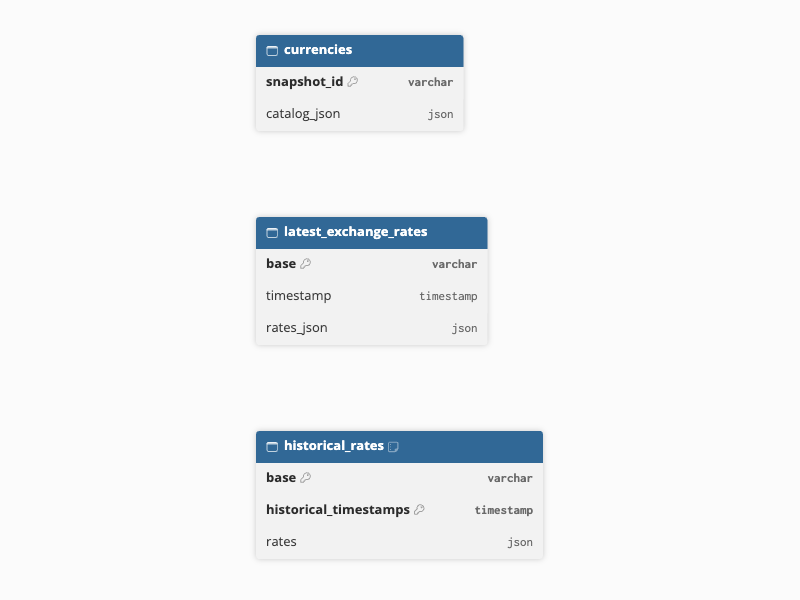
Hevo uses the following schema to upload the records in the Destination. For a detailed view of the objects, fields, and relationships, click the ERD.
Data Model
The following is the list of tables (objects) that are created at the Destination when you run the Pipeline:
| Object | Description |
|---|---|
| Currencies | Contains the list of all the currencies for which Open Exchange Rates provides exchange rates, including alternative and digital currencies, with the code and full name of each currency in a single JSON field. |
| Historical Rates | Contains the daily exchange rates of all currencies against the base currency, US Dollar (USD), with one record for each day. Each record contains the rates that Open Exchange Rates last published for that UTC day, up to 23:59:59 UTC, in a JSON field. |
| Latest Exchange Rates | Contains the latest exchange rates of all currencies against the base currency, US Dollar (USD), and the time at which Open Exchange Rates published them. |
Additional Information
Read the detailed Hevo documentation for the following related topics:
Handling of Deletes
Hevo does not capture deletes for this Source. In each run, Hevo replaces the existing records of the Currencies and Latest Exchange Rates objects with the data returned by the Source.
Source Considerations
-
The exchange rates of all objects are against US Dollar (USD), the default base currency of Open Exchange Rates. Hevo does not change the base currency.
-
Hevo ingests the rates of alternative currencies, such as digital currencies and unofficial rates, along with the standard currencies. Read Alternative Rates.
-
The Latest Exchange Rates object contains only the most recent rates. Hevo replaces the record in each run, and the update frequency of the rates depends on your Open Exchange Rates plan. For example, the Free plan updates the rates every hour. To retain the rates of each day, use the Historical Rates object.
Limitations
- Hevo does not ingest the time-series, currency conversion, open-high-low-close (OHLC), or bid-ask data of Open Exchange Rates.