Mailjet is an email marketing and delivery platform that businesses use to send marketing campaigns and transactional emails, manage contact lists, and track the delivery and engagement of their emails.
Hevo uses the Mailjet Email API to replicate the campaigns, campaign drafts, contacts, contact lists, messages, templates, and email delivery and engagement statistics of your Mailjet account to the Destination of your choice. To ingest data, you must provide Hevo with the API key and secret key of your Mailjet account.
Supported Features
| Feature Name | Supported |
|---|---|
| Capture deletes | Yes |
| History mode | No |
| Custom data (user-configured tables & fields) | No |
| Data blocking (skip objects and fields) | Yes |
| Resync (objects and Pipelines) | Yes |
| API configurable | Yes |
Prerequisites
-
An active Mailjet account from which data is to be ingested.
-
Access to the API Key Management page of your Mailjet account.
-
The API key and secret key of your Mailjet account are available.
Obtain the API Key and Secret Key
Hevo connects to your Mailjet account using its API key and secret key. Mailjet creates the API key of your account, also called the primary API key, when you sign up. You must generate the secret key yourself, and Mailjet displays it only once.
Perform the following steps to obtain the API key and secret key:
-
Log in to your Mailjet account.
-
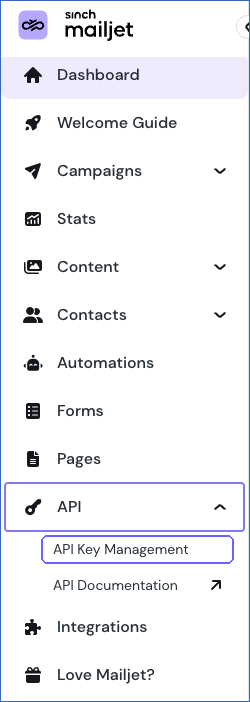
In the left navigation pane, click API, and then click API Key Management.
-
In the Primary API Key section, click Generate Secret Key.

Note: If you have already generated the secret key and saved it, you can use it to configure your Source and skip the next step.
-
In the New Primary API Key dialog, copy the API Key and the Secret Key, save them securely like any other password, and then click Done.
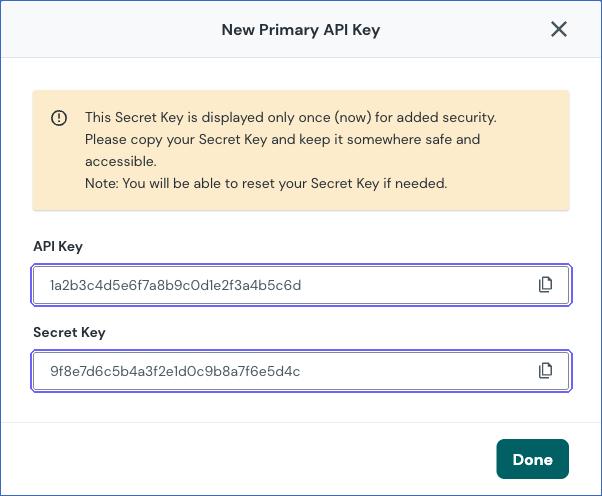
Note: The API key and secret key of your primary account read the data of the primary account only. To replicate the data of a subaccount, use the API key and secret key of that subaccount from the Subaccount API Keys section of the API Key Management page.
Configure Mailjet as a Source in your Pipeline
Perform the following steps to configure your Mailjet Source:
-
Click Pipelines in the Navigation Bar.
-
Click + Create Pipeline in the Pipelines List View.
-
On the Select Source Type page, select Mailjet.
-
On the Select Destination Type page, select the type of Destination you want to use.
-
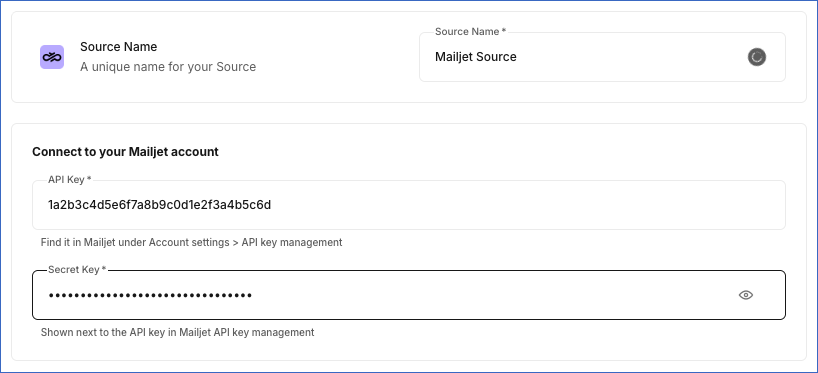
In the Configure Source screen, specify the following:
-
Click Test & Continue to test the connection to your Mailjet Source. Once the test is successful, you can proceed to set up your Destination.
Data Replication
Hevo replicates data for all the objects selected on the Configure Objects page during Pipeline creation. By default, all supported objects and their available fields are selected. However, you can modify this selection while creating or editing the Pipeline. To ingest a child object, you must also select its parent object. For example, to ingest the Message History object, you must also select the Message object. The Data Model lists the child objects of each parent object.
Hevo replicates data in the following ways:
-
Historical data: In the first run of the Pipeline, Hevo ingests all the existing data of the selected objects.
-
Incremental data: In each subsequent run, as per the sync frequency:
-
For the Bounce Event, Campaign, Campaign Open Information, Campaign Statistics, Click Stat, Contact List Signup, Contact Statistics, Message, and Message Information objects, Hevo ingests the records that were created or that had activity since the last run. To capture late updates, Hevo also re-ingests the records of the last seven days.
-
For all other objects, Hevo ingests the entire data of the object.
-
You can resync all the objects except the child objects. Resyncing a parent object also resyncs its child objects.
Mailjet limits the number of API requests that each API key can make per second. If Hevo exceeds this limit, Mailjet returns an error, and Hevo waits and retries the request. Read Rate limits.
Note: You can create a Pipeline with this Source only using the Merge load mode. The Append mode is not supported for this Source.
Schema and Primary Keys
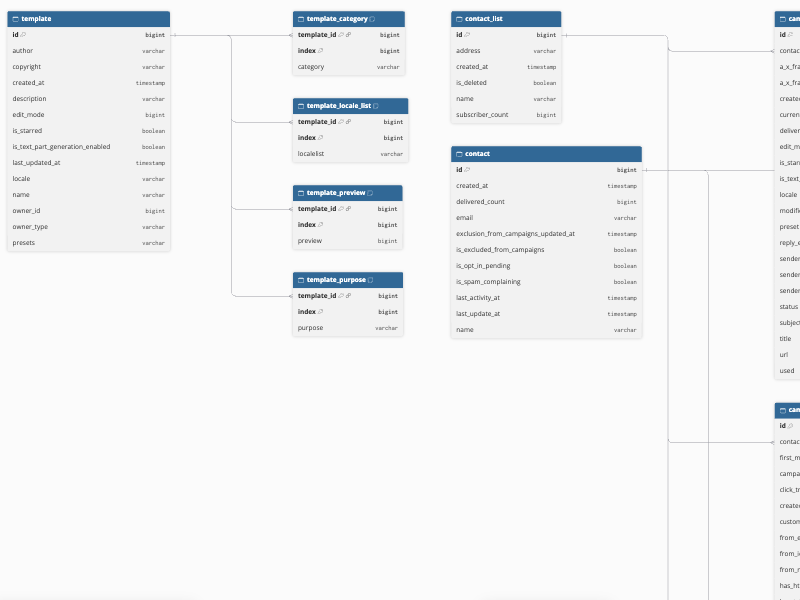
Hevo uses the following schema to upload the records in the Destination. For a detailed view of the objects, fields, and relationships, click the ERD.
Data Model
The following is the list of tables (objects) that are created at the Destination when you run the Pipeline:
| Object | Description |
|---|---|
| Bounce Event | Contains the bounces of the messages sent to your contacts, including the campaign, contact, bounce time, bounce reason, and whether the bounce is permanent and the contact is blocked. |
| Campaign | Contains the campaigns that you have sent, including the contact list, subject, sender, type, status, tracking settings, and the start and end times of sending. It includes a child object, Campaign Click Statistics. |
| Campaign Click Statistics | Contains the number of click events and the number of messages with clicks for each link in a campaign. |
| Campaign Draft | Contains the campaign drafts, including the title, subject, sender, contact list, locale, status, and the creation, modification, and delivery times of each draft. It includes a child object, Campaign Draft Schedules. |
| Campaign Draft Schedules | Contains the scheduled sending time and status of each campaign draft. |
| Campaign Open Information | Contains the opens of the messages sent to your contacts, including the campaign, contact, message, open time, and user agent. |
| Campaign Overview | Contains a summary of each campaign and campaign draft, including the title, subject, status, sending start time, and the number of processed, delivered, opened, and clicked messages. |
| Campaign Statistics | Contains the delivery and engagement statistics of each campaign, including the number of processed, delivered, opened, clicked, bounced, blocked, and unsubscribed messages and spam complaints. |
| Click Stat | Contains the link clicks in the messages sent to your contacts, including the contact, message, URL, click time, and the delay between delivery and the click. |
| Contact | Contains your contacts, including the email address, name, creation time, number of delivered messages, exclusion from campaigns, and the time of their last activity. |
| Contact Filter | Contains the segmentation filters that you use to target contacts, including the name, description, expression, and status of each filter. |
| Contact List | Contains your contact lists, including the name, address, creation time, and number of subscribers of each list. |
| Contact List Signup | Contains the subscriptions of contacts to your contact lists, including the contact, contact list, signup source, and the signup and confirmation times and IP addresses. |
| Contact Statistics | Contains the delivery and engagement statistics of each contact, including the number of processed, delivered, opened, clicked, bounced, blocked, and unsubscribed messages and spam complaints. |
| Geo Statistics | Contains the number of opens and clicks of your messages for each country. |
| List Statistics | Contains the delivery and engagement statistics of each contact list, including the number of subscribers, active, unsubscribed, and excluded contacts, and the number of delivered, opened, clicked, bounced, and blocked messages. |
| Message | Contains the messages sent to your contacts, including the contact, campaign, subject, size, status, arrival time, and tracking settings of each message. It includes a child object, Message History. |
| Message History | Contains the events of each message, such as sent, opened, and clicked, including the event type, time, state, and user agent. |
| Message Information | Contains the sending details of each message, including the campaign, contact, size, spam score, and the number of open-tracked, click-tracked, queued, and sent messages. |
| Template | Contains your email templates, including the name, description, author, locale, edit mode, owner, and the creation and last update times of each template. It includes the child objects, Template Category, Template Locale List, Template Preview, and Template Purpose. |
| Template Category | Contains the categories assigned to each template. |
| Template Locale List | Contains the locales of each template. |
| Template Preview | Contains the IDs of the preview images of each template. |
| Template Purpose | Contains the purposes of each template, such as marketing or transactional. |
| Toplink Clicked | Contains the links in your messages with the most clicks, including the URL and number of clicks of each link. |
Additional Information
Read the detailed Hevo documentation for the following related topics:
Handling of Deletes
Hevo captures deletes by comparing the data ingested from the Source with the data present in the Destination in each run. How Hevo handles a deleted record depends on the object:
-
Campaign Draft, Campaign Overview, Contact, Contact Filter, Contact List, List Statistics, and Template: If a record exists in the Destination but is no longer returned by the Source, Hevo marks it as deleted by setting the value of the metadata column __hevo__marked_deleted to True. The record remains in the Destination with all its data. However, if an object no longer has any records in Mailjet, for example, if you delete your only template, Hevo does not mark its previous records as deleted.
-
Campaign Draft Schedules, Template Category, Template Locale List, Template Preview, and Template Purpose: Hevo replaces the child records of each parent record in every run. A child record that is no longer returned by the Source is removed from the Destination. However, if the parent record is deleted or no longer has any child records, Hevo does not remove its previous child records from the Destination.
-
All other objects: Hevo does not capture deletes for these objects.
Source Considerations
-
Mailjet displays the secret key only once, when you generate it. If you lose the secret key, you must reset it in Mailjet and update it in the configuration of your Source.
-
When you archive a campaign draft in Mailjet, Hevo continues to ingest it, and the status field of the draft contains -1. When you delete the draft, Hevo marks it as deleted.
-
For campaign drafts that are not scheduled, the date field of the Campaign Draft Schedules object contains 1970-01-01T00:00:00Z.
Limitations
- Hevo does not ingest the SMS data, sender addresses, sender domains, webhooks, or account settings of your Mailjet account.