LaunchDarkly is a feature management platform that teams use to release features with feature flags, target them to specific users and segments, and run experiments.
Hevo uses the LaunchDarkly REST API to replicate the projects, environments, feature flags, segments, metrics, teams, and audit log of your LaunchDarkly account to the Destination of your choice. To ingest data, you must provide Hevo with an API access token of your LaunchDarkly account.
Supported Features
| Feature Name | Supported |
|---|---|
| Capture deletes | Yes, for the Environment, Feature Flag, Flag Default Project, Metric, Project, Segment, and Team objects |
| History mode | No |
| Custom data (user-configured tables & fields) | No |
| Data blocking (skip objects and fields) | Yes |
| Resync (objects and Pipelines) | Yes |
| API configurable | Yes |
Prerequisites
-
An active LaunchDarkly account exists from which data is to be ingested.
-
You are a member of your LaunchDarkly account. Any member can create a personal access token with the Reader role. If your LaunchDarkly plan includes service tokens, Hevo recommends that you create a service token.
-
An API access token is created in LaunchDarkly and is available.
Create an API Access Token
Hevo reads your LaunchDarkly data with an API access token. Read API access tokens.
Perform the following steps to create an access token:
-
Log in to your LaunchDarkly account.
-
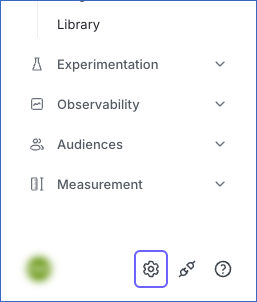
In the bottom left corner of the left navigation pane, click the Settings icon.
-
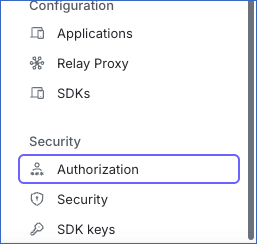
In the Settings sidebar, under Security, click Authorization.
-
On the Tokens tab, click Create token.

-
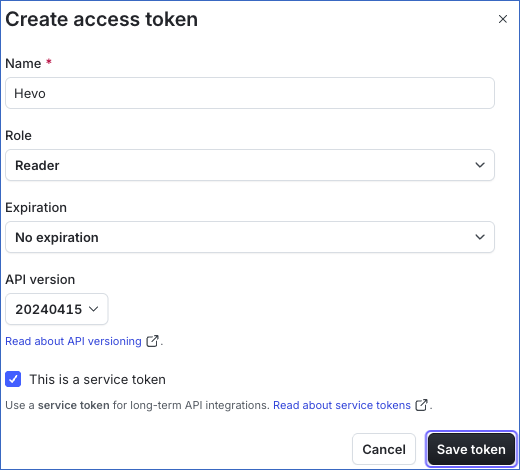
In the Create access token dialog, specify the following, and then click Save token:
-
Name: A name for the token, for example, Hevo.
-
Role: Reader. This role is selected by default and is sufficient for Hevo, as Hevo only reads data from LaunchDarkly.
-
Expiration: No expiration. If you select an expiration date, you must update the Pipeline with a new token before the token expires.
-
API version: The default version.
-
This is a service token: If your LaunchDarkly plan includes service tokens, select this check box, so that the token is not tied to your member account and keeps working if you leave the organization.
-
-
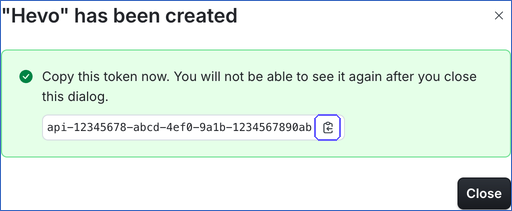
Click the copy icon next to the token, and save it securely like any other password. LaunchDarkly does not show the token again after you close the dialog.
-
Click Close.
Configure LaunchDarkly as a Source in your Pipeline
Perform the following steps to configure your LaunchDarkly Source:
-
Click Pipelines in the Navigation Bar.
-
Click + Create Pipeline in the Pipelines List View.
-
On the Select Source Type page, select LaunchDarkly.
-
On the Select Destination Type page, select the type of Destination you want to use.
-
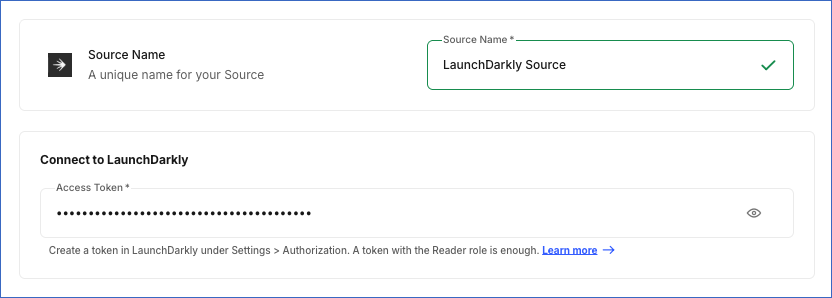
In the Configure Source screen, specify the following:
-
Source Name: A unique name for your Source, not exceeding 255 characters. For example, LaunchDarkly Source.
-
In the Connect to LaunchDarkly section:
- Access Token: The API access token that you created in LaunchDarkly.
-
-
Click Test & Continue to test the connection to your LaunchDarkly Source. Once the test is successful, you can proceed to set up your Destination.
When you click this button, Hevo checks that LaunchDarkly accepts the access token.
Data Replication
Hevo replicates data for all the objects selected on the Configure Objects page during Pipeline creation. By default, all supported objects and their available fields are selected. However, you can modify this selection while creating or editing the Pipeline. The Data Model lists the child objects of each parent object. If you select a child object without its parent object, Hevo reads the parent object to ingest the child object, but does not load the parent object to the Destination.
In the first run of the Pipeline, Hevo ingests all the data available for the selected objects in your LaunchDarkly account, including all the entries of the audit log that LaunchDarkly retains. In the subsequent runs, as per the sync frequency, Hevo ingests data as follows:
| Ingestion | Parent Objects |
|---|---|
| The audit log entries created since the previous run. Changes are identified using the date of each entry. | Audit Log |
| All the records, in each run | All the other parent objects |
Hevo ingests the child objects of a parent object along with it.
Hevo reads the environments, feature flags, flag defaults, metrics, and segments of each project in your account, and the maintainers and roles of each team.
LaunchDarkly limits the number of API requests that an access token can make. Read Rate limiting. If LaunchDarkly returns a rate limit error, Hevo waits and retries the request up to three times. If the limit persists, Hevo ingests the data in the next run. To understand how Hevo handles such scenarios, read Handling Rate Limit Exceptions.
Schema and Primary Keys
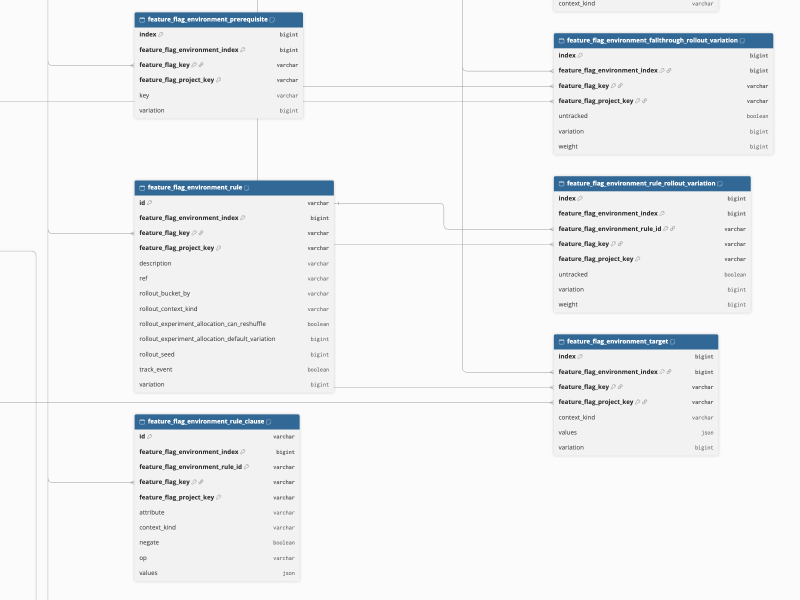
Hevo uses the following schema to upload the records in the Destination. For a detailed view of the objects, fields, and relationships, click the ERD.
Data Model
The following is the list of tables (objects) that are created at the Destination when you run the Pipeline:
| Object | Description |
|---|---|
| Audit Log | Contains the entries of the audit log of your account, such as the change made, the member who made it, and the resource that was changed. It includes the following child objects: Audit Log Access and Audit Log Target Resource. |
| Environment | Contains the environments of each project, such as Production and Test, with settings such as the approval requirements. It includes the following child objects: Required Approval Tag and Tags. |
| Feature Flag | Contains the feature flags of each project, such as the name, kind, maintainer, and creation date of each flag. It includes the following child objects: Feature Flag Environment, Feature Flag Environment Action Allowed, Feature Flag Environment Action Denied, Feature Flag Environment Context Target, Feature Flag Environment Evaluation, Feature Flag Environment Fallthrough Rollout Variation, Feature Flag Environment Prerequisite, Feature Flag Environment Rule, Feature Flag Environment Rule Clause, Feature Flag Environment Rule Rollout Variation, Feature Flag Environment Target, Feature Flag Experiment, and Feature Flag Experiment Environment. |
| Feature Flag Status | Contains the status of each feature flag in each environment, such as active, inactive, or launched, and the time at which the flag was last requested. |
| Feature Flag Tag | Contains the tags assigned to the feature flags. |
| Feature Flag Variation | Contains the variations of each feature flag, such as the name and value of each variation. |
| Flag Default Project | Contains the default settings that each project applies to new feature flags. It includes a child object, Flag Default Project Tag. |
| Maintainer | Contains the maintainers of each team. |
| Metric | Contains the metrics of each project that experiments measure, such as the kind, event key, and success criteria of each metric. It includes the following child objects: Metric Access, Metric Randomization Unit, and Metric Tag. |
| Project | Contains the projects of your account. It includes a child object, Project Tag. |
| Role | Contains the custom roles assigned to each team. |
| Segment | Contains the segments of each project and environment, such as the name and the contexts included or excluded. It includes the following child objects: Rule Clause, Segment Access, Segment Excluded Contexts, Segment Included Contexts, Segment Rule, Segment Tags, and Segment Target. |
| Segment Flag | Contains the feature flags that use each segment. |
| Team | Contains the teams of your account, such as the name, description, and member count of each team. It includes the following child objects: Role Project, Team Access, and Team Project. |
Additional Information
Read the detailed Hevo documentation for the following related topics:
Handling of Deletes
LaunchDarkly does not mark deleted records in its API responses. Hevo handles deletes as follows:
-
Environment, Feature Flag, Flag Default Project, Metric, Project, Segment, and Team objects: Hevo ingests all the records of these objects in each run. If a record that exists in the Destination is not returned by LaunchDarkly, Hevo marks it as deleted by setting the value of the metadata column, __hevo__marked_deleted, to True. LaunchDarkly does not return archived feature flags, so Hevo marks an archived feature flag as deleted.
-
Child objects of Audit Log: Each time Hevo ingests an audit log entry, it replaces the child records of that entry in the Destination.
-
All the other objects: In each run, Hevo ingests all the records of these objects and replaces the Destination table with them. A record that is deleted in LaunchDarkly is removed from the Destination. For example, if you delete a feature flag, Hevo removes its variations from the Destination, instead of marking them as deleted.
-
Audit Log object: Hevo does not capture deletes for this object. Audit log entries that LaunchDarkly removes after its retention period remain in the Destination.
Source Considerations
-
Hevo ingests the audit log entries that LaunchDarkly retains for your account. The retention period depends on your LaunchDarkly plan. Entries that LaunchDarkly removed before the first run of the Pipeline are not ingested.
-
If your LaunchDarkly plan does not include teams, or your access token cannot read teams, Hevo marks the Maintainer, Role, Role Project, Team, Team Access, and Team Project objects as inaccessible and ingests the other objects.
-
Hevo creates a table in the Destination only for the objects that have data. For example, if your account does not use experiments, the Feature Flag Experiment table is not created.