Helpjuice is a knowledge base platform that businesses use to create, organize, and publish help articles for their customers and employees. It enables teams to group articles into categories, control access to content through user groups, and track the activity in the knowledge base.
Hevo uses the Helpjuice API v3 to replicate the activities, articles, categories, groups, and users of your Helpjuice knowledge base to the Destination of your choice. To ingest data, you must provide Hevo with an API key and the subdomain of your Helpjuice account.
Supported Features
| Feature Name | Supported |
|---|---|
| Capture deletes | Yes, for the objects whose records Hevo ingests in each run |
| History mode | No |
| Custom data (user-configured tables & fields) | No |
| Data blocking (skip objects and fields) | Yes |
| Resync (objects and Pipelines) | Yes |
| API configurable | Yes |
Prerequisites
-
An active Helpjuice account from which data is to be ingested.
-
You are a Super Administrator or the Account Owner of your Helpjuice account, to obtain the account API key. Alternatively, you can use the personal API key of any user except a Viewer.
-
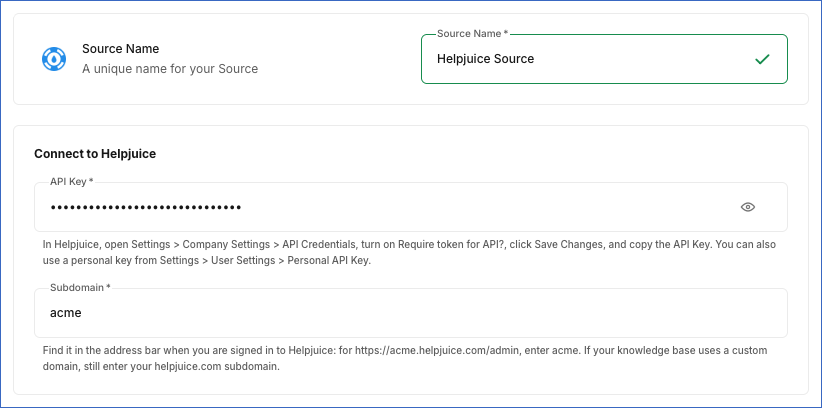
The API key and the subdomain of your Helpjuice account are available.
Obtain the API Key
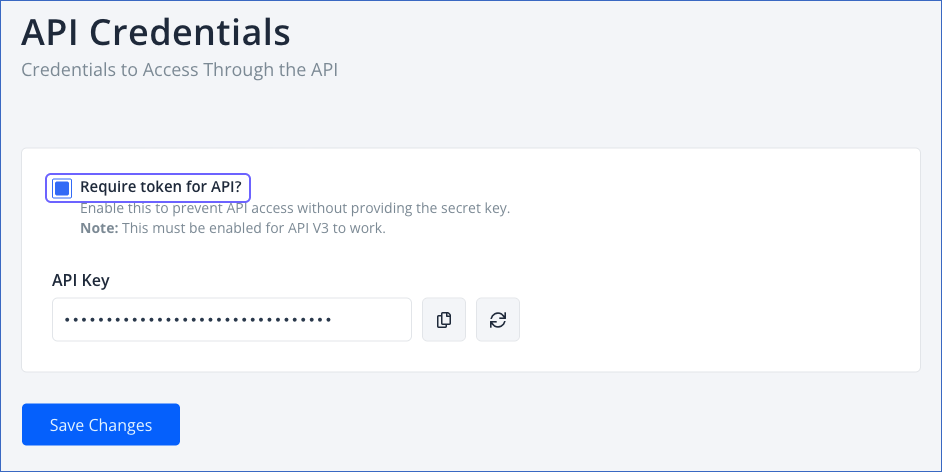
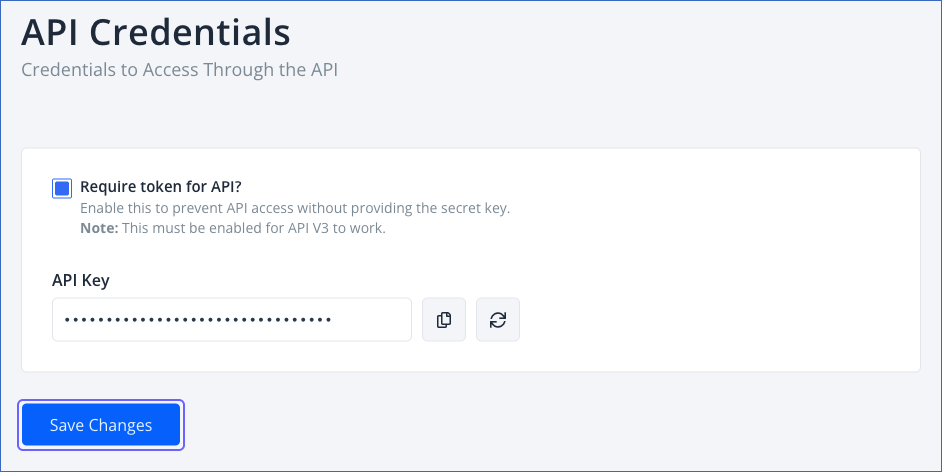
Hevo connects to your Helpjuice account using an API key. You can use the API key of your account, which provides access to all the data of the account, or a personal API key, which provides the access of the user who generates it. Hevo uses the Helpjuice API v3, which works only if the Require token for API? option is enabled in the API credentials settings of your account.
Perform the following steps to obtain the API key of your account:
-
Log in to your Helpjuice account as a Super Administrator or the Account Owner.
-
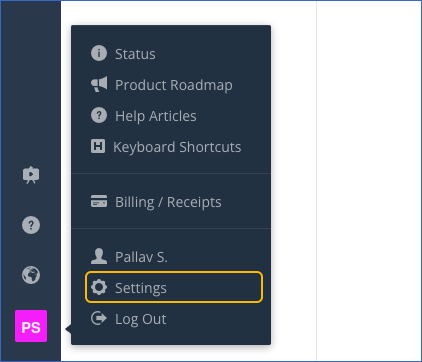
Click your profile icon in the bottom-left corner, and then click Settings.
-
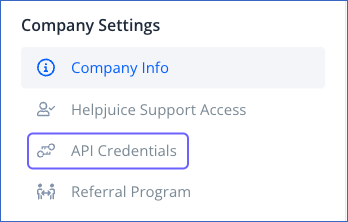
Under Company Settings, click API Credentials.
-
Select the Require token for API? check box, if it is not already selected.
-
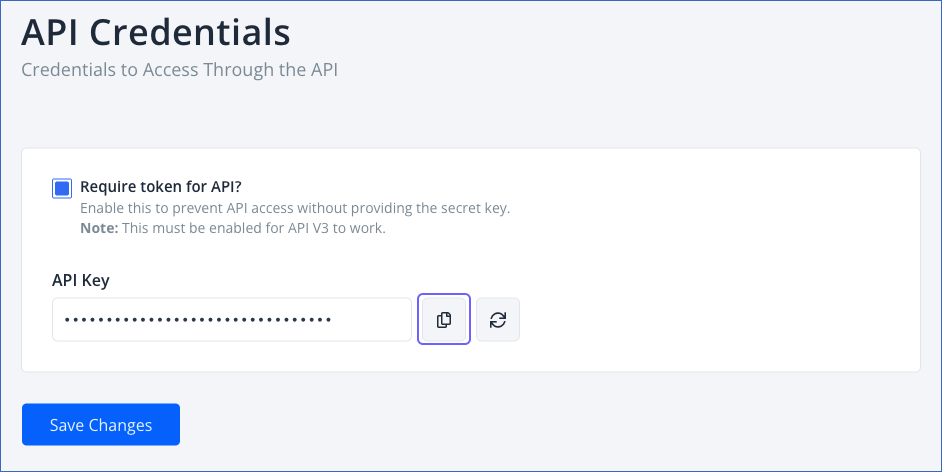
Click the copy icon next to the API Key field to copy the API key, and save it securely like any other password.
-
Click Save Changes.
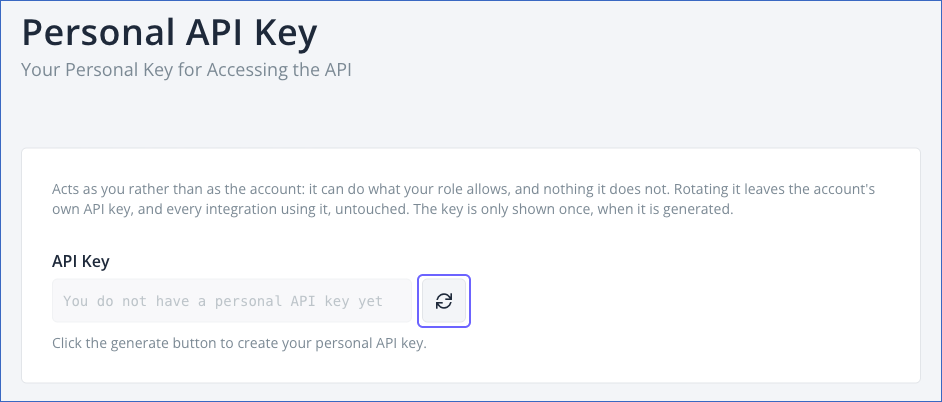
To use a personal API key instead, on the Settings page, under User Settings, click Personal API Key, and then click the generate icon next to the API Key field. Helpjuice displays the personal API key only once, when it is generated.
Find your Subdomain
The subdomain is the part of your Helpjuice address before .helpjuice.com. For example, if you access Helpjuice at https://acme.helpjuice.com/admin, your subdomain is acme. If your knowledge base uses a custom domain, you must still use your helpjuice.com subdomain.
Configure Helpjuice as a Source in your Pipeline
Perform the following steps to configure your Helpjuice Source:
-
Click Pipelines in the Navigation Bar.
-
Click + Create Pipeline in the Pipelines List View.
-
On the Select Source Type page, select Helpjuice.
-
On the Select Destination Type page, select the type of Destination you want to use.
-
On the Configure Source page, specify the following:
-
Click Test & Continue to test the connection to your Helpjuice Source. Once the test is successful, you can proceed to set up your Destination.
Data Replication
Hevo replicates data for all the objects selected on the Configure Objects page during Pipeline creation. By default, all supported objects and their available fields are selected. However, you can modify this selection while creating or editing the Pipeline. To ingest a child object, you must also select its parent object. The Data Model lists the child objects of each parent object.
The first run of the Pipeline ingests all the data of the selected objects. In the subsequent runs, as per the sync frequency, Hevo ingests data as follows:
| Ingestion | Objects |
|---|---|
| New and updated records, based on the time each record was last updated | Article, along with its child objects, Article Answer and Article Keyword. |
| All the records, in each run | All other objects. |
You can resync all the objects except the child objects. Resyncing a parent object also resyncs its child objects.
Helpjuice limits API requests to 100 requests per minute. If Hevo exceeds this limit, Hevo waits and retries the request. Read Rate Limit.
Note: You can create a Pipeline with this Source only using the Merge load mode. The Append mode is not supported for this Source.
Schema and Primary Keys
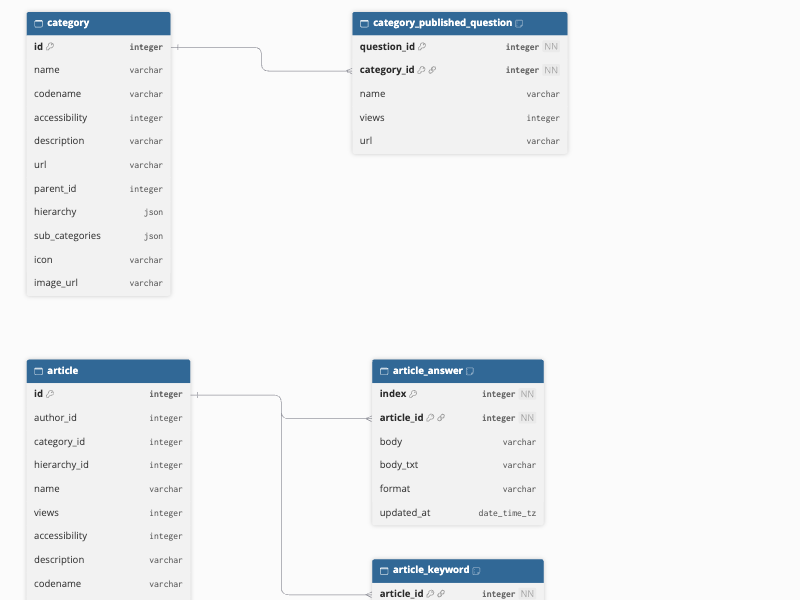
Hevo uses the following schema to upload the records in the Destination. For a detailed view of the objects, fields, and relationships, click the ERD.
Data Model
The following is the list of tables (objects) that are created at the Destination when you run the Pipeline:
| Object | Description |
|---|---|
| Activity | Contains the activities in your knowledge base, such as the creation, update, deletion, and viewing of articles, categories, and users, including the action, the user who performed it, the record it applies to, and the time of each activity. |
| Article | Contains the articles of your knowledge base, including the name, author, category, accessibility, number of views, publication status, URL, and the creation, update, and expiration dates of each article. It includes the following child objects: - Article Answer, which contains the content of each article in HTML and plain text. - Article Keyword, which contains the keywords of each article. |
| Category | Contains the categories of your knowledge base, including the name, description, accessibility, parent category, URL, and the hierarchy and subcategories of each category as JSON. It includes a child object, Category Published Question, which contains the published articles of each category. |
| Groups | Contains the user groups of your Helpjuice account, including the name, creation time, and the rules that add users to each group automatically as JSON. It includes a child object, Groups Users, which contains the users of each group. |
| Users | Contains the users of your Helpjuice account, including the name, email address, role, and the creation and update times of each user. |
Additional Information
Read the detailed Hevo documentation for the following related topics:
Handling of Deletes
Hevo captures the deletes of the Helpjuice objects as follows:
| Deletes Captured | Objects |
|---|---|
| In each run, by comparing the data |
Activity, Category, Category Published Question, Groups, Groups Users, and Users. Hevo ingests all the records of these objects in each run, and marks the records that are no longer returned by Helpjuice as deleted by setting the value of the metadata column _hevo_marked_deleted to True. For example, if you remove a user from a group, the record is marked as deleted in the Groups Users table in the next run. |
| Not captured | Article, Article Answer, and Article Keyword. An article that you delete in Helpjuice, along with its content and keywords, remains in the Destination. Similarly, if you remove a keyword from an article, the keyword remains in the Article Keyword table. To remove these records from the Destination, resync the Article object using the Drop and Load option. |
Source Considerations
-
The personal API key of a user provides access only to the data that the user can access. To replicate all the data of your account, use the API key of your account.
-
Helpjuice may take a few minutes to add a newly published article to the list of published articles of its category. As a result, the article is ingested into the Category Published Question object in the next run after Helpjuice lists it.
-
If you regenerate or delete the API key in Helpjuice, Hevo cannot authenticate with your account. To resume data replication, update the API key in the configuration of your Source.
Limitations
- Hevo does not ingest the draft articles of a category, the analytics data, or the webhooks of your Helpjuice account.