Google Ads is an advertising platform by Google that allows businesses to create and manage ad campaigns across Google Search, YouTube, and other Google properties. It connects businesses with users who are actively searching or browsing for related products and services, and provides tools to measure campaign performance, optimize bidding strategies, and target audiences based on demographics, interests, and behavior.
Hevo uses the Google Ads API to replicate data from your Google Ads account to the Destination of your choice.
Hevo supports the following authentication methods to connect to your Google Ads account:
-
Open Authorization (OAuth): Allows Hevo to connect to your account through an authorization flow, where you sign in to Google and grant Hevo access to your account data.
-
OAuth app: Allows Hevo to connect to your account using the client ID, client secret, and refresh token of an OAuth app that you create in Google.
Note: To create a Pipeline with Google Ads as the Source using an OAuth app, you must use the Create a Pipeline endpoint through the Hevo API. This method is not available in the Hevo UI. Read Creating a Pipeline with Hevo API for the steps to create the Pipeline.
Supported Features
| Feature Name | Supported |
|---|---|
| Capture deletes | Yes |
| History mode | Yes |
| Custom data (user-configured tables & fields) | Yes |
| Data blocking (skip objects and fields) | Yes |
| Resync (objects and Pipelines) | Yes |
| API configurable | Yes |
Prerequisites
-
An active Google Ads account exists from which data is to be ingested.
-
Access to the manager account if the Google Ads account is linked to a manager account.
-
You have at least Read-only access to the Google Ads account or its linked manager account that you want to connect to Hevo.
-
Two-factor authentication (2FA) must be enabled for the Google account used to authenticate the Google Ads Source.
Obtain the Customer ID
To ingest data from your Google Ads account, you need to provide the Customer ID of your Google Ads account to Hevo. To do so, perform the following steps:
-
Log in to your Google Ads account.
-
In the top right corner of the page, click your profile icon.

-
From the drop-down that appears, copy the customer ID for your account, and save it securely like any other password.
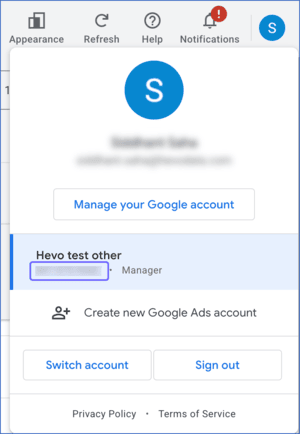
Use this customer ID while configuring your Google Ads Source in Hevo.
Configure Google Ads as a Source in your Pipeline
Perform the following steps to configure your Google Ads Source:
-
Click Pipelines in the Navigation Bar.
-
Click + Create Pipeline in the Pipelines List View.
-
On the Select Source Type page, select Google Ads.
-
On the Select Destination Type page, select the type of Destination you want to use.
-
On the Select Pipeline Type page, click Edge, and then click Continue.
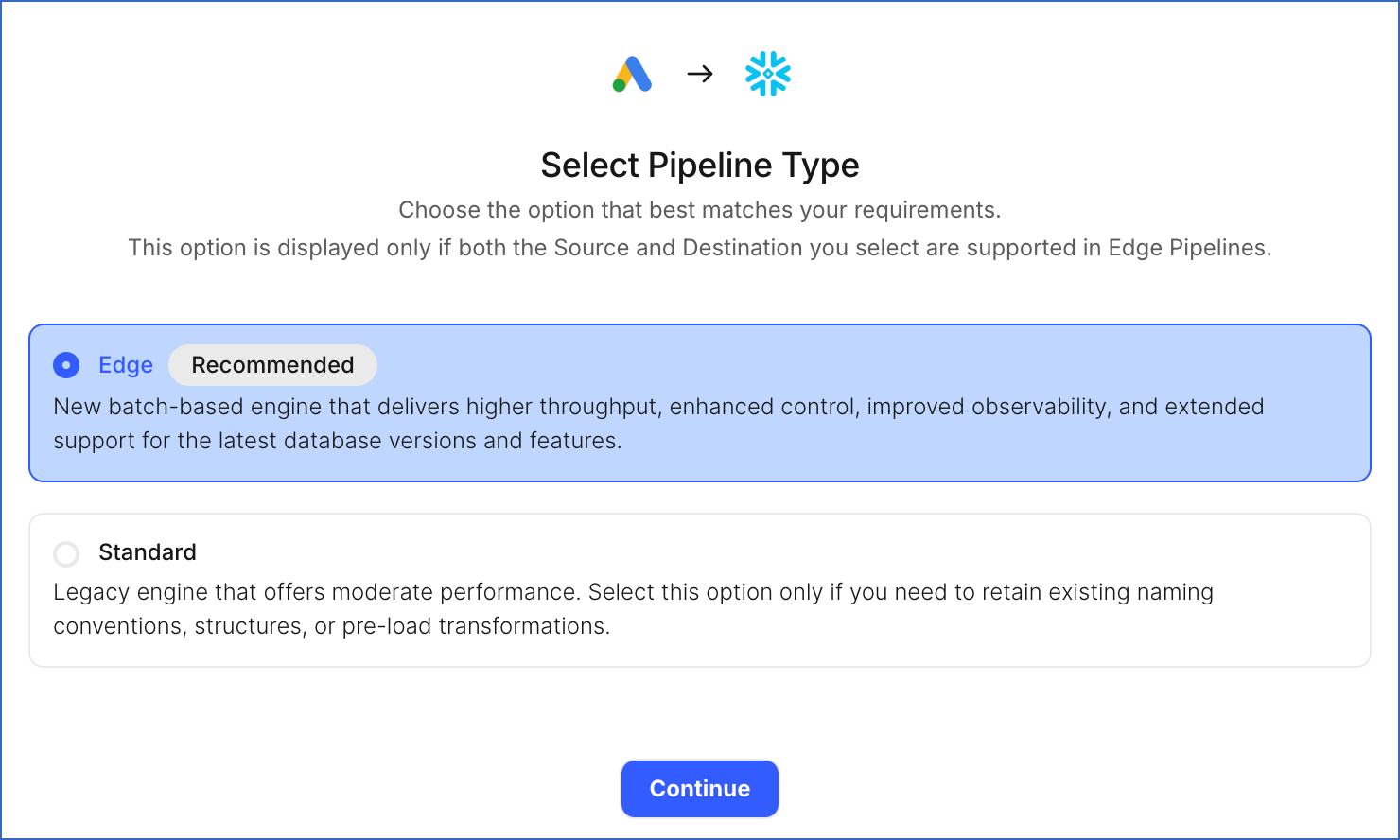
Note: This page appears only if the selected Destination type is supported in Edge and your Team has an existing Google Ads Pipeline with the same Destination type. Otherwise, you can proceed to create an Edge Pipeline.
-
In the Configure Source screen, specify the following:
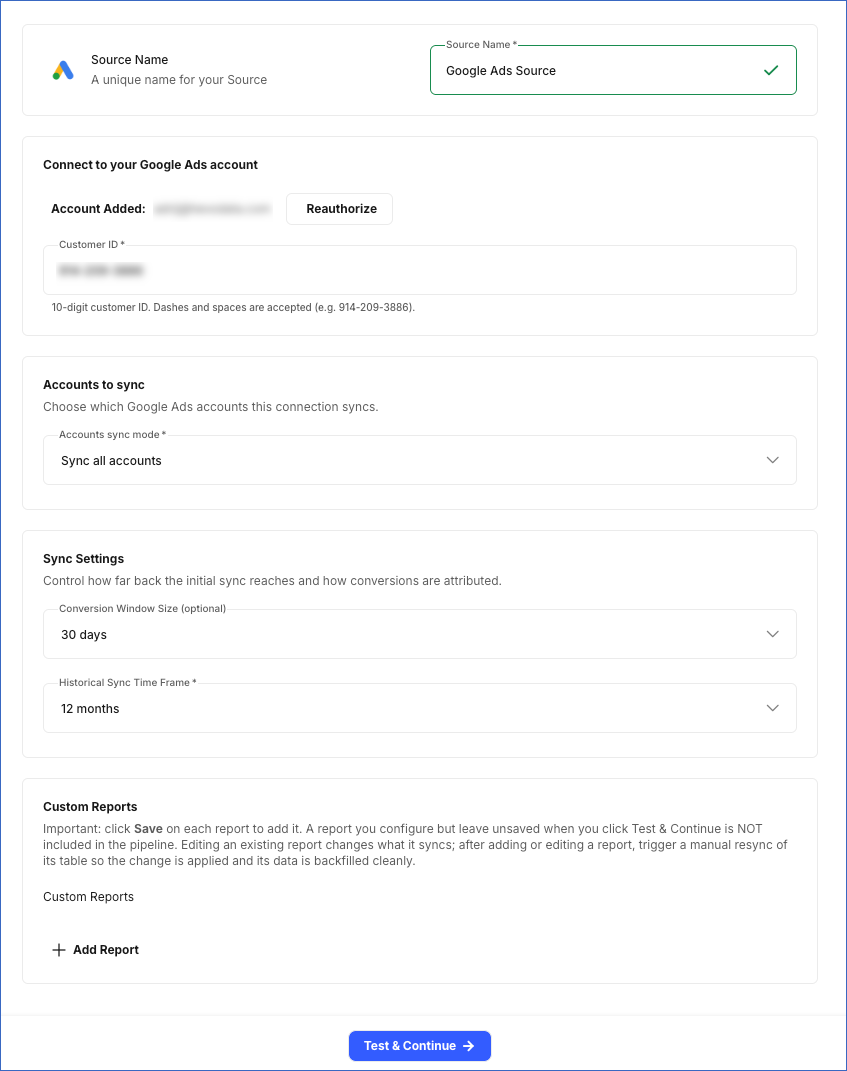
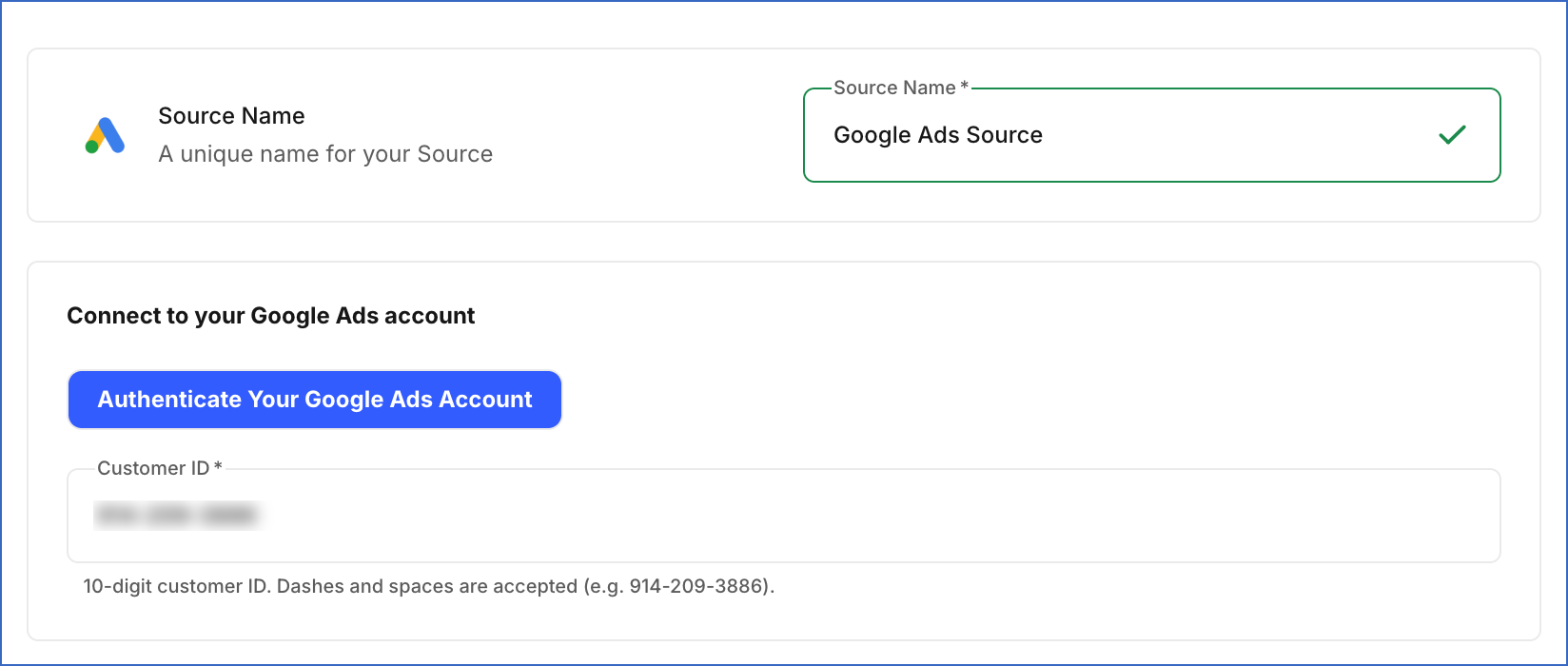
Connect to your Google Ads account
-
Click Authenticate your Google Ads account, log in to your Google Ads account, and click Allow to grant Hevo access to your account.
-
Customer ID: The 10-digit customer ID of the Google Ads account that you obtained, containing the data you want to sync.
Accounts to sync
-
Select Google Ads Account: Choose whether to sync data from all accessible accounts, only specific accounts, or every child account under a specific manager (MCC) account. Default value: Sync all accounts.
-
Sync all accounts: Hevo syncs data for all ad accounts accessible to your authorized Google Ads account, including any accounts added later.
-
Sync specific accounts: Hevo ingests data only for the accounts you select from the Accounts to sync drop-down.
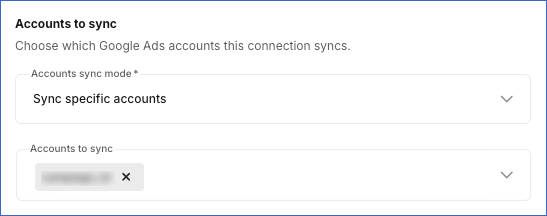
-
Sync by manager accounts: Hevo ingests data from every child account under the manager (MCC) accounts you select from the Manager accounts to sync drop-down.
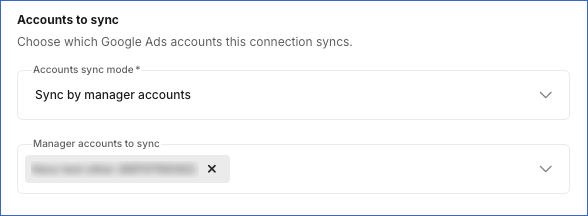
Note: Only the child accounts directly under the selected manager (MCC) accounts are synced. If a selected manager account contains sub-manager accounts, their child accounts are not synced automatically. To sync those accounts, select the relevant sub-manager accounts separately.
-
Sync Settings
- Historical Sync Duration: The duration for which you want to ingest existing data from the Source. This cannot be changed after the Pipeline is created. Default duration: 12 Months.
Advanced Options
-
Show Advanced Options: Enable this toggle to reveal optional settings that fine-tune how stats are re-fetched. These settings are only necessary in specific cases. Default value: Off.
- Conversion Window Size (optional): The duration during which a conversion is recorded. Select Auto if you want the window size to be detected automatically. Default value: 30 days.
Custom Reports (optional)
-
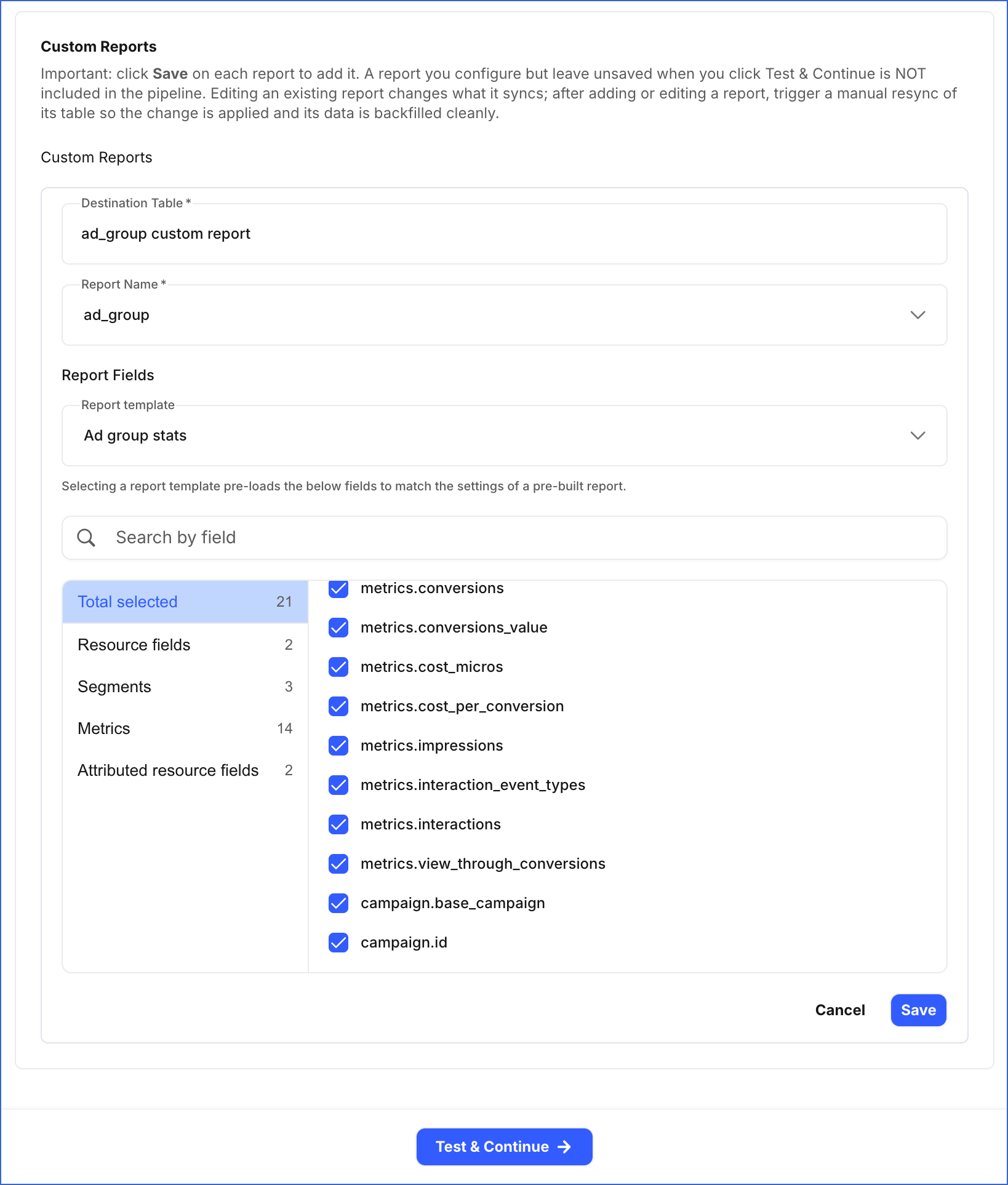
Custom Reports: Hevo allows you to create your own reports by choosing a valid combination of metrics and dimensions. Each report syncs to its own Destination table. For each report, specify the following:
-
Destination Table: Specify a unique name for the Destination table where Hevo loads the data for this report.
-
Report Type: The type of Google Ads data to include in the report. The fields available for the report are based on the value in this field. Default: ad_group.
-
Report Fields: The fields to include in the report. You can choose a report template to automatically add fields, or select them manually. The available fields depend on the selected Report Type value.
Note:
-
Click Save to add each report. Any report that is not saved before you click Test & Continue is not included in the Pipeline.
-
If you add a new custom report or edit an existing one after the Pipeline is created, resync the corresponding object to apply the changes and load the data using the updated configuration.
-
-
-
Click Test & Continue to test the connection to your Google Ads Source.
Note: If any custom report is configured incorrectly, such as with an unsupported field combination, an invalid aggregation, or a duplicate table name, clicking Test & Continue fails the Source configuration. Hevo lists all configuration issues in your custom reports. You can fix these issues by editing the reports before retrying.
Data Replication
Hevo replicates data for all the objects selected on the Configure Objects page during Pipeline creation. By default, all supported objects and their available fields are selected. However, you can modify this selection while creating or editing the Pipeline.
Hevo ingests the following types of data from your Source objects:
-
Historical Data: The first run of the Pipeline ingests all available historical data for the selected objects, for the duration specified in the Historical Sync Duration field, and loads it into the Destination.
-
Incremental Data: Once the historical load is complete, new and updated records for objects are ingested as per the sync frequency.
For the following objects, Hevo re-fetches data within the configured Conversion Window Size to capture delayed conversions:
-
account_stats
-
account_hourly_stats
-
ad_group_stats
-
ad_group_hourly_stats
-
ad_stats
-
audience_stats
-
campaign_stats
-
campaign_hourly_stats
-
click_stats
-
keyword_stats
-
landing_page_stats
-
search_keyword_stats
-
search_term_keyword_stats
-
search_term_stats
For the following objects, Hevo ingests only the incremental data in subsequent Pipeline runs:
| Object Category | Objects |
|---|---|
| Campaign | campaign_history, campaign_bidding_strategy_history |
| Campaign Targeting Criteria | campaign_criterion_history, campaign_criterion_ad_schedule_history, campaign_criterion_listing_scope_dimension_history, campaign_criterion_proximity_history |
| Campaign Settings | campaign_app_campaign_setting_history, campaign_dynamic_search_ads_setting_history, campaign_geo_target_type_setting_history, campaign_hotel_setting_history, campaign_local_setting_history, campaign_network_setting_history, campaign_optimization_goal_setting_history, campaign_real_time_bidding_setting_history, campaign_shared_set_history, campaign_shopping_setting_history, campaign_targeting_setting_history, campaign_tracking_setting_history |
| Ad Group | ad_group_history, ad_group_bid_modifier_history, ad_group_bidding_strategy_history, ad_group_custom_parameter_history |
| Ad Group Targeting Criteria | ad_group_criterion_history, ad_group_criterion_custom_parameter_history, ad_listing_group_criterion_history |
| Ad | ad_history, ad_custom_parameter_history, ad_policy_topic_history, ad_policy_topic_constraint_history, ad_policy_topic_evidence_history |
| Ad Type Details | app_ad_history, app_engagement_ad_history, demand_gen_carousel_ad_history, demand_gen_multi_asset_ad_history, demand_gen_product_ad_history, display_upload_ad_history, expanded_dynamic_search_ad_history, expanded_text_ad_history, hotel_ad_history, image_ad_history, legacy_app_install_ad_history, legacy_responsive_display_ad_history, local_ad_history, responsive_display_ad_history, responsive_search_ad_history, shopping_comparison_listing_ad_history, shopping_product_ad_history, shopping_smart_ad_history, smart_campaign_ad_history, text_ad_history, video_ad_history, video_responsive_ad_history |
| Labels and Shared Sets | shared_set_history, shared_criterion_history |
| Lead Generation | lead_form_submission_data, local_services_lead, local_services_lead_conv |
For the following objects, Hevo ingests the entire data during each Pipeline run:
-
account_history
-
account_label_history
-
campaign_budget_history
-
campaign_bid_modifier_history
-
campaign_conversion_goal_history
-
ad_group_label_history
-
ad_group_criterion_label_history
-
campaign_label_history
-
ad_label_history
-
audience
-
combined_audience
-
custom_audience
-
geo_target
-
label
-
mobile_device
-
operating_system_version
-
topic
-
user_interest
-
user_list
Note: The geo_target table is synced once every 15 days.
Google Ads API enforces rate limits using a token bucket algorithm, applied independently for each developer token and each linked account. To understand how Hevo handles such scenarios, read Handling Rate Limit Exceptions.
You can create a Pipeline with this Source using either the Merge or Append load mode.
Schema and Primary Keys
Hevo uses the following schema to upload the records to the Destination. For a detailed view of the objects, fields, and relationships, click the ERD.
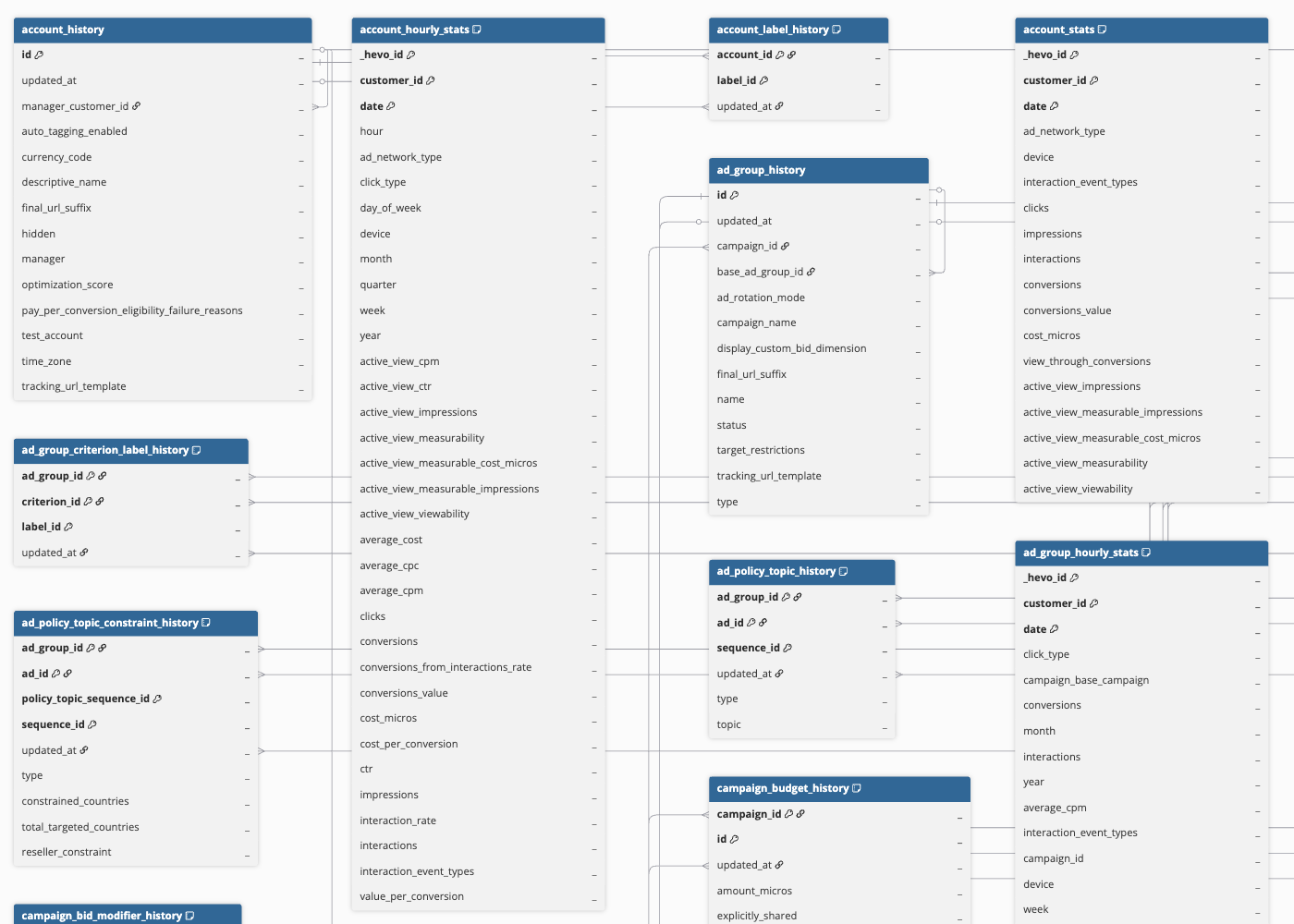
Data Model
The following is the list of tables (objects) that are created at the Destination when you run the Pipeline:
| Object | Description |
|---|---|
| account_history | Contains details of your Google Ads account, such as its currency code, time zone, auto-tagging setting, and manager account hierarchy. This object has a child object, account_label_history. |
| account_stats | Contains day-wise performance metrics for your Google Ads account, such as impressions, clicks, interactions, conversions, and cost. |
| account_hourly_stats | Contains hour-wise performance metrics for your Google Ads account, such as impressions, clicks, interactions, conversions, and cost. |
| campaign_history | Contains details of the ad campaigns running in your account, including their names, statuses, advertising channel types, and serving statuses. An ad campaign consists of one or more ad groups used to advertise your products or services. This object has the following child objects: - Campaign App Campaign Setting - Campaign Bidding Strategy - Campaign Dynamic Search Ads Setting - Campaign Geo Target Type Setting - Campaign Hotel Setting - Campaign Label - Campaign Local Setting - Campaign Network Setting - Campaign Optimization Goal Setting - Campaign Real-Time Bidding Setting - Campaign Shopping Setting - Campaign Targeting Setting - Campaign Tracking Setting |
| campaign_bidding_strategy_history | Contains details about how much to bid for a campaign to get more impressions, clicks, or conversions. It includes the bidding method, target cost per action (CPA), target return on ad spend (ROAS), and minimum or maximum bid limits. |
| campaign_budget_history | Contains details of the budget you have set for one or more campaigns, such as its amount, currency, and the number of campaigns sharing it. |
| campaign_bid_modifier_history | Contains the bid adjustments applied to a campaign for a specific criterion, such as a hotel booking window or length of stay. |
| campaign_conversion_goal_history | Contains details of the conversion goals configured for a campaign, indicating whether a conversion action is biddable for that campaign. |
| campaign_stats | Contains day-wise performance metrics for your ad campaigns, such as impressions, clicks, interactions, conversions, and cost. |
| campaign_hourly_stats | Contains hour-wise performance metrics for your ad campaigns, such as impressions, clicks, interactions, conversions, and cost. |
| campaign_criterion_history | Contains details of the targeting criteria applied to a campaign, such as geographic location, device, age range, gender, keyword, or audience list. This object has the following child objects: - Campaign Criterion Ad Schedule - Campaign Criterion Listing Scope Dimension - Campaign Criterion Proximity |
| campaign_shared_set_history | Contains the association between a campaign and a shared set, such as a shared negative keyword list. |
| ad_group_history | Contains details of an ad group created in your Google Ads account, such as its name, status, type, ad rotation mode, and the campaign to which it belongs. An ad group contains one or more ads that share a common target audience. This object has the following child objects: - Ad Group Bidding Strategy - Ad Group Custom Parameter - Ad Group Label |
| ad_group_bid_modifier_history | Contains the bid adjustments applied to an ad group for a specific criterion, such as a hotel booking window or length of stay. |
| ad_group_stats | Contains day-wise performance metrics for your ad groups, such as impressions, clicks, interactions, conversions, and cost. |
| ad_group_hourly_stats | Contains hour-wise performance metrics for your ad groups, such as impressions, clicks, interactions, conversions, and cost. |
| ad_group_criterion_history | Contains details of the targeting criteria applied to an ad group, such as keywords, audiences, placements, age range, gender, or income range, along with their approval status and quality score. This object has the following child objects: - Ad Group Criterion Custom Parameter - Ad Group Criterion Label - Ad Listing Group Criterion |
| ad_history | Contains details of an ad within an ad group, such as its name, type, status, approval status, and final URLs. This object has the following child objects: - Ad Custom Parameter - Ad Label - Ad Policy Topic - Ad Policy Topic Constraint - Ad Policy Topic Evidence - App Ad - App Engagement Ad - Demand Gen Carousel Ad - Demand Gen Multi Asset Ad - Demand Gen Product Ad - Display Upload Ad - Expanded Dynamic Search Ad - Expanded Text Ad - Hotel Ad - Image Ad - Legacy App Install Ad - Legacy Responsive Display Ad - Local Ad - Responsive Display Ad - Responsive Search Ad - Shopping Comparison Listing Ad - Shopping Product Ad - Shopping Smart Ad - Smart Campaign Ad - Text Ad - Video Ad - Video Responsive Ad |
| ad_stats | Contains day-wise performance metrics for your ads, such as impressions, clicks, interactions, conversions, cost, and video views. |
| audience | Contains details of a custom audience segment you have built in your Google Ads account using your own dimensions, such as its name, description, and scope. |
| audience_stats | Contains performance metrics for your ad groups and campaigns, aggregated at the audience segment level, such as impressions, clicks, interactions, conversions, and cost. |
| combined_audience | Contains details of a combined audience, which merges two or more audience lists, such as affinity, in-market, and remarketing lists, into a single targetable segment. |
| custom_audience | Contains details of a custom audience you have built based on specific keywords, URLs, and applications, such as its name, description, and member interests. |
| user_interest | Contains details of a Google Ads user interest (affinity or in-market) taxonomy node available for audience targeting. |
| user_list | Contains details of a user list, such as its name, membership status, size, and eligibility for the Display and Search Networks. A user list is a remarketing list you use to target users who have previously interacted with your website or app. |
| topic | Contains details of a topic targeting constant, used to target or exclude ads on webpages classified under specific categories, such as Autos & Vehicles. |
| label | Contains details of the labels defined in your Google Ads account, such as their name, status, background color, and description. Labels allow you to group and organize entities, such as campaigns, ad groups, ads, or keywords, for easier filtering and reporting. |
| shared_set_history | Contains details of a shared set, such as a shared negative keyword list, including its name, type, status, and the number of campaigns using it. This object has a child object, shared_criterion_history. |
| geo_target | Contains details of a geographic location that can be used for targeting, such as its name, country code, target type, and parent location. |
| mobile_device | Contains details of a mobile device that can be used as a targeting criterion, such as its manufacturer, name, and operating system. |
| operating_system_version | Contains details of an operating system version that can be used as a targeting criterion, such as its name and major and minor version numbers. |
| keyword_stats | Contains day-wise performance metrics for the keywords you use in an ad group, such as impressions, clicks, interactions, conversions, and cost. |
| search_keyword_stats | Contains day-wise performance metrics, such as impressions, clicks, and cost, of the keywords that triggered your ads to serve on the Google Search Network. |
| search_term_keyword_stats | Contains day-wise performance metrics of the search terms that triggered your ads to serve, aggregated at the matched keyword level. |
| search_term_stats | Contains day-wise performance metrics of the search terms that triggered your ads to serve, such as impressions, clicks, cost, and conversions. |
| click_stats | Contains day-wise details of the individual clicks on your ads, such as the Google Click Identifier (GCLID) and the campaign and ad group associated with the click. |
| landing_page_stats | Contains day-wise performance metrics of your ads, aggregated at the unexpanded final URL (landing page) level, such as impressions, clicks, cost, and page load speed score. |
| lead_form_submission_data | Contains details of the lead form submissions collected through your lead form ad extensions, such as the submission date and time, and the associated ad, ad group, and campaign. |
| local_services_lead | Contains details of the leads generated through your Local Services ads, such as the lead creation date, charge status, and credit details. This object has a child object, local_services_lead_conversations. |
Additional Information
Read the detailed Hevo documentation for the following related topics:
Handling of Deletes
For objects where only new and updated records are ingested after the first Pipeline run, Hevo identifies deleted records using the Google Ads change_status feed. If a record contains the REMOVED status, Hevo marks it as deleted in the Destination by setting the value of the metadata column __hevo__marked_deleted to True.
For child objects, Hevo re-ingests the complete data from the parent object on every Pipeline run. As a result, if a child record is deleted at the Source, it is automatically removed from the Destination on the next sync.
For all other objects, Hevo does not support capturing deletes.
Source Considerations
-
Google Ads custom reports can include only the objects and fields supported by the Google Ads API. Custom fields are not supported.
-
If a Google Ads entity has no performance data for a given period, the API does not return it. As a result, Hevo does not create a record for that entity in the corresponding Destination table for that period.
Limitations
- You can configure a maximum of 50 custom reports per Pipeline.