dbt Cloud is a platform for developing, testing, scheduling, and documenting the data transformations that you write in dbt. You organize your work in projects, run it in environments through jobs, and review the result of each run.
Hevo uses the dbt Cloud Administrative API to replicate the account details, projects, environments, repositories, connections, jobs, runs, run results, users, groups, permissions, and notifications of your dbt Cloud account to the Destination of your choice. To ingest data, you must provide Hevo with a service token and the access URL of your dbt Cloud account.
Supported Features
| Feature Name | Supported |
|---|---|
| Capture deletes | Yes |
| History mode | No |
| Custom data (user-configured tables & fields) | No |
| Data blocking (skip objects and fields) | Yes |
| Resync (objects and Pipelines) | Yes |
| API configurable | Yes |
Prerequisites
-
An active dbt Cloud account on a plan that includes access to the Administrative API, such as the Starter or Enterprise plan, from which data is to be ingested.
-
The Account Admin permission in dbt Cloud to create a service token.
-
A service token of your dbt Cloud account. Read Create a Service Token.
-
The access URL of your dbt Cloud account. Read Obtain the Account Host.
Create a Service Token
Hevo connects to your dbt Cloud account using a service token. Perform the following steps to create a service token:
-
Log in to your dbt Cloud account.
-
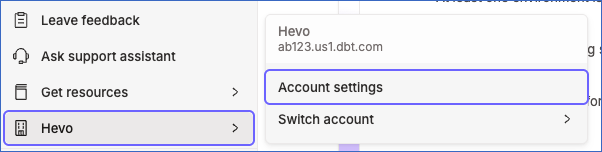
In the left navigation pane, click your account name, and then click Account settings.
-
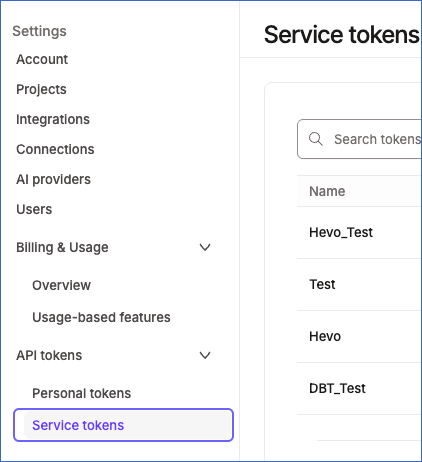
In the Settings pane, under API tokens, click Service tokens.
-
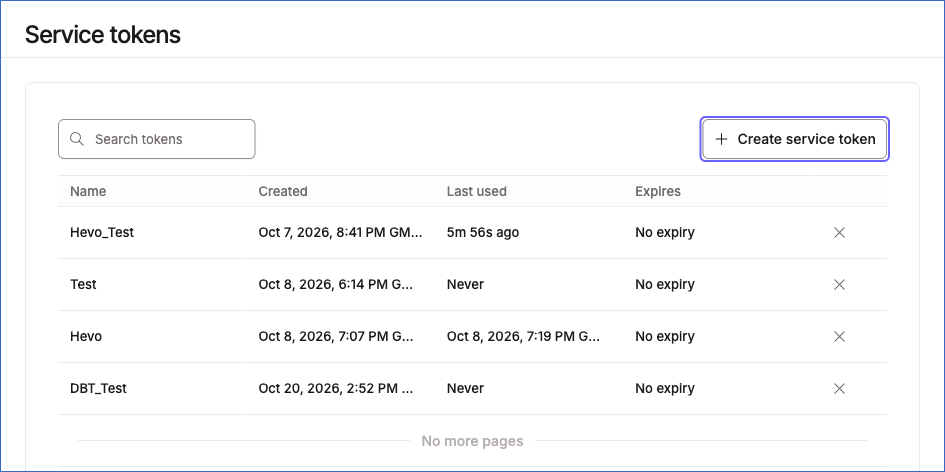
On the Service tokens page, click + Create service token.
-
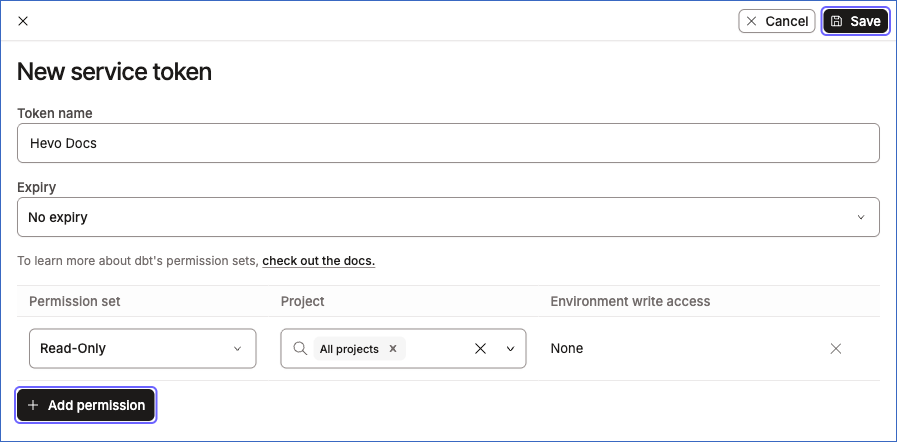
In the New service token pane, do the following:
-
In the Token name field, enter a name for the token. For example, Hevo Docs.
-
From the Expiry drop-down, select when the token expires. If the token expires, the Pipeline fails until you update the Source with a new token. You cannot change the expiry later.
-
Click + Add permission, and from the Permission set drop-down, select a permission set with access to All projects. For example, Read-Only, or Account Viewer on the Enterprise plans.
Note: A token with the Read-Only permission set cannot read job notifications. To replicate the Notification object and its child objects, select the Account Admin permission set.
-
Click Save.
-
-
Click Copy to copy the token, and save it securely like any other password. dbt Cloud does not show the token again after you close the pane.
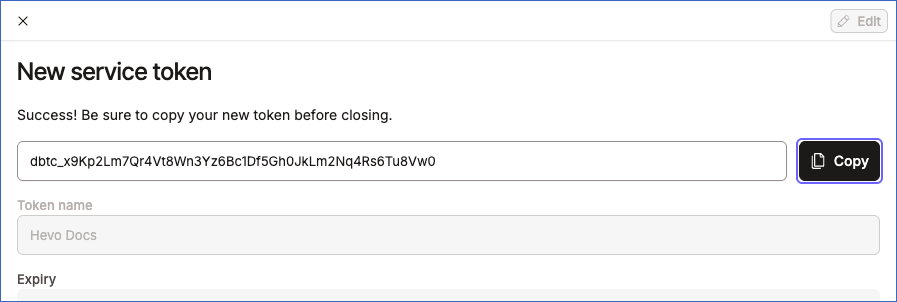
Read Service account tokens for more information.
Obtain the Account Host
The account host is the hostname of the access URL of your dbt Cloud account, without https:// or a path. For example, ab123.us1.dbt.com or cloud.getdbt.com.
To find the account host, log in to your dbt Cloud account and click your account name in the left navigation pane. The menu shows the account host below the account name. Read Access, Regions, & IP addresses for the access URLs of each region.
Configure dbt Cloud as a Source in your Pipeline
Perform the following steps to configure your dbt Cloud Source:
-
Click Pipelines in the Navigation Bar.
-
Click + Create Pipeline in the Pipelines List View.
-
On the Select Source Type page, select dbt Cloud.
-
On the Select Destination Type page, select the type of Destination you want to use.
-
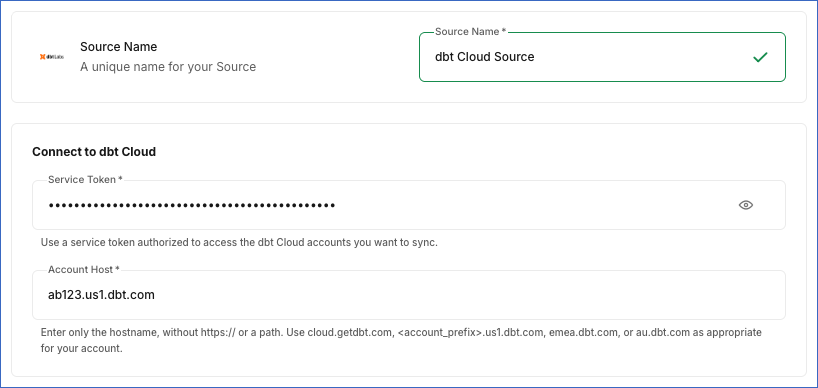
On the Configure Source page, specify the following:
-
Source Name: A unique name for your Source, not exceeding 255 characters. For example, dbt Cloud Source.
-
In the Connect to dbt Cloud section:
-
Service Token: The service token that you created in dbt Cloud.
-
Account Host: The hostname of the access URL of your dbt Cloud account. For example, ab123.us1.dbt.com. Do not include https:// or a path.
-
-
-
Click Test & Continue to test the connection to your dbt Cloud Source. Hevo checks that it can read the account that the service token belongs to. Once the test is successful, you can proceed to set up your Destination.
Data Replication
Hevo replicates data for all the objects selected on the Configure Objects page during Pipeline creation. By default, all supported objects and their available fields are selected. However, you can modify this selection while creating or editing the Pipeline.
The first run of the Pipeline ingests all the data of the selected objects. In the subsequent runs, as per the sync frequency, Hevo ingests data as follows:
| Ingestion | Objects |
|---|---|
| New runs, and the latest runs again |
Run and its child objects. In each run of the Pipeline, Hevo ingests the dbt Cloud runs that were created after the last ingested run. It also ingests the 100 most recent ingested runs again, so that the status, duration, and results of runs that were still in progress are updated. |
| All the records, in each run | All other objects |
For each dbt Cloud run that Hevo ingests, Hevo reads its artifacts and its run_results.json file with separate API requests. As a result, the number of API requests in each run increases with the number of new runs.
You can resync any object.
Note: You can create a Pipeline with this Source only using the Merge load mode. The Append mode is not supported for this Source.
Schema and Primary Keys
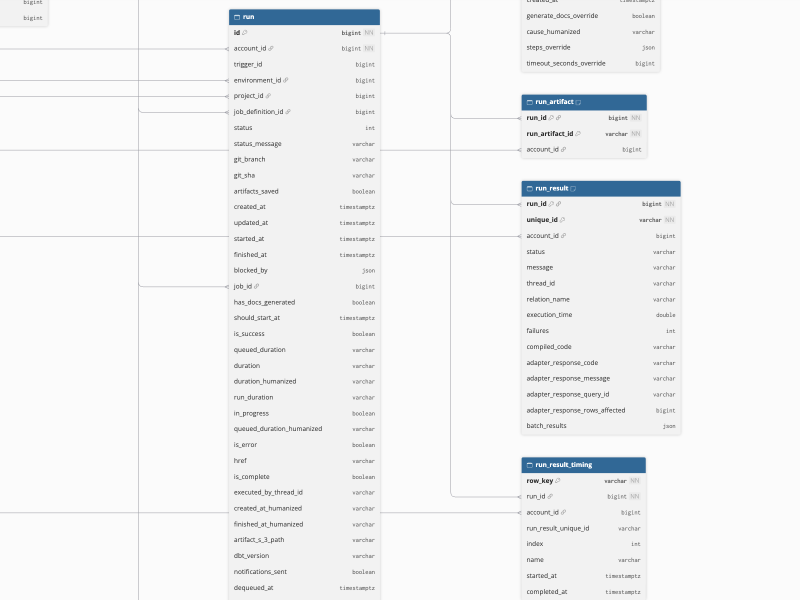
Hevo uses the following schema to upload the records in the Destination. For a detailed view of the objects, fields, and relationships, click the ERD.
Data Model
The following is the list of tables (objects) that are created at the Destination when you run the Pipeline:
| Object | Description |
|---|---|
| Account | Contains the dbt Cloud account that the service token belongs to, including the name, plan, state, run slots, seats, and access URLs of the account. It includes the following child objects: - Account Group - Account Migration Event |
| Audit Log Event | Contains the audit log events of each account, including the actor, the event type, the service, and the context of each event. |
| Connection | Contains the data platform connections of each account, including the name, the adapter version, and whether an SSH tunnel is enabled for each connection. |
| Environment | Contains the environments of each project, including the name, the connection, the dbt version, the deployment type, such as production or staging, and whether each environment uses a custom branch. |
| Groups | Contains the user groups of each account, including the name, the number of members, the SSO group mapped to each group, and whether the group is managed through SCIM. It includes a child object, Group Permission. |
| IP Restriction | Contains the IP restriction rules of each account, including the name, the type, and whether each rule is enabled and applies to service tokens. It includes a child object, IP Restriction CIDR. |
| Job | Contains the jobs of each project, including the name, the environment, the type, the schedule, the triggers, and the most recent run of each job. It includes the following child objects: - Job Execute Step - Job Schedule Date Day |
| Notification | Contains the job notifications of each account, including the type, such as email or Slack, the user, the external email address, and the Slack channel of each notification. It includes the following child objects: - Notification On Cancel - Notification On Failure - Notification On Success |
| OAuth Configuration | Contains the OAuth configurations of each account, including the type, the name, and the authorization, token, and redirect URLs of each configuration. |
| Project | Contains the projects of each account, including the name, the description, the connection, the repository, and the job that generates the documentation of each project. |
| Repository | Contains the Git repositories of each project, including the name, the remote URL, the Git provider, and the clone strategy of each repository. |
| Run | Contains the runs of the jobs, including the job, the environment, the status, the Git branch and commit, the queued and run durations, and the start and finish times of each run. It includes the following child objects: - Run Step - Run Trigger |
| Run Artifact | Contains the paths of the artifact files, such as manifest.json and run_results.json, that each run generates. |
| Run Result | Contains the result of each node, such as a model, test, or seed, that a run executes, including the status, the message, the execution time, the number of failures, the compiled code, and the response of the data platform. It includes a child object, Run Result Timing. |
| Users | Contains the users of each account, including the name, the email address, the time of the last login, and whether each user is active. It includes the following child objects: - Auth Provider User Groups - Permission - Permission Statement |
| Webhook Event | Contains the events sent to each webhook subscription, including the job, the event type, the payload, and the HTTP status code returned by the endpoint. |
| Webhook Subscription | Contains the webhook subscriptions of each account, including the name, the endpoint URL, the event types, the jobs, and whether each subscription is active. |
Additional Information
Read the detailed Hevo documentation for the following related topics:
Handling of Deletes
Hevo captures the deletes of the dbt Cloud objects as follows:
| Deletes Captured | Objects |
|---|---|
| In each run, by comparing the data | All objects except Run and its child objects. Hevo ingests all the records of these objects in each run, and marks the records that are no longer returned by dbt Cloud as deleted by setting the value of the metadata column __hevo__marked_deleted to True. For example, a job that you delete in dbt Cloud is marked as deleted in the next run. |
| Not captured | Run and its child objects. A run that is deleted in dbt Cloud remains in the Destination. |
Source Considerations
-
Hevo ingests the data of the dbt Cloud account that the service token belongs to. A service token belongs to one account, so to replicate data from another dbt Cloud account, create a separate Pipeline with a service token from that account.
-
In each run, Hevo ingests the 100 most recent ingested runs again to update the runs that were still in progress. If more than 100 newer runs are created before a run finishes, for example, when a long-running job overlaps many short jobs, the status, duration, and results of that run are not updated in the Destination.
-
Some objects contain data only if your dbt Cloud plan includes the related feature:
-
Audit Log Event: The audit log, available on the Enterprise plans.
-
Webhook Subscription and Webhook Event: Webhooks, available on the Starter and Enterprise plans.
-
IP Restriction and IP Restriction CIDR: IP restrictions, available on the Enterprise+ plan.
If your plan does not include a feature, Hevo creates the related tables, but they do not contain any data.
-
-
The Run Step, Run Artifact, Run Result, and Run Result Timing objects contain data only for the runs that dbt Cloud started. A run that is cancelled before it starts has no steps or artifacts. Similarly, a run that fails before dbt executes any model, test, or other node has no run results.
-
dbt Cloud allows 5,000 Administrative API requests per minute for each account. If the limit is exceeded, Hevo waits and retries the request. Read API rate limits.