Auth0 is an identity and access management (IAM) platform that provides authentication and authorization services for web, mobile, and legacy applications. It enables businesses to manage user identities, secure APIs, implement single sign-on (SSO) and multi-factor authentication (MFA), and build custom login and access control experiences for their applications without having to build and maintain this infrastructure themselves.
Hevo uses the Auth0 Management API to replicate data to the Destination of your choice. To authenticate, Hevo uses Client Credentials for a Machine-to-Machine (M2M) application authorized for the Management API. You must provide Hevo with the credentials of this M2M application created in your Auth0 account.
Supported Features
| Feature Name | Supported |
|---|---|
| Capture deletes | Yes |
| History mode | No |
| Custom data (user-configured tables & fields) | No |
| Data blocking (skip objects and fields) | Yes |
| Resync (objects and Pipelines) | Yes |
| API configurable | Yes |
Prerequisites
-
An active Auth0 account from which data is to be ingested.
-
You have Admin access to the Auth0 account to create a Machine-to-Machine (M2M) application and authorize it for the Auth0 Management API.
-
The required credentials are available to provide Hevo access to your Auth0 account.
Obtain the Auth0 Credentials
To connect Hevo to your Auth0 account, you must create a Machine-to-Machine application in your Auth0 account and authorize it to access the Auth0 Management API.
Perform the following steps to obtain the credentials:
-
Log in to your Auth0 dashboard as a user with Admin access.
-
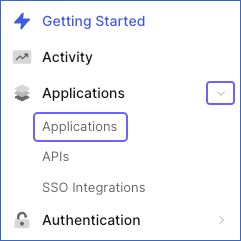
In the left navigation pane, under Applications, click Applications.
-
On the Applications page, click + Create Application.

-
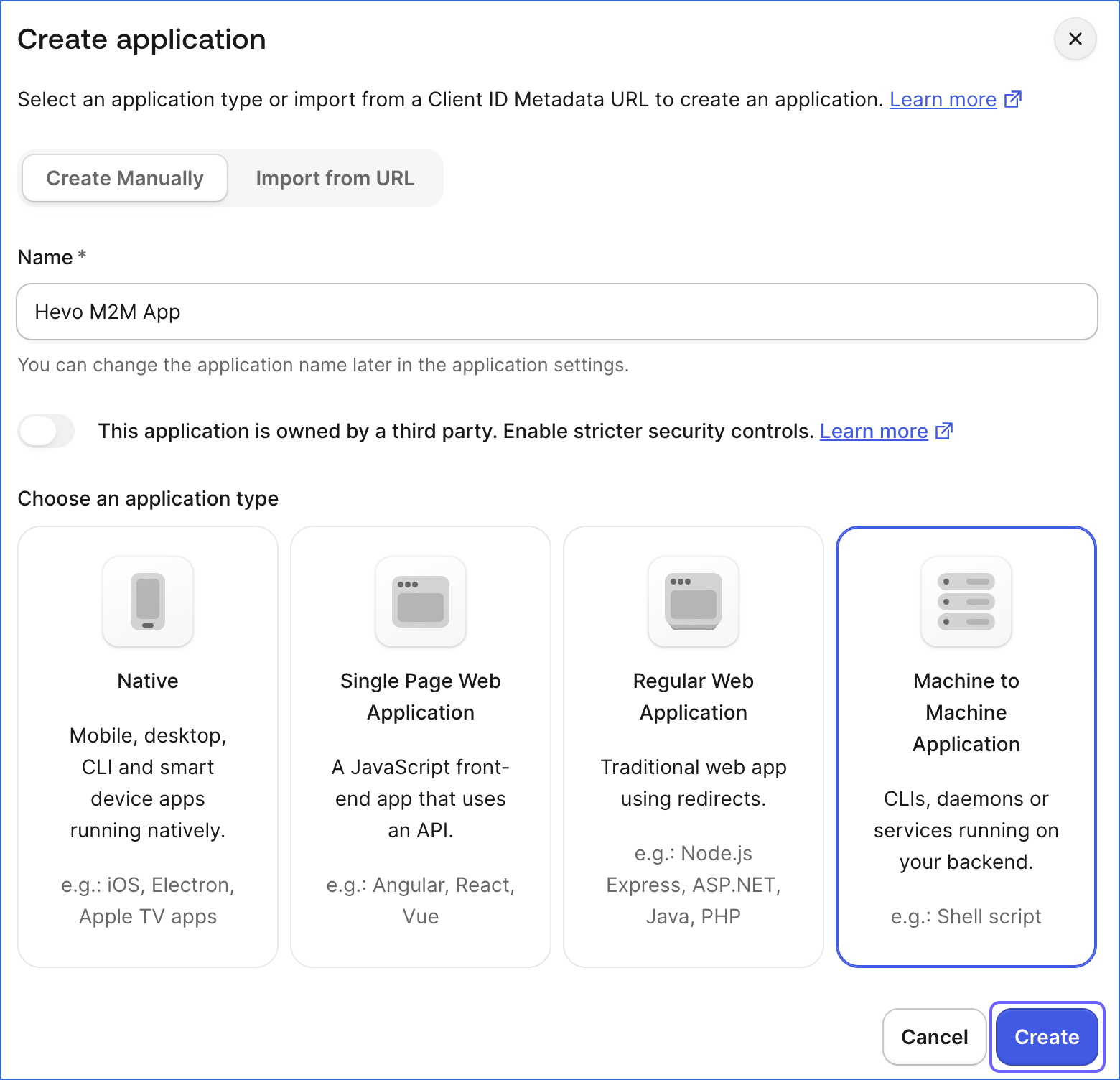
In the Create application pop-up window, specify a name for the application, select Machine to Machine Application as the application type, and click Create.
-
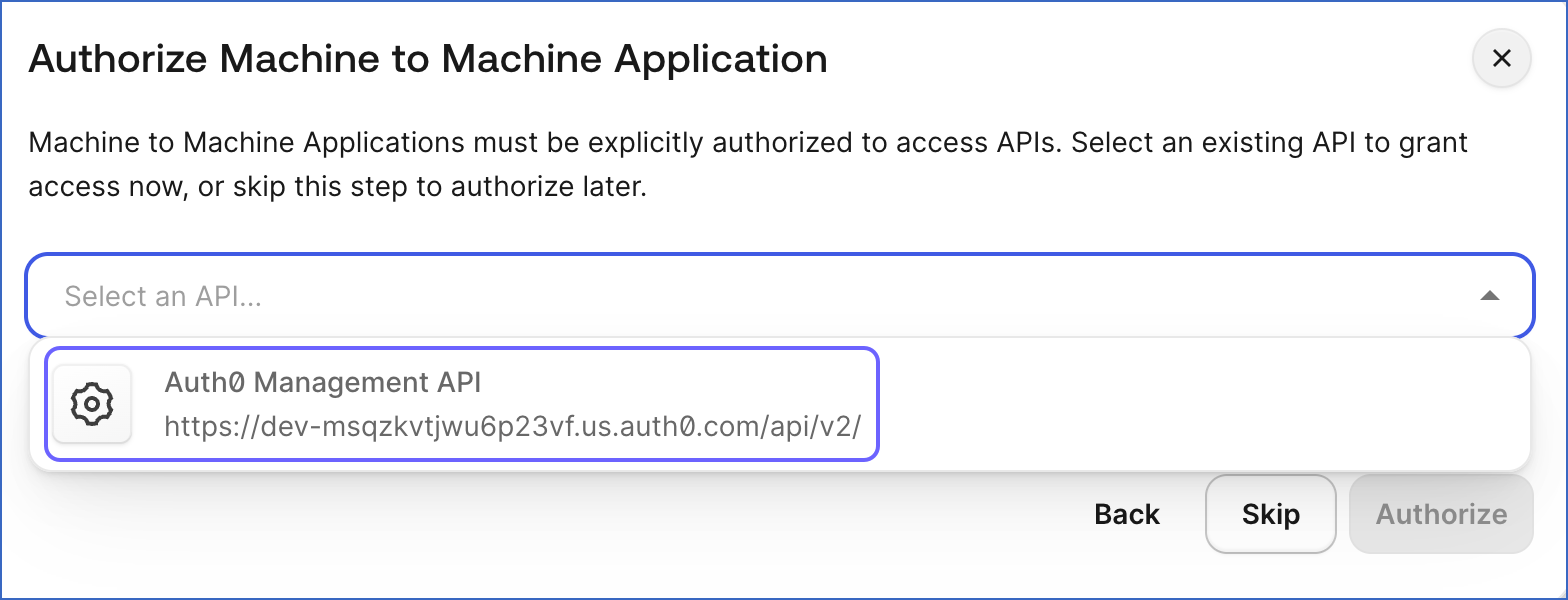
In the Authorize Machine to Machine Application screen, select the Auth0 Management API from the Select an API drop-down.
-
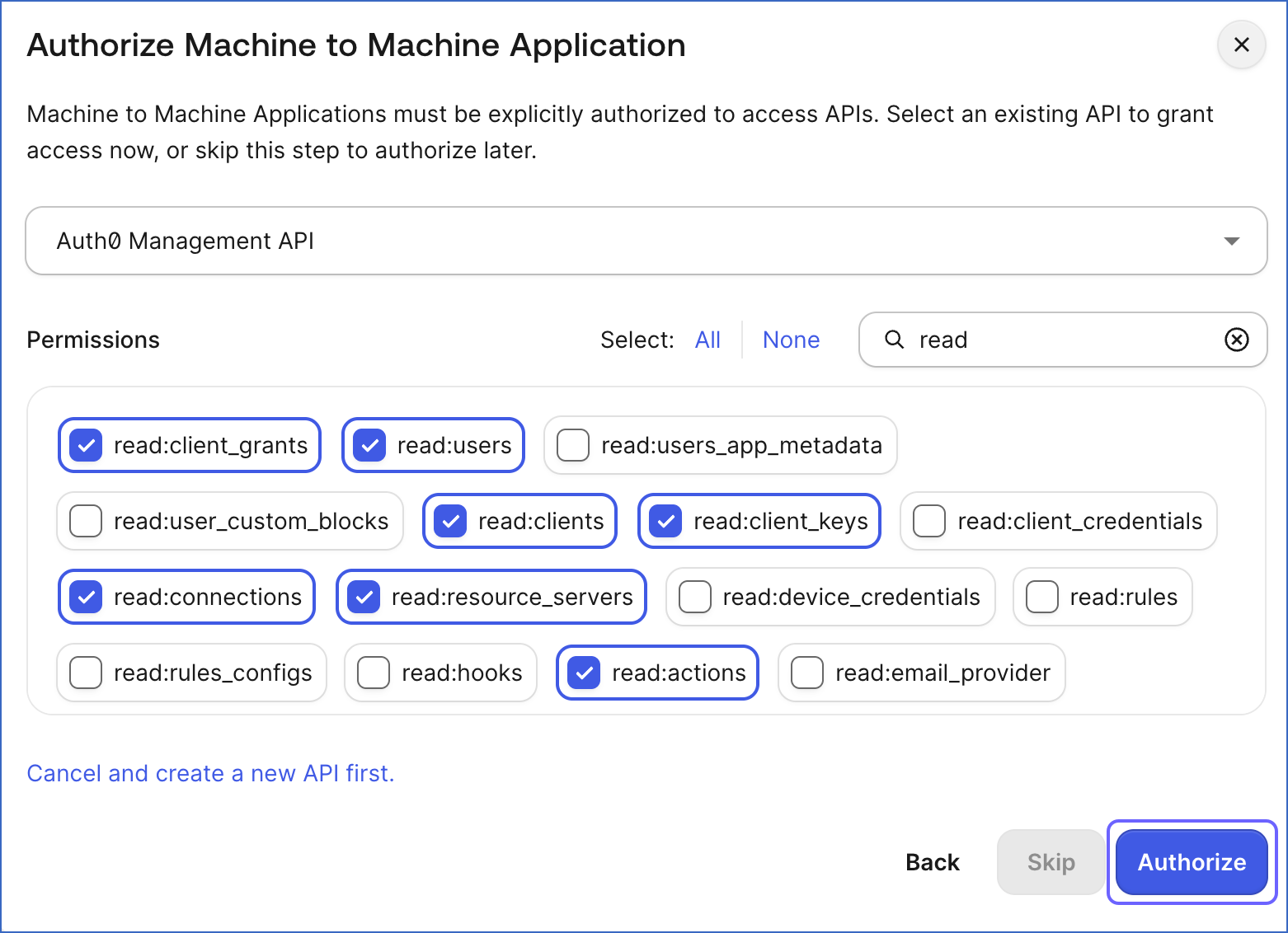
Select the following permissions required to replicate the objects supported by Hevo, and then click Authorize:
-
read:tenant_settings -
read:users -
read:user_idp_tokens -
read:logs -
read:clients -
read:client_keys -
read:connections -
read:connections_options -
read:roles -
read:organizations -
read:organization_members -
read:organization_member_roles -
read:actions -
read:client_grants -
read:grants -
read:resource_servers -
read:log_streams -
read:event_streams -
read:stats
-
-
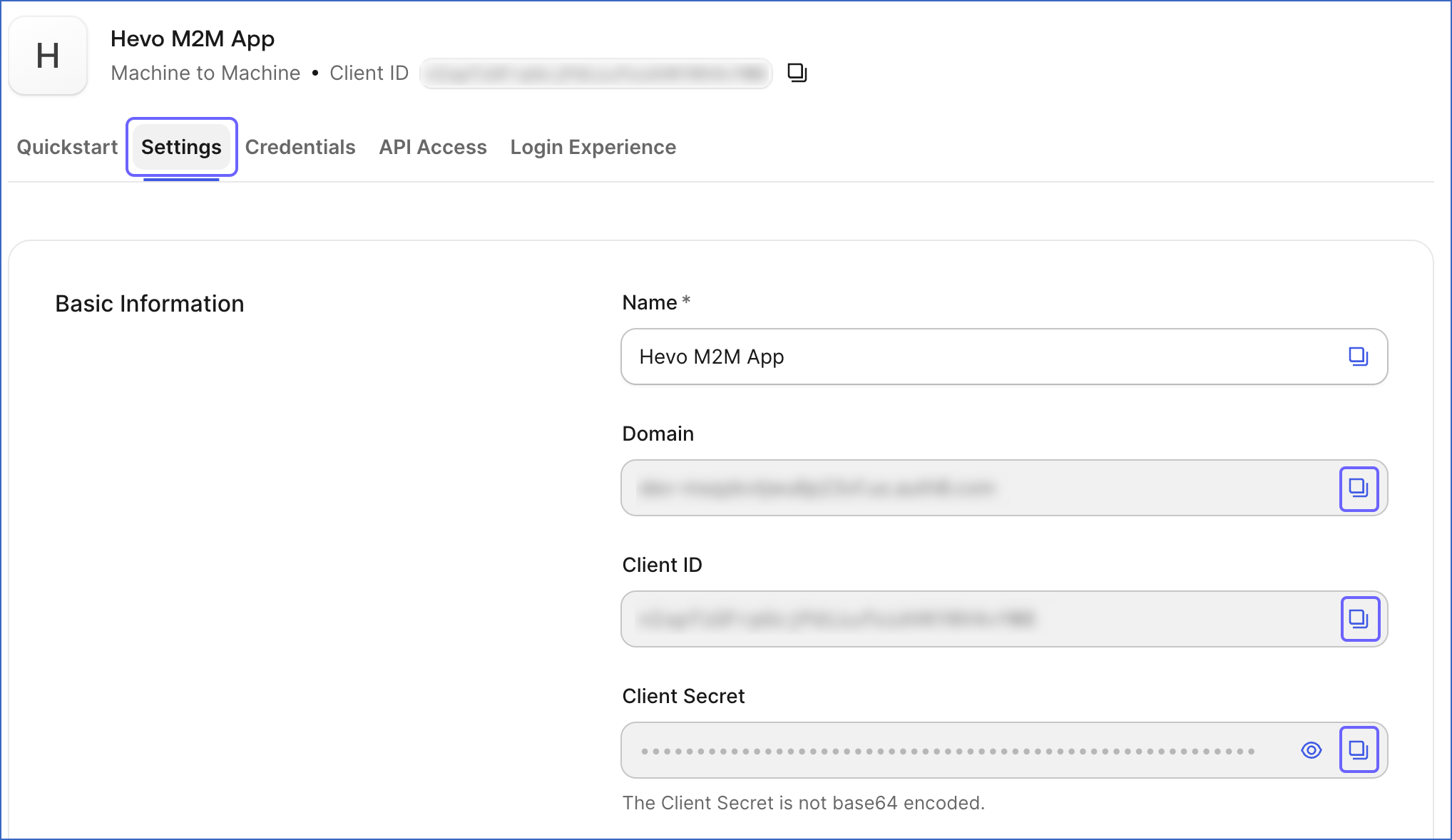
Click the Settings tab, then click the copy icon to copy the values for the Domain, Client ID, and Client Secret, and save them securely like any other password.
-
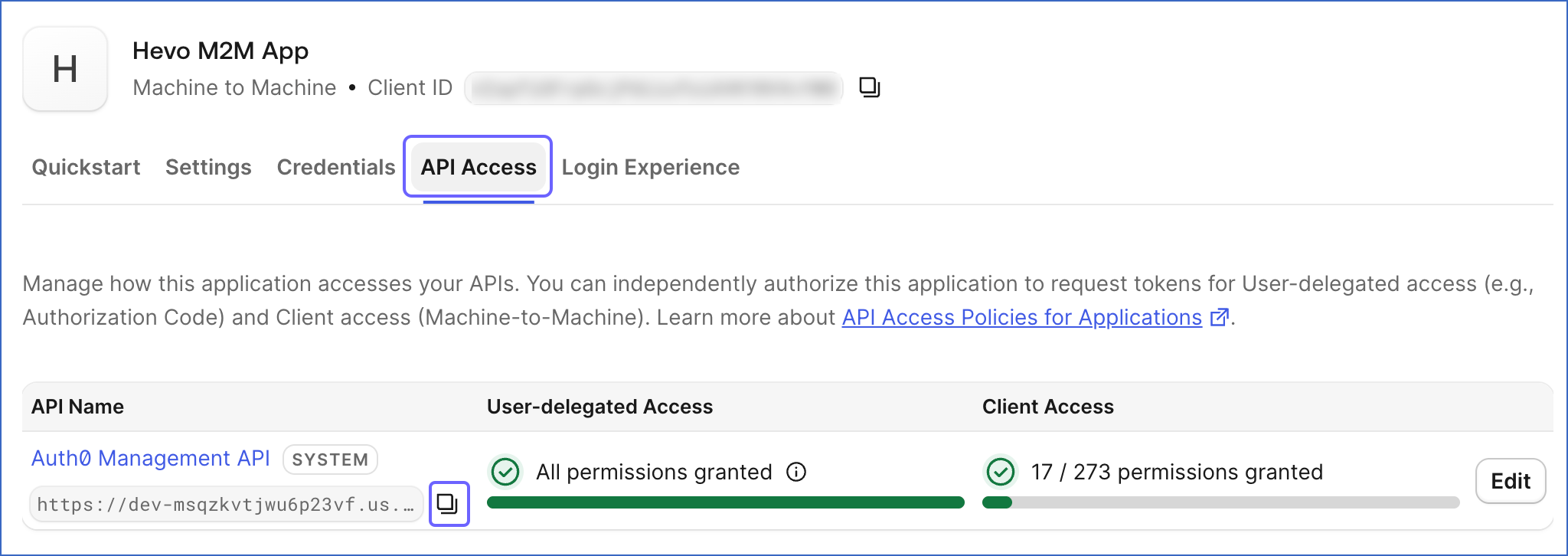
Click the API Access tab and then click the copy icon under Auth0 Management API to copy the API Audience value.
Use these credentials when configuring your Auth0 Source in Hevo. If the Client Secret configured in the Pipeline is revoked manually from your Auth0 account, Hevo cannot authenticate with the Source. As a result, all active jobs for the Pipeline fail, and no data is replicated. To resume data replication, modify the Source configuration in the Pipeline with a valid Client Secret. Once the updated key is saved, Hevo re-authenticates the Source, and data ingestion resumes from the last saved offset.
Configure Auth0 as a Source in your Pipeline
Perform the following steps to configure your Auth0 Source:
-
Click Pipelines in the Navigation Bar.
-
Click + Create Pipeline in the Pipelines List View.
-
On the Select Source Type page, select Auth0.
-
On the Select Destination Type page, select the type of Destination you want to use.
-
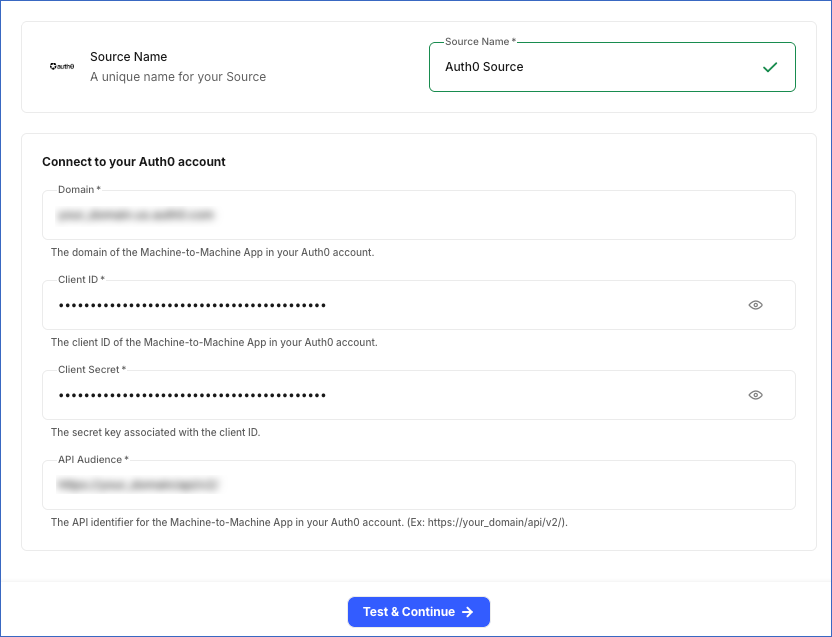
In the Configure Source screen, specify the following:
-
Source Name: A unique name for your Source, not exceeding 255 characters. For example, Auth0 Source.
-
In the Connect to your Auth0 account section, specify the following:
-
Domain: The domain of the Machine-to-Machine App in your Auth0 account. For example, your_domain.us.auth0.com.
-
Client ID: The client ID of the Machine-to-Machine App in your Auth0 account.
-
Client Secret: The secret key associated with the client ID.
-
API Audience: The API identifier for the Machine-to-Machine App in your Auth0 account. For example, https://your_domain/api/v2/.
-
-
-
Click Test & Continue to test the connection to your Auth0 Source. Once the test is successful, you can proceed to set up your Destination.
Data Replication
Hevo replicates data for all the objects selected on the Configure Objects page during Pipeline creation. By default, all supported objects and their available fields are selected. However, you can modify this selection while creating or editing the Pipeline.
Hevo ingests the following types of data from your Source objects:
-
Historical Data: The first run of the Pipeline ingests all available historical data for the selected objects and loads it into the Destination.
-
Incremental Data: Once the historical load is complete, new and updated records for objects are ingested as per the sync frequency.
For the following objects, Hevo ingests only the incremental data in subsequent Pipeline runs:
-
Logs
-
Log Detail Accessed Secret
-
Stats Daily
-
Users
-
User Identities
-
User App Metadata
-
User Metadata
-
User Profile Data
Hevo also re-fetches data for the Stats Daily object every 7 days. This captures any updates made to previously ingested data and keeps your Destination up to date.
For all other objects, Hevo re-fetches the entire data during each Pipeline run:
Auth0 enforces a rate limit on the number of calls that can be made to its Management API in a given time period. The rate limits vary by Auth0 plan and deployment type and may include both sustained and burst limits. If this limit is exceeded, a rate limit exception occurs. To understand how Hevo handles such scenarios, read Handling Rate Limit Exceptions.
Note: You can create a Pipeline with this Source only using the Merge load mode. The Append mode is not supported for this Source.
Schema and Primary Keys
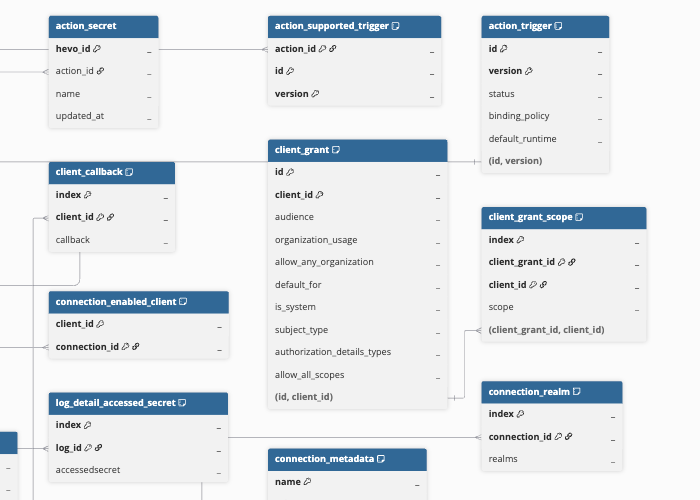
Hevo uses the following schema to upload the records to the Destination. For a detailed view of the objects, fields, and relationships, click the ERD.
Data Model
The following is the list of tables (objects) that are created at the Destination when you run the Pipeline:
| Object | Description |
|---|---|
| Action | Contains custom actions configured in Auth0, including when they run, their deployment status, runtime environment, and currently deployed version. It includes the following child objects: - Action Secret - Action Dependency - Action Supported Trigger - Action Integration |
| Action Trigger | Contains the triggers available for Actions, such as post-login or pre-user-registration, along with their binding policy and default runtime. It includes the following child objects: - Action Trigger Compatible - Action Trigger Runtime |
| Client | Contains configuration details of the applications registered in the Auth0 account, such as application type, allowed origins, JSON Web Token (JWT) settings, and Open Authorization (OAuth) and OpenID Connect (OIDC) settings. It includes the following child objects: - Client Callback - Client Metadata - Client Grant Type |
| Client Grant | Contains the permissions that define which APIs an application is allowed to request access tokens for. It includes a child object, Client Grant Scope. |
| Connection | Contains configuration details for the identity providers used to authenticate users, such as provider types, display settings, and sign-in options. It includes the following child objects: - Connection Metadata - Connection Realm - Connection Enabled Client |
| Event Stream | Contains the configuration of event streams that send Auth0 events to external destinations, such as webhooks or Amazon EventBridge. |
| Grants | Contains the permissions users have granted to applications to access specific APIs on their behalf. It includes a child object, Grant Scope. |
| Logs | Contains records of account activity, such as sign-ins, sign-outs, sign-ups, and errors, along with related details, including the application, identity provider, IP address, and location for each record. It includes a child object, Log Detail Accessed Secret. Note: Auth0 retains log data for a limited period based on your subscription plan and deletes it after that period. As a result, historical data for this object is limited to your plan’s retention window. For retention periods by plan, read Log Data Retention. |
| Log Stream | Contains configuration details for sending account activity records to external destinations, such as HTTP endpoints, Datadog, or Splunk, along with the current status of each setup. It includes a child object, Log Stream Sink. |
| Organization | Contains organization details, such as name, display name, branding, and associated application configuration, used for B2B access management. It includes the following child objects: - Organization Metadata - Organization Member - Organization Member Role |
| Resource Server | Contains configuration details for APIs protected by Auth0, such as unique identifiers, signing algorithms, token lifetimes, and token settings. It includes a child object, Resource Server Scopes. |
| Role | Contains roles configured in Auth0, including their names, descriptions, and associated permissions. It includes a child object, Role Permission. |
| Stats Daily | Contains account activity totals for each day, such as the number of sign-ins, sign-ups, and leaked passwords detected. |
| Users | Contains user profile information, such as email, name, login activity, multifactor authentication status, and account status. It includes the following child objects: - User Identities - User App Metadata - User Metadata - User Profile Data |
Additional Information
Read the detailed Hevo documentation for the following related topics:
Handling of Deletes
Hevo uses a full data refresh approach to capture delete actions for parent objects. During each Pipeline run, Hevo compares the data fetched from the Source object with the data present in the Destination table. If a record exists in the Destination but is no longer returned by the Source, the record is marked as deleted by setting the value of the metadata column __hevo__marked_deleted to True. This applies to the following objects:
-
Client
-
Client Callback
-
Client Metadata
-
_lient Grant Type
-
Connection
-
Connection Metadata
-
Connection Realm
-
Connection Enabled Client
-
Role
-
Role Permission
-
Organization
-
Organization Metadata
-
Organization Member
-
Organization Member Role
-
Action
-
Action Secret
-
Action Dependency
-
Action Supported Trigger
-
Action Integration
-
Action Trigger
-
Action Trigger Compatible
-
Action Trigger Runtime
-
Client Grant
-
Client Grant Scope
-
Grants
-
Grant Scope
-
Resource Server
-
Resource Server Scopes
-
Log Stream
-
Log Stream Sink
-
Event Stream
-
Stats Daily
For all other objects, Hevo does not support capturing deletes.