PostgreSQL (Edge)
Hevo Edge supports the following variations of PostgreSQL as a Source:
Supported Configurations
| Supportability Category | Supported Values |
|---|---|
| Database versions | 10 - 18 |
| Maximum row size | 4 MB per row |
| Connection limit per database | No limit |
| Transport Layer Security (TLS) | 1.2 and 1.3 |
| Server encoding | UTF-8 |
Supported Features
| Feature Name | Supported |
|---|---|
| Capture deletes | Yes |
| Custom data (user-configured tables & fields) | COMPOSITE, ENUM, and DOMAIN data types |
| Data blocking (skip objects and fields) | Yes |
| Resync (objects and Pipelines) | Yes |
| API configurable | Yes |
| Connecting through a private link | Connections via AWS PrivateLink are allowed. Subscription to a business plan is required. |
Supported Instance Types
| Instance Types | Logical Replication | XMIN |
|---|---|---|
| Amazon Aurora PostgreSQL | ||
| Primary instance | Yes (versions 11 - 18) | Yes (versions 11 - 18) |
| Standby instance | No | No |
| Amazon RDS PostgreSQL | ||
| Primary instance | Yes (versions 11 - 18) | Yes (versions 11 - 18) |
| Standby instance | Yes (versions 16 - 18) | No |
| Azure Database for PostgreSQL | ||
| Primary instance | Yes (versions 11 - 18) | Yes (versions 11 - 18) |
| Standby instance | Yes (versions 16 - 18) | No |
| Generic PostgreSQL | ||
| Primary instance | Yes (versions 10 - 18) | Yes (versions 10 - 18) |
| Standby instance | Yes (versions 16 - 18) | No |
| Google Cloud PostgreSQL | ||
| Primary instance | Yes - Enterprise (versions 10 - 18) - Enterprise Plus (versions 12 - 18) |
Yes - Enterprise (versions 10 - 18) - Enterprise Plus (versions 12 - 18) |
| Standby instance | Yes - Enterprise (versions 16 - 18) - Enterprise Plus (versions 16 - 18) |
No |
Handling Source Partitioned Tables
Hevo Edge supports loading data ingested from partitioned tables in PostgreSQL versions 10 to 18. The way data is loaded varies across versions because PostgreSQL handles partitioning differently across these versions. The table below shows how each version group handles partitioning and how this affects logical replication:
| PostgreSQL Versions | Partitioning Behavior | Logical Replication Behavior |
|---|---|---|
| 10 to 12 | Partitioning operations use internal logic. | Each partition is treated as a separate table. |
| 13 to 18 | Partitioning is managed through the publish_via_partition_root parameter in publications. | Partition changes are tracked through the partition table name or the parent table name, depending on the parameter value. |
Note: For versions 13 and above, a publication is created by default with publish_via_partition_root set to FALSE. Refer to the Create a publication for your database tables section in the respective Source documentation to create one with the value set to TRUE.
The following table explains Edge’s behavior for loading data ingested from partitioned tables based on the value of the publish_via_partition_root parameter:
| PostgreSQL Version | Value of publish_via_partition_root
|
Hevo Behavior |
|---|---|---|
| 10 - 12 | Not applicable | Data from the Source table partitions is loaded into separate tables at the Destination. |
| 13 - 18 | TRUE | Data from the partitioned Source table is loaded into a single Destination table. |
| FALSE | Data from the Source table partitions is loaded into individual tables at the Destination. |
XMIN
In PostgreSQL, XMIN is a system-generated column that exists for every row in a table. It stores the ID of the transaction that last inserted or updated the row. PostgreSQL updates this value whenever a row is created or modified.
Hevo uses the XMIN column values to track newly inserted or updated rows in the XMIN Pipeline mode. During the historical load, Hevo performs a full data fetch and stores the current XMIN value for each row. In subsequent Pipeline runs, Hevo queries rows whose XMIN values have changed since the last ingested value. If a Pipeline run fails, Hevo resumes from the last saved XMIN value, which may result in some records being re-ingested.
When to use the XMIN Pipeline mode?
XMIN Pipeline mode is recommended when:
-
Logical replication cannot be used due to limitations such as restricted access to WAL-based replication.
-
You want to avoid additional configuration and maintenance, including creating publications, managing replication slots, and handling WAL retention.
-
Capturing deleted records is not required.
-
The volume of incremental data is low, making query-based ingestion a suitable option.
Limitations of XMIN Pipeline mode
-
XMIN does not capture deleted records by default. They are captured only when the Capture Deletes option is enabled while creating the Pipeline. Read Handling of Deletes for more information.
-
When a record is updated multiple times between two consecutive data ingestion runs, XMIN captures only the latest update made to the record. As a result, if your Pipeline is created using Append mode, Hevo ingests only the latest record at the time of ingestion.
-
PostgreSQL has a limited range of XMIN values. After this limit is reached, XMIN values may be reused, which may require a full resync of the Pipeline to maintain data consistency.
-
XMIN values are not ordered. As a result, Hevo scans the entire table to identify changed rows, which can slow down ingestion and increase load on the PostgreSQL system.
-
Long-running transactions can block ingestion. If a transaction remains uncommitted for an extended period, the Pipeline may stall until the transaction is committed.
Handling of Deletes
When a row is deleted in PostgreSQL, its XMIN value is also removed. As a result, Hevo cannot detect deleted rows in subsequent Pipeline runs when using XMIN Pipeline mode.
However, if you enable the Capture Deletes option while creating the Pipeline, Hevo performs a full data refresh to identify deleted records by comparing data fetched from the Source with data in the Destination.
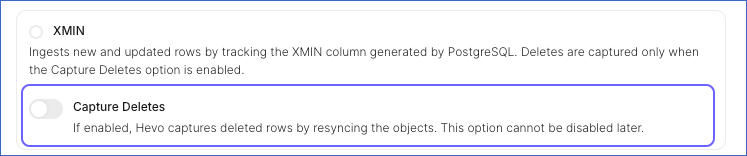
For this comparison, Hevo uses Current Tuple Identifier (CTID), a system column generated by PostgreSQL, that represents the physical location of a row. Hevo stores this value for each row in a __hevo__ctid helper column in the Destination. When a row is deleted, its CTID value no longer appears in query results. Hence, if a __hevo__ctid value exists in the Destination but is no longer present in the Source, Hevo marks the record as deleted by setting the metadata column __hevo__marked_deleted to True.
Handling Toast Data
PostgreSQL can efficiently store large amounts of data in columns using The Oversized-Attribute Storage Technique (TOAST). When a column’s value exceeds approximately 8 KB (the default page size), PostgreSQL compresses the data and may store it in a separate TOAST table. Columns managed in this way are referred to as TOASTed columns.
Hevo Edge identifies TOASTed columns in the ingested data and replicates data from these columns into your Destination tables using a merge operation. This operation updates existing records and adds new ones.
Note: In Edge, Hevo does not replicate data from TOASTed columns if your Pipeline loads data in Append mode. In this mode, existing records are not updated; only new records are added.
Resolving Data Loss in Paused Pipelines
For log-based Edge Pipelines created with any variant of the PostgreSQL Source, the data to be replicated is identified from the write-ahead logs (WAL) by the publications created on the database tables. Hence, disabling the log-based Pipeline may lead to data loss, as the corresponding WAL segment may have been deleted. The log can get deleted due to the expiry of its retention period or limited storage space in the case of large log files.
If you notice a data loss in your Edge Pipeline after enabling it, resync the Pipeline. The Resync Pipeline action restarts the historical load for all the active objects in your Pipeline, thus recovering any lost data.