Oracle database is a widely used Relational Database Management System (RDBMS) designed to support high-performance data processing across multiple platforms, including Windows Server, Unix, and various GNU/Linux distributions. Oracle is used to store and manage both small and large datasets with optimal speed, efficiency, and security.
Oracle databases can be deployed using different configurations depending on availability, scalability, and workload requirements. Hevo supports ingesting data from databases deployed using the following configurations and replicating it to a Destination of your choice:
-
Single Instance Database: A traditional Oracle deployment in which the database runs on a single server. This configuration is typically used for small to medium workloads or environments that do not require high availability through clustering. Hevo connects directly to the Oracle database and replicates data changes from redo logs using LogMiner.
-
Real Application Clusters (RAC): A clustered Oracle deployment in which multiple database nodes run the same database and share a common storage system. This configuration provides high availability and scalability by distributing workloads across multiple nodes. If one node becomes unavailable, the database remains accessible through the remaining nodes. Hevo connects to the Oracle database using the configured service name, which routes connections to the available RAC nodes, and captures data changes from the database redo logs using LogMiner.
-
Multitenant Architecture (CDB/PDB): An Oracle deployment model that allows multiple logical databases to run within a single Oracle instance. In this model:
-
A Container Database (CDB) acts as the primary database container.
-
One or more Pluggable Databases (PDBs) reside within the CDB. Each PDB behaves as an independent logical database containing its own schemas, tables, and data.
Multitenant databases can run either as a single-instance deployment or as part of a Real Application Clusters (RAC) configuration. Hevo connects to the specific PDB service to capture data from that pluggable database.
Note: A Pipeline can replicate data from only one Pluggable Database (PDB). If your Container Database (CDB) contains multiple PDBs and you need to ingest data from more than one PDB, create a separate Pipeline for each PDB.
-
Prerequisites
-
The oracle database version is 19c. You can retrieve the version of your Oracle database with the following command:
SELECT BANNER_FULL FROM V$VERSION WHERE BANNER_FULL LIKE 'Oracle Database%'; -
Redo Log-based replication is enabled, along with SYSDBA privileges for the database user.
Perform the following steps to configure your Generic Oracle Source:
Create a Database User and Grant Privileges
Connect to your Oracle server as a Database Administrator (DBA) using any SQL client tool and create a database user with the privileges required by Hevo to:
-
Access database metadata
-
Read redo logs
-
Run LogMiner packages to capture changes from redo logs
This user is used by Hevo to capture data changes from the Oracle database. The steps for creating the database user depend on the deployment type you are using.
-
If your database runs on a single-instance deployment, follow the steps in the Create a database user for a Single Instance Database section.
-
If your database uses Real Application Clusters (RAC) or the multitenant architecture (CDB/PDB), follow the steps in the Create a database user for RAC or CDB/PDB section.
Create a database user for a Single Instance Database
Run the following script to create a database user and grant the privileges required by Hevo:
-- Create a Database User
CREATE USER <username> IDENTIFIED BY <password>;

-- Grant Privileges to the Database User
GRANT CREATE SESSION TO <username>;
GRANT SELECT ON V_$DATABASE TO <username>;
GRANT FLASHBACK ANY TABLE TO <username>;
GRANT SELECT ANY TABLE TO <username>;
GRANT SELECT ANY TRANSACTION TO <username>;

-- Grant Roles to the Database User
GRANT SELECT_CATALOG_ROLE TO <username>;
GRANT EXECUTE_CATALOG_ROLE TO <username>;

-- Grant Permission to run LogMiner
GRANT LOGMINING TO <username>;
GRANT EXECUTE ON DBMS_LOGMNR TO <username>;
GRANT EXECUTE ON DBMS_LOGMNR_D TO <username>;
GRANT SELECT ON V_$LOG TO <username>;
GRANT SELECT ON V_$LOG_HISTORY TO <username>;
GRANT SELECT ON V_$LOGMNR_LOGS TO <username>;
GRANT SELECT ON V_$LOGMNR_CONTENTS TO <username>;
GRANT SELECT ON V_$LOGMNR_PARAMETERS TO <username>;
GRANT SELECT ON V_$LOGFILE TO <username>;
GRANT SELECT ON V_$ARCHIVED_LOG TO <username>;
GRANT SELECT ON V_$ARCHIVE_DEST_STATUS TO <username>;
GRANT SELECT ON V_$TRANSACTION TO <username>;
GRANT SELECT ON V_$MYSTAT TO <username>;
GRANT SELECT ON V_$STATNAME TO <username>;
Note: Replace the placeholder values in the commands above with your own. For example, <username> with hevo.
Refer to the table below for more information about these commands:
| Command | Grants access to |
|---|---|
| GRANT CREATE SESSION TO <username>; | Connect to the database and create sessions. |
| GRANT SELECT ON V_$DATABASE TO <username>; | Query information about the database, such as the current System Change Number (SCN) and log mode, from the V_$DATABASE view. |
| GRANT FLASHBACK ANY TABLE TO <username>; | Restore past versions of any table in the database. |
| GRANT SELECT ANY TABLE TO <username>; | Retrieve data from any table in the database. |
| GRANT SELECT ANY TRANSACTION TO <username>; | Query data from any transaction in the database. |
| GRANT SELECT_CATALOG_ROLE TO <username>; | Query various data dictionary and performance views, containing metadata about database objects. |
| GRANT EXECUTE_CATALOG_ROLE TO <username>; | Run procedures and functions within the data dictionary. |
| GRANT LOGMINING TO <username>; | Use LogMiner to analyze and extract information from the redo log files. |
| GRANT EXECUTE ON DBMS_LOGMNR TO <username>; | Run procedures and functions from the DBMS_LOGMNR package. Note: This package is required for starting and stopping LogMiner, adding redo log files for analysis, querying change data, and managing LogMiner sessions effectively. |
| GRANT EXECUTE ON DBMS_LOGMNR_D TO <username>; | Run procedures and functions defined in the DBMS_LOGMNR_D package. Note: This package is required for managing LogMiner dictionary data, which LogMiner uses to translate redo logs during log switches. |
| GRANT SELECT ON V_$LOG TO <username>; | Query information about redo logs, such as their status and group details, from the V_$LOG view. |
| GRANT SELECT ON V_$LOG_HISTORY TO <username>; | Query information about archived redo logs and their sequences from the V_$LOG_HISTORY view. |
| GRANT SELECT ON V_$LOGMNR_LOGS TO <username>; | Query information about the redo logs added to a LogMiner session from the V_$LOGMNR_LOGS view. |
| GRANT SELECT ON V_$LOGMNR_CONTENTS TO <username>; | Query transaction details retrieved during a LogMiner session from the V_$LOGMNR_CONTENTS view. |
| GRANT SELECT ON V_$LOGMNR_PARAMETERS TO <username>; | Query configuration details for the LogMiner session from the V_$LOGMNR_PARAMETERS view. |
| GRANT SELECT ON V_$LOGFILE TO <username>; | Query information about redo logs, such as their type and status, from the V_$LOGFILE view. |
| GRANT SELECT ON V_$ARCHIVED_LOG TO <username>; | Query metadata about archived redo logs, such as file names and timestamps, from the V_$ARCHIVED_LOG view. |
| GRANT SELECT ON V_$ARCHIVE_DEST_STATUS TO <username>; | Query configuration details for archived redo log destinations from the V_$ARCHIVE_DEST_STATUS view. |
| GRANT SELECT ON V_$TRANSACTION TO <username>; | Query information about active transactions in the database from the V_$TRANSACTION view. |
| GRANT SELECT ON V_$MYSTAT TO <username>; | Query performance statistics specific to the current session from the V_$MYSTAT view. |
| GRANT SELECT ON V_$STATNAME TO <username>; | Query details about performance monitoring statistics from the V_$STATNAME view. |
Create a database user for RAC or CDB/PDB
If your Oracle database is deployed using RAC or the multitenant architecture (CDB/PDB), you must create a common database user in the CDB root container (CDB$ROOT) and grant the required privileges across all containers.
In Oracle multitenant databases:
-
The Container Database (CDB) is the primary database container.
-
The CDB root container (
CDB$ROOT) stores common users and shared metadata. -
One or more Pluggable Databases (PDBs) reside within the CDB.
-
A user created in
CDB$ROOTcan be granted privileges that allow access to multiple containers.
Note: A user created in the CDB root container must be a common user with the prefix C##. A common user can access multiple containers depending on the granted privileges. If the user is created without this prefix, it becomes a local user that exists only within a single PDB. In such cases, the required privileges may not be applied correctly across containers, which can cause the setup to fail.
Perform the following steps to create a common database user and grant the required privileges:
-
Run the following command to verify that you are connected to the CDB root container:
SHOW CON_NAME;If the result is
CDB$ROOT, proceed to step 2. Else, run the following command to switch to the root container:ALTER SESSION SET CONTAINER = CDB$ROOT; -
Run the following script to create a common database user and grant the privileges required by Hevo:
-- Create a common Database User CREATE USER C##<username> IDENTIFIED BY <password>; -- Grant Privileges to the Database User across Containers GRANT CREATE SESSION TO C##<username> CONTAINER=ALL; GRANT SELECT ON V_$DATABASE TO C##<username> CONTAINER=ALL; GRANT FLASHBACK ANY TABLE TO C##<username> CONTAINER=ALL; GRANT SELECT ANY TABLE TO C##<username> CONTAINER=ALL; GRANT SELECT ANY TRANSACTION TO C##<username> CONTAINER=ALL; -- Grant Roles to the Database User GRANT SELECT_CATALOG_ROLE TO C##<username> CONTAINER=ALL; GRANT EXECUTE_CATALOG_ROLE TO C##<username> CONTAINER=ALL; -- Grant Permission to run LogMiner GRANT LOGMINING TO C##<username> CONTAINER=ALL; GRANT EXECUTE ON DBMS_LOGMNR TO C##<username> CONTAINER=ALL; GRANT EXECUTE ON DBMS_LOGMNR_D TO C##<username> CONTAINER=ALL; GRANT SELECT ON V_$LOG TO C##<username> CONTAINER=ALL; GRANT SELECT ON V_$LOG_HISTORY TO C##<username> CONTAINER=ALL; GRANT SELECT ON V_$LOGMNR_LOGS TO C##<username> CONTAINER=ALL; GRANT SELECT ON V_$LOGMNR_CONTENTS TO C##<username> CONTAINER=ALL; GRANT SELECT ON V_$LOGMNR_PARAMETERS TO C##<username> CONTAINER=ALL; GRANT SELECT ON V_$LOGFILE TO C##<username> CONTAINER=ALL; GRANT SELECT ON V_$ARCHIVED_LOG TO C##<username> CONTAINER=ALL; GRANT SELECT ON V_$ARCHIVE_DEST_STATUS TO C##<username> CONTAINER=ALL; GRANT SELECT ON V_$TRANSACTION TO C##<username> CONTAINER=ALL; GRANT SELECT ON V_$MYSTAT TO C##<username> CONTAINER=ALL; GRANT SELECT ON V_$STATNAME TO C##<username> CONTAINER=ALL; -- Grant Permission to switch containers GRANT SET CONTAINER TO C##<username> CONTAINER=ALL;Note: Replace the placeholder values in the commands above with your own. For example, <username> with hevo.
Refer to the table below for more information about these commands:
Command Grants access to GRANT CREATE SESSION TO C##<username> CONTAINER=ALL; Connect to the database and create sessions across all containers. GRANT SELECT ON V_$DATABASE TO C##<username> CONTAINER=ALL; Query information about the database, such as the current System Change Number (SCN) and log mode, from the V_$DATABASEview.GRANT FLASHBACK ANY TABLE TO C##<username> CONTAINER=ALL; Restore past versions of any table in the database. GRANT SELECT ANY TABLE TO C##<username> CONTAINER=ALL; Retrieve data from any table in the database. GRANT SELECT ANY TRANSACTION TO C##<username> CONTAINER=ALL; Query data from any transaction in the database. GRANT SELECT_CATALOG_ROLE TO C##<username> CONTAINER=ALL; Query various data dictionary and performance views, containing metadata about database objects. GRANT EXECUTE_CATALOG_ROLE TO C##<username> CONTAINER=ALL; Run procedures and functions within the data dictionary. GRANT LOGMINING TO C##<username> CONTAINER=ALL; Use LogMiner to analyze and extract information from the redo log files. GRANT EXECUTE ON DBMS_LOGMNR TO C##<username> CONTAINER=ALL; Run procedures and functions from the DBMS_LOGMNRpackage.
Note: This package is required for starting and stopping LogMiner, adding redo log files for analysis, querying change data, and managing LogMiner sessions effectively.GRANT EXECUTE ON DBMS_LOGMNR_D TO C##<username> CONTAINER=ALL; Run procedures and functions defined in the DBMS_LOGMNR_Dpackage.
Note: This package is required for managing LogMiner dictionary data, which LogMiner uses to translate redo logs during log switches.GRANT SELECT ON V_$LOG TO C##<username> CONTAINER=ALL; Query information about redo logs, such as their status and group details, from the V_$LOGview.GRANT SELECT ON V_$LOG_HISTORY TO C##<username> CONTAINER=ALL; Query information about archived redo logs and their sequences from the V_$LOG_HISTORYview.GRANT SELECT ON V_$LOGMNR_LOGS TO C##<username> CONTAINER=ALL; Query information about the redo logs added to a LogMiner session from the V_$LOGMNR_LOGSview.GRANT SELECT ON V_$LOGMNR_CONTENTS TO C##<username> CONTAINER=ALL; Query transaction details retrieved during a LogMiner session from the V_$LOGMNR_CONTENTSview.GRANT SELECT ON V_$LOGMNR_PARAMETERS TO C##<username> CONTAINER=ALL; Query configuration details for the LogMiner session from the V_$LOGMNR_PARAMETERSview.GRANT SELECT ON V_$LOGFILE TO C##<username> CONTAINER=ALL; Query information about redo logs, such as their type and status, from the V_$LOGFILEview.GRANT SELECT ON V_$ARCHIVED_LOG TO C##<username> CONTAINER=ALL; Query metadata about archived redo logs, such as file names and timestamps, from the V_$ARCHIVED_LOGview.GRANT SELECT ON V_$ARCHIVE_DEST_STATUS TO C##<username> CONTAINER=ALL; Query configuration details for archived redo log destinations from the V_$ARCHIVE_DEST_STATUSview.GRANT SELECT ON V_$TRANSACTION TO C##<username> CONTAINER=ALL; Query information about active transactions in the database from the V_$TRANSACTIONview.GRANT SELECT ON V_$MYSTAT TO C##<username> CONTAINER=ALL; Query performance statistics specific to the current session from the V_$MYSTATview.GRANT SELECT ON V_$STATNAME TO C##<username> CONTAINER=ALL; Query details about performance monitoring statistics from the V_$STATNAMEview.GRANT SET CONTAINER TO C##<username> CONTAINER=ALL; Switch between containers, such as the root container and a pluggable database (PDB), when accessing redo logs.
Set up Redo Logs for Replication
A redo log is a collection of log files that record information about modifications made to data objects on an Oracle server instance. Oracle LogMiner uses redo logs to track these modifications and determine the rows requiring updates in the Destination system.
Connect to your Oracle server as a user with SYSDBA privileges using SQL Developer or any other SQL client tool and perform the following steps:
1. Enable Archive Log
Archive logs are essential for backup and recovery processes of a database management system.
Enter the command below to verify the current archive log mode:
SELECT LOG_MODE FROM V$DATABASE;
This query returns either of the following values:
-
ARCHIVELOG: Indicates that the archive log is enabled. -
NOARCHIVELOG: Indicates that the archive redo is disabled.
If the archive mode is NOARCHIVELOG, enable it using the following commands:
-
Enter the command below to initiate the shutdown process without waiting for active sessions or transactions to complete. It forcefully terminates existing connections.
SHUTDOWN IMMEDIATE; -
Enter the command below to start the Oracle database instance in a mounted state:
STARTUP MOUNT; -
Enter the command below to alter the database and enable archive log mode. This command instructs the database to start archiving the redo log files:
ALTER DATABASE ARCHIVELOG; -
Enter the command below to open the database for operations after enabling ARCHIVELOG mode:
ALTER DATABASE OPEN;
2. Configure the Fast Recovery Area
The fast recovery area in Oracle serves as a centralized storage space for all database recovery-related files. Consolidating these files into a single location simplifies backup and recovery management.
Set appropriate values for the following parameters:
-
DB_RECOVERY_FILE_DEST_SIZE: Sets the size of the fast recovery area.
-
DB_RECOVERY_FILE_DEST: Sets the location of the fast recovery area. This area contains the redo logs.
-
ARCHIVE_LAG_TARGET: Sets a non-zero target value in seconds for the maximum acceptable delay between log switches.
Configure these parameters using the following commands:
-
Enter the command below to specify the size of the fast recovery area:
ALTER SYSTEM SET DB_RECOVERY_FILE_DEST_SIZE = <size>; -
Enter the command below to specify the location of the fast recovery area:
ALTER SYSTEM SET DB_RECOVERY_FILE_DEST = '<path>'; -
Enter the command below to specify a non-zero value in seconds to force a log switch:
ALTER SYSTEM SET ARCHIVE_LAG_TARGET = <value>;
Note: Replace the placeholder values in the commands above with your own. For example, <size> with 10G.
3. Configure the Retention Period
The Recovery Manager (RMAN) settings determine how long the database holds backlogs and archive logs.
-
Enter the command below to connect to the RMAN:
RMAN CONNECT TARGET <username> -- (to connect to your database)Note: Replace the placeholder values in the commands above with your own. For example, <username> with jacobs.
-
Configure the log retention policy to 3 days (72 hours):
CONFIGURE RETENTION POLICY TO RECOVERY WINDOW OF 3 DAYS;Note: The minimum value for archive log retention hours is 3 days (72 hours). This avoids any data loss that may occur due to downtimes in the Source database.
4. Enable Supplemental Logging
Supplemental logging ensures that any changes in columns are logged in redo log files, which is essential for LogMiner to access the activity history of a database.
-
Check if supplemental logging is enabled:
SELECT SUPPLEMENTAL_LOG_DATA_MIN FROM "V$DATABASE";This query returns one of the following values:
-
YES: Indicates that supplemental logging is enabled. -
IMPLICIT: Indicates that supplemental logging is automatically enabled by the database based on certain conditions or configurations. -
NO: Indicates that supplemental logging is disabled.
-
-
If the result of the above query is NO, enable supplemental logging with one of the following commands:
- Enable supplemental logging at the database level for all columns:
ALTER DATABASE ADD SUPPLEMENTAL LOG DATA (ALL) COLUMNS;Note: Enabling supplemental logging at the database level will increase redo log data.
- Enable minimal supplemental logging at the database level:
ALTER DATABASE ADD SUPPLEMENTAL LOG DATA;-
Enter the following command to retrieve the status of table-level supplemental logging:
SELECT COUNT(*) FROM ALL_LOG_GROUPS WHERE LOG_GROUP_TYPE='ALL COLUMN LOGGING' AND OWNER= '<group_name>' AND TABLE_NAME='<table_name>';Note: Replace the placeholder values in the commands above with your own. For example, <group_name> with jacobs.
This returns one of the following values:
-
<number>: The number of log groups for which supplemental logging is enabled. -
zero: This represents that the supplemental logging is disabled.
-
-
If the result of the above query is zero, enable supplemental logging for all columns of a table in your Source database which you want to replicate:
ALTER TABLE <SCHEMA_NAME>.<TABLE_NAME> ADD SUPPLEMENTAL LOG DATA (ALL) COLUMNS;
Oracle Buffers
In Oracle, buffers refer to memory storage for caching data to enhance database performance. When LogMiner reads data from redo log files, it utilizes the native in-memory Oracle buffer to cache ongoing transactions (ones that have not been committed or rolled back).
Data Manipulation Language (DML) operations within a transaction are buffered until a commit or rollback is detected. A long-running transaction can have a negative impact on the database performance. It can lead to increased lag in processing change events and memory usage on the database server.
This accumulation of data in the Oracle LogMiner buffers can lead to increased Program Global Area (PGA) memory consumption in your database. Therefore, it is essential to appropriately set the PGA memory size based on your database workload. Read Check PGA/SGA Memory Settings to review the memory settings and configure the PGA_AGGREGATE_LIMIT to prevent server OutOfMemory (OOM) errors.
Only your DBA can determine if your database has long-running transactions with a large number of changes. If so, set the PGA_AGGREGATE_LIMIT to an appropriate value to process these transactions.
5. Check PGA/SGA Memory Settings (Recommended)
In Oracle, the PGA memory settings allow you to manage and optimize memory usage for individual user processes involved in SQL execution.
-
Enter the command below to retrieve information about the initialization parameters ‘pga_aggregate_limit’ and ‘pga_aggregate_target’ from the
V$PARAMETERview:SELECT NAME, VALUE/1024/1024 as VALUE_MB FROM V$PARAMETER WHERE NAME IN ('pga_aggregate_limit', 'pga_aggregate_target');The following is an explanation of the command above:
-
SELECT NAME, VALUE/1024/1024 as VALUE_MB: This part retrieves data for the columns NAME and VALUE from the dynamic performance viewV$PARAMETER. It retrieves theNAMEcolumn as is and calculates theVALUEcolumn divided by 1024 twice to convert the value from bytes to megabytes. It aliases the result as VALUE_MB. -
WHERE NAME IN ('pga_aggregate_limit', 'pga_aggregate_target'): This part filters the results to include only the rows where theNAMEcolumn is eitherpga_aggregate_limitorpga_aggregate_target.
-
-
Enter the command below to monitor the current PGA memory usage in your Oracle database:
SELECT NAME, VALUE, UNIT
    FROM V$PGASTAT
    WHERE NAME IN ('total PGA inuse','total PGA allocated');
The following is an explanation of the command above:
-
SELECT NAME, VALUE, UNIT: This part retrieves data for the columns NAME, VALUE, and UNIT from the dynamic performance viewV$PGASTAT. It retrieves the PGA statistic name, its value, and the unit for the value. -
WHERE NAME IN ('total PGA inuse', 'total PGA allocated'): This part filters the results to include only the rows where theNAMEcolumn is eithertotal PGA inuseortotal PGA allocated.
-
6. Configure the PGA Aggregate Limit (Recommended)
It is important to set up the PGA aggregate limit for managing and controlling memory usage in individual user sessions and queries. Depending on your database workload, you can set the pga_aggregate_limit parameter to prevent out-of-memory errors. To do this, enter the following command:
ALTER SYSTEM SET pga_aggregate_limit = <new value> SCOPE=BOTH;
Note:
-
Replace the placeholder value in the command above with your own. For example, <new value> with 1G.
-
You can set the above value in one of the following units of measurement:
-
Krepresents kilobytes. -
Mrepresents megabytes. -
Grepresents gigabytes.
-
Retrieve the Database Name
The database name represents the Oracle database to which Hevo connects for replicating data. To retrieve it, connect to your Oracle server in any SQL client tool as a masteruser and run the appropriate command based on the Oracle deployment type you are using.
Single-instance deployment
Run the following command to retrieve the database name:
SELECT NAME FROM V$DATABASE;
Multitenant architecture (CDB/PDB)
Run the following command to list the available Pluggable Databases (PDBs) in your Container Database (CDB):
SELECT NAME FROM V$PDBS;
Configure Oracle as a Source in your Pipeline
Perform the following steps to configure Oracle as a Source in Hevo:
-
Click PIPELINES in the Navigation Bar.
-
Click + Create Pipeline in the Pipelines List View.
-
On the Select Source Type page, select Oracle.
-
On the Select Destination Type page, select the type of Destination you want to use.
-
On the page that appears, do the following:

-
Select Pipeline Mode: Choose RedoLog. Hevo supports only this mode for Edge Pipelines created with Oracle Source. If you choose any other mode, you can proceed to create a Standard Pipeline.
-
Select Pipeline Type: Choose the type of Pipeline you want to create based on your requirements, and then click Continue.
-
If you select Edge, skip to step 6 below.
-
If you select Standard, read Generic Oracle to configure your Standard Pipeline.
This section is displayed only if all the following conditions are met:
-
The selected Destination type is supported in Edge.
-
The Pipeline mode is set to RedoLog.
-
Your Team was created before September 15, 2025, and has an existing Pipeline created with the same Destination type and Pipeline mode.
For Teams that do not meet the above criteria, if the selected Destination type is supported in Edge and the Pipeline mode is set to RedoLog, you can proceed to create an Edge Pipeline. Otherwise, you can proceed to create a Standard Pipeline. Read Generic Oracle to configure your Standard Pipeline.
-
-
-
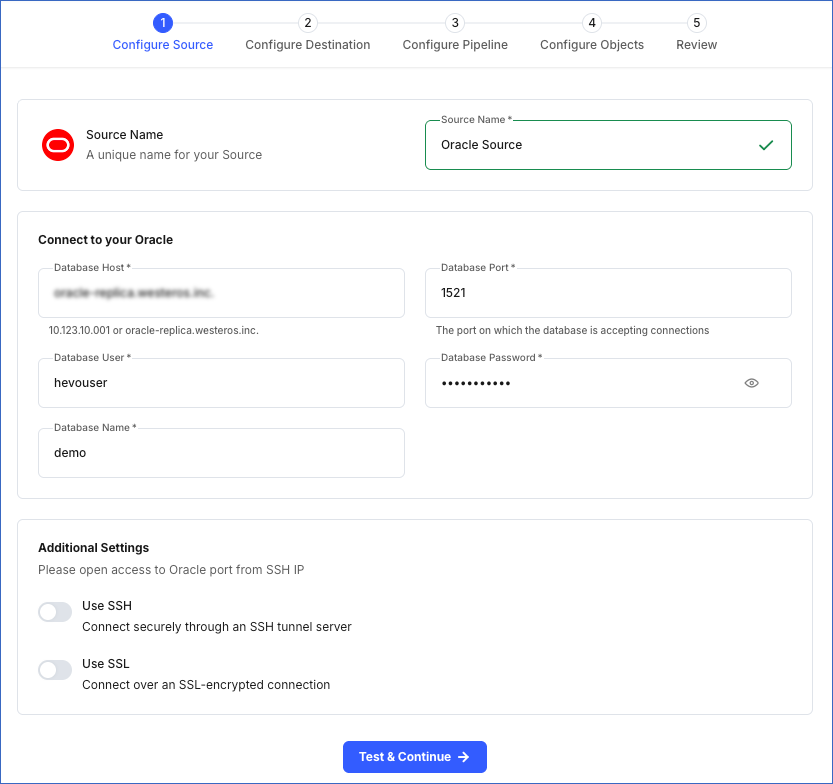
In the Configure Source screen, specify the following:
-
Source Name: A unique name for your Source, not exceeding 255 characters. For example, Oracle Source.
-
In the Connect to your Oracle section:
-
Database Host: The Oracle database host’s IP address, DNS, or service endpoint. For example, 192.168.2.5.
-
Database Port: The port on which your Oracle server listens for connections. Default value: 1521.
-
Database User: The user with permission to read data from your database tables. This user can be the one you created in the Create a Database User and Grant Privileges section. For example, hevouser.
-
Database Password: The password for your database user.
-
Database Name: The database from which you want to replicate data. For example, demo.
Note: If your database uses the multitenant architecture (CDB/PDB), specify the Pluggable Database (PDB) name.
-
-
In the Additional Settings section:
-
Use SSH: Enable this option to connect to Hevo using an SSH tunnel instead of directly connecting your Oracle database host to Hevo. This provides an additional level of security to your database by not exposing your Oracle setup to the public.
If this option is turned off, you must configure your Source to accept connections from Hevo’s IP address.
-
Use SSL: Enable this option to use an SSL-encrypted connection. Specify the following:
-
CA File: The file containing the SSL server certificate authority (CA).
-
Client Certificate: The client’s public key certificate file.
-
Client Key: The client’s private key file.
-
-
-
-
Click Test & Continue to test the connection to your Oracle Source. Once the test is successful, you can proceed to set up your Destination.
Additional Information
Read the detailed Hevo documentation for the following related topics:
Data Type Mapping
Hevo maps the Oracle Source data type internally to a unified data type, referred to as the Hevo Data Type, in the table below. This data type is used to represent the Source data from all supported data types in a lossless manner.
The following table lists the supported Oracle data types and the corresponding Hevo data type to which they are mapped:
| Oracle Data Type | Hevo Data Type |
|---|---|
| - BIT | BOOLEAN |
| - NUMBER - FLOAT |
- DECIMAL - DOUBLE |
| - CHAR - VARCHAR - VARCHAR2 - NCHAR - NVARCHAR - ROWID - INTERVAL_DAY_TO_SECOND - INTERVAL_YEAR_TO_MONTH |
VARCHAR |
| - TIMESTAMPTZ - TIMESTAMP_LOCALTZ |
TIMESTAMPTZ (Format: YYYY-MM-DDTHH:mm:ss.SSSSSSSSSZ) |
| - DATE - TIMESTAMP |
TIMESTAMP |
Read ANSI, DB2, and SQL/DS Data Types to know the data types that Oracle converts from ANSI to its supported ones.
Note: Hevo replicates values in TIMESTAMPTZ and TIMESTAMP_LOCALTZ fields in Coordinated Universal Time (UTC). Due to this, you may observe a time difference if the original values of these fields uses a different time zone. For example, if a value in a TIMESTAMPTZ column is in the US Eastern Time (UTC-4) and is recorded as 2024-05-01 10:00:00 -04:00, Hevo converts it to UTC and replicates it as 2024-05-01 14:00:00 00:00 in the Destination column.
Handling of NUMBER Data Type
In Oracle, NUMBER is a data type that stores fixed or floating-point numbers. To keep a check on the integrity of the input, the NUMBER data type is specified in the format NUMBER (p,s), where s is the scale and p is the precision. Precision (p) refers to the maximum number of significant digits a number can have. Significant digits are the digits in a number carrying meaningful information and exclude leading or trailing zeros. Scale (s) refers to the number of digits to the right of the decimal point. Read Numeric Data Types to know more about how Oracle handles the NUMBER data type.
Hevo calculates the width of a stored value, when its scale is less than or equal to zero, using the formula, Width = Precision - Scale. Width refers to the total number of digits required to store a number, considering both the integer (digits before decimal point) and fractional (digits after decimal point) parts.
The NUMBER data types are mapped to the following Hevo data types based on the calculated width:
| Width | Hevo Data Type |
|---|---|
| < 5 | SHORT |
| < 10 | INT |
| < 19 | LONG |
| > 19 | DECIMAL |
Note: If precision and scale are not defined for the NUMBER data type, Destination-specific default maximum values for precision and scale are used.
Handling of Unsupported Data Types
If any of the Source objects contain data types that are not supported by Hevo, the corresponding fields are marked as unsupported during object configuration in the Pipeline.
At this time, the following Oracle data types are not supported by Hevo:
- CLOB
- NCLOB
- BLOB
- UROWID
- LONG
- RAW
- LONG RAW
- XMLTYPE
- BFILE
- Any other data type not listed in the tables above.
Source Considerations
-
Redo Log does not support user-defined data types. Therefore, fields with such data types are not captured in the log and are lost.
-
Hevo uses Oracle LogMiner to read redo logs to capture changes made to a database. When LogMiner reads a log entry, it refers to the Oracle data dictionary to understand and translate the logs. However, as the data dictionary is not included in the redo logs by default, LogMiner uses the version of the dictionary available at the time of reading the logs. As a result, if the schema of any active object in the Pipeline changes after the redo log was generated, Hevo cannot track these schema changes, potentially leading to data loss. However, schema changes to skipped tables do not impact the Pipeline.
Note: If your Source database schema changes frequently and you want Hevo to write the Oracle data dictionary to the redo logs to track these changes, contact Hevo Support.
-
Oracle LogMiner does not support tables or columns with names longer than 30 characters.
As a result, Hevo cannot ingest data from objects whose names exceed this limit or that contain columns with names exceeding 30 characters. These objects are marked as Inaccessible during object configuration in the Pipeline.
To ingest data from these objects, rename the tables and columns to ensure the names are within the supported limit.
-
Oracle does not capture the negative sign for timestamps representing Before Common Era (BCE) dates in the redo logs. As a result, Hevo replicates negative timestamp values in DATE, TIMESTAMP, TIMESTAMPTZ, and TIMESTAMP_LOCALTZ fields as positive timestamp in the Destination columns. For example, a value
2024-01-24 12:34:56 BCin a TIMESTAMP column in the Source table is replicated as2024-01-24 12:34:56in the Destination column.
Limitations
-
Hevo does not set the metadata column __hevo__marked_deleted to True for data deleted from the Source table using the TRUNCATE command. This action could result in a data mismatch between the Source and Destination tables.
-
If a table is created in the Source using the CREATE TABLE AS SELECT (CTAS) statement after the Pipeline is created, Hevo cannot automatically capture its schema. This happens because CTAS tables do not generate the metadata that Hevo uses to detect new objects. As a result, data ingestion for the corresponding object fails, and the object is marked as Skipped in the Pipeline. To ingest data for this object, you must resync it.