MySQL is an Open Source Relational SQL Database Management System used by small and large businesses. It has a customizable software and works well even with large datasets.
Hevo supports ingesting data from the following MySQL database instance types and replicating it to your Destination for analytics and reporting:
-
Generic MySQL: Suitable for self-managed or cloud-managed MySQL databases that run standard MySQL distributions. Hevo currently supports data ingestion from primary instances, making Generic MySQL a reliable choice for production environments.
-
Percona Server for MySQL: MySQL-compatible database engine designed for improved performance, scalability, and observability while maintaining full compatibility with open-source MySQL. Hevo supports ingesting data from both primary instances and Percona MySQL read replicas.
Prerequisites
-
The MySQL server (not a local host) is running. To check this, connect to your MySQL database instance and run the following command in the terminal window:
service mysql statusThe status must show as
Active: active (running). -
The MySQL version is 5.6, 5.7, 8.0, or 8.4. To check this, connect to your MySQL database instance and run the following command in the terminal window:
mysql -V -
Binary Log (BinLog) replication is enabled.
Note: Hevo currently supports ingesting data from read replicas only for Percona Server for MySQL version 8.0. The steps to create a read replica depend on your infrastructure or database host. For example, you can use Percona’s standard replication setup method of creating replicas using Percona XtraBackup.
-
Hevo’s IP address(es) for your region is added to your MySQL database IP Allowlist.
-
The SELECT, RELOAD, SHOW DATABASES, and REPLICATION privileges are granted to the database user.
Note: We recommend that you create a database user for configuring your MySQL Source in Hevo. However, if you already have one, refer to section Grant privileges to the user.
Perform the following steps to configure your Generic MySQL Source:
Set up MySQL Binary Logs for Replication
In MySQL, the binary log (BinLog) is a collection of log files that records modifications, including deletes, made to data objects in your server instance. Binary logs are typically used for data replication and data recovery.
Hevo uses binary logs to replicate incremental data from your MySQL server. For this, you must enable binary logging on your MySQL server instance. Binary logging can be enabled by modifying the MySQL configuration file or by providing startup options to mysqld.
Note: It is recommended to enable binary logging by modifying the configuration file, as settings applied via startup options persist only until the server restarts.
Perform the following steps to set up BinLog replication:
1. Check if BinLog replication is already enabled
-
Access the MySQL database you want to check for BinLog activity:
mysql -h hostname -u user -p database -
Open a secure shell:
ssh user@localhost -
Enter the command:
select @@log_bin;If this statement returns a value of 1, BinLog is active. If value returned is 0, this means that BinLog is disabled. To enable it, follow the steps below.
2. Enable BinLog replication
-
Log in to your MySQL server instance.
-
Check your MySQL Server configuration:
sudo nano /etc/mysql/my.cnfThis may be
sudo nano /etc/my.cnfin some cases. In some installations, the file may be found in/etc/. -
In the configuration file, ensure the following settings are specified. If not, add them now.
[mysqld] binlog_format=ROW binlog_row_image=FULL # Retention period: 3 days (86400*3=259200), number of seconds in a day=86400 # For MySQL 8.0 and higher, use binlog_expire_logs_seconds=259200 expire_logs_days=3 # For MySQL 5.7 and older # Path to binary logs, typically created in the data directory (def) # For Ubuntu set to: /var/log/mysql/mysql-bin.log log_bin=mysql-binlog # Must be a unique positive integer server-id=1 # A unique identifier (GTID) for every transaction committed on the server gtid_mode=ON # A safety filter to ensure that only operations safe for GTID-based replication are run enforce_gtid_consistency=ON # Maximum size in bytes of one packet or any generated/intermediate string max_allowed_packet=16777216 # (Optional) Add these parameters for longer-lived connections in case of SSH net_read_timeout=600 # Seconds to wait for more data from a network connection before terminating the read operation net_write_timeout=600 # Seconds to wait for more data from a network connection before terminating the read operation wait_timeout=86400 # Seconds to wait for before closing a non-interactive network or file connection interactive_timeout=86400 # Seconds to wait for before closing an interactive network or file connectionNote:
- Enabling Global Transaction Identifiers (GTIDs) is recommended because it simplifies replication by uniquely identifying transactions. This makes it easier to track them and ensures that the primary and replica servers are in sync.
- The SSH parameters are necessary to maintain a stable data connection for an extended period during data replication.
-
(Optional) Validate the MySQL configuration using the following command:
mysqld --validate-configNote: If this command returns no output, your configuration is syntactically correct.
-
Restart the MySQL server using the following command:
service mysql restart -
After restarting, log in to the MySQL server and do the following:
-
Recheck the value of BinLog by running the following command:
SELECT @@log_bin;The value returned is now
1, indicating that BinLog is active.Note: The retention period should ideally be at least 72 hours (3 days). This helps ensure that Hevo does not miss any log files, especially when historical data replication is enabled.
-
Verify that the
binlog_formatsetting is set to ROW by running the following command:SHOW VARIABLES LIKE '%binlog_format%';The expected output should be:
+---------------+------+ | Variable_name | Value| +---------------+------+ | binlog_format | ROW | +---------------+------+Note: Hevo cannot replicate data using binary logs if the value is not set to ROW.
-
-
Run the following command to check the current value of
binlog_row_value_optionsvariable:show global variables where variable_name = 'binlog_row_value_options'; -
If the value is set to
PARTIAL_JSON, unset this variable by:set @@global.binlog_row_value_options="";
The replication reference guide on MySQL’s documentation portal provides a complete reference of the options available for replication and binary logging.
Allowlist Hevo IP addresses for your region
You need to allowlist the Hevo IP address for your region to enable Hevo to connect to your MySQL database. To do this:
-
Edit the MySQL server configuration:
sudo nano /etc/mysql/mysql.conf.d/mysqld.cnf -
Scroll to
[mysqld]and add:bind-address = 0.0.0.0Or
bind-address = 10.2.7.152Check the Hevo IP address for your region.
-
Save the file.
Configure SSH Server Settings (Optional)
If you are connecting to Hevo through an SSH tunnel for reliable data replication, ensure that your SSH server is configured to maintain long-lived connections. You can do this by adding specific stability parameters to the SSH server configuration file.
To do this:
-
Log in to your SSH host.
-
Edit your SSH configuration file, sshd_config. This file is generally located in the
/etc/sshdirectory. -
Add or update the following parameters and save the file:
# Keep client connections alive ClientAliveInterval 500 ClientAliveCountMax 50 # Handle multiple concurrent data streams MaxSessions 50 MaxStartups 30:50:100 -
Run the following commands to validate the changes and restart the server:
# Check for errors before restarting the SSH service
sudo sshd -t

# Restart the service
# Ubuntu/Debian
sudo systemctl restart ssh

# OR
# RHEL/CentOS/Fedora/Arch Linux
sudo systemctl restart sshd
Create a Database User and Grant Privileges
1. Create a database user (Optional)
Perform the following steps to create a database user in your MySQL database:
-
Connect to your MySQL database as an admin user with an SQL client tool, such as MySQL workbench.
-
Run the following command to create a user in your database:
CREATE USER <database_username>@'%' IDENTIFIED BY '<password>';Note: Replace the placeholder values in the command above with your own. For example, <database_username> with hevo.
2. Grant privileges to the user
The database user for Hevo requires the following privileges:
| Privilege | Grants access to |
|---|---|
| SELECT | Retrieve rows from the database tables. |
| RELOAD | Clear or reload internal caches, flush tables, or acquire locks. |
| SHOW DATABASES | View the list of database names in the server. |
| REPLICATION CLIENT | Access the MySQL server’s BinLog for replication. |
| REPLICATION SLAVE | View replication status and log details. |
Connect to your MySQL database as an admin user with an SQL client tool, such as MySQL Workbench, and run the following script. These commands grant only the privileges required by Hevo to ingest data from your MySQL database.
# Grant Privileges to the Database User
GRANT RELOAD, SHOW DATABASES, REPLICATION CLIENT, REPLICATION SLAVE ON *.* TO <database_username>@'%';

# (Optional) Grant Hevo access to all Tables in the Database
GRANT SELECT ON <database_name>.* TO <database_username>;

# Grant Hevo access to the Tables in the Database that you want to replicate
GRANT SELECT, SHOW VIEW ON <database_name>.<table_name> TO <database_username>;

# (Optional) View the grants for the user:
SHOW GRANTS FOR <database_username>@'%';

# Finalize the User’s Permissions
FLUSH PRIVILEGES;
Note:
-
Replace the placeholder values in the commands above with your own. For example, <database_username> with hevo.
-
The
SELECT,RELOAD, andSHOW DATABASESprivileges are required only for the historical load.
Configure MySQL as a Source in your Pipeline
Perform the following steps to configure your MySQL Source:
-
Click PIPELINES in the Navigation Bar.
-
Click + Create Pipeline in the Pipelines List View.
-
On the Select Source Type page, select MySQL.
-
On the Select Destination Type page, select the type of Destination you want to use.
-
On the page that appears, do the following:

-
Select Pipeline Mode: Choose BinLog. Hevo supports only this mode for Edge Pipelines created with MySQL Source. If you choose any other mode, you can proceed to create a Standard Pipeline.
-
Select Pipeline Type: Choose the type of Pipeline you want to create based on your requirements, and then click Continue.
-
If you select Edge, skip to step 6 below.
-
If you select Standard, read Generic MySQL to configure your Standard Pipeline.
This section is displayed only if all the following conditions are met:
-
The selected Destination type is supported in Edge.
-
The Pipeline mode is set to BinLog.
-
Your Team was created before September 15, 2025, and has an existing Pipeline created with the same Destination type and Pipeline mode.
For Teams that do not meet the above criteria, if the selected Destination type is supported in Edge and the Pipeline mode is set to BinLog, you can proceed to create an Edge Pipeline. Otherwise, you can proceed to create a Standard Pipeline. Read Generic MySQL to configure your Standard Pipeline.
-
-
-
In the Configure Source screen, specify the following:
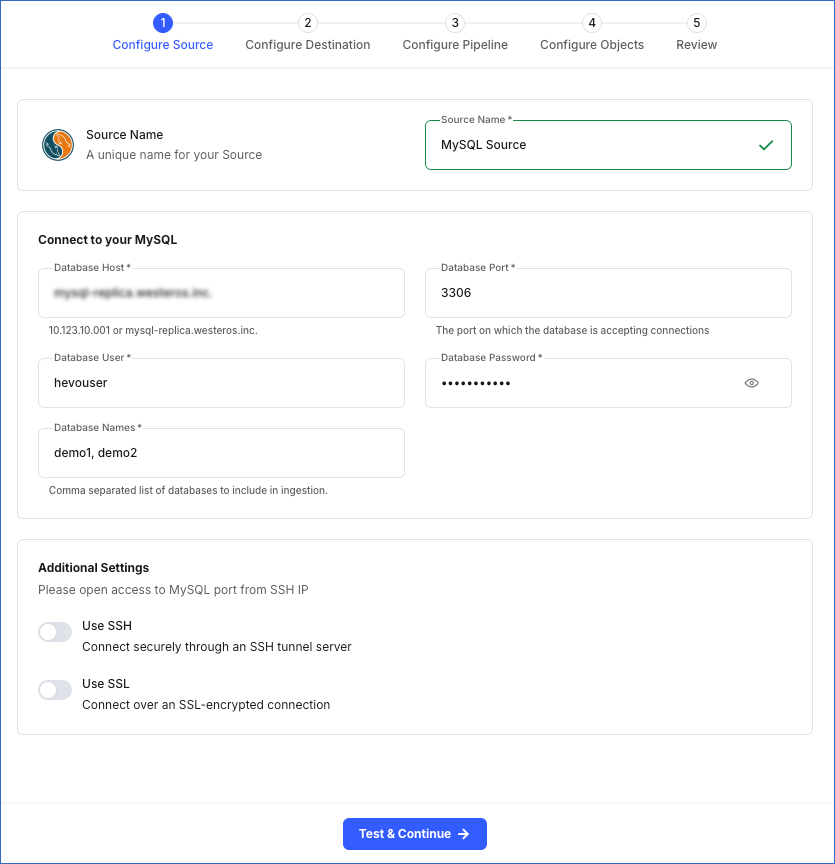
-
Source Name: A unique name for your Source, not exceeding 255 characters. For example, MySQL Source.
-
In the Connect to your MySQL section:
-
Database Host: The MySQL host’s IP address or DNS. For example, 10.123.10.001.
Note: For URL-based hostnames, exclude the http:// or https:// part. For example, if the hostname URL is http://mysql-replica.westeros.inc, enter mysql-replica.westeros.inc.
-
Database Port: The port on which your MySQL server listens for connections. Default value: 3306.
-
Database User: The authenticated user who has the permissions to read tables in your database. This user can be the one you created in Step 3 above. For example, hevouser.
-
Database Password: The password of your database user.
-
Database Names: The comma separated list of databases from where you want to replicate data. For example, demo1, demo2.
-
-
In the Additional Settings section:
-
Use SSH: Enable this option to connect to Hevo using an SSH tunnel instead of directly connecting your MySQL database host to Hevo. This provides an additional level of security to your database by not exposing your MySQL setup to the public. You can optionally define additional parameters on your SSH server to maintain long-lived sessions during data replication.
If this option is turned off, you must configure your Source to accept connections from Hevo’s IP address.
-
Use SSL: Enable this option to use an SSL-encrypted connection. Specify the following:
-
CA File: The file containing the SSL server certificate authority (CA).
-
Client Certificate: The client’s public key certificate file.
-
Client Key: The client’s private key file.
-
-
-
-
Click Test & Continue to test the connection to your MySQL Source. Once the test is successful, you can proceed to set up your Destination.
Additional Information
Read the detailed Hevo documentation for the following related topics:
Data Type Mapping
Hevo maps the MySQL Source data type internally to a unified data type, referred to as the Hevo Data Type, in the table below. This data type is used to represent the Source data from all supported data types in a lossless manner.
The following table lists the supported MySQL data types and the corresponding Hevo data type to which they are mapped:
| MySQL Data Type | Hevo Data Type |
|---|---|
| - BIT(1) - BOOLEAN - TINYINT(1) - TINYINT UNSIGNED(1) |
BOOLEAN |
| - TINYINT(>1) - SMALLINT - TINYINT UNSIGNED(>1) |
SHORT |
| - INT - MEDIUMINT - SMALLINT UNSIGNED - MEDIUMINT UNSIGNED - YEAR |
INTEGER |
| - BIGINT - INT UNSIGNED - BIGINT UNSIGNED |
LONG |
| - FLOAT(0-23) | FLOAT |
| - REAL - DOUBLE - FLOAT(24-53) |
DOUBLE |
| - NUMERIC - DECIMAL |
DECIMAL |
| - CHAR - VARCHAR - TINYTEXT - TEXT - MEDIUMTEXT - LONGTEXT - JSON - ENUM - SET |
VARCHAR |
| - TIMESTAMP | TIMETZ |
| - DATE | DATE |
| - TIME | TIME |
| - DATETIME | TIMESTAMP |
| - BIT(>1) - BINARY - VARBINARY - TINYBLOB - BLOB - MEDIUMBLOB - LONGBLOB |
BYTEARRAY |
| - GEOMETRY - LINESTRING - POLYGON - MULTIPOINT - MULTILINESTRING - MULTIPOLYGON - GEOMETRYCOLLECTION |
JSON |
Any other data type not listed in the table above is not supported by Hevo.
Note: If any of the Source objects contain data types that are not supported by Hevo, the corresponding fields are marked as unsupported during object configuration in the Pipeline.
Source Considerations
-
MySQL does not generate log entries for cascading deletes. So, Hevo cannot capture these deletes for log-based Pipelines.
-
If you have configured a limit on binary log retention in your Percona Server for MySQL instance, older binary logs may be automatically deleted once that limit is reached. In environments with a high volume of data changes and a low sync frequency, the required binary logs may be deleted before Hevo can read them. This can result in missed changes during ingestion. To avoid this, ensure that:
-
Binary logs are retained until Hevo has read and processed them, and
-
The Pipeline frequency is configured to read changes frequently enough to keep up with the volume of data changes.
-
Limitations
-
Hevo only fetches tables from the MySQL database. It does not fetch other entities such as functions, stored procedures, views, and triggers.
-
Hevo does not set the metadata column __hevo__marked_deleted to True for data deleted from the Source table using the TRUNCATE command. This action could result in a data mismatch between the Source and Destination tables.